
1. Uvod
Thank you for choosing the XTUGA ES USB/MP3/Bluetooth Professional Audio Mixer. This manual provides essential information for the safe and efficient operation of your mixer. Please read it thoroughly before use and retain it for future reference.
The XTUGA ES series mixers (ES802/ES1202) are designed for professional audio applications, offering features such as USB/MP3 playback and recording, Bluetooth connectivity, built-in digital effects, and +48V phantom power for condenser microphones. Its ultra-thin design and robust metal chassis make it suitable for various environments, including DJ setups, stage performances, and recording studios.
2. Varnostna navodila
- Napajanje: Uporabljajte samo navedeni napajalnik. Prepričajte se, da je glasnosttage ustreza vašemu lokalnemu napajalniku.
- Prezračevanje: Ne blokirajte prezračevalnih odprtin. Zagotovite zadosten pretok zraka okoli enote, da preprečite pregrevanje.
- Voda in vlaga: Do not expose the mixer to rain, moisture, or any liquids. Do not place objects filled with liquids on the mixer.
- Viri toplote: Keep the mixer away from heat sources such as radiators, heat registers, stoves, or other apparatus (including amplifiers), ki proizvajajo toploto.
- Čiščenje: Clean only with a dry cloth. Disconnect the power before cleaning.
- Servisiranje: Tega izdelka ne poskušajte servisirati sami. Vsa servisna dela prepustite usposobljenemu servisnemu osebju.
- Ozemljitev: Poskrbite za ustrezno ozemljitev, da preprečite električni udar.
- Upravljanje kablov: Zaščitite napajalne kable pred hojo po njih ali njihovim preščipnjenjem, zlasti pri vtičih, vtičnicah in na mestu, kjer izstopajo iz naprave.
3. Izdelek je končanview
The XTUGA ES series mixer features a compact, durable design with a comprehensive set of controls for versatile audio mixing. It includes multiple input channels, a 3-band equalizer per channel, built-in digital effects, and various connectivity options.

Slika 3.1: Spredaj view of the XTUGA ES Series Professional Audio Mixer, showing all input channels, faders, EQ knobs, and the central control panel with USB/MP3 display.
Ključne značilnosti:
- Kanali: Available in 8 or 12 mono channel configurations with stereo inputs.
- Prejamplifirji: High-quality microphone preamposvežilci.
- Izenačenje: 3-band EQ on each mono channel for precise tone shaping.
- Povezljivost: USB/MP3 playback and recording, Bluetooth function for wireless audio streaming.
- Fantomska moč: +48V phantom power for condenser microphones.
- Digitalni učinki: Built-in digital effects processor.
- Spremljanje: Headphone monitoring and dual 12-band main level display.
- Trajna zasnova: Ultra-thin metal chassis for durability and portability.
4. Nastavitev
4.1 Napajalni priključek
- Prepričajte se, da je stikalo za vklop mešalnika v položaju "IZKLOP".
- Priloženi napajalnik priključite na vhod za napajanje mešalnika.
- Priključite napajalnik v ustrezno vtičnico za izmenični tok.
- Turn the mixer's power switch to "ON". The power indicator will illuminate.
4.2 Vhodne povezave
The mixer supports various input sources:
- Mikrofoni: Connect microphones to the XLR inputs (MIC) on each channel. For condenser microphones requiring phantom power, ensure the +48V button is activated (see Section 5.2).
- Naprave na linijski ravni: Connect instruments, keyboards, or other line-level devices to the 1/4" TRS/TS LINE inputs on each channel.
- Stereo vhodi: Use the dedicated stereo input channels for devices like CD players or external media players.
4.3 Izhodne povezave
- Glavni izhod: Priključite glavne zvočnike ali amplifier to the MAIN L/R outputs (XLR or 1/4" TRS).
- Izhod za slušalke: Connect headphones to the PHONES output for monitoring.
- AUX Send: Use the AUX SEND output to connect to external effects processors or monitor speakers.
4.4 Povezava z računalnikom (USB)
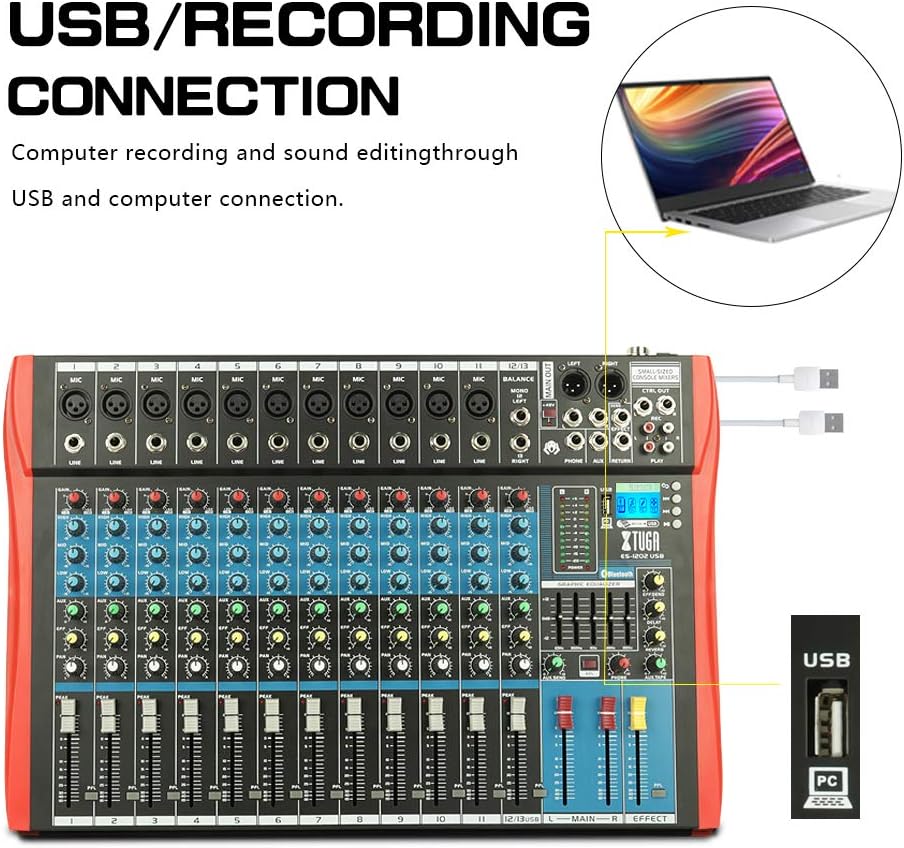
Slika 4.1: Diagram illustrating the USB connection for computer recording and sound editing. Connect the mixer's USB port to your computer using a standard USB cable.
To use the mixer with a computer for recording or playback:
- Connect a USB cable from the mixer's USB port to an available USB port on your computer.
- The mixer will typically be recognized as a standard audio device. No special drivers are usually required for basic functionality.
- Select the mixer as your input/output device in your computer's sound settings or digital audio workstation (DAW) software.
5. Navodila za uporabo
5.1 Nadzor kanala
- DOBITE: Adjusts the input sensitivity for each channel. Set this to achieve a strong signal without clipping (the PEAK LED should only flash occasionally).
- IZENAČILNIK (VISOKO, SREDNJE, NIZKO): 3-band equalizer for shaping the tone of each channel.

Slika 5.1: Visual representation of the 3-band EQ frequency response curves. The HIGH band boosts/cuts above 12kHz, the MID band sweeps from 250Hz to 6kHz, and the LOW band boosts/cuts below 80Hz.
- VISOKA: Adjusts frequencies above 12 kHz (±15 dB).
- MID: Adjusts frequencies between 150 Hz and 3.5 kHz (±15 dB). This is a sweepable mid-range control.
- NIZKA: Adjusts frequencies below 80 Hz (±15 dB).
- UČINEK: Sends a portion of the channel signal to the built-in effects processor.
- PAN: Adjusts the stereo position of the channel signal (left to right).
- CHANNEL FADER: Controls the output level of each individual channel to the main mix.
- PEAK LED: Sveti, ko je vhodni signal previsok, kar kaže na morebitno prekinitev signala. Zmanjšajte GAIN, če ta LED dioda pogosto sveti.
5.2 +48V Phantom Power
The mixer provides +48V phantom power for condenser microphones. To activate:
- Ensure all channel faders and the main fader are set to their minimum positions.
- Connect your condenser microphone(s) to the XLR inputs.
- Press the +48V PHANTOM POWER button. An indicator light will confirm activation.
- Gradually raise the channel faders and main fader to the desired levels.
Caution: Do not activate phantom power when dynamic microphones or other devices not requiring +48V are connected, as this may cause damage.
5.3 Povezava Bluetooth

Slika 5.2: Close-up of the Bluetooth and MP3 control panel, showing the digital LCD display and control buttons.
Če želite povezati napravo Bluetooth:
- Press the "MODE" button on the MP3 player section until "Bluetooth" is selected on the digital display.
- On your mobile phone, tablet, or other Bluetooth-enabled device, search for available Bluetooth devices.
- Select "XTUGA MIXER" (or similar name) from the list to pair.
- Once paired, you can play audio from your device through the mixer.
5.4 USB/MP3 Playback and Recording
The mixer supports U-DISK MP3 playback and direct recording to a USB drive.
- Predvajanje MP3: Vstavite bliskovni pogon USB, ki vsebuje MP3 files into the USB port. The mixer will automatically detect and begin playing the files. Use the control buttons (PLAY/PAUSE, PREV, NEXT) on the MP3 player section to navigate.
- snemanje: To record the main mix to a USB drive, ensure a formatted USB drive is inserted. Press the "REC" button on the MP3 player section to start recording. Press it again to stop.
5.5 Digitalni učinki
The mixer includes a built-in digital effects processor. Use the "EFFECT" knob on each channel to send signal to the effects. The main "EFFECT" fader controls the overall level of the effects return to the main mix. Adjust the effect type and parameters using the dedicated controls in the effects section.
5.6 Spremljanje
Connect headphones to the PHONES jack to monitor the main mix. The PHONES level knob controls the headphone volume. The main LED meters provide a visual indication of the main output level.

Slika 5.3: Close-up of the main LED level meters, showing output levels for Left (L) and Right (R) channels, along with the USB and PC connection ports.
6. Vzdrževanje
- Čiščenje: Regularly wipe the mixer's surface with a soft, dry, lint-free cloth. Do not use abrasive cleaners, solvents, or waxes.
- Shranjevanje: When not in use for extended periods, store the mixer in a cool, dry place, away from direct sunlight and extreme temperatures. Cover the unit to protect it from dust.
- Skrb za kabel: Avoid bending or twisting cables excessively. Disconnect cables by pulling the plug, not the cable itself.
7. Odpravljanje težav
| Težava | Možen vzrok | rešitev |
|---|---|---|
| Ni zvoka |
|
|
| Popačen zvok |
|
|
| Bluetooth se ne povezuje |
|
|
| USB/MP3 not playing or recording |
|
|
8. Specifikacije
| Funkcija | Specifikacija |
|---|---|
| Znamka | XTUGA |
| Model | ES802/1202 |
| Število kanalov | 8 or 12 (depending on model) |
| Tehnologija povezljivosti | Pomožni, Bluetooth, USB |
| Vir napajanja | Električni na kabel |
| Frekvenčni odziv | Microphone line input to any output: ±1.5 dB, 20 Hz ~ 20 KHz |
| Popolno harmonično popačenje + šum | Sensitivity -30dB, Mix output +14dBu <0.02% @ 1 KHz or EQ (stereo input) |
| Crosstalk (1 KHz) | Channel mute > 90 dB, Fader off > 90 dB, AUX send port closed > 83 dB |
| Mono EQ (Q(MF): 1.5) | Low: 80Hz ± 15dB, Mid (sweepable): 150Hz-3.5KHz ± 15dB, High: 12 KHz ± 15 dB |
| Stereo EQ (Q(MF): 0.8) | Low: 80Hz ± 15dB, Mid: 720Hz ± 15dB, High: 12KHz ± 15dB |
| Poraba energije | Manj kot 35 W |
| Delovna temperatura | 5°C do +40°C |
| Avdio vhod | XLR, Line, and Digital Inputs |
| UPC | 784124158662 |
| GTIN | 784124158662 |
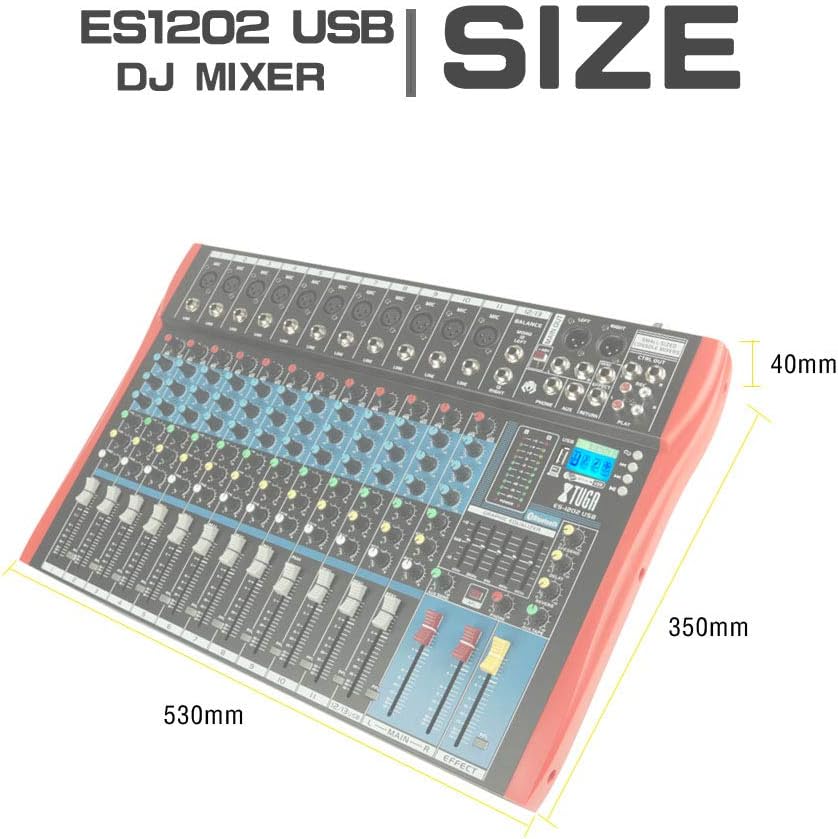
Slika 8.1: Dimensions of the XTUGA ES1202 USB Mixer, showing approximate measurements of 530mm (width), 350mm (depth), and 40mm (height).
9. Garancija in podpora
9.1 Informacije o garanciji
XTUGA products are designed and manufactured to high-quality standards. For specific warranty terms and conditions, please refer to the warranty card included with your product or contact your local XTUGA distributor or retailer. Keep your proof of purchase for warranty claims.
9.2 Podpora strankam
If you encounter any issues or have questions regarding your XTUGA ES USB/MP3/Bluetooth Professional Audio Mixer that are not covered in this manual, please contact XTUGA customer support or your authorized dealer for assistance. Please have your model number (ES802/1202) and purchase information ready when contacting support.


