
Uvod
This manual provides instructions for the VINABTY RC-1034 replacement remote control. This remote is designed to function as a direct replacement for original remote controls used with DENON audio receivers and home cinema systems. It is compatible with various models, including the DENON DRA-F102.
Nastavitev
1. Namestitev baterije
The VINABTY RC-1034 remote control requires two AAA alkaline batteries (not supplied). Follow these steps to install them:
- Poiščite pokrov prostora za baterije na zadnji strani daljinskega upravljalnika.
- Potisnite pokrov navzdol ali pritisnite zapah, da ga odprete.
- Vstavite dve bateriji AAA in pazite, da se pozitivni (+) in negativni (-) pol pravilno poravnata z oznakami v predalu.
- Namestite pokrov predalčka za baterije in ga potisnite nazaj na svoje mesto, dokler se ne zaskoči.

Figure 1: Battery compartment with batteries inserted.
2. Začetna uporaba
No programming or pairing is required for this remote control. Once batteries are installed, it is ready for immediate use with compatible DENON devices. Ensure there is a direct line of sight between the remote control's infrared emitter and the device's IR sensor, without any obstructions.
Navodila za uporabo
The VINABTY RC-1034 remote control provides comprehensive control over your compatible DENON audio receiver or home cinema system. Below is a general overview pogoste funkcije gumbov:
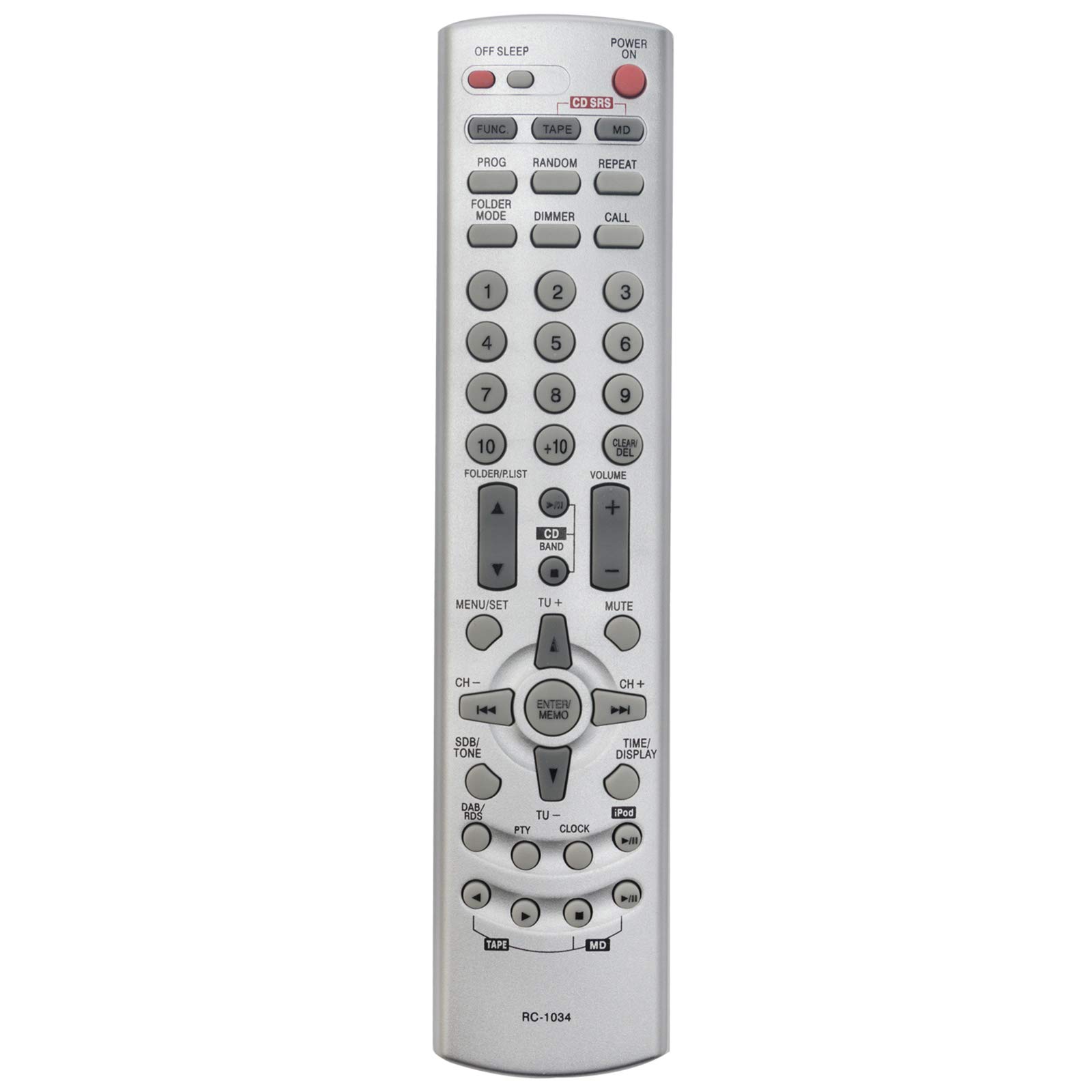
Slika 2: Spredaj view of the VINABTY RC-1034 remote control.
- VKLOP/IZKLOP VKLOPA: Vklopi ali izklopi napravo.
- OFF SLEEP: Aktivira funkcijo časovnika za spanje.
- FUNC / TAPE / CD / MD: Selects the input source (Function, Tape, CD, MiniDisc).
- PROG / RANDOM / REPEAT: Controls playback modes such as program, random, or repeat.
- FOLDER MODE / DIMMER / CALL: Accesses folder navigation, display dimmer, or call functions.
- Numeric Keypad (0-9, +10): Directly selects tracks, radio presets, or enters numerical values.
- FOLDER/LIST: Navigates through folders or lists.
- CLEAR/DEL: Clears entries or deletes items.
- GLASNOST +/-: Prilagodi glavno glasnost.
- MUTE: Utiša zvočni izhod.
- MENU/SET: Accesses the device's menu and confirms selections.
- CD BAND / TU+/-: Selects CD band or tunes radio frequencies up/down.
- Navigacijske puščice (gor, dol, levo, desno): Krmari po menijih in možnostih.
- ENTER/MEMO: Confirms selections or stores settings in memory.
- CH +/-: Changes channels or presets.
- SDB/TONE: Adjusts sound balance or tone settings.
- DAB/RDS: Accesses Digital Audio Broadcasting or Radio Data System functions.
- PTY / CLOCK / TIME/DISPLAY / iPod: Accesses Program Type, Clock settings, Time/Display information, or iPod controls.
- Playback Controls (Play, Pause, Stop, Skip, Fast Forward/Rewind): Standard media playback functions.
For specific functions, refer to your DENON device's original user manual.
Vzdrževanje
To ensure the longevity and optimal performance of your VINABTY RC-1034 remote control, follow these maintenance guidelines:
- Zamenjava baterije: Baterije zamenjajte, ko daljinski upravljalnik postane počasen ali preneha delovati. Vedno zamenjajte obe bateriji hkrati z novima.
- Čiščenje: Daljinski upravljalnik obrišite z mehko, suho krpo. Za trdovratno umazanijo rahloampKrpo sperite z vodo ali blagim, neabrazivnim čistilom. Izogibajte se uporabi agresivnih kemikalij ali topil.
- Shranjevanje: Daljinski upravljalnik shranjujte na hladnem in suhem mestu, stran od neposredne sončne svetlobe in ekstremnih temperatur. Če daljinskega upravljalnika ne boste uporabljali dlje časa, odstranite baterije, da preprečite puščanje.
- Izogibajte se kapljicam: Daljinski upravljalnik zaščitite pred fizičnimi udarci, saj lahko padci poškodujejo notranje komponente.
Odpravljanje težav
If you encounter issues with your VINABTY RC-1034 remote control, try the following troubleshooting steps:
- Daljinski upravljalnik se ne odziva:
- Preverite, ali so baterije pravilno vstavljene in ali so dovolj napolnjene. Po potrebi jih zamenjajte.
- Ensure there are no obstructions between the remote control and the device's infrared sensor.
- Verify that you are pointing the remote directly at the device.
- Določeni gumbi ne delujejo:
- This may indicate a dirty contact under the button. Try gently pressing the button multiple times. If the issue persists, the remote may require professional cleaning or replacement.
- Device Not Responding to Any Remote:
- Check the power status of your DENON device.
- Ensure the device's IR sensor is not covered or damaged.
If these steps do not resolve the issue, or if you are unsure about the remote's compatibility with your specific DENON model, please contact customer support for further assistance.
Specifikacije
| Znamka | VINABTY |
| Številka modela | RC-1034 |
| Tehnologija povezljivosti | Infrardeči (IR) |
| Posebna funkcija | Brezžično |
| barva | Črna |
| Največ podprtih naprav | 1 |
| Združljive naprave | DENON Audio Receivers, Home Cinema Systems (e.g., DRA-F102) |
| Število gumbov | Multiple function buttons |
| Največji doseg | 10 metrov |
| Vrsta baterije | AAA Alkaline (not included) |
Informacije o garanciji
A 60-day warranty is provided for this VINABTY RC-1034 replacement remote control, covering manufacturing defects from the date of purchase. Please retain your proof of purchase for warranty claims.
Podpora uporabnikom
For any questions, technical assistance, or warranty inquiries regarding your VINABTY RC-1034 remote control, please do not hesitate to contact VINABTY customer support. We are committed to responding to your messages within 24 hours to provide prompt and helpful service.