
1. Uvod
Thank you for choosing Senso Wireless Earbuds. These True Wireless Stereo (TWS) earphones are designed for an active lifestyle, featuring a secure fit, high-quality audio, and sweatproof construction. This manual will guide you through the setup, operation, and maintenance of your new earbuds.
2. Kaj je v škatli
- Senso Wireless Earbuds (Left and Right)
- Prenosni etui za polnjenje
- USB polnilni kabel
- Uporabniški priročnik
- Več velikosti ušesnih nastavkov
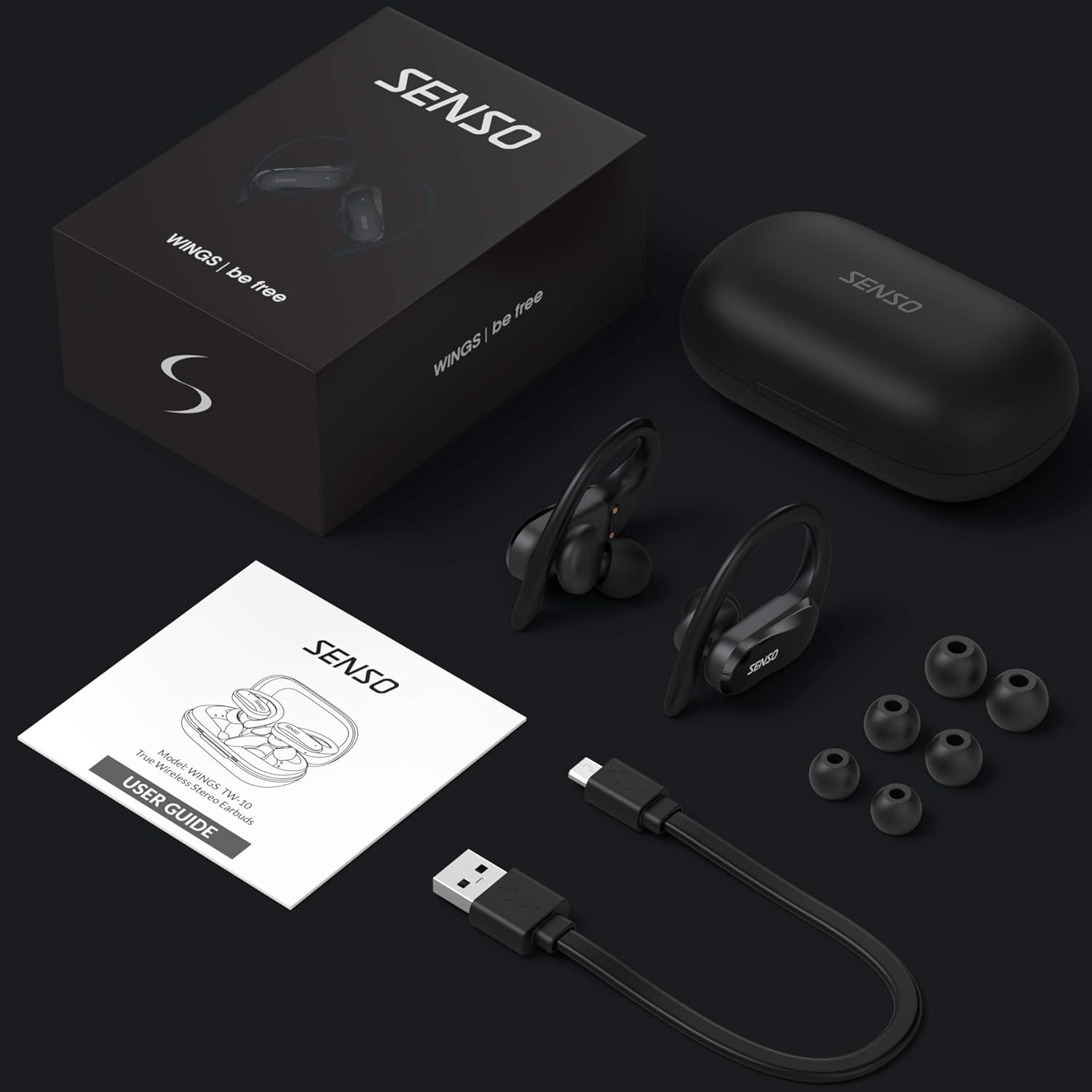
Image: The Senso Wireless Earbuds packaging, displaying the earbuds, charging case, user guide, USB charging cable, and various ear tip sizes.
3. Izdelek je končanview
The Senso Wings TW10 earbuds are designed for comfort and performance, featuring advanced audio technology and a durable build.

Slika: Eksplodirala view of the earbud, illustrating the 13mm dynamic driver responsible for delivering premium sound quality with intense bass and dynamic range.

Slika: Podrobna view of the earbud's internal circuitry, emphasizing the Bluetooth 5.0 chipset and CVC 8.0 Noise Cancellation Technology for stable connection and clear audio.

Image: Two scenarios demonstrating the earbuds' versatility: one earbud in use for mono mode (e.g., driving) and both earbuds for dual mode (e.g., binaural calls).

Image: The earbuds are shown resisting water splashes, indicating their IPX6 waterproof rating, suitable for sweat, water, and rain.
4. Nastavitev
4.1 Polnjenje slušalk in etuija
Before first use, fully charge the earbuds and the charging case. Place the earbuds into the charging case. Connect the USB charging cable to the case and a power source. The indicator lights on the case will show the charging status.
4.2 Začetno seznanjanje
- Prepričajte se, da so vaše slušalke napolnjene.
- Odprite polnilno ohišje. Slušalke se bodo samodejno vklopile in preklopile v način seznanjanja.
- V napravi (pametnem telefonu, tabličnem računalniku itd.) omogočite Bluetooth.
- Iskanje available Bluetooth devices and select "SENSO Wings TW10" from the list.
- Once connected, you will hear an audio prompt, and the earbud indicator lights will change.

Image: The earbuds are shown connecting to a smartphone, demonstrating the simple and fast pairing process upon removal from the charging case.
Video: An official product video demonstrating the features and setup of the Senso WINGS Ultra Durable Premium Audio Wireless Earbuds.
5. Navodila za uporabo
5.1 Nošenje slušalk
Place the earbuds in your ears and adjust the ear hooks for a secure and comfortable fit. The 60-degree twist lock system ensures they stay in place during physical activity.

Image: A user demonstrating the secure fit of the earbuds with the 60-degree twist lock system, ideal for sports and exercise.
5.2 Osnovne kontrole
The earbuds feature touch-sensitive controls for media playback and call management. Refer to the detailed user guide included in the box for specific touch commands for functions such as play/pause, skip track, answer/end call, and voice assistant activation.
5.3 Mono or Dual Mode
You can use either earbud independently (mono mode) or both together (dual mode) for a stereo audio experience. This flexibility allows for awareness of your surroundings when needed.
5.4 Klicne funkcije
Each earbud is equipped with a microphone, enabling binaural calls for clear communication. Use the touch controls to answer, end, or reject calls.
6. Vzdrževanje
6.1 Čiščenje
- Slušalke in polnilno ohišje redno čistite z mehko, suho krpo, ki ne pušča vlaken.
- Odstranite ušesne nastavke in jih očistite z blagim milom in vodo, nato pa jih pred ponovno namestitvijo temeljito posušite.
- Izogibajte se uporabi abrazivnih čistil ali topil.
6.2 Shranjevanje
- Ko slušalk ne uporabljate, jih shranite v polnilni etui, da jih zaščitite in ohranite napolnjene.
- Napravo hranite na hladnem in suhem mestu, stran od ekstremnih temperatur in neposredne sončne svetlobe.
7. Odpravljanje težav
7.1 Težave s seznanjanjem
- Prepričajte se, da sta obe slušalki popolnoma napolnjeni.
- Izklopite Bluetooth v napravi in ga nato znova vklopite.
- Pozabite napravo s seznama Bluetooth in jo poskusite znova seznaniti.
- If only one earbud connects, try resetting the earbuds (refer to the full user guide for specific reset instructions).
7.2 Ni zvoka ali nizka glasnost
- Preverite glasnost tako na napravi kot na slušalkah.
- Prepričajte se, da so slušalke pravilno nameščene v ušesih.
- Očistite morebitne umazanije z zvočnikov in ušesnih nastavkov.
7.3 Težave s polnjenjem
- Preverite, ali je polnilni kabel varno priključen tako na ohišje kot na vir napajanja.
- Prepričajte se, da so polnilni kontakti na slušalkah in v ohišju čisti in brez ovir.
- Poskusite z drugim polnilnim kablom ali napajalnikom.
8. Specifikacije
| Funkcija | Podrobnost |
|---|---|
| Ime modela | Wings TW10 |
| Tehnologija povezljivosti | Bluetooth 5.0, brezžično |
| Brezžična komunikacijska tehnologija | Bluetooth |
| Nadzor hrupa | Aktivno odpravljanje hrupa |
| Stopnja vodoodpornosti | Vodotesen (IPX6) |
| Življenjska doba baterije (slušalke) | 8 ur |
| Skupni čas predvajanja (z ohišjem) | Do 30 uri |
| Velikost zvočnega gonilnika | 10 milimetrov |
| Impedanca | 32 Ohmov |
| Vrsta nadzora | Nadzor medijev |
| Nadzorna metoda | Daljinsko |
| Namestitev ušesa | V ušesu |
| Faktor oblike | V ušesu |
| Material | Silikon |
| Teža predmeta | 7 unč |

Image: The earbuds and charging case illustrating the extended playtime: 6 hours for the earbuds and up to 30 hours total with the portable charging case.
9. Garancija in podpora
Senso offers a standard warranty for its products. Additionally, you may be eligible for an extended warranty.
9.1 Podaljšana garancija
To convert to a two-year extended warranty, visit www.sensoshop.com/warranty. This must be claimed within 7 days of receiving your product.
9.2 Podpora strankam
For any product-related issues or inquiries, please contact Senso customer support. Details can be found on the warranty card included in your product packaging or on the official Senso webmesto.