
Sharp B08H3STVWG
Sharp Digital Clock with Alarm and Dual USB FastCharge Charging Ports
Model: B08H3STVWG
Blagovna znamka: Sharp
1. Izdelek je končanview
The Sharp Digital Clock is designed for simplicity and convenience, featuring a clear green LED display and dual USB FastCharge ports for charging your devices. It includes an alarm function and a battery backup system to retain settings during power outages.

Slika 1: Spredaj view of the Sharp Digital Clock, highlighting the large green LED display and dual USB charging ports.
2. Navodila za namestitev
2.1 Napajalni priključek
Connect the provided power adapter to the DC IN jack located at the back of the clock. Plug the other end into a standard electrical outlet. The display will illuminate, and the clock will be ready for time setting.
2.2 Rezervna baterija (neobvezno)
For battery backup functionality, which retains time and alarm settings during a power outage, install two (2) AAA batteries (not included) into the battery compartment located on the bottom of the unit. During battery backup, the display will go blank to conserve power, but settings will be preserved.
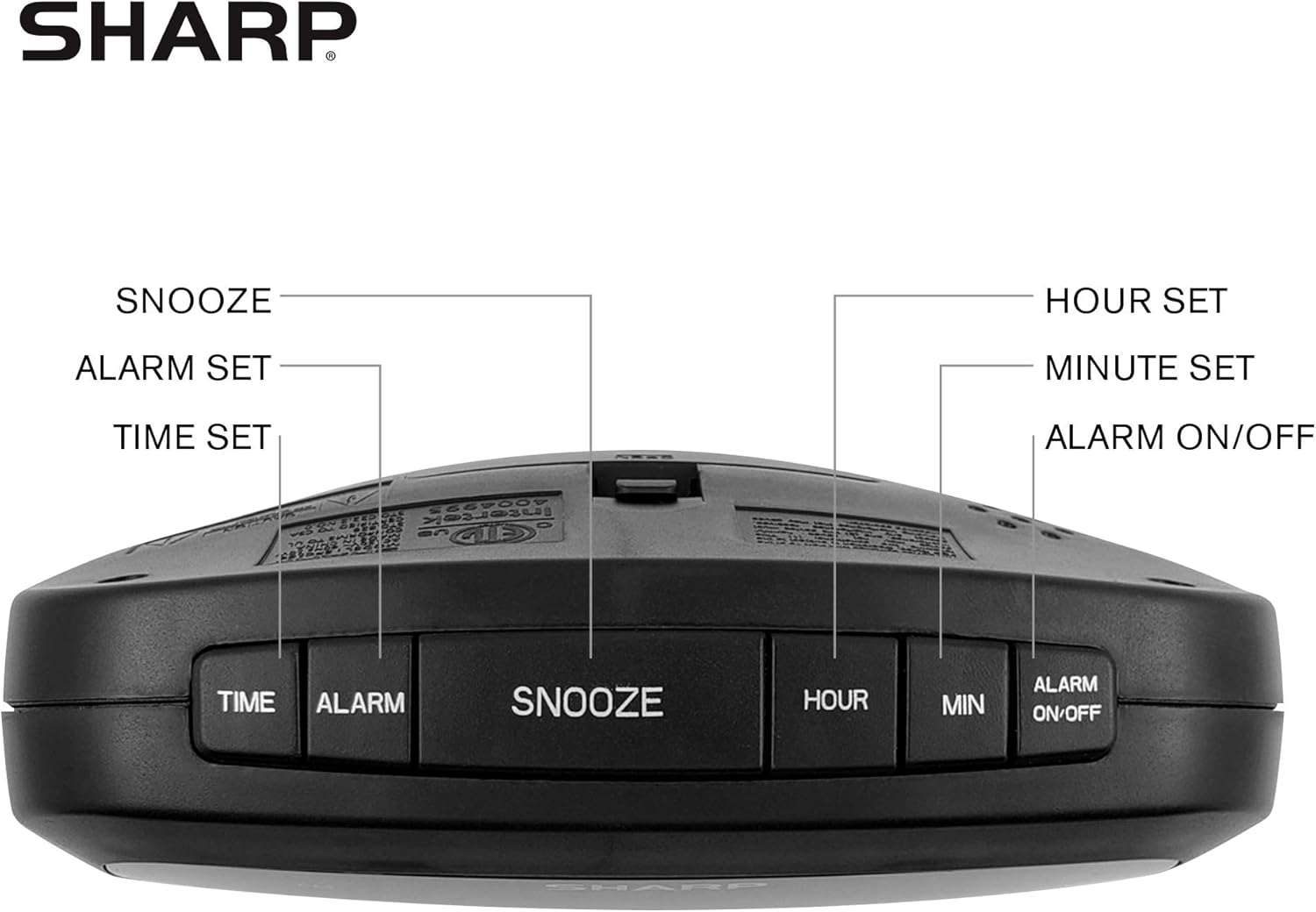
Figure 2: Underside of the clock with the battery compartment visible, requiring 2 AAA batteries for backup.
3. Navodila za uporabo
The clock features intuitive top-mounted buttons for easy operation.

Figure 3: Top panel of the clock with clearly labeled buttons for time, alarm, snooze/dimmer, hour, minute, and alarm on/off.
3.1 Nastavitev časa
- Pritisnite in držite ČAS gumb, dokler ne začnejo utripati številke za uro.
- Pritisnite URA button to adjust the hour. Pay attention to the PM indicator if setting a PM time.
- Pritisnite MIN gumb za prilagoditev minut.
- Pritisnite ČAS ponovno pritisnite gumb za potrditev in shranjevanje časa.
3.2 Nastavitev alarma
- Pritisnite in držite ALARM gumb, dokler ne začnejo utripati številke ure budilke.
- Pritisnite URA gumb za nastavitev budilke.
- Pritisnite MIN gumb za nastavitev minut alarma.
- Pritisnite ALARM ponovno pritisnite gumb, da potrdite in shranite čas alarma.
- Za vklop ali izklop alarma pritisnite VKLOP / IZKLOP ALARMA button. An alarm indicator light will appear on the display when the alarm is active.
3.3 Funkcija dremeža in zatemnitve
- Ko se oglasi alarm, pritisnite veliko DREMŽAJ/ZATEMNILO button to temporarily silence the alarm for a few minutes.
- To adjust the brightness of the green LED display, repeatedly press the DREMŽAJ/ZATEMNILO button when the alarm is not sounding. Cycle through bright, medium, and low brightness settings.
3.4 Using the USB Charging Ports
The clock is equipped with two 2 AMP USB charging ports on the front, allowing you to conveniently charge your smartphone or other USB-powered devices directly from the clock.

Figure 4: The clock demonstrating its dual USB charging capability with two smartphones connected.
- Simply connect your device's USB charging cable to one of the USB ports on the front of the clock.
- Ensure your device is compatible with 2 AMP charging for optimal speed.
4. Vzdrževanje
To ensure the longevity and proper functioning of your Sharp Digital Clock, follow these simple maintenance guidelines:
- Čiščenje: Wipe the clock with a soft, dry cloth. Do not use abrasive cleaners, waxes, or solvents as they may damage the finish.
- Umestitev: Uro postavite na stabilno, ravno površino, stran od neposredne sončne svetlobe, virov toplote in prekomerne vlage.
- Zamenjava baterije: If using the battery backup, replace the AAA batteries annually or when the clock consistently loses time during power interruptions.
5. Odpravljanje težav
| Težava | Možen vzrok | rešitev |
|---|---|---|
| Prikaz ure je prazen. | Brez moči ali močitage. | Ensure the power adapter is securely plugged into the clock and a working electrical outlet. If there was a power outage, check if backup batteries are installed and functional. |
| Alarm se ne oglasi. | Alarm not set or not activated. | Verify that the alarm time is correctly set and that the alarm indicator light is visible on the display (press ALARM ON/OFF). |
| Vrata USB niso polnilne naprave. | Device incompatibility or faulty cable. | Ensure your device is compatible with USB charging. Try a different USB cable. Confirm the clock is powered on. |
| Zaslon je presvetel/pretemn. | Potrebno je prilagoditi nastavitev svetlosti. | Press the SNOOZE/DIMMER button repeatedly to cycle through brightness levels (bright, medium, low). |
6. Specifikacije izdelka
- Znamka: Ostra
- Model: B08H3STVWG
- Vrsta zaslona: Digital Green LED
- vir energije: Električni na kabel
- Varnostno kopiranje baterije: 2 x AAA baterije (niso priložene)
- Vrata USB: 2 x 2 AMP USB FastCharge Ports
- Dimenzije izdelka: 5.95 cm Š x 2.3 cm V
- Teža artikla: 9.59 unč
- barva: Zelena Led
- Material: Plastika
- UPC: 049353005089
7. Garancija in podpora
This Sharp Digital Clock comes with a limited warranty. For detailed warranty information, product support, or to purchase accessories, please visit the official Sharp webspletno mesto ali se obrnite na njihovo službo za stranke. Obiščete lahko tudi Trgovina Sharp na Amazonu.
Za uveljavljanje garancije shranite račun.
Sorodni dokumentiB08H3STVWG


Ask a question about this manual
Ask about setup, troubleshooting, compatibility, parts, safety, or missing instructions. Manuals+ will review the question and use this page’s manual context to help answer it.