
1. Uvod
This manual provides detailed instructions for the installation, operation, and maintenance of your ANRAN 1080P Security Camera System. This system includes a 13-inch LCD DVR and four 1080P indoor/outdoor surveillance cameras, designed to provide reliable home security with features like night vision, motion detection, and remote access.
2. Vsebina paketa
Pred začetkom namestitve preverite, ali so v paketu prisotne vse spodaj navedene komponente:

This image displays all components included in the ANRAN 1080P Security Camera System package. It includes the AHD DVR with a 13-inch LCD, four AHD cameras, a 1TB hard drive, screws for mounting, BNC cables, 1-to-4 power cables, a USB mouse, and power adapters.
- 1 x 13-inch LCD DVR (with pre-installed 1TB HDD)
- 4 x 1080P AHD Surveillance Cameras
- 4 x BNC Video/Power Cables
- 1 x 1-to-4 Power Splitter Cable
- 2 x Power Adapters (one for DVR, one for cameras)
- 1 x USB miška
- Montažni vijaki in mozniki
- 1 x uporabniški priročnik
3. Izdelek je končanview
3.1 Digitalni video snemalnik (DVR)
The DVR unit features an integrated 13-inch LCD monitor for direct viewing and playback. It includes various ports for connectivity and control.
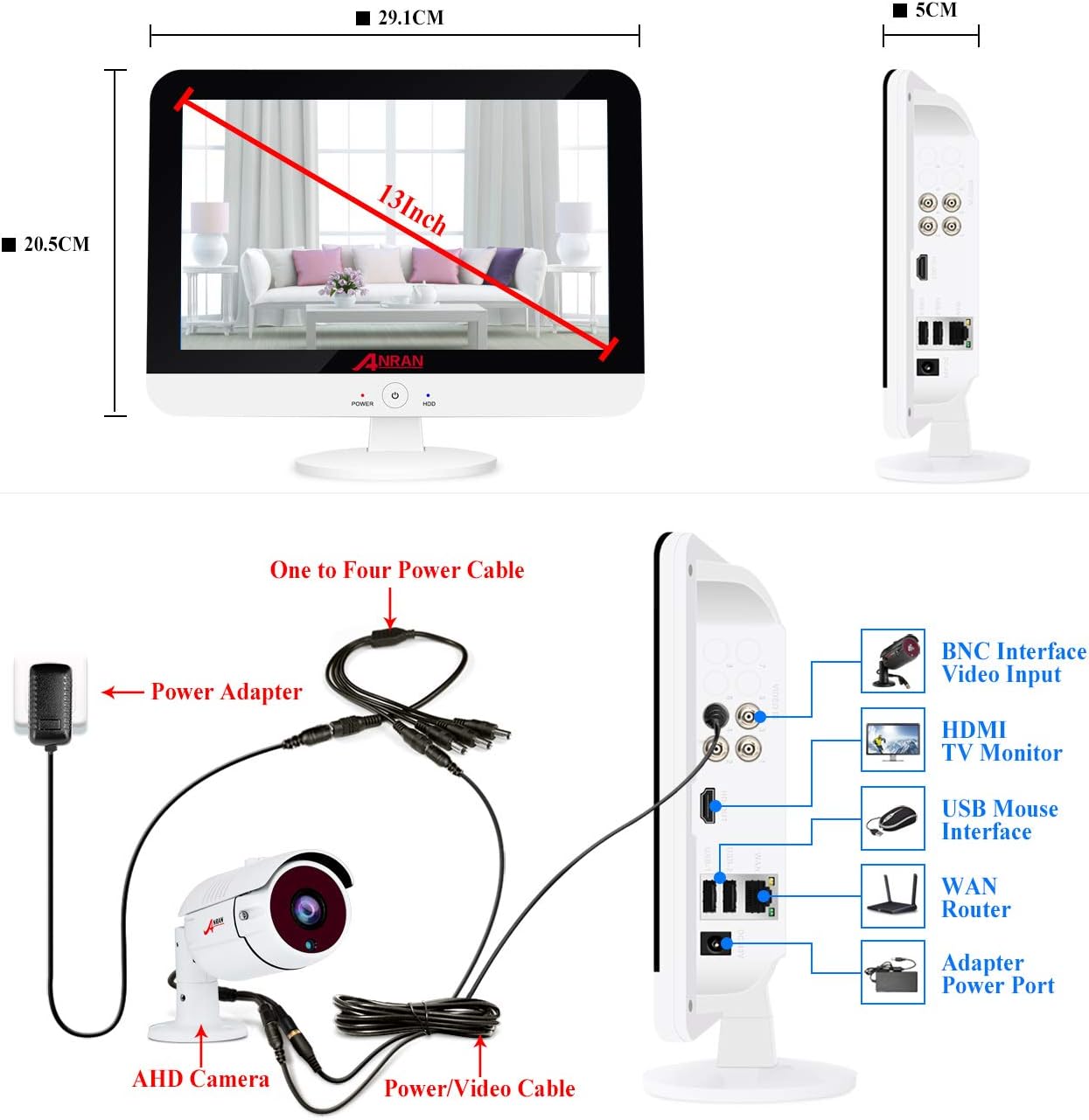
This image shows the ANRAN 13-inch LCD DVR from the front and side. The front view indicates a 13-inch screen with approximate dimensions of 29.1cm width and 20.5cm height. The side view highlights various ports: BNC Interface Video Input, HDMI TV Monitor, USB Mouse Interface, WAN Router, and Adapter Power Port.
3.2 Nadzorna kamera
The cameras are designed for both indoor and outdoor use, featuring robust construction and essential surveillance capabilities.

This diagram illustrates the key features of the ANRAN security camera, including 36PCS IR LEDs for night vision, an IIR-CUT Filter, a waterproof case, a mounting bracket, a power port, and an HD lens.
4. Navodila za nastavitev
4.1 Sistemsko ožičenje
Follow the diagram below to connect your cameras to the DVR and power supply.

This image provides a wiring diagram for the ANRAN security camera system. It shows how the AHD camera connects to the DVR via a power/video cable, and how the DVR is powered by a power adapter and a one-to-four power cable. The DVR's side ports for BNC video input, HDMI, USB mouse, WAN router, and power adapter are also visible.
- Connect each camera to a BNC video/power cable.
- Connect the BNC end of each cable to the corresponding BNC video input port on the DVR.
- Connect the power end of the camera cables to the 1-to-4 power splitter cable.
- Plug one power adapter into the 1-to-4 power splitter cable and then into a power outlet.
- Connect the second power adapter to the DVR's power port and then into a power outlet.
- Connect the USB mouse to the DVR's USB port for navigation.
- For remote access, connect the DVR's WAN port to your router using an Ethernet cable.
4.2 Postavitev kamere
Consider optimal viewing angles and security for camera installation.

This image demonstrates flexible mounting options for the ANRAN security cameras, showing one camera wall-mountable on an outdoor patio and another ceiling-mountable in an indoor living room.
- Mount cameras in locations that provide a clear view of critical areas.
- Ensure cameras are securely fastened using the provided mounting screws.
- Adjust the camera angle to cover the desired surveillance zone.
5. Navodila za uporabo
5.1 Začetni vklop in nastavitev
Once all connections are made, power on the DVR. The system will boot up and display the live camera feeds on the integrated 13-inch LCD monitor. Follow any on-screen prompts for initial setup, including setting a password.
Ta videoposnetek ponuja konecview of the ANRAN wired security camera system with a 13-inch monitor DVR, demonstrating its components and basic functionality.
This video showcases the ANRAN 1080P wired home camera system, highlighting its features and the integrated 13-inch monitor.
5.2 Oddaljeni dostop
Access your camera feeds from anywhere using the mobile application.

This image illustrates the three steps for mobile access: 1. Simple Connection (DVR connected to router), 2. Download the free Danale APP, and 3. Enjoy Live View na vašem pametnem telefonu.
- Ensure your DVR is connected to your home router via an Ethernet cable.
- Download the official ANRAN mobile application (e.g., Danale App) from your smartphone's app store.
- Register an account and add your DVR device by scanning the QR code on the DVR or entering its serial number.
- Zdaj lahko view live feeds, playback recordings, and receive alerts on your mobile device.
5.3 Zaznavanje gibanja
Configure motion detection settings to receive alerts and trigger recordings when activity is detected.

This image demonstrates the customizable motion detection feature, showing a person triggering a recording and an email alert being sent to a smartphone. The DVR screen also displays the detected motion.
- Navigate to the DVR's menu and select 'Motion Detection' settings.
- Določite specifična območja znotraj kamere view where motion should be detected.
- Set up alert preferences, such as email notifications or app push alerts.
5.4 Nočni vid
The cameras automatically switch to night vision mode in low-light conditions.

This image illustrates the night vision feature, showing a camera view transitioning from daytime to a clear black and white night view.
- The integrated IR LEDs provide clear black and white video footage v popolni temi.
- Prepričajte se, da nobena ovira ne blokira kamere view, especially at night, to maximize night vision effectiveness.
6. Vzdrževanje
Redno vzdrževanje zagotavlja optimalno delovanje in dolgo življenjsko dobo vašega varnostnega sistema.
This image highlights the camera's IP66 waterproof rating, indicating its ability to withstand rain, snow, and other outdoor elements within a temperature range of -10°C to +50°C.
- Čiste leče: Občasno očistite objektive fotoaparata z mehko krpoamp krpo za odstranjevanje prahu in madežev.
- Preverite kable: Inspect all cables for wear, damage, or loose connections. Secure or replace as needed.
- Posodobitve programske opreme: Check the ANRAN website or app for any available firmware updates for your DVR to ensure the latest features and security patches.
- Upravljanje trdega diska: 1TB trdi disk zagotavlja ample storage. Regularly review in varnostno kopirajte pomembne podatketage. The system typically overwrites the oldest footage when the disk is full.
- Varstvo okolja: While cameras are IP66 rated for outdoor use, avoid direct exposure to extreme conditions if possible to extend their lifespan.
7. Odpravljanje težav
Preden se obrnete na podporo, si oglejte naslednje pogoste težave in rešitve.
- Brez video prikaza:
- Ensure all power adapters are securely plugged in and receiving power.
- Check BNC cable connections between cameras and DVR.
- Verify the DVR is powered on (check power indicator light).
- Slaba kakovost slike:
- Očistite leče fotoaparata.
- Ensure cameras are within their effective range and not obstructed.
- Check cable integrity for any damage that might affect signal quality.
- Zaznavanje gibanja ne deluje:
- Review motion detection settings in the DVR menu to ensure zones are correctly configured and sensitivity is appropriate.
- Verify alert settings (email, push notifications) are correctly set up and tested.
- Napaka oddaljenega dostopa:
- Confirm the DVR is connected to the internet via an Ethernet cable to your router.
- Preverite internetno povezavo vašega usmerjevalnika.
- Ensure the mobile app is updated to the latest version.
- Verify device registration in the app.
8. Specifikacije
| Funkcija | Podrobnost |
|---|---|
| Znamka | ANRAN |
| Tehnologija povezljivosti | Žično |
| Ločljivost zajema videa | 1080p |
| Posebne lastnosti | Senzor gibanja, nočni vid |
| Število kanalov | 4 |
| Zmogljivost pomnilnika | 1 TB |
| Vir napajanja | Električni na kabel |
| Združljive naprave | Fotoaparati, osebni računalniki, pametni telefoni, tablični računalniki |
| Tehnologija slabe svetlobe | Nočna barva |
| Teža predmeta | 11.44 funtov |
| Prvič na voljo | 12. avgust 2020 |
9. Garancija in podpora
ANRAN products come with a standard manufacturer's warranty. Please refer to the warranty card included in your package for specific terms and conditions.
For technical support, customer service, or warranty claims, please contact ANRAN through the following channels:
- Podpora po e-pošti
- Telefonska podpora
- Live chat (available during stated business hours)
Contact details are typically provided in the user manual included with your product or on the official ANRAN webmesto.