
Uvod
Thank you for choosing the T'nB Feat True Wireless Bluetooth Earbuds. This manual provides essential information for the proper setup, operation, and maintenance of your device. Please read it carefully before use and retain it for future reference.
Vsebina paketa
Prepričajte se, da so v paketu prisotni vsi elementi:
- T'nB Feat True Wireless Bluetooth Earbuds (Left and Right)
- etui za polnjenje
- Micro USB polnilni kabel
- Uporabniški priročnik (ta dokument)
Konec izdelkaview
The T'nB Feat earbuds are designed for comfortable, wire-free audio. The compact charging case protects your earbuds and recharges them on the go.
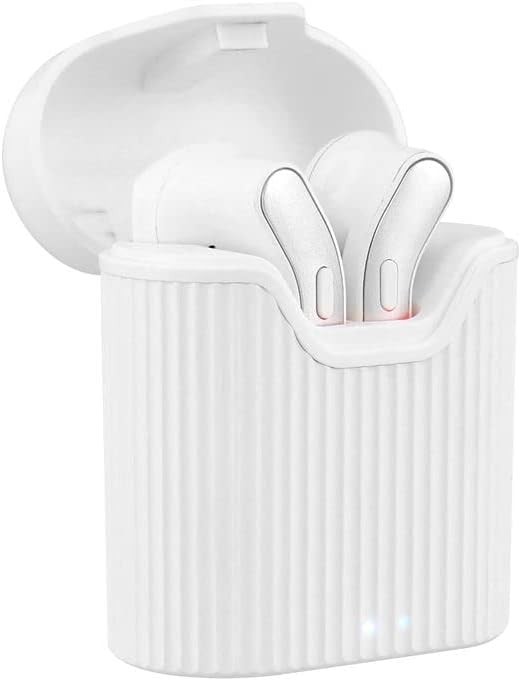
Image: T'nB Feat True Wireless Earbuds placed inside their open charging case, showing the earbuds and the interior of the case.

Image: The T'nB Feat True Wireless Earbuds charging case in a closed position, displaying its compact and portable design.
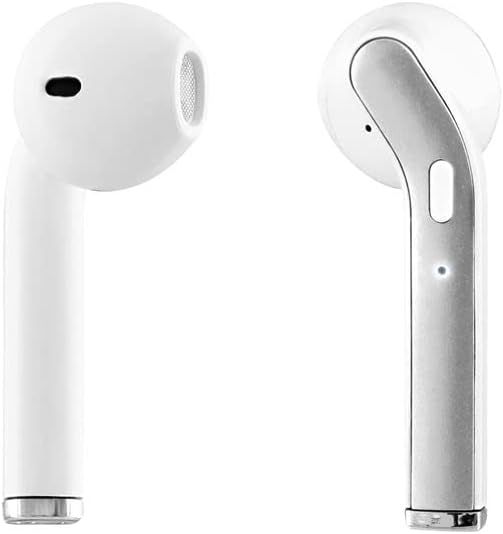
Slika: Bližnji posnetek view of the individual T'nB Feat True Wireless Earbuds, highlighting their ergonomic in-ear design.
Nastavitev
1. Polnjenje slušalk in etuija
Pred prvo uporabo popolnoma napolnite slušalke in polnilno ohišje.
- Slušalke vstavite v polnilno ohišje. Prepričajte se, da so pravilno nameščene, da se dotikajo polnilnih priključkov.
- Connect the Micro USB charging cable to the charging port on the case and the other end to a USB power source (e.g., computer USB port, wall adapter).
- The indicator lights on the case and/or earbuds will show the charging status. Refer to the indicator light section for details (if applicable, otherwise assume standard behavior).
- Ko je baterija popolnoma napolnjena, odklopite polnilni kabel.
Opomba: A full charge provides approximately 5 hours of operating time for the earbuds.
2. Seznanjanje z napravo Bluetooth
Slušalke uporabljajo Bluetooth 5.0 za stabilno brezžično povezavo.
- Prepričajte se, da so slušalke napolnjene.
- Open the charging case and remove both earbuds. They will automatically power on and enter pairing mode. You may hear an audio prompt or see flashing indicator lights.
- On your Bluetooth-enabled device (smartphone, tablet, etc.), go to the Bluetooth settings and turn Bluetooth on.
- Iskanje available devices. You should see "T'nB FEAT" or a similar name appear in the list.
- Select "T'nB FEAT" to connect. Once connected, you will hear a confirmation tone or the indicator lights will change.
- The earbuds are now paired and ready for use. They will automatically reconnect to the last paired device when removed from the case, if Bluetooth is enabled on the device.
Upravljanje slušalk
Vklop/izklop
- Vklop: Slušalke odstranite iz polnilnega ohišja. Samodejno se bodo vklopile.
- Ugasniti: Slušalke postavite nazaj v polnilno ohišje. Samodejno se bodo izklopile in začele polniti.
Predvajanje glasbe
The earbuds feature intuitive controls for music management. (Specific control actions may vary slightly based on earbud design, typically involving taps or presses on the earbud surface.)
- Predvajanje/pavza: Enkrat se dotaknite obeh slušalk.
- Naslednja skladba: Dvakrat tapnite desno slušalko.
- Prejšnja skladba: Dvakrat se dotaknite leve slušalke.
Upravljanje klicev
With the built-in microphone, you can manage calls directly from your earbuds.
- Sprejmi/končaj klic: Tap once on either earbud during an incoming call or an active call.
- Zavrni klic: Med dohodnim klicem pritisnite in držite katero koli slušalko približno 2 sekundi.
Vzdrževanje
To ensure the longevity and optimal performance of your T'nB Feat earbuds, follow these maintenance guidelines:
- Čiščenje: Za čiščenje slušalk in polnilnega ohišja uporabite mehko, suho krpo, ki ne pušča vlaken. Ne uporabljajte abrazivnih čistil, alkohola ali kemičnih topil.
- Shranjevanje: Ko slušalk ne uporabljate, jih shranite v polnilno škatlico, da jih zaščitite pred prahom in poškodbami. Hranite na hladnem in suhem mestu.
- Izogibajte se vodi: Slušalke niso vodoodporne. Izogibajte se izpostavljanju vodi, vlagi ali ekstremnim temperaturam.
- Polnjenje: Napravo redno polnite, tudi če je ne uporabljate pogosto, da ohranite zdravje baterije.
Odpravljanje težav
Če imate težave s slušalkami, si oglejte naslednje pogoste rešitve:
| Težava | rešitev |
|---|---|
| Slušalke se ne seznanjajo/povezujejo |
|
| Brez zvoka iz slušalk |
|
| Slušalke se pogosto odklopijo |
|
| Polnilna torbica se ne polni |
|
Specifikacije
- Ime modela: EBFEATWH
- Povezljivost: Pravi brezžični Bluetooth 5.0
- Faktor oblike: In-Ear
- Impedanca: 32 Ohmov
- Občutljivost: 95 dB
- Čas delovanja: Približno 5 ur
- Mikrofon: Built-in Universal Microphone
- Vrata za polnjenje: Micro USB (for case)
- Posebne lastnosti: Universal application, Cable-free design

Image: The retail packaging for the T'nB Feat True Wireless Earbuds, displaying key features and specifications.
Garancija in podpora
T'nB products are covered by a manufacturer's warranty. For specific warranty terms and conditions, please refer to the documentation provided with your purchase or visit the official T'nB website. For technical support or further assistance, please contact T'nB customer service through their official channels.