
Uvod
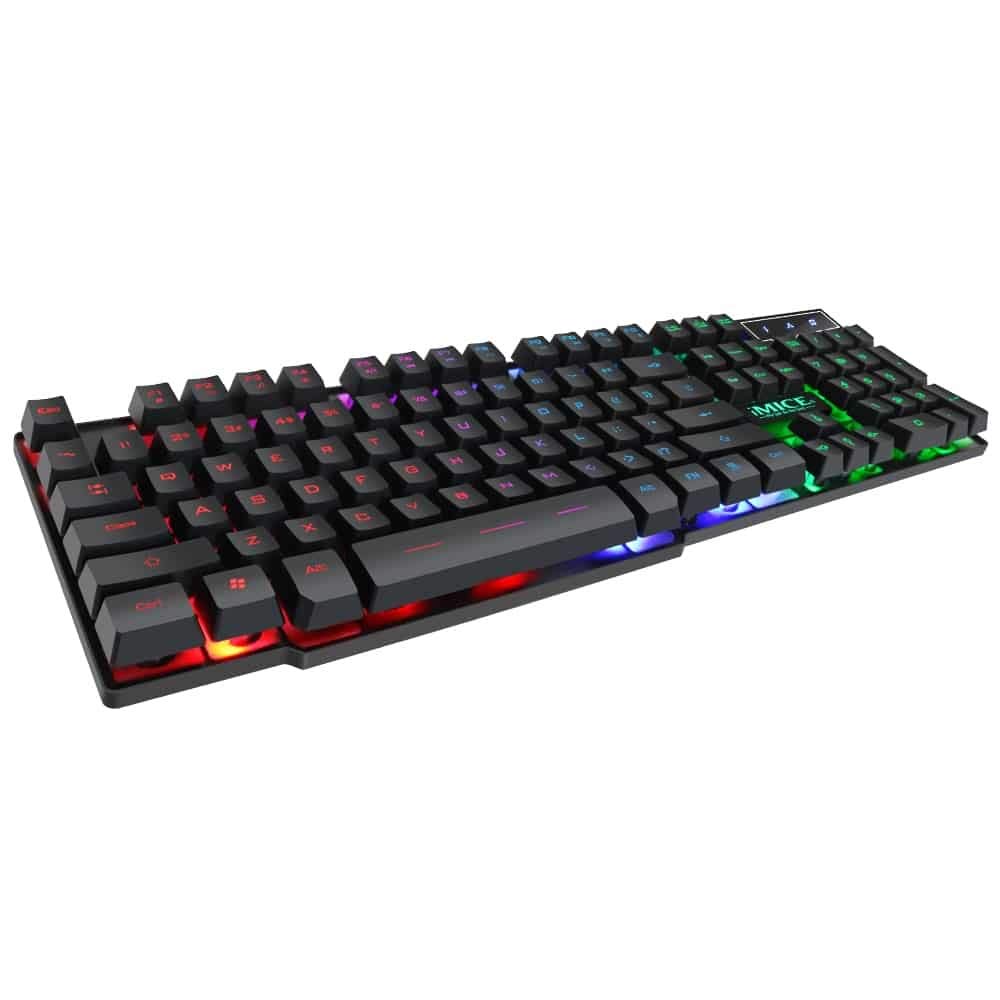
This manual provides instructions for the iMICE AK-600 Backlit USB Wired Gaming Keyboard. It covers setup, operation, maintenance, and troubleshooting to ensure optimal performance and longevity of your device. Please read this manual thoroughly before using the keyboard.
Nastavitev
Kaj je v škatli
The iMICE AK-600 keyboard package includes:
- iMICE AK-600 Backlit USB Wired Gaming Keyboard (with integrated USB cable)
Priključitev tipkovnice
To connect your iMICE AK-600 keyboard:
- Poiščite razpoložljiva vrata USB na vašem računalniku.
- Plug the integrated USB cable from the keyboard into the USB port.
- The keyboard is plug-and-play and should be automatically recognized by your operating system without requiring additional drivers for basic functionality.
Navodila za uporabo
Osnovne funkcije tipkovnice
The iMICE AK-600 features a standard 104-button layout, providing all essential keys for typing and gaming.
Nadzor osvetlitve ozadja
The keyboard is equipped with a three-color backlight system (red, blue, green). The key characters are illuminated for visibility in low-light conditions.
- To change the backlight color or cycle through modes, use the dedicated backlight control key (often labeled with a light bulb icon or similar).
- Pressing the key repeatedly will switch between red, blue, green, and off modes.
Multimedijske tipke
The keyboard includes 12 groups of multimedia function keys, typically accessed by pressing the Fn key in combination with the F1-F12 keys. These provide quick access to functions such as volume control, media playback, and more.
Anti-Ghosting
The iMICE AK-600 supports 19-key anti-ghosting. This feature ensures that multiple key presses are registered simultaneously and accurately, preventing input conflicts during fast-paced gaming or typing.
Vzdrževanje in nega
Pravilno vzdrževanje bo podaljšalo življenjsko dobo vaše tipkovnice:
- Čiščenje: Regularly wipe the keyboard surface with a soft, dry, lint-free cloth to remove dust and debris. For deeper cleaning, use a slightly damp krpo z blagim milom in pazite, da v tipkovnico ne pride tekočina.
- Razlitje tekočine: The keyboard features an integrated liquid guide hole design to help with minor spills. However, it is not fully waterproof. In case of a spill, immediately disconnect the keyboard from your computer and allow it to dry completely before reconnecting.
- Izogibajte se močnim kemikalijam: Do not use abrasive cleaners, solvents, or strong detergents, as these can damage the keyboard's finish and key legends.
- Skrb za kabel: Ensure the USB cable is not excessively bent, twisted, or placed under heavy objects, which could damage the internal wires.
Odpravljanje težav
Tipkovnica se ne odziva
- Ensure the USB cable is securely connected to both the keyboard and an active USB port on your computer.
- Poskusite tipkovnico priključiti na drug USB vhod na računalniku.
- Znova zaženite računalnik.
- Preizkusite tipkovnico na drugem računalniku, da ugotovite, ali je težava v tipkovnici ali v vratih USB/gonilnikih računalnika.
Osvetlitev ozadja ne deluje
- Verify that the keyboard is properly connected and receiving power.
- Press the backlight control key (often labeled with a light bulb icon) to cycle through backlight modes and ensure it is not turned off.
Določeni ključi se ne registrirajo
- Gently clean around the affected keys to remove any dust or debris that might be obstructing the key mechanism.
- Če težave ne odpravite, se za nadaljnjo pomoč obrnite na podporo strankam.
Specifikacije
| Funkcija | Podrobnost |
|---|---|
| Znamka | OEM (iMICE) |
| Model | AK-600 |
| Tehnologija povezljivosti | USB (žično) |
| Opis tipkovnice | Igranje |
| Posebna funkcija | Backlit (Red, Blue, Green) |
| Material | Plastika |
| Vključene komponente | Integriran USB kabel |
| Tip stikala | Tipna |
| Ročna orientacija | Obojepravni |
| Number of Buttons/Keys | 104 |
| Združljivi operacijski sistemi | Windows (XP/2000/Vista/7/8/10), Android, Linux |
| Dolžina kabla | 1.3 metrov |
| Življenjska doba ključa | Up to 5 million presses |
Garancija in podpora
For information regarding product warranty, returns, or technical support, please refer to the retailer's policy where the product was purchased. It is recommended to retain your purchase receipt as proof of purchase for any warranty claims. For direct manufacturer support, please visit the official OEM or iMICE webmesto.