
1. Izdelek je končanview
The SXFJF 4K Ultra HD WiFi Action Camera is designed for capturing high-quality video and photos during various outdoor and sports activities. It features 4K video recording, a wide-angle lens, electronic image stabilization, and a waterproof design, making it suitable for adventures both on land and underwater.
Ključne značilnosti:
- Ultra HD Video: Records crystal clear 4K video and high-quality images with a wide-angle lens.
- Funkcija proti tresljajem: Built-in electronic image stabilization ensures smooth and steady footage even during fast-moving activities.
- Vodotesna zasnova: Equipped with a waterproof case, allowing for underwater use in sports like swimming, surfing, and diving.
- Dolga življenjska doba baterije: Rechargeable batteries provide extended recording time.
- Vsestranski dodatki: Comes with various accessories for adapting to different indoor and outdoor activities.
- Povezljivost: Features Wi-Fi and HDMI output for easy sharing and viewing.

Image 1.1: The SXFJF 4K Ultra HD WiFi Action Camera, showcasing its compact design and primary lens.
2. Začetek: Nastavitev
2.1 Razpakiranje in preverjanje vsebine
Before using your camera, please ensure all components are present in the package:
- SXFJF 4K Ultra HD WiFi Action Camera
- Vodotesno ohišje
- Akumulatorska baterija
- Različni dodatki za montažo
- USB kabel
- Uporabniški priročnik (ta dokument)
2.2 Namestitev in polnjenje baterije
- Poiščite predal za baterije na fotoaparatu.
- Open the compartment cover and insert the rechargeable battery, ensuring the correct orientation according to the polarity indicators.
- Trdno zaprite pokrov prostora za baterije.
- To charge, connect the camera to a power source using the provided USB cable. The charging indicator light will illuminate.
- A full charge typically takes approximately 2-3 hours. The indicator light will change or turn off once charging is complete.
2.3 Vstavljanje kartice Micro SD
The camera requires a Micro SD card (not included) for storing photos and videos. A Class 10 or UHS-I (U1) or higher speed rating is recommended for 4K recording.
- Poiščite režo za kartico Micro SD na strani ali na spodnji strani kamere.
- Insert the Micro SD card with the gold contacts facing the front of the camera until it clicks into place.
- Za odstranitev kartico nežno potisnite navznoter, dokler ne izskoči.
2.4 Uporaba vodoodpornega ohišja
The included waterproof case allows the camera to be used underwater. Before first use, perform a waterproof test without the camera inside.
- Open the waterproof case latch and carefully place the camera inside, ensuring it fits snugly.
- Zaklep trdno zaprite, da ustvarite vodotesno tesnilo.
- Always ensure the rubber seal is clean and free of debris before closing the case.
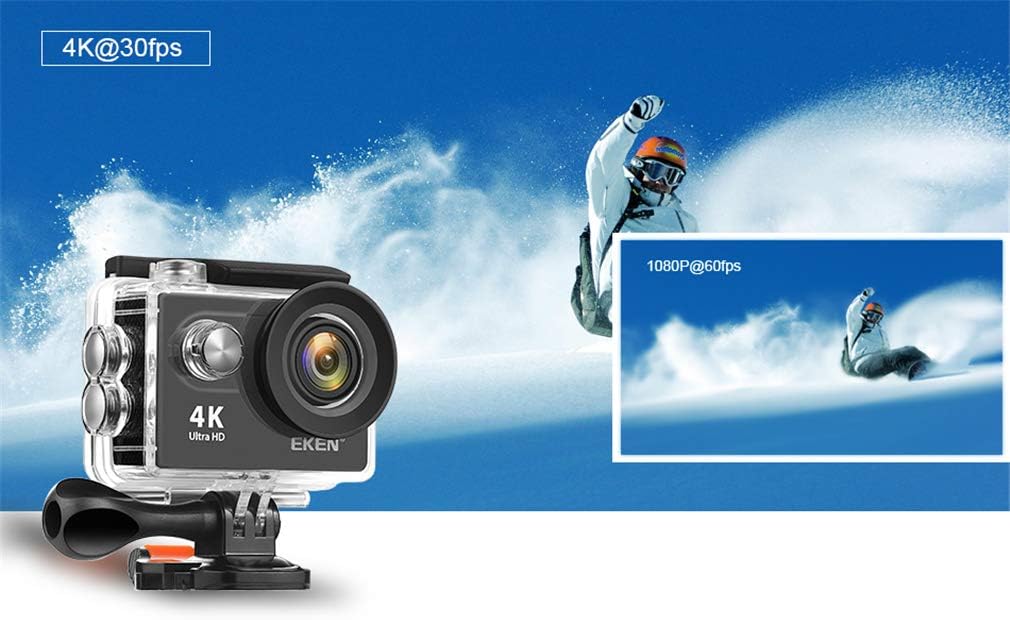
Image 2.1: The action camera enclosed in its waterproof housing, highlighting its 4K and 1080P video recording capabilities for various action shots.
2.5 Attaching Mounting Accessories
The camera comes with various mounts for different scenarios. Refer to the accessory guide for specific attachment instructions. Generally, mounts attach to the waterproof case or directly to the camera via a standard tripod screw mount.
3. Upravljanje kamere
3.1 Vklop/izklop
- Vklop: Pritisnite in držite gumb za vklop/način nekaj sekund, dokler se zaslon ne prižge.
- Ugasniti: Ponovno pritisnite in držite gumb za vklop/izklop, dokler se zaslon ne izklopi.
3.2 Izbira načina
Press the Power/Mode button repeatedly to cycle through different modes:
- Video način: Za snemanje videoposnetkovtage.
- Foto način: For taking still images.
- Način predvajanja: Za ponovnoviewing recorded videos and photos.
- Način nastavitev: To adjust camera settings.
3.3 Snemanje videoposnetkov in fotografiranje
- Za snemanje videa: In Video Mode, press the Shutter/OK button to start recording. Press it again to stop. A red indicator light will usually flash during recording.
- Za fotografiranje: In Photo Mode, press the Shutter/OK button to capture an image.

Image 3.1: The action camera highlighting its 12-megapixel photo capability, suitable for capturing detailed images in various environments.
3.4 Povezava Wi-Fi
The camera can connect to your smartphone via Wi-Fi for remote control and file prenos.
- Omogočite Wi-Fi na kameri prek menija Nastavitve.
- Download the dedicated camera app (refer to the camera's display or packaging for the app name) on your smartphone.
- Na pametnem telefonu se povežite z omrežjem Wi-Fi fotoaparata (SSID in geslo bosta prikazana na zaslonu fotoaparata).
- Odprite aplikacijo za daljinsko upravljanje kamere, view v živo footage in prenos files.
3.5 Uporaba daljinskega upravljalnika
The 2.4G remote control allows for convenient operation from a distance.
- Ensure the remote control is paired with the camera (refer to the camera's settings for pairing instructions).
- Use the designated buttons on the remote to start/stop recording or take photos.
3.6 Stabilizacija slike
The camera features electronic image stabilization (EIS) to reduce blur and shakiness in your videos. This feature is typically enabled by default or can be toggled in the camera's video settings menu for smoother footage.
3.7 Izhod HDMI
Connect the camera to an HDMI-compatible display (e.g., TV, monitor) using an HDMI cable (not included) to view svoje posnetke na večjem zaslonu.

Image 3.2: The action camera demonstrating its various features including 4K video, 12MP photos, waterproof capability, Wi-Fi, and remote control, shown in an active outdoor setting.
4. Vzdrževanje
4.1 Čiščenje fotoaparata in ohišja
- Use a soft, lint-free cloth to clean the camera body and lens. For stubborn smudges, a slightly damp Uporabite lahko krpo, nato pa še suho.
- Clean the waterproof case, especially the rubber seal, after each use, particularly after exposure to saltwater, sand, or dirt. Rinse with fresh water and allow to air dry.
- Za čiščenje ne uporabljajte močnih kemikalij ali abrazivnih materialov.
4.2 Skrb za baterije
- Ko baterije ne uporabljate, jih hranite na hladnem in suhem mestu.
- Da bi podaljšali življenjsko dobo baterij, se izogibajte rednemu popolnemu praznjenju.
- Če baterije shranjujete dlje časa, jih napolnite do približno 50 % njihove kapacitete.
4.3 Shranjevanje
When not in use, store the camera and accessories in a protective case in a cool, dry environment, away from direct sunlight and extreme temperatures.
5. Odpravljanje težav
Če imate težave s fotoaparatom, si oglejte naslednje pogoste rešitve:
| Težava | Možen vzrok/rešitev |
|---|---|
| Kamera se ne vklopi. | Battery is depleted or not inserted correctly. Charge the battery or re-insert it. |
| Ni mogoče snemati videoposnetkov/fotografirati. | Micro SD card is full, not inserted, or corrupted. Format the card (this will erase all data) or replace it. Ensure the camera is in the correct mode. |
| Slaba kakovost videa/fotografij. | Lens may be dirty. Clean the lens. Ensure sufficient lighting. Check resolution settings. |
| Težave z Wi-Fi povezavo. | Ensure Wi-Fi is enabled on the camera and smartphone. Check app permissions. Restart both devices. |
| Puščanje vode v vodoodpornem ohišju. | Rubber seal is dirty, damaged, or case not closed properly. Clean the seal, inspect for damage, and ensure the latch is securely fastened. |
Če težava ne izgine, se obrnite na podporo strankam.
6. Specifikacije
Detailed technical specifications for the SXFJF 4K Ultra HD WiFi Action Camera:
| Funkcija | Specifikacija |
|---|---|
| Znamka | SXFJF |
| Ločljivost zajema videa | 4K |
| Vrsta bliskovnega pomnilnika | Micro SD |
| Format za zajem videa | MP4 |
| Velikost zaslona | 2 palcev |
| Tehnologija povezljivosti | HDMI, Wi-Fi |
| Posebna funkcija | Prenosni, vodoodporni |
| Vrsta kamere | Akcijska kamera |
| Vključene komponente | Baterija |
| Stopnja vodoodpornosti | Vodotesen |
| Stabilizacija slike | Elektronski |
| Faktor oblike | Kompakten |
| Povprečna življenjska doba baterije | 60 minut (pribl.) |
| Vrsta objektiva | Širok kot |
| Vrsta ostrenja | Samodejno ostrenje |
| Največja ločljivost zaslona | 4K UHD |
| Združljive naprave | Pametni telefon, televizor |
| Video ločljivost | 4K |
| Načini fotografiranja | Časovni zamik |
| Razmerje slike | 16:9 |
| Podprti format slike | JPEG |
| File Oblika | MP4 |
| Zoom | Optični |
7. Garancija in podpora
For warranty information, please refer to the documentation included with your purchase or contact the retailer. For technical support or further assistance, please reach out to SXFJF customer service through their official webspletnega mesta ali kontaktnih podatkov, ki so navedeni z vašim izdelkom.