Uvod
This manual provides detailed instructions for the operation and maintenance of your GTMEDIA Z3 Portable DAB+/FM RDS Radio. Please read this manual thoroughly before using the device to ensure proper functionality and to maximize your listening experience.
Pomembne varnostne informacije
- Naprave ne izpostavljajte dežju, vlagi ali ekstremnim temperaturam.
- Izogibajte se padcem ali izpostavljanju naprave močnim udarcem.
- Ne poskušajte razstavljati ali popravljati enote sami. Vsa servisna dela prepustite usposobljenemu osebju.
- Uporabljajte samo predpisani polnilni kabel in napajalnik.
- Hraniti izven dosega otrok.
Vsebina paketa
Prepričajte se, da so v paketu prisotni vsi elementi:
- 1 x GTMEDIA Z3 DAB+/FM Radio
- 1 x USB polnilni kabel
- 1 x uporabniški priročnik

Image: The GTMEDIA Z3 radio, its retail box, USB charging cable, and user manual.
Konec izdelkaview
The GTMEDIA Z3 is a portable DAB+/FM RDS radio featuring a 2.4-inch TFT-LCD screen. It supports 60 preset stations for both DAB+ and FM, and includes functions such as clock, alarm, and sleep timer. The device is powered by a rechargeable 18650 lithium battery.
Nadzor in zaslon na sprednji plošči
- Gumb za vklop/stanje pripravljenosti: Turns the radio on/off or puts it in standby mode.
- Gumb za skeniranje: Initiates station scanning.
- Gumb DAB/FM: Switches between DAB+ and FM modes.
- Gumb menija: Dostop do glavnega menija.
- Gumb EQ: Prilagodi nastavitve izenačevalnika.
- Prednastavljen gumb: Dostopa do prednastavljenih postaj.
- Volume/Select Knob: Adjusts volume and navigates/selects menu options.
- 2.4-inch TFT-LCD Display: Prikazuje informacije o postaji, čas in možnosti menija.
Zadnja plošča in vrata
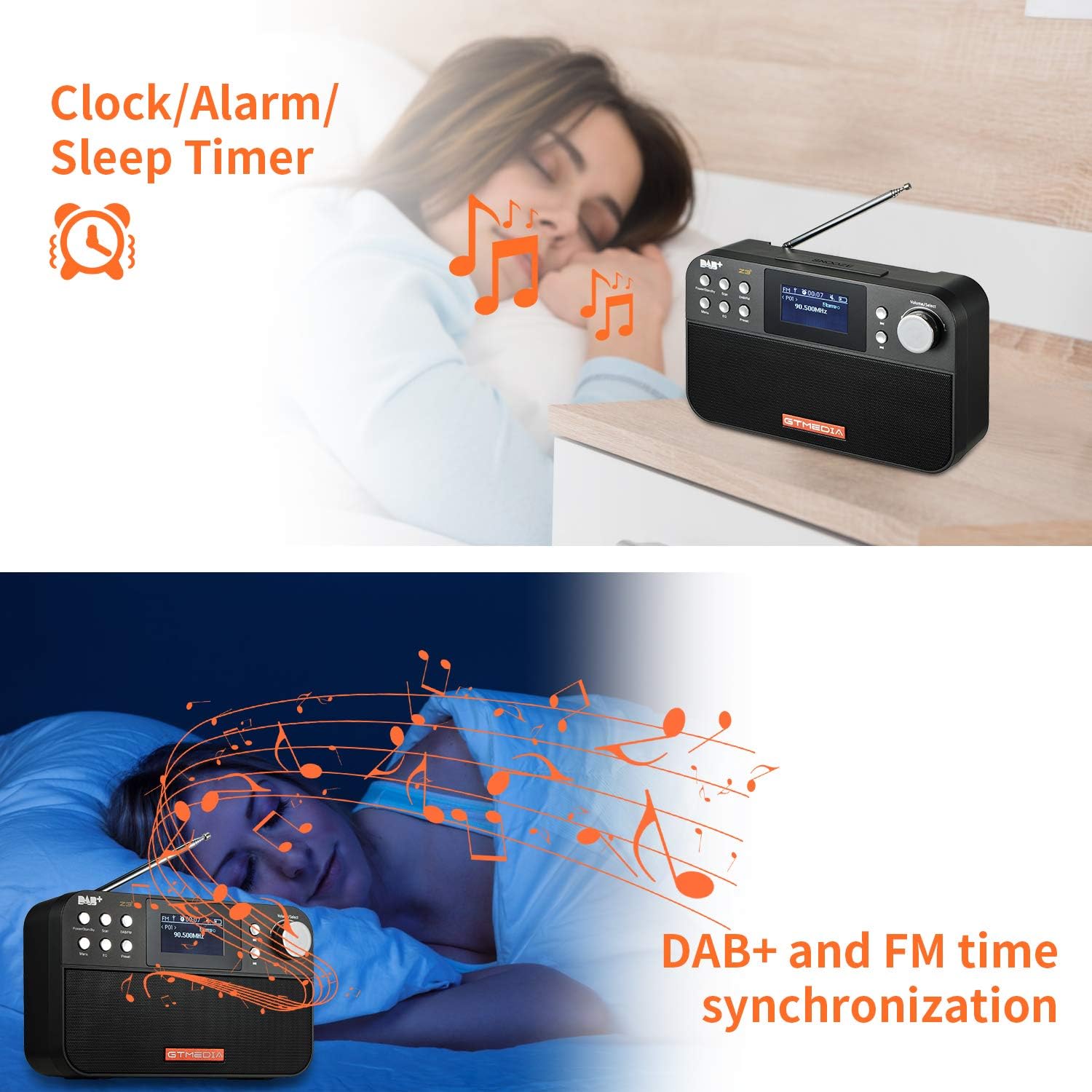
Image: The back of the GTMEDIA Z3 radio, highlighting the 18650 lithium battery compartment and the DC 5V USB charging port.
- 18650 Lithium Battery Compartment: Vsebuje polnilno baterijo.
- DC 5V USB Charging Port: Za polnjenje naprave.
Vodnik za namestitev
1. Polnjenje baterije
- Locate the USB charging port on the rear of the radio.
- Connect the provided USB charging cable to the radio and to a compatible USB power adapter (DC 5V, ≥1500mA) or a computer USB port.
- The battery indicator on the display will show charging status. A full charge typically provides 4-7 hours of operation.
Image: The GTMEDIA Z3 radio's rear panel, illustrating the USB charging port and battery specifications.
2. Začetni vklop in izbira jezika
- Pritisnite in držite Napajanje/pripravljenost gumb za vklop radia.
- Upon first use, you may be prompted to select a language. Use the Volume/Select knob to navigate and press to confirm your choice. English is the default language.
3. Časovna sinhronizacija
The clock can be set manually or synchronized automatically with DAB+ or FM signals.
- Samodejna sinhronizacija: When tuned to a DAB+ or FM station that broadcasts time information, the radio will automatically update its clock.
- Ročna nastavitev: Access the system settings via the meni button to manually set the time and date.
Navodila za uporabo
1. Radio Modes (DAB+/FM)
Preklopni načini:
Pritisnite DAB/FM button to switch between DAB+ and FM radio modes.
Iskanje postaj:
- Samodejno iskanje (FM): V načinu FM pritisnite Skeniraj gumb za samodejno iskanje in shranjevanje razpoložljivih postaj.
- Local Scan (DAB+): V načinu DAB+ pritisnite Skeniraj button to perform a local scan for DAB+ stations. Manual tuning is also supported.
Prednastavitev postaj:
The radio supports 60 preset stations for both FM and DAB+ (10 quick access presets). To save a station:
- Nastavite želeno postajo.
- Pritisnite in držite Prednastavitev gumb.
- Uporabite Volume/Select knob to choose a preset number and press to confirm.
Za priklic prednastavljene postaje na kratko pritisnite Prednastavitev gumb in uporabite Volume/Select gumb za izbiro.
FM RDS Station Name Display:
When tuned to an FM station broadcasting RDS (Radio Data System) information, the 2.4-inch TFT-LCD screen will display the station name and other relevant data.
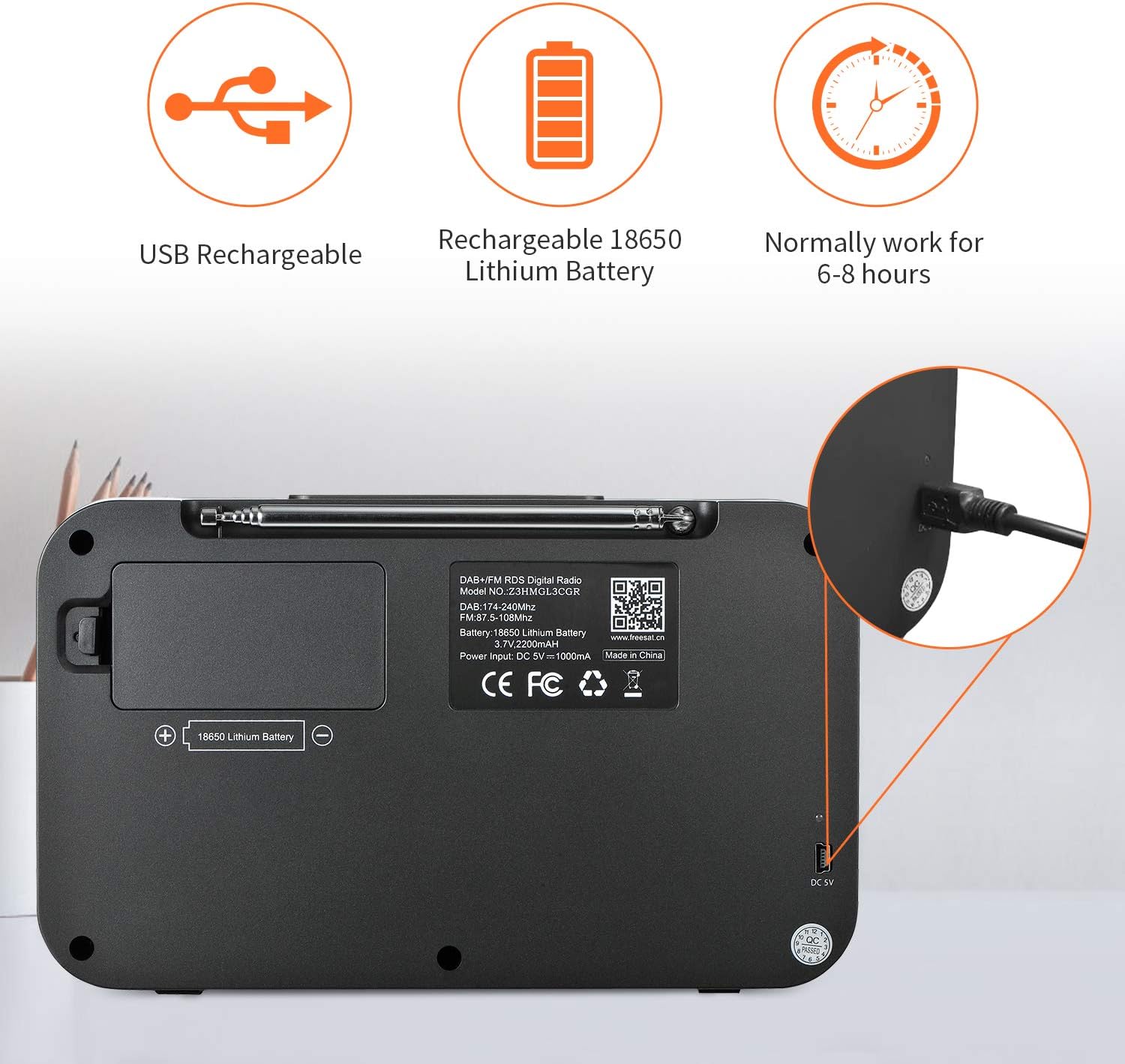
Image: The GTMEDIA Z3 radio's display showing "FM" and "90.500MHz" along with a station name, demonstrating the RDS feature.
2. Ura, budilka in časovnik za spanje
The GTMEDIA Z3 radio includes integrated clock, alarm, and sleep timer functions for enhanced convenience.

Image: The GTMEDIA Z3 radio with icons representing clock, alarm, and sleep timer functions, depicted in a bedroom setting.
Nastavitev alarma:
- Pritisnite meni button and navigate to the "Alarm" settings.
- Uporabite Volume/Select knob to set the alarm time, duration, and alarm source (e.g., buzzer, DAB+, FM).
- Potrdite svoje nastavitve.
Nastavitev časovnika za spanje:
- Pritisnite meni button and navigate to the "Sleep Timer" settings.
- Uporabite Volume/Select knob to choose the desired sleep duration (e.g., 15, 30, 60 minutes).
- Radio se bo po nastavljenem času samodejno izklopil.
3. Predvajanje glasbe
The GTMEDIA Z3 supports playback of various music formats including MP3, FLAC, and WAV. Playback modes include single play, repeat, and shuffle. Specific instructions for accessing and controlling music playback are typically found within the device's menu system.
Vzdrževanje
Čiščenje:
- Radio obrišite z mehko, suho krpo.
- Ne uporabljajte tekočih čistil ali abrazivnih materialov.
Vzdrževanje baterije:
- Da podaljšate življenjsko dobo baterije, se izogibajte pogostemu popolnemu praznjenju baterije.
- Redno polnite baterijo, tudi če radia ne uporabljate pogosto.
- Ko radia dlje časa ne uporabljate, ga shranite na hladnem in suhem mestu.
Odpravljanje težav
| Težava | Možen vzrok | rešitev |
|---|---|---|
| Brez moči | Baterija je izpraznjena. | Napolnite baterijo s priloženim kablom USB. |
| Slab radijski sprejem | Šibek signal; antena ni iztegnjena. | Extend the telescopic antenna fully. Try repositioning the radio. Perform a new scan for stations. |
| Brez zvoka | Volume too low; Mute activated. | Povečajte glasnost z Volume/Select knob. Check if mute is active in settings. |
| Prikaz ni jasen | Nastavitev svetlosti je prenizka. | Adjust LCD brightness in the system settings. |
Specifikacije
| Funkcija | Podrobnost |
|---|---|
| Znamka | GTMEDIA |
| Model | Z3 |
| Tehnologija sprejemnika | DAB Plus, FM RDS |
| Podprti radijski pasovi | DAB+ (174.92-239.20 MHz), FM (87.5-108 MHz) |
| Zaslon | 2.4-inch TFT-LCD (240 x 320 pixels) |
| Prednastavljene postaje | 60 FM, 60 DAB+ |
| Vir napajanja | Napajanje na baterije |
| Vrsta baterije | 18650 Lithium Battery (3.7V 2200mAh) |
| Delovni čas | 4-7 hours (typical) |
| Vhod za polnjenje | DC 5V, ≥1500mA (via USB) |
| Tehnologija povezljivosti | USB |
| Posebna funkcija | Portable, Clock, Alarm, Sleep Timer, USB Upgradeable |
| Teža predmeta | 620 g |
| Dimenzije izdelka | 20 x 5 x 12 cm |
| Delovna temperatura | 0 ~ + 45 ° C |
| Temperatura shranjevanja | -10~+60°C |
| Glasbeni formati | MP3, FLAC, WAV |

Image: Dimensions of the GTMEDIA Z3 radio, showing approximate measurements of 200mm x 120mm x 50mm.
Nadgradnja vdelane programske opreme
The GTMEDIA Z3 radio supports firmware upgrades via a USB connection to a PC. For the latest firmware and detailed instructions, please visit the official support webmesto.

Image: The GTMEDIA Z3 radio connected to a laptop via a USB cable, indicating its upgradeable feature.
Garancija in podpora
For technical support, warranty information, or any questions regarding your GTMEDIA Z3 radio, please visit the official GTMEDIA support webspletno mesto: