
1. Uvod
This manual provides detailed instructions for the installation, operation, and maintenance of the Fafeicy TM626 DIN Rail Mount AC220V Power Timer Switch. This digital timer is designed for precise time control of electrical appliances and systems, offering programmable on/off cycles for various applications.
The TM626 is suitable for controlling street lights, factory equipment, advertising signs, production machinery, radio and television equipment, stage lighting, and other power equipment that requires regular automated switching.
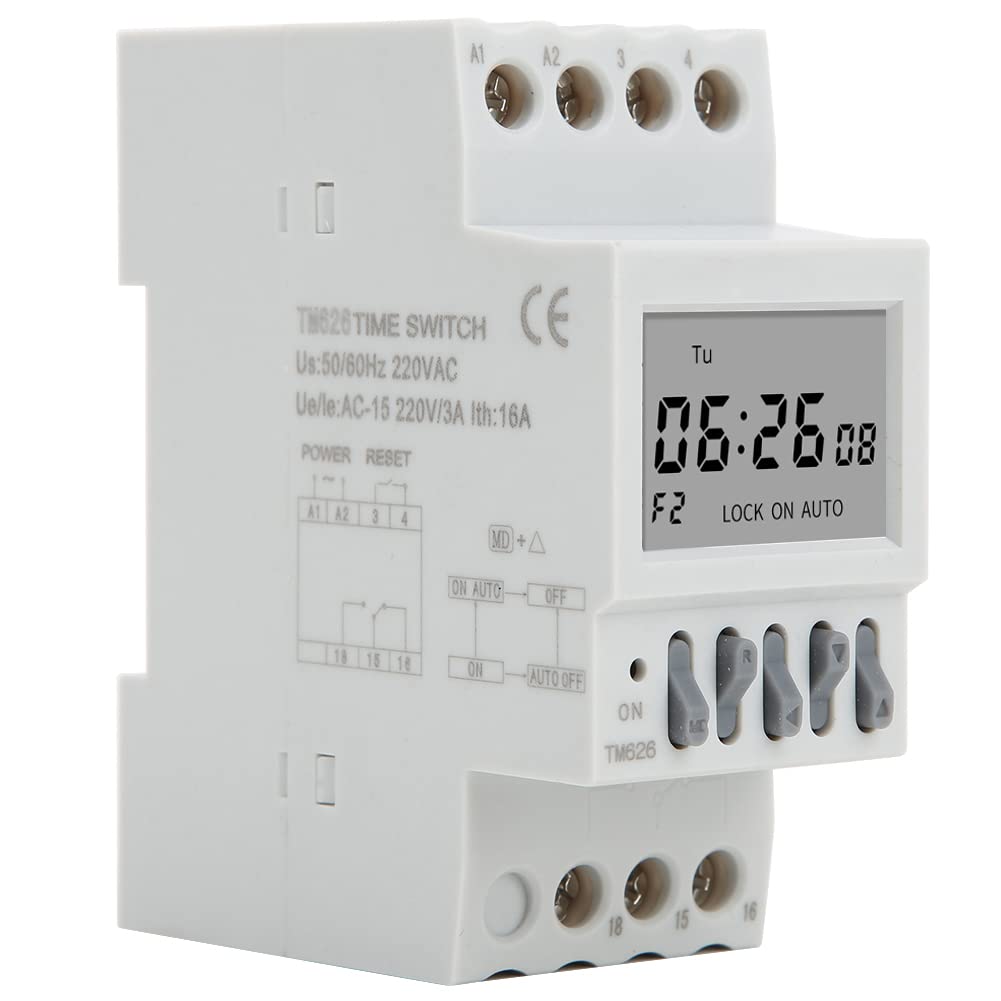
Slika 1.1: Pod kotom view of the Fafeicy TM626 Power Timer Switch, showing the display and terminal connections.

Image 1.2: The TM626 timer switch is ideal for automating various applications, including street lighting, industrial equipment, and advertising displays.
2. Varnostne informacije
Pred namestitvijo ali uporabo te naprave preberite in razumite vsa varnostna navodila. Neupoštevanje teh navodil lahko povzroči električni udar, požar ali resne poškodbe.
- Pred kakršnimi koli namestitvenimi ali vzdrževalnimi deli se prepričajte, da je napajanje odklopljeno.
- Namestitev naj izvede samo usposobljen električar.
- Ne prekoračite navedene količinetage (AC220V) and current (16A) ratings.
- Napravo hranite stran od vode in okolij z visoko vlažnostjo.
- Naprave ne poskušajte odpirati ali popravljati sami. Za servis se obrnite na usposobljeno osebje.
3. Izdelek je končanview
The Fafeicy TM626 is a compact digital timer switch designed for DIN rail mounting. It features a clear LCD display for time and program settings, along with intuitive control buttons.
3.1 Komponente
- LCD zaslon: Shows current time, day, and programming status.
- Gumbi za upravljanje: Used for setting time, programming, and manual override.
- Terminalni bloki: For connecting power input and load output.
- DIN Rail Clips: For secure mounting on a standard DIN rail.

Slika 3.1: Spredaj view of the TM626 timer switch, highlighting the LCD display and control buttons.

Slika 3.2: Stran view of the TM626, illustrating the integrated DIN rail mounting clips.
4. Specifikacije
| Funkcija | Specifikacija |
|---|---|
| Znamka | Fafeicy |
| Številka modela | TM626 (Fafeicy txusog0m3i) |
| Delovna zvezatage | AC220V (50/60Hz) |
| Nazivni tok | 16A |
| Velikost zaslona | 1.6 palcev |
| Mehansko življenje | ≥ 30,000-krat |
| Električna življenjska doba | ≥ 10,000-krat |
| Mere (pribl.) | Width: 35mm (1.4in), Height: 82mm (3.2in), Depth: 68mm (2.7in) |
| Montaža | DIN tirnica |
| Država izvora | Kitajska |

Image 4.1: Dimensional drawing of the TM626 timer switch, showing key measurements.

Image 4.2: The TM626 timer switch, illustrating its robust design for long mechanical and electrical life.
5. Nastavitev in namestitev
Follow these steps for proper installation and initial setup of your TM626 timer switch.
5.1 Montaža
- Ensure the main power supply is OFF before mounting.
- Locate a standard 35mm DIN rail within your electrical panel.
- Align the DIN rail clips on the back of the TM626 with the DIN rail.
- Press the timer firmly onto the rail until it clicks into place.
5.2 Ožičenje
Refer to the wiring diagram on the device and below for correct connections. Incorrect wiring can damage the device or cause electrical hazards.

Slika 5.1: Stran view of the TM626 showing the wiring terminals and a simplified internal diagram. Terminals A1 and A2 are for power input (AC220V). Terminals 15, 16, 18 are for load output (15: Common, 16: Normally Closed, 18: Normally Open).
- Connect the AC220V power supply to terminals A1 in A2.
- Connect the common wire of your load to terminal 15.
- For normally open operation (load turns ON when timer activates), connect the load's live wire to terminal 18.
- For normally closed operation (load turns OFF when timer activates), connect the load's live wire to terminal 16.
- Prepričajte se, da so vse povezave varne in izolirane.
5.3 Začetni vklop
After wiring, restore power. The display should light up. If the display is blank, check power connections. The timer may require an initial charge if it has been stored for a long time; allow it to be powered for a few minutes.
6. Navodila za uporabo
The TM626 timer switch allows you to set the current time and program multiple on/off cycles.
6.1 Nastavitev trenutnega časa in dneva
- Pritisnite URA button (if available, or a similar button for time setting).
- Uporabite D+ (Day), H+ (Hour), and M+ (Minute) buttons to adjust the current day, hour, and minute.
- Pritisnite URA znova shranite in zapustite.
6.2 Programiranje ciklov vklopa/izklopa
The TM626 typically supports multiple ON/OFF programs. The exact number may vary, but common models support 8-16 programs.
- Pritisnite PROG button. The display will show "1 ON".
- Uporaba D+ to select the day(s) for this ON event (e.g., Mon-Fri, Sat-Sun, every day, specific days).
- Uporaba H+ in M+ to set the desired ON time.
- Pritisnite PROG ponovno. Na zaslonu se bo prikazalo "1 IZKLOP".
- Uporaba D+, H+, in M+ to set the desired OFF time for the first program.
- Repeat steps 1-5 for additional ON/OFF programs (e.g., "2 ON", "2 OFF", etc.).
- Ko nastavite vse želene programe, pritisnite URA button to exit programming mode and save settings.
6.3 Ročna preglasitev
The PRIROČNIK or VKLOP/SAMODEJNO/IZKLOP button allows you to manually override the programmed settings.
- Pressing this button cycles through modes: ON (always on), AUTO (follows programs), IZKLOP (always off).
- Izberite AUTO for the timer to execute its programmed schedules.
6.4 Funkcija ponastavitve
To clear all settings and return the timer to its factory default state, locate the small PONASTAVI button (often recessed) and press it using a pointed object (e.g., a pen tip). This will erase all time and program settings.
7. Vzdrževanje
The Fafeicy TM626 timer switch requires minimal maintenance to ensure long-term reliable operation.
- Čiščenje: Za brisanje zunanjosti naprave uporabite mehko, suho krpo. Ne uporabljajte abrazivnih čistil ali topil.
- Pregled: Občasno preverjajte tesnost priključkov in morebitne znake obrabe ali poškodb.
- Varnostno kopiranje baterije: The device typically includes an internal battery for retaining settings during power outages. This battery is usually non-replaceable by the user and recharges when the device is powered.
8. Odpravljanje težav
If you encounter issues with your TM626 timer switch, refer to the following common problems and solutions:
| Težava | Možen vzrok | rešitev |
|---|---|---|
| Zaslon je prazen. | Ni napajanja; notranja baterija je prazna. | Check power connections to A1/A2. Allow device to be powered for several minutes to charge the internal battery. |
| Load does not turn ON/OFF as programmed. | Incorrect programming; timer in manual ON/OFF mode; incorrect wiring; faulty load. | Verify program settings. Ensure the timer is in AUTO mode. Check wiring connections (15, 16, 18). Test the load independently. |
| Čas je napačen. | Time not set correctly; power interruption (though internal battery should prevent this). | Reset and re-set the current time and day. Ensure the internal battery is charged. |
| Gumbi se ne odzivajo. | Device malfunction; temporary software glitch. | Perform a full reset using the recessed RESET button. If the issue persists, contact support. |
9. Garancija in podpora
For warranty information or technical support, please refer to the documentation provided with your purchase or contact Fafeicy customer service through their official channels. Keep your purchase receipt as proof of purchase.
Za splošna vprašanja lahko obiščete Fafeicy Brand Store.