
SENTRY KX200
Sentry Industries Inc. HPXKX200 Gaming Keyboard + Mouse 2 Pack
Model: KX200 User Manual
Uvod
Hvala za nakupasing the Sentry Industries Inc. HPXKX200 Gaming Keyboard and Mouse 2 Pack. This combo kit is designed to enhance your gaming and computing experience with its responsive keyboard and precise mouse. The keyboard features 104 keys with RGB backlighting, while the mouse offers 7200 DPI sensitivity and RGB lighting. Both devices connect via USB for reliable performance.
This manual provides detailed instructions for setup, operation, maintenance, and troubleshooting to ensure optimal use of your new gaming peripherals.
Vsebina paketa
- 1 x Sentry HPXKX200 104-Key RGB USB Gaming Keyboard
- 1 x Sentry HPXKX200 7200 DPI RGB Gaming Mouse
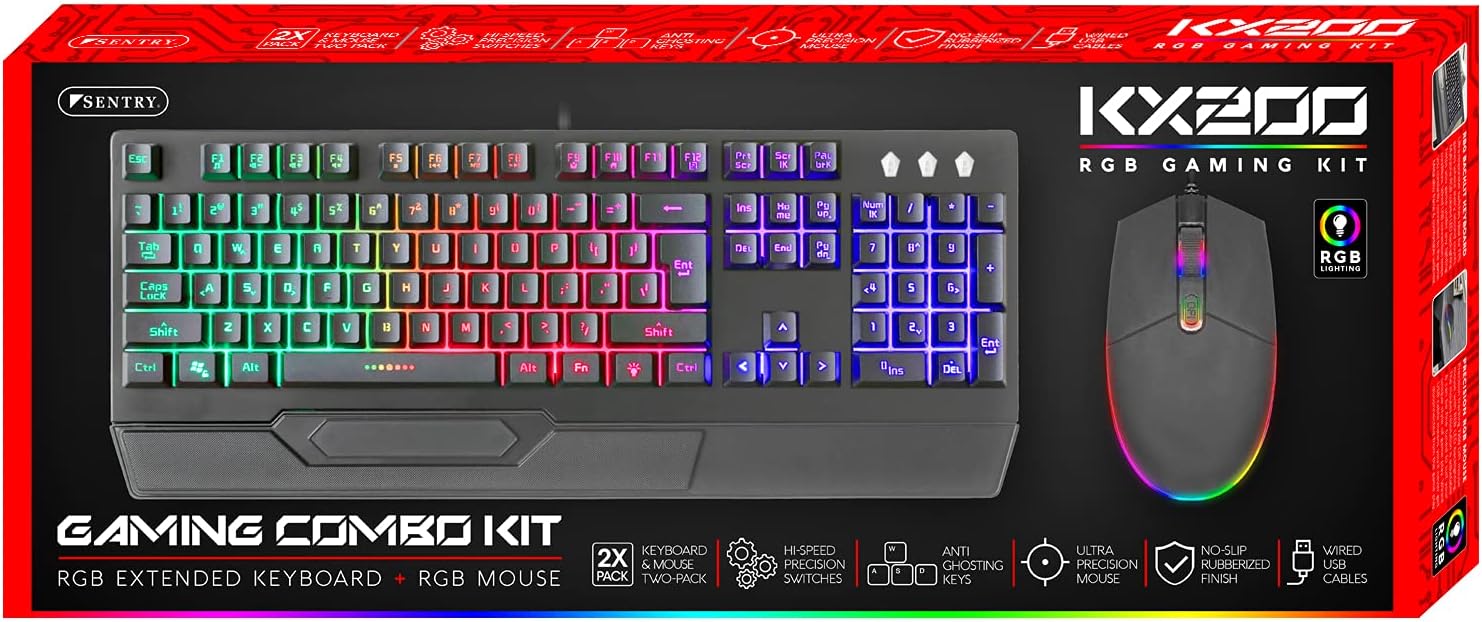
Image: The retail packaging for the Sentry HPXKX200 Gaming Keyboard and Mouse combo kit, showing both devices and key features.
Navodila za namestitev
Follow these steps to connect your Sentry HPXKX200 Gaming Keyboard and Mouse to your computer:
- Razpakirajte naprave: Previdno vzemite tipkovnico in miško iz embalaže.
- Priključite tipkovnico: Poiščite prosta vrata USB na računalniku. Priključek USB tipkovnice trdno vstavite v vrata USB.
- Povežite miško: Poiščite drug prosti USB vhod na računalniku. USB priključek miške trdno vstavite v USB vhod.
- Namestitev gonilnika: Your operating system (e.g., Windows) should automatically detect and install the necessary drivers. This process may take a few moments.
- Preverite povezavo: Once drivers are installed, the keyboard and mouse RGB lighting should illuminate, indicating they are ready for use.

Image: The Sentry HPXKX200 Gaming Keyboard, showcasing its full layout and attached USB cable for connection.

Image: The Sentry HPXKX200 Gaming Mouse, highlighting its ergonomic design and attached USB cable.

Slika: Bližnji posnetek view of a standard USB-A connector, which is used to connect both the keyboard and mouse to a computer.
Navodila za uporabo
Uporaba tipkovnice
The 104-key layout provides a full range of standard typing and function keys. The RGB backlighting enhances visibility and aesthetics.
- Tipkanje: Use the alphanumeric keys for standard text input.
- Funkcijske tipke (F1–F12): These keys perform various functions, often in combination with the 'Fn' key, depending on your operating system and applications.
- Nadzor osvetlitve RGB: Specific key combinations (e.g., Fn + Scroll Lock, Fn + Home/End) may cycle through different RGB lighting modes or adjust brightness. Refer to the keyboard's specific key legends for lighting controls.
Uporaba miške
The 7200 DPI RGB mouse offers precise tracking and comfortable use.
- Levi klik: Primarno dejanje, izbira.
- Desni klik: Kontekstni meni.
- Kolesce za pomikanje: Pomikajte se po dokumentih in web strani. Drsno kolesce deluje tudi kot srednji klik.
- Prilagoditev DPI: The DPI button (often located near the scroll wheel) allows you to cycle through different sensitivity settings (DPI levels) to match your preference for various tasks or games. The mouse supports up to 7200 DPI.
- RGB osvetlitev: The mouse features integrated RGB lighting that typically changes based on DPI settings or cycles through colors automatically.

Image: The Sentry HPXKX200 Gaming Keyboard and Mouse side-by-side, illustrating their design and illuminated RGB features.
Vzdrževanje
Proper care will extend the life of your gaming peripherals:
- Čiščenje: Za brisanje površin tipkovnice in miške uporabite mehko, suho krpo. Za trdovratno umazanijo rahlo obrišiteampKrpo sperite z vodo ali blagim, neabrazivnim čistilom. Izogibajte se prekomerni vlagi.
- Odstranjevanje prahu: Use compressed air to remove dust and debris from between the keyboard keys and from the mouse's optical sensor.
- Izogibajte se tekočinam: Do not immerse the devices in water or expose them to excessive liquids.
- Shranjevanje: Store the keyboard and mouse in a cool, dry place when not in use.
Odpravljanje težav
If you encounter issues with your Sentry HPXKX200 Gaming Keyboard and Mouse, try the following solutions:
| Težava | Možna rešitev |
|---|---|
| Tipkovnica/miška se ne odziva |
|
| RGB osvetlitev ne deluje |
|
| Kazalec miške se premika nepravilno ali se ne premika |
|
| Keys not registering on keyboard |
|
Specifikacije
| Funkcija | Podrobnost |
|---|---|
| Znamka | STRAŽA |
| Številka modela | KX200 |
| Tehnologija povezljivosti | USB (žično) |
| Vrsta tipkovnice | 104-Key RGB USB Keyboard |
| DPI miške | 7200 DPI RGB Mouse |
| barva | Črna |
| Združljivost operacijskega sistema | Windows (and generally compatible with other OS supporting USB peripherals) |
| Dimenzije izdelka (tipkovnica) | Približno 21.65 x 9.84 x 3.15 palca |
| Teža predmeta | Približno 2.2 funta (skupaj) |
Garancija in podpora
Sentry Industries Inc. products are manufactured to high-quality standards. For information regarding warranty coverage, technical support, or service inquiries, please refer to the warranty card included with your product or visit the official Sentry Industries Inc. webspletnega mesta. Prosimo, shranite dokazilo o nakupu za uveljavljanje garancije.
Ask a question about this manual
Ask about setup, troubleshooting, compatibility, parts, safety, or missing instructions. Manuals+ will review the question and use this page’s manual context to help answer it.