
1. Uvod
This manual provides essential information for the proper use and care of your Amazon Renewed Samsung Galaxy Note 10+ Plus N975 smartphone. This device features a 6.8-inch Quad HD+ Dynamic AMOLED screen, a versatile camera system including 12MP Telephoto, 12MP Wide-angle, and 16MP Ultra Wide rear cameras, a 10MP selfie camera, 12GB RAM, 256GB internal storage, and runs on Android 9 (Pie). It also includes stereo speakers tuned by AKG with Dolby Atmos technology and the S Pen for remote, intuitive gestures. As a renewed product, it has been professionally inspected and tested to work and look like new.

Figure 1.1: Samsung Galaxy Note 10+ Plus N975 Smartphone Overview
2. Kaj je v škatli
Please verify that all the following items are included with your renewed device:
- Samsung Galaxy Note 10+ Plus N975 Smartphone
- USB polnilni blok
- USB polnilni kabel
Opomba: As an Amazon Renewed product, accessories may be generic but are fully compatible and functional.
3. Navodila za namestitev
3.1 Začetno polnjenje
Before first use, fully charge your device. Connect the USB charging cable to the USB charger block, then plug it into a power outlet. Insert the USB-C end of the cable into the charging port at the bottom of your phone.
3.2 Namestitev kartice SIM
- Poiščite pladenj za kartico SIM na zgornjem robu telefona.
- Insert the SIM ejection tool (not always included with renewed products; a paperclip can be used) into the small hole next to the tray to eject it.
- Kartico Nano-SIM postavite na pladenj z zlatimi kontakti obrnjenimi navzdol.
- Previdno vstavite pladenj nazaj v telefon, dokler se ne zaskoči.
3.3 Vklop/izklop
- Za vklop: Pritisnite in držite tipko za vklop/stran (nahaja se na desni strani), dokler se ne prikaže logotip Samsung.
- Za izklop: Press and hold the Power/Side key, then tap 'Power off' on the screen. Alternatively, swipe down from the top of the screen to open the Quick Settings panel, tap the Power icon, and select 'Power off'.
3.4 Čarovnik za začetno nastavitev
Ob prvem vklopu sledite navodilom na zaslonu, da:
- Izberite svoj jezik.
- Povežite se z omrežjem Wi-Fi.
- Prijavite se s svojim Google Računom ali ustvarite novega.
- Set up security features (fingerprint, face recognition, PIN, pattern).
- Prenesite podatke iz stare naprave (neobvezno).
4. Navodila za uporabo
4.1 Osnovna navigacija
The Galaxy Note 10+ Plus uses a touchscreen interface. Swipe up, down, left, or right to navigate menus and content. Tap icons to open applications. Use pinch-to-zoom gestures for images and web strani.
4.2 Uporaba kamere
Your device features a versatile camera system:
- Zadnji fotoaparati: 12MP Telephoto, 12MP Wide-angle, 16MP Ultra Wide. Open the Camera app and tap the lens icons to switch between modes.
- Sprednja kamera: 10MP Selfie Camera. Tap the camera switch icon to activate.
Tap the shutter button to take photos or the record button to capture videos. Explore various modes like Pro, Panorama, and Live Focus for enhanced photography.
4.3 Zvočne funkcije
Experience rich audio with stereo speakers tuned by AKG and surround sound with Dolby Atmos technology. Connect compatible earphones (sound by AKG) for a personalized audio experience.
4.4 Funkcionalnost pisala S Pen
The S Pen is integrated into your Galaxy Note 10+ Plus. Eject it from its slot at the bottom of the phone. Use it for:
- Opomba o izklopljenem zaslonu: Jot down notes instantly when the screen is off.
- Zračne akcije: Perform remote gestures to control camera, media playback, and more.
- Pametna izbira: Zajemite določena območja zaslona.
- Sporočilo v živo: Create animated handwritten messages.
4.5 Android 9 (Pie) Basics
Familiarize yourself with the Android 9 operating system. Key features include adaptive battery, gesture navigation (optional), digital wellbeing tools, and enhanced privacy controls. Access settings by swiping down from the top of the screen and tapping the gear icon.
5. Vzdrževanje
5.1 Čiščenje naprave
Use a soft, lint-free cloth to clean the screen and body of your phone. Avoid abrasive materials or harsh chemicals. For stubborn smudges, slightly dampkrpo sperite z vodo ali čistilom za zaslone, namenjenim elektroniki.
5.2 Skrb za baterije
Your device has an intelligent 3500 mAh battery. To prolong battery life:
- Izogibajte se ekstremnim temperaturam.
- Telefona ne puščajte polnjenega dlje časa, ko doseže 100 %.
- Utilize power-saving modes when necessary.
- Keep software updated for optimal battery management.
5.3 Posodobitve programske opreme
Redno preverjajte in nameščajte posodobitve programske opreme. Te posodobitve pogosto vključujejo izboljšave delovanja, varnostne popravke in nove funkcije. Pojdite na Nastavitve > Posodobitev programske opreme > Prenesi in namesti.
5.4 Upravljanje shranjevanja
Z 256 GB notranjega pomnilnika imate ample space. To manage storage:
- Redno brišite nepotrebne files, fotografije in videoposnetki.
- Odstranite neuporabljene aplikacije.
- Za varnostno kopiranje uporabite storitve shranjevanja v oblaku.
5.5 General Care for Renewed Devices
While renewed devices are tested for functionality, they may show minor cosmetic imperfections. Handle your device with care, use a protective case and screen protector to prevent further damage.
6. Odpravljanje težav
Če imate težave z napravo, poskusite naslednje korake:
6.1 Naprava se ne vklopi
- Prepričajte se, da je baterija napolnjena. Priključite polnilnik in počakajte nekaj minut, preden poskusite vklopiti napravo.
- Perform a forced restart: Press and hold the Volume Down button and the Power/Side key simultaneously for about 7-10 seconds.
6.2 Težave s polnjenjem
- Check the charging cable and adapter for damage. Try a different cable and adapter if available.
- Prepričajte se, da so vrata za polnjenje čista in brez smeti.
6.3 Zaslon se ne odziva
- Restart the device using the forced restart method (Volume Down + Power/Side key).
- If the issue persists, consider a factory reset (Opomba: S tem boste izbrisali vse podatke).
6.4 Težave z omrežno povezljivostjo
- Vklop in izklop letalskega načina.
- Check SIM card installation.
- Ponastavitev omrežnih nastavitev: Nastavitve > Splošno upravljanje > Ponastavi > Ponastavi omrežne nastavitve.
6.5 Ponastavitev na tovarniške nastavitve (zadnja možnost)
If all other troubleshooting fails, you may need to perform a factory reset. This will erase all data on your device. Back up important data before proceeding. Go to Nastavitve > Splošno upravljanje > Ponastavi > Ponastavitev na tovarniške nastavitve.
7. Specifikacije
| Ime modela | Galaxy Note 10 Plus |
| Številka modela artikla | SM-N975U |
| Operacijski sistem | Android 9.0 (Pie) |
| Velikost zaslona | 6.8 Inches Quad HD+ Dynamic AMOLED |
| Resolucija | 1440 x 2960 |
| Velikost nameščenega RAM-a | 12 GB |
| Zmogljivost pomnilnika | 256 GB |
| Zadnja kamera | 12MP Telephoto, 12MP Wide-angle, 16MP Ultra Wide |
| Sprednja kamera | 10MP selfie kamera |
| Kapaciteta baterije | 3500 milliamp Ure (litij-ionska) |
| Dimenzije izdelka | 6.39 x 3.04 x 0.31 palcev |
| Teža predmeta | 12 unč |
| Brezžični nosilec | AT&T (for this specific variant) |
8. Amazon Renewed Product Conditions
As an Amazon Renewed product, your device has undergone a thorough inspection and testing process. It is guaranteed to be fully functional. The cosmetic condition is categorized as follows:
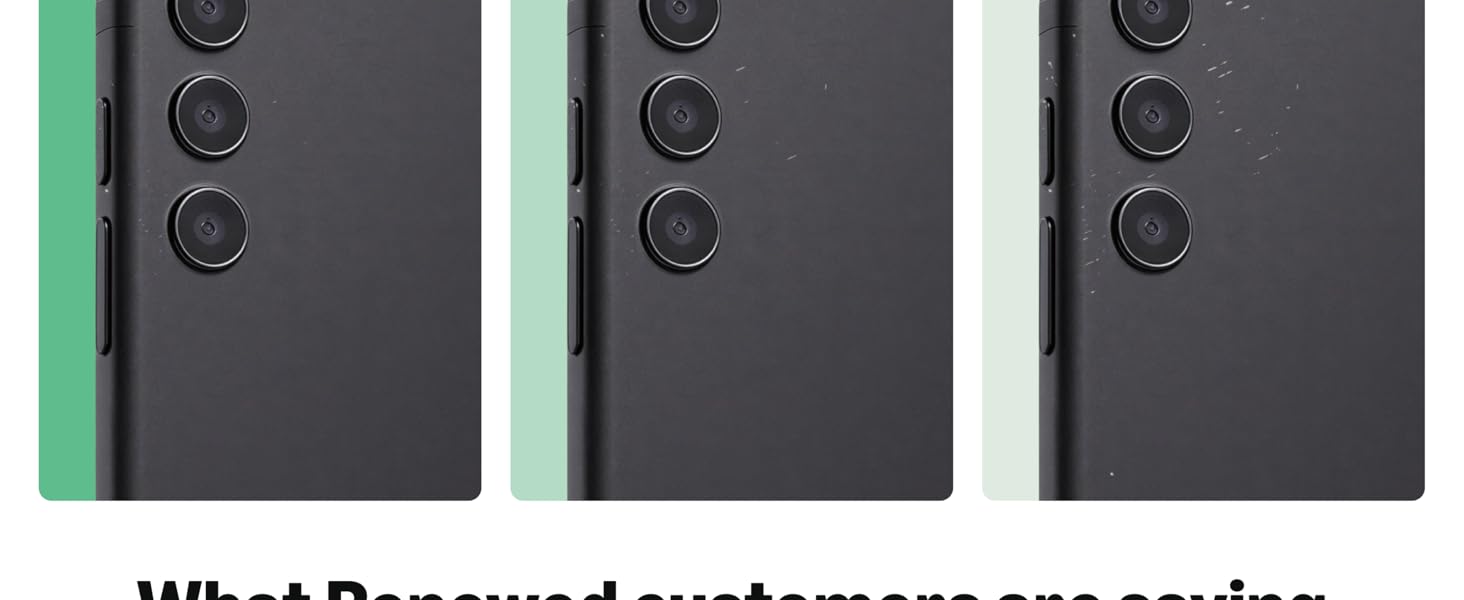
Figure 8.1: Amazon Renewed Condition Guidelines
9. Garancija in podpora
9.1 Obnovljena garancija Amazona
Your Amazon Renewed purchase is backed by the Amazon Renewed Guarantee. This provides a 90-day refund or replacement policy if the product does not work as expected. Please refer to the Amazon Renewed program terms for full details.
9.2 Podpora strankam
For any issues, questions, or support requests regarding your Amazon Renewed Samsung Galaxy Note 10+ Plus, please contact Amazon Customer Service or the seller directly through your Amazon order history. Provide your order number and a detailed description of the issue for efficient assistance.