
1. Izdelek je končanview
The cimetech Bluetooth Numeric Keypad is a slim, wireless 18-key device designed to extend the functionality of your laptop, desktop, or notebook. It connects via Bluetooth 3.0, offering a cable-free experience. Its ergonomic design provides comfort for extended use, particularly for data entry in spreadsheets and financial applications.

Image 1.1: The cimetech Bluetooth Numeric Keypad in a typical workspace setup, demonstrating its compact size next to a laptop, mouse, and tablet.
2. Vsebina paketa
- 1 x cimetech Bluetooth Numeric Keypad (Model G1MINI-BK)
Opomba: 1 AAA battery is required for operation and is not included in the package.
3. Nastavitev in seznanjanje
3.1 Namestitev baterije
- Locate the battery compartment on the back of the numeric keypad.
- Odprite pokrov prostora za baterije.
- Vstavite eno (1) baterijo AAA in pazite na pravilno polarnost (+/-).
- Trdno zaprite pokrov prostora za baterije.

Slika 3.1: Podrobno view of the battery compartment on the back of the keypad, illustrating the process of inserting a single AAA battery.
3.2 Bluetooth seznanjanje
The keypad uses Bluetooth 3.0 for connection and does not require a USB dongle.
- Ensure the keypad has a fresh AAA battery installed.
- On the keypad, simultaneously press and hold the KLJUČAVNICA NUM ključ in Vnesite tipko približno 3 sekunde.
- The green indicator light on the keypad will begin to flash, indicating it is in pairing mode.
- On your device (laptop, desktop, tablet, or smartphone), navigate to the Bluetooth settings.
- Iskanje available Bluetooth devices. The keypad should appear as "digital Keypad" or similar.
- Select "digital Keypad" from the list to initiate pairing.
- Once paired, the green indicator light on the keypad will stop flashing and remain solid for a moment, then turn off.
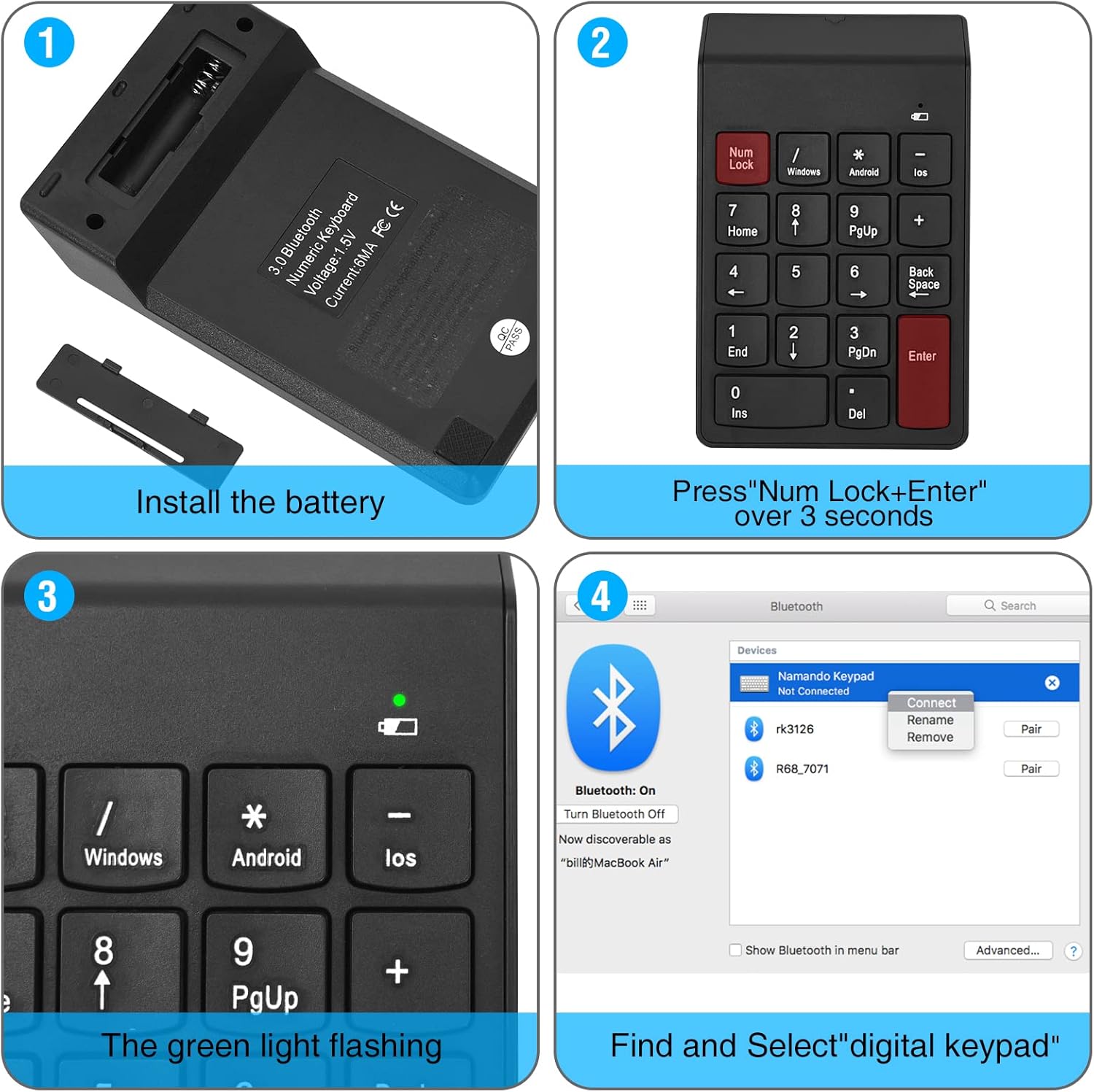
Image 3.2: Step-by-step visual guide for installing the battery and pairing the numeric keypad via Bluetooth to a computer.

Image 3.3: The keypad connects directly via Bluetooth, eliminating the need for a USB dongle for a clean, wireless setup.
4. Delovanje
4.1 Basic Keypad Use
After successful pairing, the numeric keypad functions like a standard 18-key numeric pad. Use the number keys for data entry and arithmetic operations. The Num Lock key toggles the numeric function of the keys.
4.2 Preklapljanje operacijskega sistema
The keypad supports Windows, Android, and iOS operating systems. To switch between modes, use the following key combinations:
- Za Windows: Pritisnite Vnesite + / istočasno.
- Za Android: Pritisnite Vnesite + * istočasno.
- Za iOS: Pritisnite Vnesite + - istočasno.
Za ponastavitev Num Lock funkcija, pritisnite Vnesite + Num Lock istočasno.

Image 4.1: Key combinations for switching operating system modes and resetting Num Lock on the keypad.
4.3 Indikator stanja baterije
The keypad features a low voltage alarm. A red light will flash when the battery voltage drops below 0.9V, indicating that the AAA battery needs to be replaced soon.
4.4 Sleep Mode and Wake-up
To conserve battery life, the keypad enters standby mode after 3 seconds of inactivity and sleep mode after 10 minutes of inactivity. To wake the keypad from sleep mode, press any button.
5. Vzdrževanje
5.1 Zamenjava baterije
Ko nizka voltage indicator flashes, replace the AAA battery promptly to ensure uninterrupted operation. Refer to section 3.1 for battery installation instructions.
5.2 Čiščenje
To clean the keypad, gently wipe the surface with a soft, dry cloth. Avoid using harsh chemicals or abrasive materials.
6. Odpravljanje težav
- Keypad not pairing:
- Prepričajte se, da je baterija pravilno nameščena in dovolj napolnjena.
- Confirm the keypad is in pairing mode (green light flashing) by pressing KLJUČAVNICA NUM + Vnesite za 3 sekund.
- Prepričajte se, da je Bluetooth v vaši napravi omogočen in da jo je mogoče odkriti.
- Try removing any previous pairings of "digital Keypad" from your device's Bluetooth list and attempt to pair again.
- Ensure the keypad is within the 10-meter operating range of your device.
- Tipke se ne odzivajo:
- Check if the keypad is properly paired and connected to your device.
- Verify the battery level; replace if low.
- Ensure the correct operating system mode is selected (Windows, Android, iOS) using the key combinations described in section 4.2.
- Če je Num Lock function is not working as expected, try resetting it by pressing Vnesite + Num Lock.
- Keypad frequently disconnects:
- Zamenjajte baterijo s svežo.
- Ensure there are no significant obstructions or sources of interference between the keypad and your device.
- Keep the keypad within the recommended 10-meter operating distance.
7. Specifikacije
| Številka modela | G1MINI-BK |
| Tehnologija povezljivosti | Bluetooth 3.0 |
| Število ključev | 18 |
| Tip stikala | Membrana |
| Vir napajanja | 1 x AAA bateriji (nista priloženi) |
| Nizka glasnosttage Alarm | Red light flashes below 0.9V |
| Čas pripravljenosti | Keyboard enters standby after 3 seconds of inactivity |
| Način mirovanja | Po 10 minutah nedejavnosti |
| Wake Method | Pritisnite poljuben gumb |
| Delovna razdalja | Do 10 metrov (33 čevljev) |
| Dimenzije (D x Š x V) | 140 mm x 86 mm x 10 mm (5.51" x 3.39" x 0.39") |
| Material | Plastika |
| barva | BT-Black |
7.1 Združljivost
- Windows: Suggested above Windows 8.0
- macOS: Suggested above macOS 10.10
- Android: Suggested above Android 4.3

Image 7.1: The keypad features a 15-degree ergonomic tilt designed for comfortable use during extended periods of data entry.
8. Informacije o garanciji
For detailed warranty information, please refer to the product packaging or contact cimetech customer support directly. Warranty terms may vary by region and retailer.
9. Podpora strankam
If you encounter any issues or have questions regarding your cimetech Bluetooth Numeric Keypad, please visit the official cimetech website or contact their customer service department for assistance. Contact information can typically be found on the product packaging or the manufacturer's webmesto.