
Uvod
Hvala za nakupasing the Boytone BT-424FN 2.1 Multimedia Bluetooth Speaker System. This powerful shelf stereo system is designed to deliver high-quality audio with versatile connectivity options, including Bluetooth, FM radio, USB, SD card, and auxiliary input. This manual provides detailed instructions for setting up, operating, and maintaining your speaker system to ensure optimal performance and longevity.
Vsebina paketa
Prosimo, da paket natančno preverite, ali so vsi predmeti prisotni in v dobrem stanju:
- Boytone BT-424FN Main Unit (Subwoofer with built-in ampLifier)
- Two Satellite Speakers (3" x 2" Full range)
- Brezžični daljinski upravljalnik
- AUX kabel
- USB kabel
- SD Card (if included with specific models)
- 2 bateriji AAA (za daljinski upravljalnik)

Image: The Boytone BT-424FN 2.1 Multimedia Bluetooth Speaker System, showcasing the main subwoofer unit, two satellite speakers, and the included remote control.
Varnostne informacije
To prevent fire or shock hazards, do not expose this appliance to rain or moisture. Do not open the cabinet. Refer servicing to qualified personnel only.
- vir energije: Ensure the power source matches the requirements (AC 110/220V).
- Prezračevanje: Ne blokirajte prezračevalnih odprtin. Zagotovite dovolj prostora okoli enote za pravilen pretok zraka.
- Voda in vlaga: Do not expose the unit to dripping or splashing. Do not place objects filled with liquids, such as vases, on the apparatus.
- Toplota: Napravo hranite stran od virov toplote, kot so radiatorji, grelniki, štedilniki ali druge naprave (vključno z amplifiers), ki proizvajajo toploto.
- Čiščenje: Pred čiščenjem izključite enoto iz stenske vtičnice. Za čiščenje uporabite suho krpo.
- Umestitev: Napravo postavite na stabilno, ravno površino, da preprečite njen padec.
Konec izdelkaview in funkcije
The Boytone BT-424FN is a versatile 2.1 multimedia speaker system designed for a rich audio experience. It combines powerful sound output with multiple connectivity options and user-friendly controls.
Ključne značilnosti:
- Zmogljiv zvočni izhod: 40 Watts (20W subwoofer + 2x10W satellite speakers) for a wide audio spectrum.
- Bluetooth povezljivost: Easy wireless connection with a range of up to 33 feet, compatible with all Bluetooth-enabled devices.
- Več možnosti predvajanja: USB port and SD card slot for MP3 file playback, FM tuner for radio, and a 3.5mm auxiliary jack for non-Bluetooth devices.
- Digitalni zaslon in krmilniki: Digital LED display for mode and track information, with digital bass control.
- RGB svetloba: Integrated RGB lighting for enhanced visual appeal.
- Daljinski upravljalnik: Full-function wireless remote for convenient operation.
- Kompaktna zasnova: Tabletop mount design with a black wood finish.

Image: Diagram highlighting key features of the Boytone BT-424FN, including USB/SD port for MP3, wireless sound capability, all-in-one stereo system, and 40 Watts with RGB light.
Identifikacija komponente:
Familiarize yourself with the various ports and controls on your speaker system.

Slika: Zadaj in ob strani view of the Boytone BT-424FN main unit, showing the USB port, SD slot, auxiliary jack, and DVD jack for various input connections.

Image: Close-up of the Boytone BT-424FN's front panel, displaying the LED screen, volume knob, and control buttons for source selection, tone, and tuning.
Nastavitev
Follow these steps to set up your Boytone BT-424FN speaker system.
1. Povezava zvočnikov:
- Connect the two satellite speakers to the corresponding audio output jacks on the rear of the main subwoofer unit. Ensure a secure connection.
2. Napajalni priključek:
- Plug the AC power cord from the main unit into a standard AC 110/220V wall outlet.
3. Nastavitev daljinskega upravljalnika:
- Insert the two AAA batteries into the remote control, observing the correct polarity (+/-).
4. Začetni vklop:
- Press the power button on the main unit or the remote control to turn on the system. The LED display will light up.
Navodila za uporabo
Learn how to use the various functions of your Boytone BT-424FN speaker system.
1. Osnovna operacija:
- Vklop/izklop: Press the 'ST-BY/M' button on the main unit or the power button on the remote.
- Nadzor glasnosti: Rotate the 'VOLUME' knob on the front panel or use the 'VOL+' and 'VOL-' buttons on the remote control.
- Izbira vira: Press the 'SOURCE' button on the main unit or the remote to cycle through input modes: Bluetooth, FM, USB, SD, AUX.
- Nadzor tonov: Use the 'TONE' button on the main unit or remote to adjust bass and treble settings (if available).
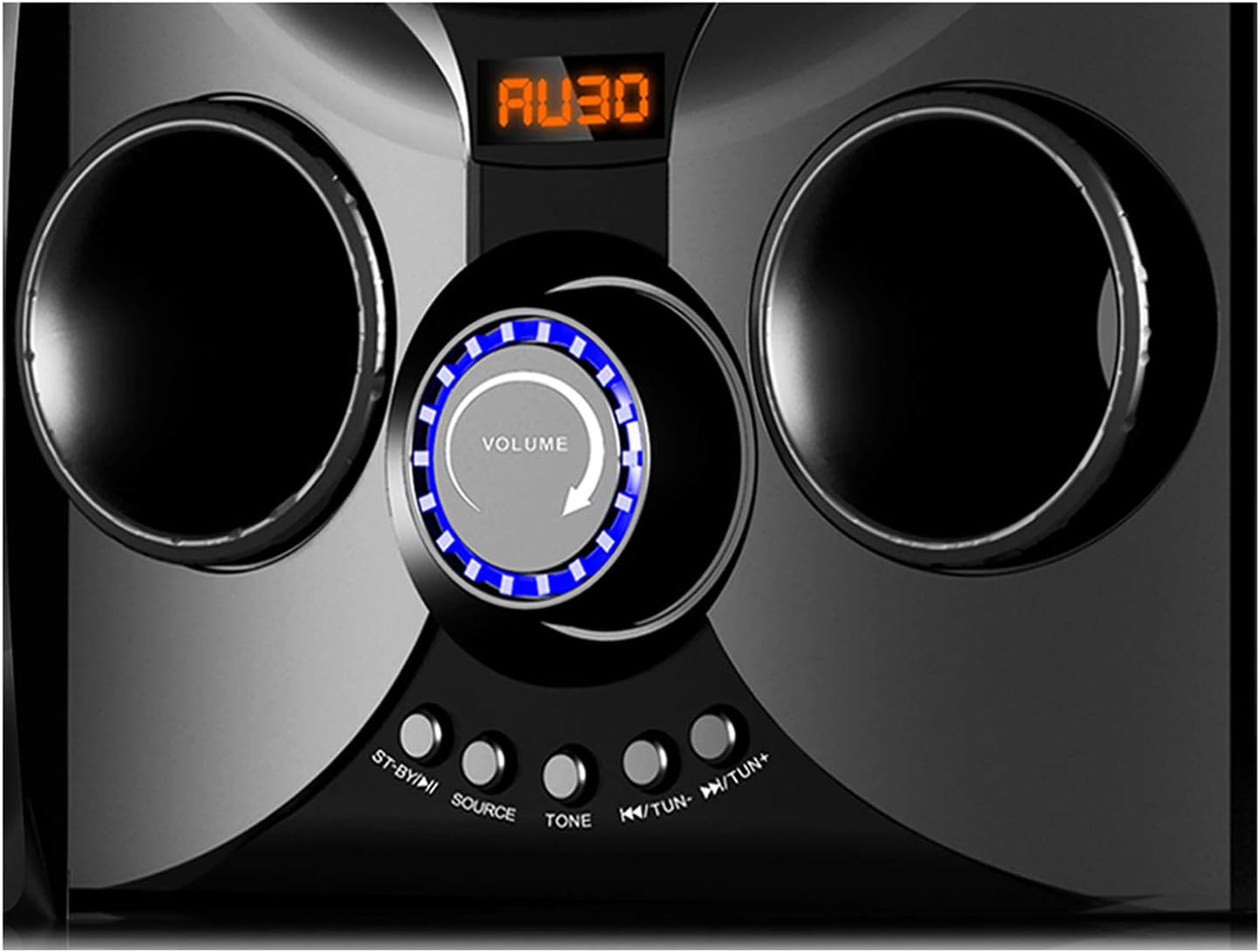
Image: Close-up of the Boytone BT-424FN's central control area, highlighting the illuminated volume knob and the function buttons below it.
2. Način Bluetooth:
- Select 'Bluetooth' mode using the 'SOURCE' button. The LED display will show 'BT' or a similar indicator.
- V napravi, ki podpira Bluetooth (pametni telefon, tablični računalnik itd.), omogočite Bluetooth in poiščite razpoložljive naprave.
- Select 'BT-424FN' or 'Boytone' from the list of devices.
- Once paired, you can play audio from your device through the speaker system.
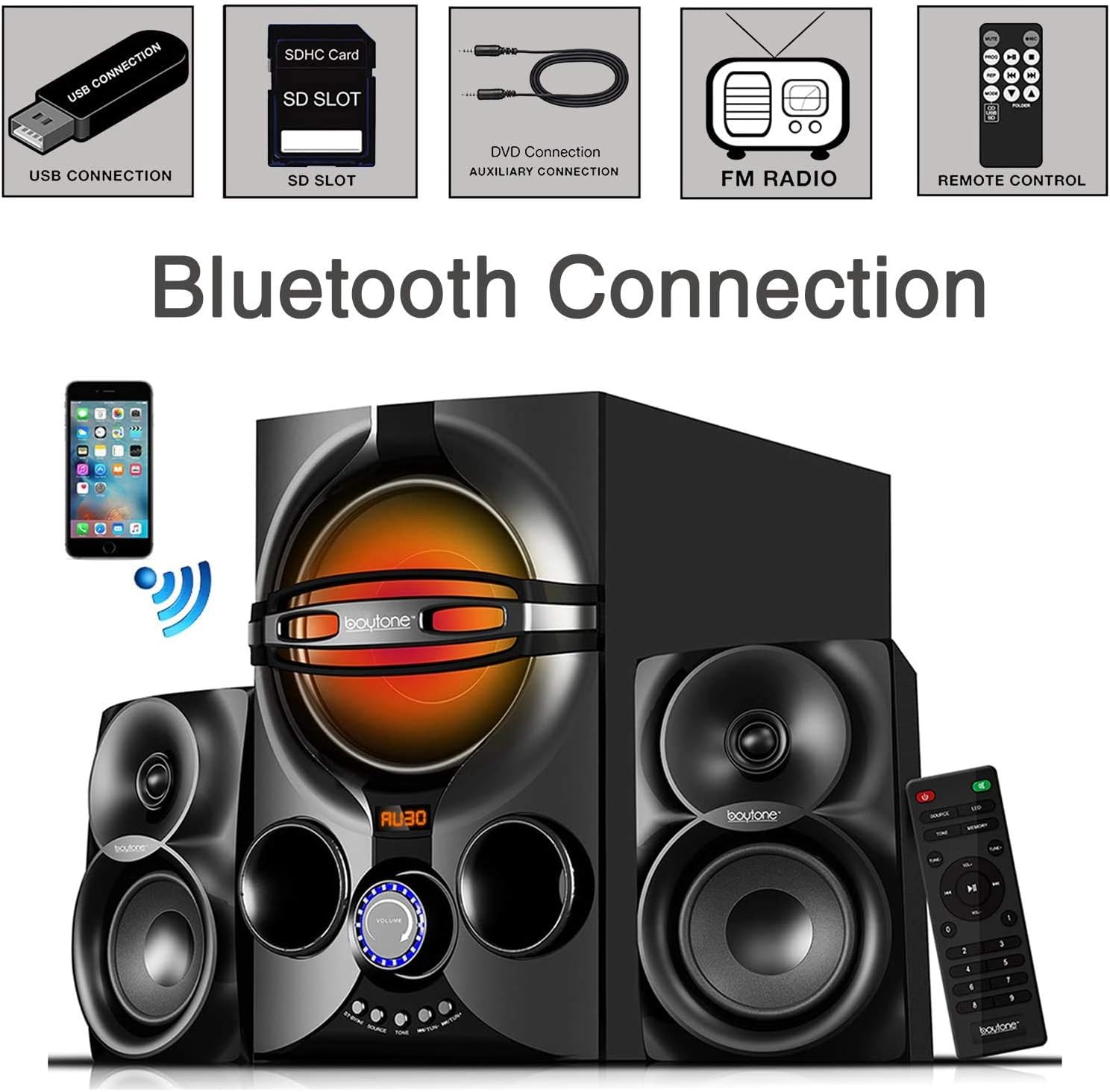
Image: A diagram illustrating the process of connecting a smartphone to the Boytone BT-424FN via Bluetooth, alongside icons representing other connectivity options like USB, SD, AUX, FM radio, and remote control.
3. FM radijski način:
- Select 'FM' mode using the 'SOURCE' button.
- Use the 'TUN+/-' buttons on the main unit or the remote to manually tune to a desired radio station.
- To auto-scan and save stations, press and hold the 'PLAY/PAUSE' button (often doubles as auto-scan in FM mode) on the remote or main unit.
4. USB/SD Card Mode:
- Vstavite USB-ključek ali SD-kartico z zvokom MP3 filev ustrezno pristanišče.
- Select 'USB' or 'SD' mode using the 'SOURCE' button. The system will automatically begin playing the first compatible audio file.
- Use the 'PREV/NEXT' buttons on the main unit or remote to skip tracks. Use 'PLAY/PAUSE' to control playback.
5. Način AUX:
- Connect your external audio device (e.g., MP3 player, TV, computer) to the 'AUX' input jack on the main unit using the provided 3.5mm audio cable.
- Select 'AUX' mode using the 'SOURCE' button.
- Predvajanje in glasnost lahko upravljate neposredno s priključene zunanje naprave.
Vzdrževanje
Proper care and maintenance will ensure the longevity of your speaker system.
- Čiščenje: Za čiščenje zunanjih površin enote uporabite mehko, suho krpo. Ne uporabljajte abrazivnih čistil, voskov ali topil.
- Prah: Regularly dust the speaker grilles and vents to prevent accumulation that could affect sound quality and ventilation.
- Shranjevanje: Če enoto shranjujete dalj časa, jo izključite iz električne vtičnice in jo shranite na hladnem in suhem mestu.
- Izogibajte se tekočinam: Tekočine hranite stran od enote, da preprečite poškodbe notranjih komponent.
Odpravljanje težav
If you encounter any issues with your Boytone BT-424FN, refer to the following common problems and solutions.
| Težava | Možen vzrok | rešitev |
|---|---|---|
| Brez moči | Napajalni kabel ni priključen; vtičnica ni aktivna | Ensure power cord is securely plugged in; Try a different power outlet |
| Brez zvoka | Volume too low; Incorrect source selected; Speakers not connected | Increase volume; Press 'SOURCE' to select correct input; Check speaker connections |
| Bluetooth povezovanje ni uspelo | Device too far; Bluetooth not enabled on device; Speaker not in pairing mode | Move device closer; Enable Bluetooth on your device; Ensure speaker is in Bluetooth mode and discoverable |
| Statični FM radio | Šibek signal; Antena ni iztegnjena | Adjust antenna position; Try auto-scanning for stronger stations |
| USB/SD se ne predvaja | Nepodprto file format; Poškodovano files; Incorrect mode selected | Zagotovite files are MP3 format; Try a different USB/SD card; Select 'USB' or 'SD' mode |
| Daljinski upravljalnik ne deluje | Batteries drained or incorrectly inserted; Obstruction between remote and unit | Replace batteries and check polarity; Remove any obstructions; Point remote directly at the unit's sensor |
Specifikacije
Detailed technical specifications for the Boytone BT-424FN speaker system.
| Funkcija | Specifikacija |
|---|---|
| Ime modela | BT-424FN |
| Vrsta zvočnika | 2.1 Channel Subwoofer System |
| Največja izhodna moč zvočnika | 40 Watts (20W Subwoofer + 2x10W Satellites) |
| Premer nizkotonca | 5 palcev |
| Velikost satelitskega zvočnika | 3" x 2" Full Range |
| Tehnologija povezljivosti | Bluetooth, USB, SD, AUX, FM radio |
| Brezžična komunikacijska tehnologija | Bluetooth |
| Bluetooth obseg | Do 33 čevljev |
| Vir napajanja | Corded Electric (AC 110/220V) |
| Nadzorna metoda | Daljinski upravljalnik, gumbi na enoti |
| Material | Les |
| barva | Črna |
| Dimenzije izdelka (glavna enota) | 8.5"D x 16.5"Š x 13"V |
| Teža predmeta | 9.5 funta |
| Vključene komponente | AUX cable, USB cable, SD card, Remote control |
| Baterije za daljinsko upravljanje | 2 AAA bateriji (priloženi) |
| Notranja/zunanja uporaba | Notranja |
| UPC | 643307992373 |

Slika: Zadaj view of the Boytone BT-424FN main unit and one satellite speaker, with dimensions indicated: 10.50 inches (height), 15 inches (depth), and 11 inches (width).
Garancija in podpora
The Boytone BT-424FN Multimedia Bluetooth Speaker System comes with a Limited Warranty. Please refer to the warranty card included in your package for specific terms and conditions, including coverage duration and claim procedures.
For technical support or service inquiries, please contact Boytone customer service through their official website or the contact information provided with your product documentation. Ensure you have your model number (BT-424FN) and proof of purchase ready when contacting support.