
1. Izdelek je končanview
The Alecto WS-1560 is a wireless weather station designed to provide accurate indoor and outdoor environmental data. Featuring a clear color display and a remote outdoor sensor, it offers comprehensive weather information and additional useful functions for your home.
Ključne značilnosti:
- Measures indoor and outdoor temperature and humidity.
- Long-range wireless outdoor sensor (up to 100 meters).
- 5.7-inch well-lit color display with animated weather forecast icons.
- Temperature and ice alarm functions.
- Budilka s funkcijo dremeža.
- Memory function for latest and highest readings.
- Moon phase indicator, date, day, and time display.
- Battery-operated main unit and outdoor sensor with backup batteries.

Figure 1.1: Alecto WS-1560 Main Unit and Wireless Outdoor Sensor.
2. Vsebina paketa
Ensure all components are present and in good condition upon unpacking:
- Alecto WS-1560 Main Unit (Indoor Display)
- Brezžični zunanji senzor
- Uporabniški priročnik
- (Power adapter and batteries may be included depending on package)
Video 2.1: Illustrative video showing typical weather station components and basic setup. (Note: This video is for a related product and may not show the exact Alecto WS-1560 model.)
3. Nastavitev in namestitev
3.1. Namestitev baterije
Both the main unit and the outdoor sensor require batteries for operation. Ensure you use the correct type and polarity.
- Zunanji senzor:
- Odprite predalček za baterije na hrbtni strani brezžičnega zunanjega senzorja.
- Vstavite 2 bateriji AA (nista priloženi) glede na označeno polarnost (+/-).
- Varno zaprite predal za baterije.
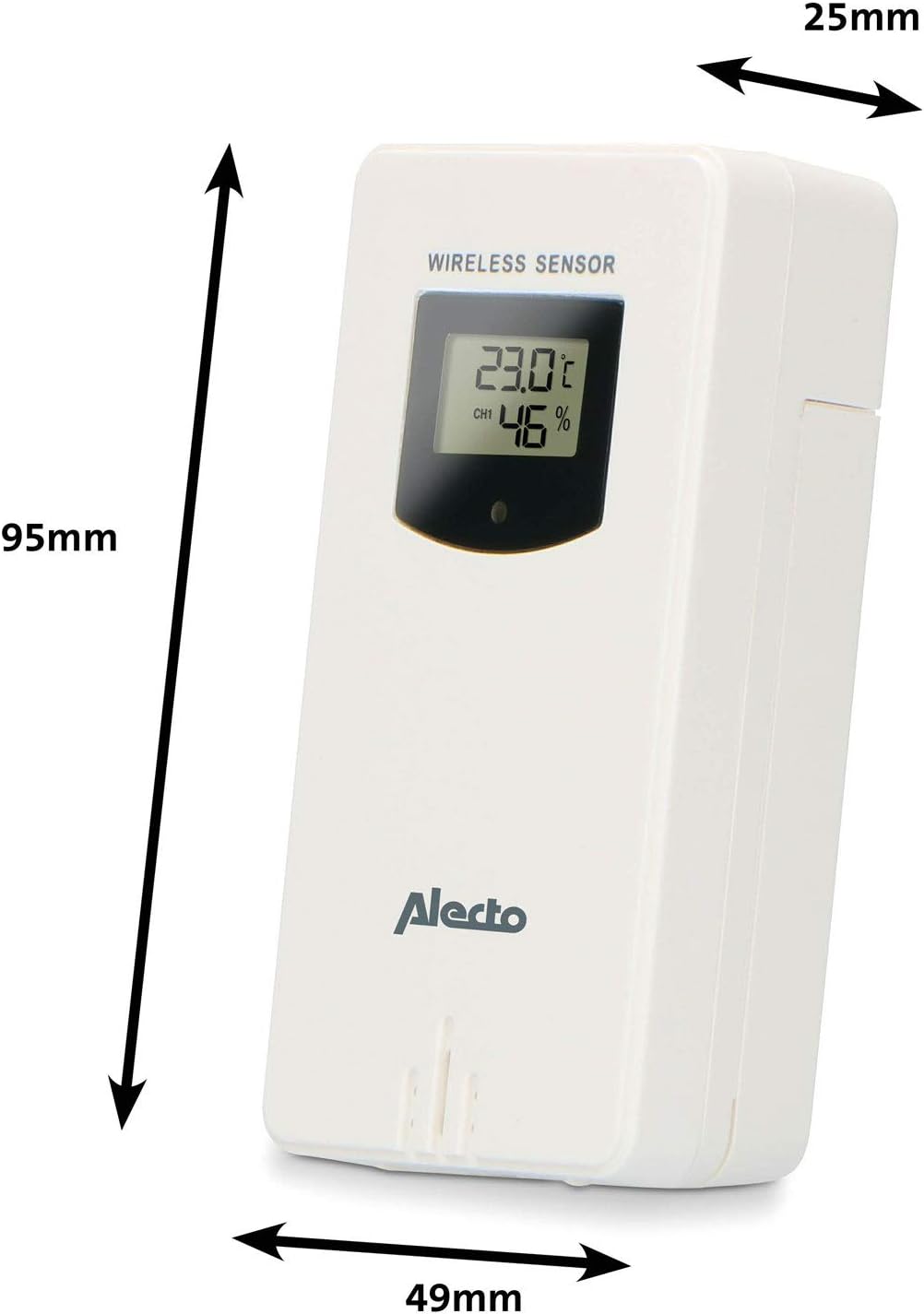
Figure 3.1: Wireless Outdoor Sensor dimensions and battery compartment location.
- Glavna enota:
- Odprite predal za baterije na zadnji strani glavne enote.
- Insert 2x AA batteries (not included) according to the polarity markings (+/-). These serve as backup batteries.
- Varno zaprite predal za baterije.
- Connect the main unit to a power outlet using the provided power adapter (if included).

Figure 3.2: Main Unit dimensions and power input.
3.2. Postavitev senzorja
For accurate outdoor readings, proper placement of the wireless sensor is crucial:
- Place the sensor in a shaded area, away from direct sunlight, to prevent inaccurate temperature readings.
- Ensure good air circulation around the sensor.
- Mount the sensor vertically, approximately 1.5 to 2.5 meters (5 to 8 feet) above the ground.
- Avoid placing the sensor near heat sources (e.g., vents, windows) or moisture sources.
- The maximum transmission range is 100 meters (328 feet) in open air. Walls and other obstacles will reduce this range.

Slika 3.3: Nprample of outdoor sensor placement on a wall.
3.3. Združevanje senzorja z glavno enoto
The main unit and sensor should automatically pair once both are powered on. If pairing does not occur:
- Ensure both units have fresh batteries and are within range.
- Press the "TX" button inside the outdoor sensor's battery compartment to manually send a signal.
- On the main unit, you may need to initiate a search for the outdoor sensor (refer to the "Operation" section for specific button functions).
4. Delovanje
4.1. Prikaz postavitve
The 5.7-inch color display provides a clear overview of all measured data. Key areas include:
- Zunanja temperatura in vlažnost: Displays current outdoor conditions.
- Notranja temperatura in vlažnost: Prikazuje trenutne notranje razmere.
- Animirana vremenska napoved: Icons predict upcoming weather (sunny, partly cloudy, cloudy, rainy, snowy).
- Čas in datum: Current time, day, and date.
- Barometrični tlak: Trenutni atmosferski tlak.
- Lunina faza: Grafični prikaz trenutne lunine mene.
- Temperature/Ice Alarm Indicators: Alerts for specific temperature thresholds or potential ice conditions.

Slika 4.1: Podrobno view of the main unit's color display.
4.2. Funkcije gumbov
The main unit features several buttons for setting and adjusting functions. Common buttons include:
- NASTAVITEV: Enters setup mode for time, date, and other settings.
- NAVODILA: Switches between display modes or confirms settings.
- UP/DOWN (or +/-): Adjusts values during setup or cycles through channels.
- ALARM: Nastavi ali aktivira funkcijo alarma.
- MEM: Displays maximum/minimum temperature and humidity records. Long press to clear records.
- SNOOZE/LUČ: Activates snooze during an alarm or adjusts backlight brightness.
Video 4.2: Illustrative video demonstrating various features and settings of a weather station. (Note: This video is for a related product and may not show the exact Alecto WS-1560 model.)
4.3. Nastavitev časa in datuma
- Press and hold the "SET" button until the time display starts flashing.
- Use the "UP" or "DOWN" buttons to adjust the hour, then press "SET" to confirm and move to minutes.
- Ponovite za minute, leto, mesec in dan.
- Press "SET" again to exit the setting mode.
4.4. Nastavitve alarma
- Press the "ALARM" button once to view čas alarma.
- Press and hold the "ALARM" button until the alarm time starts flashing.
- Use the "UP" or "DOWN" buttons to set the desired alarm hour and minute.
- Za potrditev pritisnite "ALARM".
- To activate/deactivate the alarm, press the "ALARM" button briefly when the alarm time is displayed. An alarm icon will appear/disappear.
4.5. Max/Min Records
The weather station automatically records the maximum and minimum temperature and humidity values over a 24-hour period.
- Press the "MEM" button briefly to view najvišje zabeležene vrednosti.
- Ponovno pritisnite "MEM", da view najnižje zabeležene vrednosti.
- Za vrnitev na trenutne odčitke pritisnite "MEM" tretjič.
- To clear the records, press and hold the "MEM" button for a few seconds.
5. Vzdrževanje
- Čiščenje: Površine zaslona in enote obrišite z mehko,amp krpo. Ne uporabljajte abrazivnih čistil ali topil.
- Zamenjava baterije: Ko se na zaslonu prikaže indikator nizke napolnjenosti baterije, zamenjajte baterije v glavni enoti in zunanjem senzorju. Vedno zamenjajte vse baterije hkrati z novimi iste vrste.
- Skrb za senzor: Periodically check the outdoor sensor for debris or obstructions that might affect its readings. Ensure it remains in a shaded, well-ventilated area.
6. Odpravljanje težav
| Težava | Možen vzrok | rešitev |
|---|---|---|
| No outdoor temperature/humidity reading (or "---" displayed) |
|
|
| Netočne meritve temperature/vlažnosti |
|
|
| Zaslon je zatemnjen ali prazen |
|
|
7. Specifikacije
| Številka modela | WS-1560 |
| Znamka | Alecto |
| Vir napajanja (glavna enota) | Power Adapter (if included) + 2x AA batteries (backup) |
| Vir napajanja (zunanji senzor) | 2x AA baterije |
| Dimenzije izdelka (glavna enota) | 5.1 x 16.5 x 12.3 cm |
| Teža izdelka | 440 g |
| Doseg brezžičnega senzorja | Do 100 metrov (na prostem) |
| Velikost zaslona | 5.7 palcev / 14.5 cm |
| Izvor | Kitajska |
8. Garancija in podpora
For warranty information, technical support, or service inquiries, please refer to the warranty card included with your product or visit the official Alecto webspletno mesto. Shranite račun kot dokazilo o nakupu.
Alecto Webspletno mesto: www.alecto.nl (General Alecto website, specific support page may vary)