
1. Izdelek je končanview
The ProCase Wireless Keyboard (Model PC-08362168) is a compact and portable Bluetooth keyboard designed for multi-device compatibility. It offers a comfortable typing experience with low-profile, quiet keys and an ergonomic design, suitable for use with iOS, Android, and Windows operating systems.

Image: The ProCase Wireless Keyboard, a slim black keyboard with a standard QWERTY layout, designed for portability and multi-device use.
2. Vsebina paketa
- ProCase Wireless Keyboard (Model PC-08362168)
- Uporabniški priročnik (ta dokument)
Opomba: Za delovanje so potrebne 2 baterije AAA, ki niso priložene.
3. Navodila za namestitev
3.1. Namestitev baterije
- Poiščite predal za baterije na zadnji strani tipkovnice.
- Odprite pokrov prostora za baterije.
- Vstavite dve (2) bateriji AAA in pazite na pravilno polarnost (+/-).
- Trdno zaprite pokrov prostora za baterije.

Image: Underside of the keyboard showing the ON/OFF switch, Connect button, and the battery compartment for two AAA batteries.
3.2. Vklop/izklop
Slide the ON/OFF switch, located on the back of the keyboard, to the "ON" position to power on the device. Slide it to "OFF" when not in use to conserve battery life.
3.3. Bluetooth seznanjanje
- Prepričajte se, da je tipkovnica vklopljena.
- Press the "Connect" button on the back of the keyboard. The Bluetooth indicator light (usually blue) on the keyboard will start blinking, indicating it is in pairing mode.
- V napravi (tablici, pametnem telefonu, računalniku) se pomaknite do nastavitev Bluetooth.
- Omogočite Bluetooth in poiščite razpoložljive naprave.
- Select "ProCase Keyboard" (or similar name) from the list of found devices.
- Follow any on-screen prompts to complete the pairing process. A successful connection will be indicated by the Bluetooth light on the keyboard turning solid or turning off, depending on the model.

Image: Diagram illustrating wide compatibility with Android, Windows, and iOS devices, including iPads, Android tablets, Microsoft Surface, and smartphones. It also notes that a USB drive is not included and only Bluetooth connection is supported.
4. Navodila za uporabo
4.1. Osnovno tipkanje
The keyboard features a standard QWERTY layout. Simply begin typing after successful pairing with your device.
4.2. Function Keys (F1-F12) and Hot Keys
The top row of keys serves dual functions: standard F-keys (F1-F12) and special hot keys for media control, volume, and other system functions. To use the F-keys (F1, F2, etc.), you must hold down the Fn key simultaneously with the desired F-key. Pressing the key without holding Fn will activate its associated hot key function.
- Fn + F1: Domov
- Fn + F2: Iskanje
- Fn + F3: Select All
- Fn + F4: Kopiraj
- Fn + F5: Prilepi
- Fn + F6: Cut
- Fn + F7: Prejšnja skladba
- Fn + F8: Predvajaj/Premor
- Fn + F9: Naslednja skladba
- Fn + F10: Nemo
- Fn + F11: Znižaj glasnost
- Fn + F12: Povečaj glasnost

Slika: Bližnji posnetek view of a keyboard key, illustrating the scissor-cross mechanism for comfortable and responsive keystrokes.

Image: A person typing on the ProCase Wireless Keyboard, positioned next to a tablet, highlighting the comfortable and quiet typing experience.
5. Vzdrževanje
5.1. Čiščenje
To clean the keyboard, gently wipe the surface with a soft, dry, lint-free cloth. For stubborn dirt, slightly dampen the cloth with water or a mild cleaning solution. Avoid excessive moisture and do not spray cleaners directly onto the keyboard.
5.2. Shranjevanje
When not in use for extended periods, power off the keyboard to conserve battery life. Store it in a cool, dry place away from direct sunlight and extreme temperatures.
6. Odpravljanje težav
- Tipkovnica se ne poveže:
- Prepričajte se, da je tipkovnica vklopljena in da ima nove baterije.
- Press the "Connect" button on the back of the keyboard to enter pairing mode.
- Verify Bluetooth is enabled on your device and try re-pairing.
- Premaknite tipkovnico bližje napravi.
- Restart both the keyboard (power off/on) and your device.
- Tipke se ne odzivajo:
- Preverite nivo baterije in jo po potrebi zamenjajte.
- Prepričajte se, da je tipkovnica pravilno povezana prek Bluetootha.
- Očistite morebitne umazanije okoli tipk.
- Function (F) keys not working as expected:
- Remember that to activate F1-F12 functions, you must hold down the Fn key simultaneously. Without holding Fn, the keys will activate their assigned hot key functions (e.g., media control). This behavior cannot be changed.
- Kratka življenjska doba baterije:
- Prepričajte se, da je tipkovnica izklopljena, ko je ne uporabljate.
- The keyboard features a sleep mode to conserve power during inactivity.
- Uporabljajte visokokakovostne AAA baterije.
7. Specifikacije
| Funkcija | Podrobnost |
|---|---|
| Številka modela | PC 08362168 |
| Dimenzije (D x Š x V) | 11.5 x 4.7 x 0.29 palcev (29.2 x 11.9 x 0.74 cm) |
| Teža | 10 unče (283.5 gramov) |
| Povezljivost | Brezžični Bluetooth |
| Vir napajanja | 2 x AAA baterije (niso vključene) |
| Material | Akrilonitril butadien stiren (ABS) |
| barva | Črna |
| Združljivi operacijski sistemi | iOS, Android, Windows (Note: Does not support Windows 8 Mobile) |
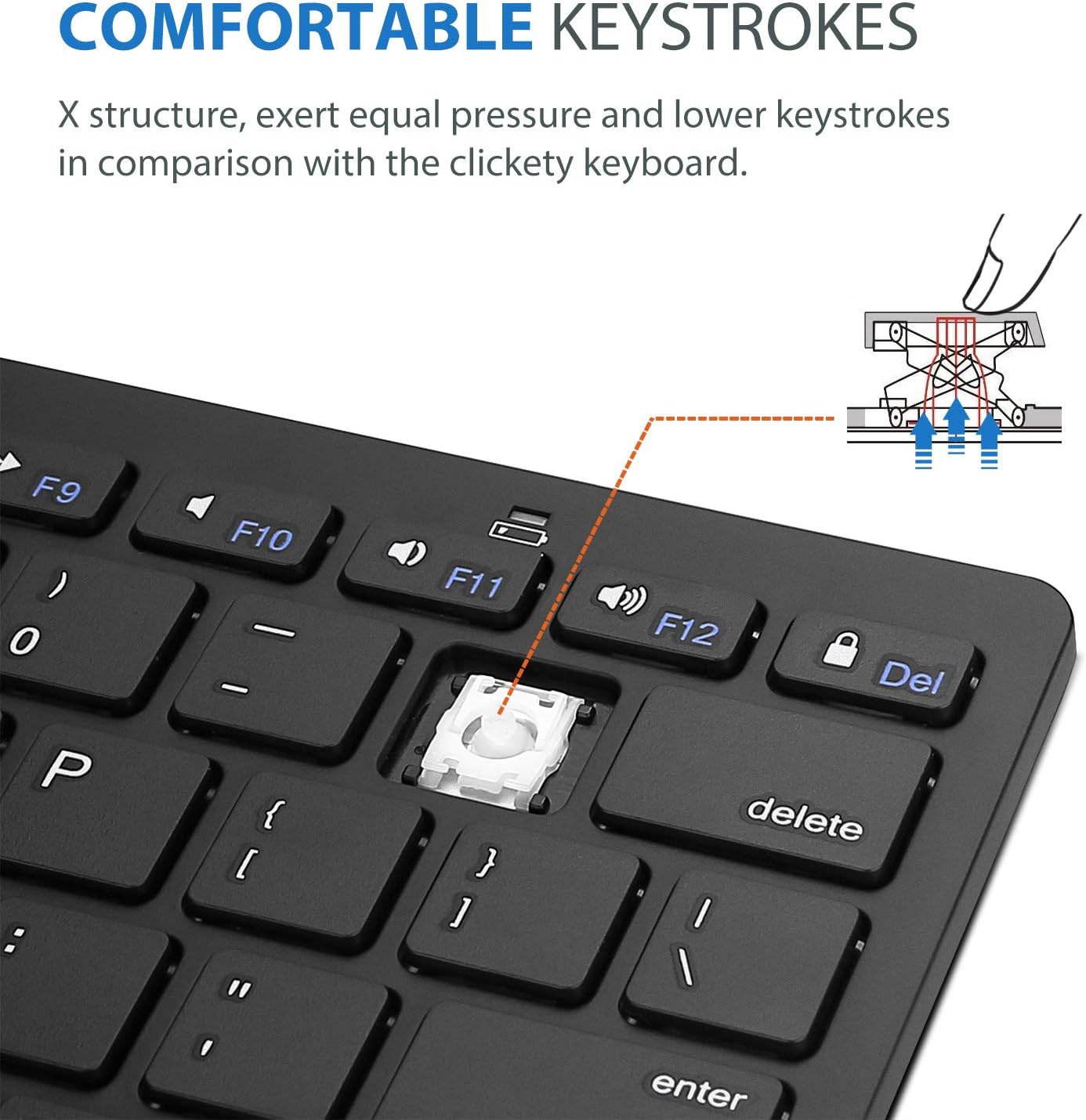
Image: Diagram showing the ultra-slim design and dimensions of the ProCase Wireless Keyboard, measuring 11.2 inches in length, 4.7 inches in width, and 0.19 inches in thickness.
8. Garancija in podpora
8.1. Informacije o garanciji
ProCase products are designed for reliability and performance. For specific warranty details regarding your ProCase Wireless Keyboard, please refer to the warranty card included with your purchase or visit the official ProCase webspletnega mesta. Shranite dokazilo o nakupu za uveljavljanje garancije.
8.2. Podpora strankam
If you encounter any issues or have questions not covered in this manual, please contact ProCase customer support. You can find contact information on the official ProCase webspletnega mesta ali prek vaše nakupovalne platforme.
Za več informacij obiščite ProCase Store on Amazon.
