
1. Uvod
Thank you for choosing the Arcam SA10 Class A/B Integrated Amplifier. This manual provides essential information for setting up, operating, and maintaining your amplifier to ensure years of high-quality audio enjoyment. The SA10 is designed to deliver class-leading sound quality, bringing your music to life with its powerful 50W per channel output, high-performance ESS9016K2M Sabre DAC, and low noise floor. It offers a listening experience as close to the artist's original performance as possible.
2. Varnostne informacije
Pred uporabo enote natančno preberite vsa varnostna navodila. Ta priročnik shranite za poznejšo uporabo.
- Naprave ne izpostavljajte dežju ali vlagi.
- Ne blokirajte prezračevalnih odprtin. Namestite v skladu z navodili proizvajalca.
- Ne nameščajte v bližini virov toplote, kot so radiatorji, grelniki, peči ali druge naprave (vključno z amplifiers), ki proizvajajo toploto.
- Zaščitite napajalni kabel, da se po njem ne pohodi ali stisne, zlasti pri vtičih, vtičnicah in na mestu, kjer izstopa iz naprave.
- Uporabljajte samo priključke/dodatke, ki jih je določil proizvajalec.
- Izklopite napravo med nevihtami ali ko je dlje časa ne uporabljate.
- Vsa servisna dela prepustite usposobljenemu servisnemu osebju. Servis je potreben, če je naprava kakor koli poškodovana.
- Ta izdelek vsebuje kemikalije, za katere zvezna država Kalifornija ve, da povzročajo raka in prirojene okvare ali druge reproduktivne poškodbe.
3. Vsebina paketa
Upon opening the box, please ensure all the following items are present:
- Integrirani Arcam SA10 Amplifier
- AC napajalni kabel
- Daljinski upravljalnik (z 2 baterijama AAA priloženima)
- Uporabniški priročnik (ta dokument)
4. Izdelek je končanview
Familiarize yourself with the front and rear panels of your Arcam SA10 amplifier.
4.1 Sprednja plošča
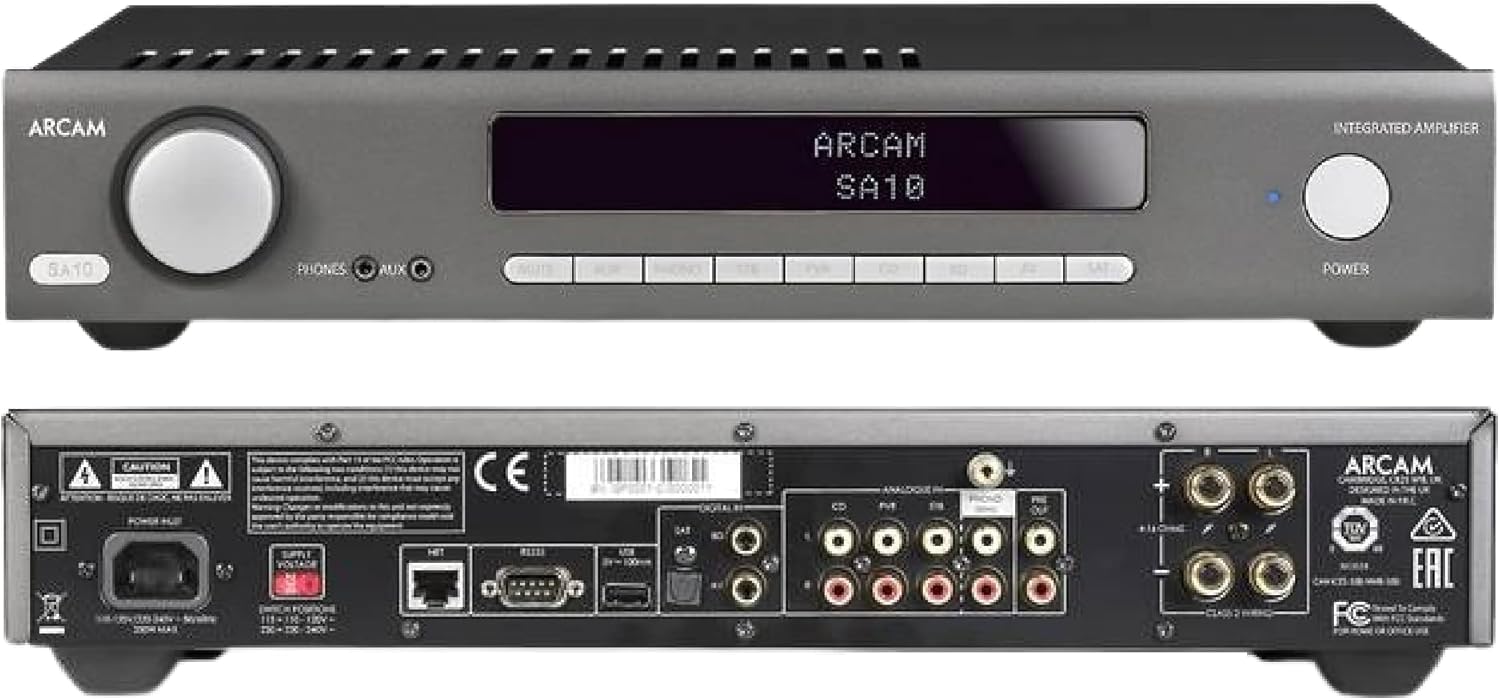
Figure 4.1: Front and Rear Panels of the Arcam SA10. The front panel features a large volume knob on the left, a display screen in the center, input selection buttons below the display, and a power button on the right. Headphone and auxiliary inputs are also present.
- Gumb za glasnost: Prilagodi skupno izhodno glasnost.
- Zaslon: Prikazuje trenutni vhod, raven glasnosti in druge informacije o stanju.
- Gumbi za izbiro vnosa: Allows selection between various audio sources (CD, Tuner, AV, SAT, etc.).
- Gumb za vklop: Preklopi amplifier between standby and operational modes.
- Izhod za slušalke: 3.5 mm priključek za priklop slušalk.
- Pomožni vhod: 3.5mm jack for connecting portable audio devices.
4.2 Zadnja plošča
The rear panel provides all the necessary connections for your audio system.
Figure 4.2: Detailed Rear Panel Connections. This view highlights the speaker terminals, analog RCA inputs (including Phono), digital optical and coaxial inputs, and the power inlet.
- Zvočniški terminali: Connect your passive speakers (left and right channels).
- Analog Inputs (RCA): Multiple stereo RCA inputs for connecting analog audio sources like CD players, tuners, or other line-level devices.
- Phono Input (RCA): Dedicated input for turntables with moving magnet (MM) cartridges.
- Digitalni vhodi:
- Optični (Toslink): For digital audio sources like TVs or game consoles.
- koaksialni: For digital audio sources like CD players or network streamers.
- Predizhod: Za priklop na zunanji vir napajanja amplifier ali globokotonski zvočnik.
- Vrata USB: For firmware updates or service.
- Ethernet vrata: For network control and future updates.
- AC napajalni vhod: Povezuje amplifier na omrežno napajanje.
5. Nastavitev
5.1 Namestitev
Place the Arcam SA10 on a stable, level surface away from direct sunlight, heat sources, and excessive moisture. Ensure adequate ventilation around the unit to prevent overheating. Do not place other components directly on top of the amplifier.
5.2 Priključitev zvočnikov
Connect your passive speakers to the speaker terminals on the rear panel. Ensure correct polarity (+ to + and - to -) for both left and right channels. Use high-quality speaker cables for optimal sound performance.
5.3 Priklop avdio virov

Figure 5.3: The Arcam SA10 offers convenient connections including Toslink optical, two digital coaxial inputs, and three stereo analog RCA inputs, plus a dedicated phono input.
- Analogni viri: Connect CD players, tuners, or other line-level devices to the RCA analog inputs (CD, Tuner, AV, SAT).
- Gramofon: Connect a turntable with a moving magnet (MM) cartridge to the dedicated PHONO input.
- Digitalni viri: Connect digital audio sources using either the optical (Toslink) or coaxial digital inputs.
- Portable Devices: Use the 3.5mm AUX input on the front panel for quick connection of portable media players.
5.4 Napajalni priključek
Once all audio connections are made, connect the supplied AC power cord to the AC power inlet on the rear panel of the amplifier and then to a suitable wall outlet.
6. Navodila za uporabo
6.1 Vklop/izklop
Pritisnite MOČ button on the front panel or the remote control to switch the amplifier on or into standby mode. The blue LED next to the power button indicates operational status.
6.2 Izbira vnosa
Use the input selection buttons on the front panel or the remote control to choose your desired audio source. The selected input will be displayed on the front panel screen.
6.3 Nadzor glasnosti
Zavrtite veliko GLASNOST knob on the front panel clockwise to increase volume and counter-clockwise to decrease it. Alternatively, use the volume up/down buttons on the remote control.
6.4 Uporaba slušalk
Plug your headphones into the 3.5mm TELEFONI jack on the front panel. Connecting headphones will automatically mute the main speaker outputs.
6.5 Remote Control & App Control

Figure 6.5: Control your SA10 with the included remote or via UPnP audio and basic functions using the FREE MusicLife App on your iPad, iPhone, or Android device.
The included remote control provides full functionality for the SA10. Ensure the supplied AAA batteries are correctly inserted. For advanced control and UPnP audio streaming, download the free Arcam MusicLife App from your device's app store (available for iOS and Android).
7. Vzdrževanje
To maintain the appearance and performance of your Arcam SA10:
- Zunanje površine obrišite z mehko, suho krpo, ki ne pušča vlaken.
- Ne uporabljajte abrazivnih čistil, voskov ali topil.
- Prepričajte se, da so prezračevalne rešetke brez prahu in ovir.
- Disconnect the power cord from the wall outlet before cleaning.
8. Odpravljanje težav
If you experience issues with your Arcam SA10, refer to the following common problems and solutions:
| Težava | Možen vzrok | rešitev |
|---|---|---|
| Brez moči | Napajalni kabel ni priključen; vtičnica je okvarjena. | Prepričajte se, da je napajalni kabel varno priključen. Poskusite z drugo vtičnico. |
| Brez zvoka | Izbran napačen vhod; kabli zvočnikov ohlapni; glasnost prenizka; vklopljen je bil izklop zvoka. | Select correct input. Check speaker cable connections. Increase volume. Deactivate mute. |
| Popačen zvok | Source signal too high; speaker impedance mismatch; faulty cables. | Reduce source output level. Ensure speakers are compatible (8 ohms recommended). Check/replace cables. |
| Daljinski upravljalnik ne deluje | Batteries depleted or incorrectly inserted; obstruction between remote and amplifier. | Zamenjajte baterije. Pazite na pravilno polarnost. Odstranite ovire. |
If the problem persists, please contact Arcam customer support or your authorized dealer.
9. Specifikacije
Key technical specifications for the Arcam SA10 Integrated Ampdvigalo:

Figure 9.1: The Arcam SA10 delivers 50 watts per channel, features 5 analog inputs (including phono), 3 digital inputs, a 32-bit DAC, and boasts a low total harmonic distortion + noise of 0.003%.
- Izhodna moč: 50W per channel (8 ohms, 20-20,000 Hz, at 0.5% THD)
- Ampvrsta lifikacije: Razred A/B
- Digital-to-Analog Converter (DAC): 32-bit ESS9016K2M Sabre DAC
- Analogni vhodi: 5 (including 1 dedicated Phono input for Moving Magnet cartridges)
- Digitalni vhodi: 3 (1 Optical Toslink, 2 Coaxial)
- Skupno harmonično popačenje + šum: 0.003 %
- Dimenzije (Š x G x V): 17.05 x 12.72 x 3.43 palca (433 x 323 x 87 mm)
- Teža: 2.03 funtov (0.92 kg)
- Nadzor: Full I/P control, Remote Control, MusicLife App compatibility
- Baterije za daljinski upravljalnik: 2 AAA (vključeno)
10. Garancija in podpora
Arcam products are designed and manufactured to the highest standards. For information regarding warranty coverage, technical support, or service, please refer to the warranty card included with your product or visit the official Arcam webspletnega mesta. Shranite dokazilo o nakupu za uveljavljanje garancije.


