
1. Uvod
Hvala za nakupasing the Media Tech MT-3333 3-in-1 Home Theater System. This manual provides essential information for the safe and efficient operation of your new audio system. Please read it thoroughly before use and retain it for future reference.
Vsebina paketa:
- 1 x Media Tech MT-3333 Subwoofer Unit
- 3 x satelitska zvočnika
- 1 x daljinski upravljalnik
- 1 x Audio/Video Cable
- 1 x uporabniški priročnik
- 1 x optični kabel

Slika 1.1: Spredaj view of the Media Tech MT-3333 Home Theater System, showing the central subwoofer unit and two tall satellite speakers, along with a smaller center speaker.
2. Varnostna navodila
Za zagotovitev varnega delovanja in preprečevanje poškodb upoštevajte naslednje varnostne ukrepe:
- vir energije: Connect the system only to a power outlet with the specified voltage (AC220-240V 50Hz).
- Prezračevanje: Ensure adequate ventilation around the subwoofer and speakers. Do not block any ventilation openings.
- Voda in vlaga: Do not expose the system to rain, moisture, or dripping/splashing liquids. Do not place objects filled with liquids, such as vases, on the apparatus.
- Viri toplote: Keep the system away from heat sources such as radiators, heat registers, stoves, or other apparatus (including amplifiers), ki proizvajajo toploto.
- Umestitev: Place the system on a stable, flat surface. Avoid placing it in direct sunlight or in areas with excessive dust or vibrations.
- Čiščenje: Unplug the system from the power outlet before cleaning. Use a dry cloth only.
- Servisiranje: Tega izdelka ne poskušajte servisirati sami. Vsa servisna dela prepustite usposobljenemu servisnemu osebju.
- otroci: Keep packaging materials and small parts out of reach of children.
3. Nastavitev
Follow these steps to set up your home theater system:
3.1 Razpakiranje
- Previdno odstranite vse komponente iz embalaže.
- Check that all items listed in the "Package Contents" section are present.
- Embalažo shranite za kasnejši transport ali shranjevanje.
3.2 Povezave zvočnikov
Connect the satellite speakers to the corresponding output ports on the rear of the subwoofer unit. Ensure correct polarity (positive to positive, negative to negative) for optimal sound quality.
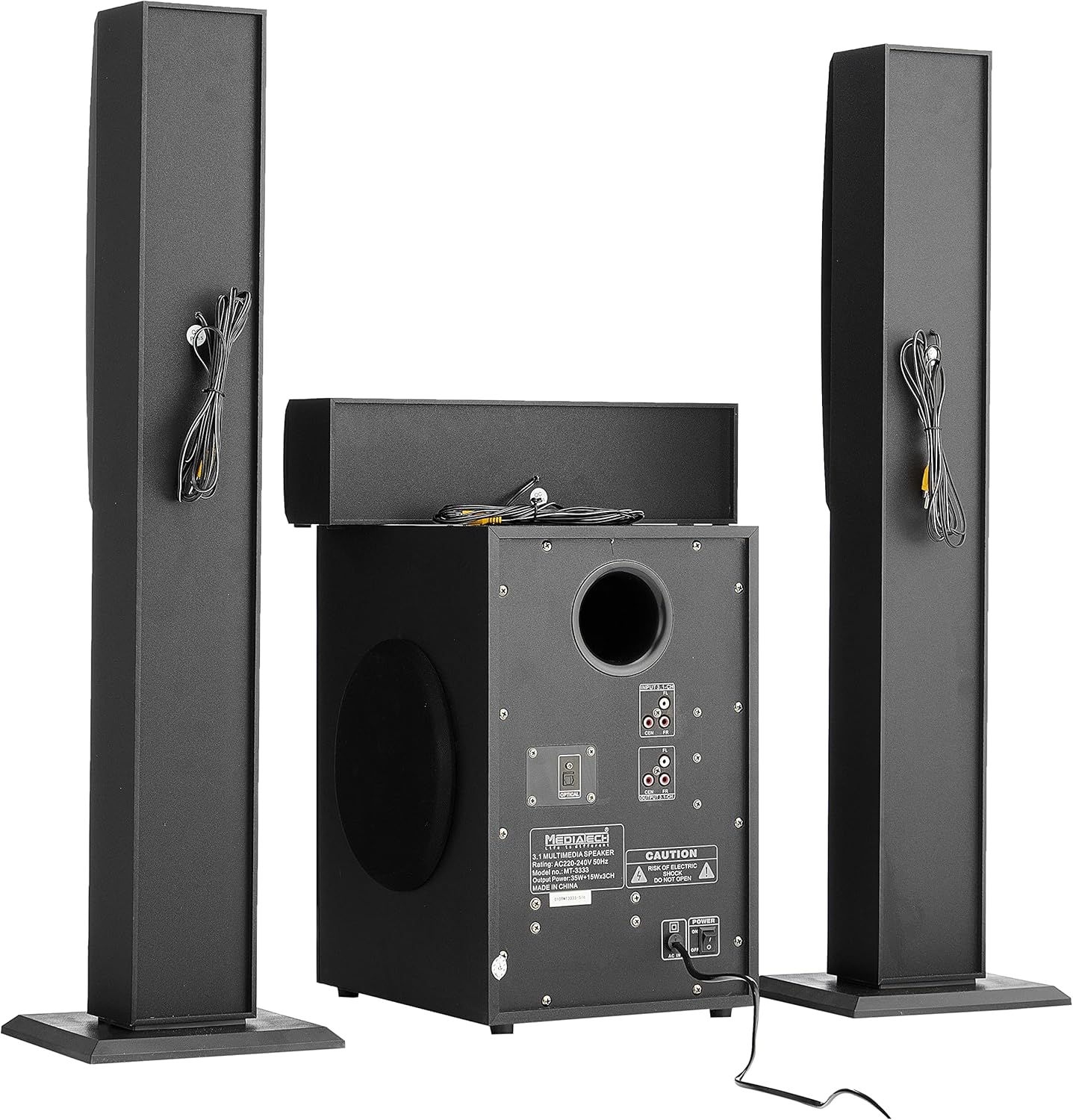
Slika 3.1: Zadaj view of the system, illustrating the subwoofer and satellite speakers connected via cables.
3.3 Povezave z viri zvoka
The MT-3333 offers multiple input options. Choose the appropriate connection for your audio source:
- Optični vhod: For high-quality digital audio from TVs, game consoles, or Blu-ray players. Connect an optical cable from your source to the OPTICAL port on the subwoofer.
- AUX (MP3) Input: For connecting devices with a 3.5mm audio output (e.g., smartphones, tablets, laptops). Use the provided audio cable to connect to the MP3/AUX port.
- Vhod USB: Vstavite bliskovni pogon USB z zvokom files v vrata USB.
- Vnos kartice SD: Vstavite pomnilniško kartico SD z zvočnimi posnetki files v režo za kartico SD.
- Bluetooth: For wireless audio streaming from Bluetooth-enabled devices. (Refer to Section 4.3 for pairing instructions).

Slika 3.2: Podrobno view of the subwoofer's rear panel, highlighting the various input and output connections, including the Optical port and 3.1-channel audio inputs/outputs.
3.4 Napajalni priključek
- Zagotovite, da so vse zvočne povezave varne.
- Connect the power cord to the AC IN port on the rear of the subwoofer.
- Plug the two-pin power plug into a suitable wall outlet.
4. Navodila za uporabo
4.1 Vklop/izklop
Locate the power switch on the rear panel of the subwoofer. Flip it to the "ON" position to power on the system. Flip it to "OFF" to power off. You can also use the power button on the remote control or the front panel of the subwoofer.
4.2 Izbira vnosa
Press the "MODE" button on the remote control or the front panel to cycle through available input sources: Bluetooth, USB, SD, AUX, and Optical.
4.3 Bluetooth seznanjanje
- Switch the system to Bluetooth mode using the "MODE" button. The display will indicate "BT".
- Omogočite Bluetooth na mobilni napravi ali računalniku.
- Iskanje available devices and select "MT-3333" from the list.
- Ko sta seznanjena, lahko zvok brezžično pretakate v sistem.
4.4 Nadzor glasnosti, nizkih in visokih tonov
- obseg: Use the "VOL+" and "VOL-" buttons on the remote or the main volume knob on the subwoofer to adjust the overall volume.
- Bas: Use the "BASS+" and "BASS-" buttons on the remote to adjust the bass level.
- Visoki toni: Use the "TRE+" and "TRE-" buttons on the remote to adjust the treble level.
4.5 Funkcije daljinskega upravljalnika
The remote control provides full functionality for your MT-3333 system:

Figure 4.1: The remote control for the Media Tech MT-3333, showing buttons for power, input selection (USB, SD, BT, AUX, OPTICAL), volume, bass, treble, equalizer presets (EQ1-EQ4), and media playback controls.
- Gumb za vklop (rdeč): Vklopi ali izklopi sistem.
- Input Selection (USB, SD, BT, AUX, DIS, LED): Selects the desired audio source. 'DIS' might refer to display or another input. 'LED' controls lighting.
- Volume Control (VOL+, VOL-): Prilagodi glavno glasnost.
- Bass Control (BASS+, BASS-): Adjusts the bass output.
- Treble Control (TRE+, TRE-): Adjusts the treble output.
- EQ (EQ1-EQ4): Selects preset equalizer modes.
- Media Playback Controls (Play/Pause, Next, Previous, Repeat): For USB/SD card playback.
- Mute: Utiša zvočni izhod.
- Numerična tipkovnica (0-9): Za neposredno izbiro skladbe na USB/SD.
- Lighting Control (LED): Activates or adjusts any integrated lighting features.
5. Vzdrževanje
Pravilno vzdrževanje zagotavlja dolgo življenjsko dobo in optimalno delovanje vašega domačega kina.
5.1 Čiščenje
- Pred čiščenjem vedno izključite sistem iz električne vtičnice.
- Use a soft, dry cloth to wipe the surfaces of the subwoofer and speakers.
- Ne uporabljajte tekočih čistil, aerosolov ali abrazivnih čistil, saj lahko poškodujejo površino ali notranje komponente.
- Use a soft brush or compressed air to gently clean dust from speaker grilles and ventilation openings.
5.2 Shranjevanje
Če nameravate sistem shraniti dlje časa:
- Odklopite vse kable in napajalne kable.
- Sistem shranjujte na hladnem in suhem mestu, stran od neposredne sončne svetlobe in ekstremnih temperatur.
- If possible, use the original packaging to protect the components from dust and physical damage.
6. Odpravljanje težav
If you encounter any issues with your Media Tech MT-3333, refer to the following table for common problems and solutions.
| Težava | Možen vzrok | rešitev |
|---|---|---|
| Brez moči | Power cord not connected; Power switch off; Wall outlet faulty | Ensure power cord is securely plugged in; Turn power switch ON; Test wall outlet with another device. |
| Brez zvoka | Izbran napačen vhod; Glasnost je prenizka; Kabli zvočnikov so ohlapni; Funkcija utišanja je aktivna | Press MODE to select correct input; Increase volume; Check speaker connections; Press MUTE on remote. |
| Slaba kakovost zvoka | Loose connections; Source audio quality low; Incorrect EQ setting | Check all cable connections; Try a different audio source; Adjust BASS/TREBLE or EQ settings. |
| Daljinski upravljalnik ne deluje | Batteries depleted; Obstruction between remote and system; Remote not pointed correctly | Replace remote control batteries; Remove any obstructions; Point remote directly at the subwoofer's sensor. |
| Bluetooth povezovanje ni uspelo | Sistem ni v načinu BT; Naprava je predaleč; Motnje | Prepričajte se, da je sistem v načinu BT; premaknite napravo bližje; izklopite druge naprave Bluetooth v bližini. |
Če težava po poskusu teh rešitev še vedno obstaja, se obrnite na podporo strankam.
7. Specifikacije
| Funkcija | Specifikacija |
|---|---|
| Številka modela | MT-3333 |
| Izhodna moč | Subwoofer: 35W, Satellite Speakers: 3 x 15W (Total 80W) |
| Velikost zvočniške enote | Subwoofer: 6.5 inches, Satellite Speakers: 3 x 3 inches |
| Material | Wood and ABS Plastic |
| Vložki | USB, AUX (MP3), SD Card, Bluetooth, Optical |
| Napajalnik | AC220-240V 50Hz |
| Approx. Shipping Dimensions | 76 x 26 x 21 cm |
| Pribl. Teža pošiljke | 3.1 kg |
8. Garancija in podpora
Media Tech products are designed for reliability and performance. This product comes with a standard manufacturer's warranty against defects in materials and workmanship under normal use.
For warranty claims, technical support, or service inquiries, please refer to the contact information provided on your purchase receipt or visit the official Media Tech webmesto.
Upoštevajte: The warranty may not cover damage caused by improper installation, accident, misuse, abuse, negligence, or unauthorized modification.