
Uvod
This manual provides essential instructions for the proper use, setup, and maintenance of your BYTECH Lightning Cable (Model: CLMFCBLASST). This cable is designed for charging and data transfer with compatible Apple iOS devices, including iPhones, iPads, and iPods, as well as connecting to laptops and personal computers.
Konec izdelkaview
The BYTECH Lightning Cable is a durable accessory for your Apple devices. It features a Lightning connector on one end and a USB-A connector on the other, facilitating both power delivery for charging and data exchange. The cable supports fast charging capabilities for compatible devices.
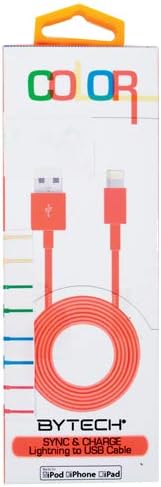
This image displays the retail packaging for the BYTECH Lightning to USB Cable. The packaging is white with 'COLOR' printed at the top in multi-colored letters. An orange Lightning to USB cable is visible through a clear window, coiled neatly. The bottom of the package indicates 'BYTECH SYNC & CHARGE Lightning to USB Cable' and compatibility with iPod, iPhone, and iPad.
Sestavine:
- Priključek za strelo: Connects to your Apple iOS device (iPhone, iPad, iPod).
- Priključek USB-A: Connects to a USB power adapter, computer USB port, or other USB charging source.
- Kabel: The flexible cord connecting the two connectors, designed for durability and efficient power/data transfer.
Nastavitev
To begin using your BYTECH Lightning Cable, follow these steps:
- Identificirajte konektorje: Locate the Lightning connector (smaller, 8-pin) and the USB-A connector (larger, rectangular).
- Priključitev na vir napajanja ali računalnik:
- For charging, insert the USB-A connector into a compatible USB wall adapter or car charger.
- For charging and data transfer, insert the USB-A connector into an available USB port on your laptop or personal computer.
- Povežite se z napravo iOS: Insert the Lightning connector into the charging port of your iPhone, iPad, or iPod. Ensure it is fully seated.
- Preverite povezavo: Your device should indicate that it is charging or connected to a computer.
Navodila za uporabo
Polnjenje naprave:
Once connected as described in the "Setup" section, your iOS device will begin charging automatically. The cable supports fast charging when paired with a compatible power adapter and device.
Prenos podatkov:
When connected to a computer, the cable enables data transfer between your iOS device and the computer. This allows for syncing media, documents, and other filez uporabo iTunes ali Finderja (macOS Catalina in novejši).
- Connect your iOS device to your computer using the BYTECH Lightning Cable.
- Unlock your iOS device and respond to any "Trust This Computer?" prompts by tapping "Trust" and entering your passcode if required.
- Open iTunes (Windows/older macOS) or Finder (macOS Catalina and later) on your computer.
- Select your device within the application to manage and transfer data.
Vzdrževanje
Proper care extends the life of your cable:
- Shranjevanje: When not in use, coil the cable loosely. Avoid tight coiling or sharp bends, especially near the connectors, as this can damage the internal wires.
- Čiščenje: Use a soft, dry cloth to gently wipe the cable and connectors. Do not use liquid cleaners or abrasive materials.
- Ravnanje: Always grasp the connector head when plugging or unplugging the cable. Avoid pulling directly on the cable itself.
- Okolje: Kabel hranite stran od ekstremnih temperatur, neposredne sončne svetlobe in vlage.
Odpravljanje težav
If you encounter issues with your BYTECH Lightning Cable, consider the following:
- Naprava se ne polni:
- Prepričajte se, da sta oba konca kabla varno povezana.
- Poskusite z drugim napajalnikom USB ali vrati USB računalnika.
- Check the charging port on your iOS device for debris or lint.
- Test the cable with a different compatible iOS device, if available.
- Težave s prenosom podatkov:
- Ensure your iOS device is unlocked and you have tapped "Trust This Computer" when prompted.
- Restart both your iOS device and your computer.
- Update iTunes or Finder to the latest version.
- Poskusite druga vrata USB na vašem računalniku.
- Poškodba kabla: Inspect the cable for any visible signs of damage, such as fraying, cuts, or bent connectors. Discontinue use if damage is found.
Specifikacije
| Atribut | Podrobnost |
|---|---|
| Znamka | Bytech |
| Številka modela | CLMFCBLASST |
| UPC | 805112016938 |
| Vrsta priključka | Lightning (Male) to USB-A (Male) |
| Vrsta kabla | Strela |
| Združljive naprave | iPhone, iPad, iPod, Laptop, Personal Computer |
| Posebna funkcija | Hitro polnjenje |
| Priporočene uporabe | Charging, data transfer for iOS devices |
| Število zatičev | 8 (Lightning) |
| Teža predmeta | 1.76 unč |
| Dimenzije izdelka | 1 x 1 x 1 palca (embalaža) |
Garancija in podpora
For warranty information or technical support regarding your BYTECH Lightning Cable, please refer to the official Bytech webspletno mesto ali se obrnite neposredno na njihovo službo za stranke. Za uveljavljanje garancije shranite račun.
Za splošna vprašanja lahko obiščete Bytech brand page on Amazon.