1. Uvod
This manual provides detailed instructions for the safe and effective use of your Sndway SW-M40 Digital Laser Rangefinder. Please read this manual thoroughly before operating the device and retain it for future reference.
The Sndway SW-M40 is a compact and precise digital laser distance meter designed for various measurement tasks, including single distance, area, volume, and Pythagorean calculations. It features a measuring range of up to 40 meters.
2. Varnostne informacije
OPOZORILO: Lasersko sevanje
- Ne glejte v laserski žarek.
- Laserskega žarka ne usmerjajte v ljudi ali živali.
- Izogibajte se neposredni izpostavljenosti oči laserskemu žarku.
- This device emits Class 2 laser radiation.
- Napravo hranite izven dosega otrok.
- Naprave ne poskušajte spreminjati ali razstaviti.
Always use the device in accordance with the instructions provided to prevent injury or damage.
3. Izdelek je končanview
The Sndway SW-M40 Digital Laser Rangefinder is equipped with a clear display and intuitive controls for efficient operation.

Slika 3.1: Spredaj view of the Sndway SW-M40 Digital Laser Rangefinder displaying multiple measurement results.
3.1 Ključne lastnosti
- Digital Laser Distance Measurement
- Area and Volume Calculation
- Pythagorean Measurement Function
- Addition and Subtraction of Measurements
- Prilagoditev referenčne točke
- Unit Switching (meters, feet, inches)
- Funkcija shranjevanja podatkov
- Integrated Horizontal and Vertical Bubble Levels for alignment.

Figure 3.2: Sndway SW-M40 functions including Distance, Area, Volume, and Pythagorean measurement.
3.2 Funkcije gumbov

Figure 3.3: Control panel with button functions.
- Gumb BRANJE: Powers on the device and initiates measurement.
- Area/Volume/Pythagorean Mode Button: Preklaplja različne načine merjenja.
- Gumba '+' / '-': Uporablja se za seštevanje ali odštevanje meritev.
- Reference Point / Unit Switch Button: Changes the measurement reference point (front/rear of device) and switches measurement units.
- Gumb za shranjevanje: Shranjuje trenutne meritvene podatke.
- OFF/CLEAR Button: Turns off the device or clears the current display.
4. Nastavitev
4.1 Namestitev baterije
The Sndway SW-M40 requires two AAA batteries for operation. Ensure correct polarity when inserting the batteries.
- Poiščite pokrov predalčka za baterije na zadnji strani naprave.
- Odprite pokrov.
- Insert two AAA batteries, matching the '+' and '-' indicators inside the compartment.
- Trdno zaprite pokrov prostora za baterije.
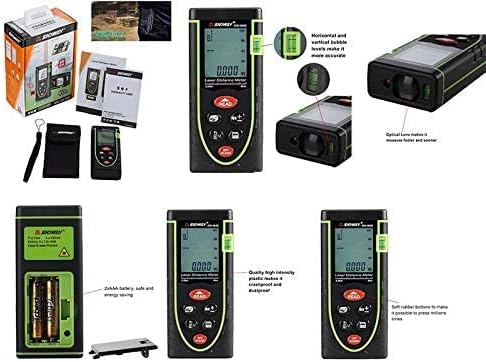
Figure 4.1: Battery compartment and other product details.
5. Navodila za uporabo
5.1 Vklop/izklop
- Za vklop: Pritisnite PREBERI gumb. Laser se bo aktiviral.
- Za izklop: Pritisnite in držite IZKLOP/POČISTI button for a few seconds. The device will also automatically power off after a period of inactivity.
5.2 Merjenje posamezne razdalje
- Power on the device by pressing PREBERI.
- Usmerite laser na ciljno točko.
- Pritisnite PREBERI again to take the measurement. The distance will be displayed on the screen.
5.3 Merjenje površine
- Pritisnite Način button (the button with the box icon) until the area icon (square) appears on the display.
- Take the first length measurement by pressing PREBERI.
- Take the second width measurement by pressing PREBERI.
- Naprava bo samodejno izračunala in prikazala površino.
5.4 Merjenje prostornine
- Pritisnite Način button until the volume icon (cube) appears on the display.
- Take the length measurement by pressing PREBERI.
- Take the width measurement by pressing PREBERI.
- Take the height measurement by pressing PREBERI.
- Naprava bo samodejno izračunala in prikazala glasnost.
5.5 Pythagorean Measurement
This mode is used to calculate indirect distances (e.g., height) using the Pythagorean theorem.
- Pritisnite Način button until the Pythagorean icon (triangle) appears. There are typically two Pythagorean modes: two-point and three-point.
- Follow the on-screen prompts to measure the required sides of the triangle (e.g., hypotenuse, base).
- Naprava bo izračunala in prikazala neznano stran.
5.6 Unit Switching and Reference Point
- Stikalo enote: Na kratko pritisnite Referenčna točka / stikalo enote button to cycle through measurement units (meters, feet, inches).
- Referenčna točka: Pritisnite in držite Referenčna točka / stikalo enote button to change the measurement reference point between the front edge and the rear edge of the device. An icon on the display will indicate the active reference point.

Figure 5.1: Device held in hand, showing button layout.
5.7 Seštevanje in odštevanje
To add or subtract measurements:
- Take the first measurement.
- Pritisnite '+' or '-' gumb.
- Take the second measurement.
- Prikazan bo rezultat seštevanja ali odštevanja.
5.8 Shranjevanje podatkov
Če želite shraniti meritev, pritisnite Shrani button after a measurement is displayed. The device can store multiple readings, which can be recalled later.
5.9 Clearing Measurements
To clear the current measurement from the display, briefly press the IZKLOP/POČISTI gumb.
6. Vzdrževanje
- Čiščenje: Uporabite mehko, damp Za čiščenje naprave uporabite krpo. Ne uporabljajte abrazivnih čistil ali topil.
- Nega leč: The optical lens is a sensitive component. Clean it gently with a soft cloth, similar to cleaning camera lenses.
- Shranjevanje: Napravo shranjujte na suhem in hladnem mestu, stran od neposredne sončne svetlobe in ekstremnih temperatur. Če jo shranjujete dlje časa, odstranite baterije, da preprečite puščanje.
- Zamenjava baterije: Replace batteries when the low battery indicator appears on the display to ensure accurate operation.
7. Odpravljanje težav
| Težava | Možen vzrok | rešitev |
|---|---|---|
| Naprava se ne vklopi | Prazne ali prazne baterije; nepravilna namestitev baterij | Zamenjajte baterije; preverite polarnost baterij |
| Netočne meritve | Unstable target surface; Obstruction in laser path; Dirty lens; Incorrect reference point | Ensure stable target; Clear laser path; Clean lens; Verify reference point setting |
| Sporočilo »Napaka« na zaslonu | Measurement out of range; Strong light interference; Laser blocked | Ensure target is within 0.05m-40m range; Measure in shaded areas; Ensure laser is not blocked |
| Laser ni viden | Bright ambient light; Laser not activated | Measure in lower light conditions; Press READ button to activate laser |
8. Specifikacije
| Funkcija | Specifikacija |
|---|---|
| Model | SW-M40 |
| Merilno območje | 0.05m - 40m |
| Merske enote | meters (m), feet (ft), inches (in) |
| Laserski razred | 2. razred |
| Baterije | 2 x AAA (vključeno) |
| Material | Plastika |
| barva | zelena |
| Teža predmeta | 0.17 kilogramov |
| Dimenzije paketa | 17 x 8.8 x 5 cm |
9. Garancija in podpora
9.1 Informacije o garanciji
Prosimo, glejte dokumentacijo ob nakupu ali prodajalčevo website for specific warranty terms and conditions applicable to your Sndway SW-M40 Digital Laser Rangefinder.
9.2 Podpora strankam
For technical assistance, troubleshooting not covered in this manual, or service inquiries, please contact the retailer or the manufacturer directly. Contact information can typically be found on the product packaging or the seller's online store page.