
Andoer HDV-201LM
Andoer HDV-201LM 1080p Digital Video Camera User Manual
Model: HDV-201LM
1. Uvod
This manual provides detailed instructions for the safe and effective use of your Andoer HDV-201LM Digital Video Camera. Please read this manual thoroughly before operating the device and retain it for future reference.
The Andoer HDV-201LM is a 1080p Full HD digital video camera featuring a 5-megapixel CMOS sensor, capable of capturing video at 1920x1080p at 30 frames per second and still images up to 24 megapixels (interpolated). It includes a 16X digital zoom, a 3.0-inch TFT-LCD screen with 270-degree rotation, and supports external accessories via a hot shoe mount.
2. Vsebina paketa
Preverite, ali so v paketu vsi spodaj navedeni predmeti. Če kateri koli predmet manjka ali je poškodovan, se obrnite na prodajalca.
- 1 x Andoer HDV-201LM Digital Video Camera
- 1 x torba za fotoaparat
- 2 x Rechargeable 3.7V 800mAh Batteries (one pre-installed)
- 1 x USB kabel
- 1 x AV kabel
- 1 x daljinski upravljalnik
- 1 x Camera User Manual (English)
- 1 x 0.39X Wide-Angle Lens
- 1 x zunanji mikrofon
- 1 x Microphone Connection Cable
- 1 x Microphone User Manual (Chinese)
Note: A memory card is not included. A Class 10 or higher SD card (up to 32GB) is strongly recommended for optimal performance.
3. Identifikacija delov
Familiarize yourself with the various components of your digital video camera.

Slika 3.1: Spredaj view of the Andoer HDV-201LM camera with attached wide-angle lens and external microphone.

Slika 3.2: Podrobno views highlighting the hot shoe mount, control buttons, battery compartment, and 1/4-inch tripod thread.
- Objektiv: Main optical component for capturing images and videos.
- LCD zaslon: 3.0-inch TFT-LCD display for viewing and menu navigation. Rotates 270 degrees.
- Gumb za vklop: Vklopi ali izklopi kamero.
- Record/Stop Button: Začne ali ustavi snemanje videa.
- Gumb za fotografije: Zajame fotografije.
- Ročica za zoom (W/T): Adjusts digital zoom (Wide/Telephoto).
- Gumb menija: Dostopi do nastavitev kamere.
- Gumbi za krmarjenje: Uporablja se za navigacijo in izbiranje po menijih.
- Nosilec za bliskavico: Za pritrditev zunanje dodatne opreme, kot so mikrofoni ali LED luči.
- Nit za stojalo: 1/4-inch thread for mounting the camera on a tripod.
- Predal za baterije: Vsebuje polnilno baterijo.
- Reža za kartico SD: Za vstavljanje pomnilniške kartice.
- Vrata USB: Za povezavo z računalnikom ali polnjenje.
- AV izhod: Za priklop na televizijo.
- LED polnilna lučka: Zagotavlja dodatno osvetlitev v slabih svetlobnih pogojih.
4. Nastavitev
4.1. Polnjenje baterije
- Odprite pokrov prostora za baterije.
- Insert the provided 3.7V 800mAh battery, ensuring correct polarity. If an insulator tab is present, remove it before insertion.
- Zaprite pokrov prostora za baterije.
- Connect the camera to a power source using the USB cable. The charging indicator will illuminate.
- Ko je baterija popolnoma napolnjena, se bo indikatorska lučka spremenila ali ugasnila.
4.2. Vstavljanje pomnilniške kartice
- Prepričajte se, da je kamera izklopljena.
- Poiščite režo za kartico SD.
- V režo vstavite SD kartico razreda 10 ali višjega (do 32 GB), dokler se ne zaskoči.
- Za odstranitev kartico nežno pritisnite, dokler ne izskoči.
4.3. Attaching the Wide-Angle Lens
- Remove the protective cap from the camera lens.
- Carefully screw the 0.39X wide-angle lens onto the camera's main lens thread until secure.

Figure 4.1: The camera with the 0.39X super wide-angle lens attached, demonstrating its expanded field of view.
4.4. Pritrditev zunanjega mikrofona
- Zunanji mikrofon potisnite v nastavek za bliskavico na vrhu fotoaparata.
- Connect the microphone cable to the camera's external microphone input port.
5. Upravljanje kamere
5.1. Vklop/izklop
- To power on, open the LCD screen or press the Moč gumb.
- To power off, close the LCD screen or press and hold the Moč gumb.
5.2. Snemanje videoposnetkov
- Ensure the camera is in video mode (indicated on the LCD screen). If not, press the Način gumb za preklop.
- Pritisnite Snemaj/Ustavi button to start recording. A red indicator will typically flash.
- Pritisnite Snemaj/Ustavi ponovno pritisnite gumb, da ustavite snemanje.
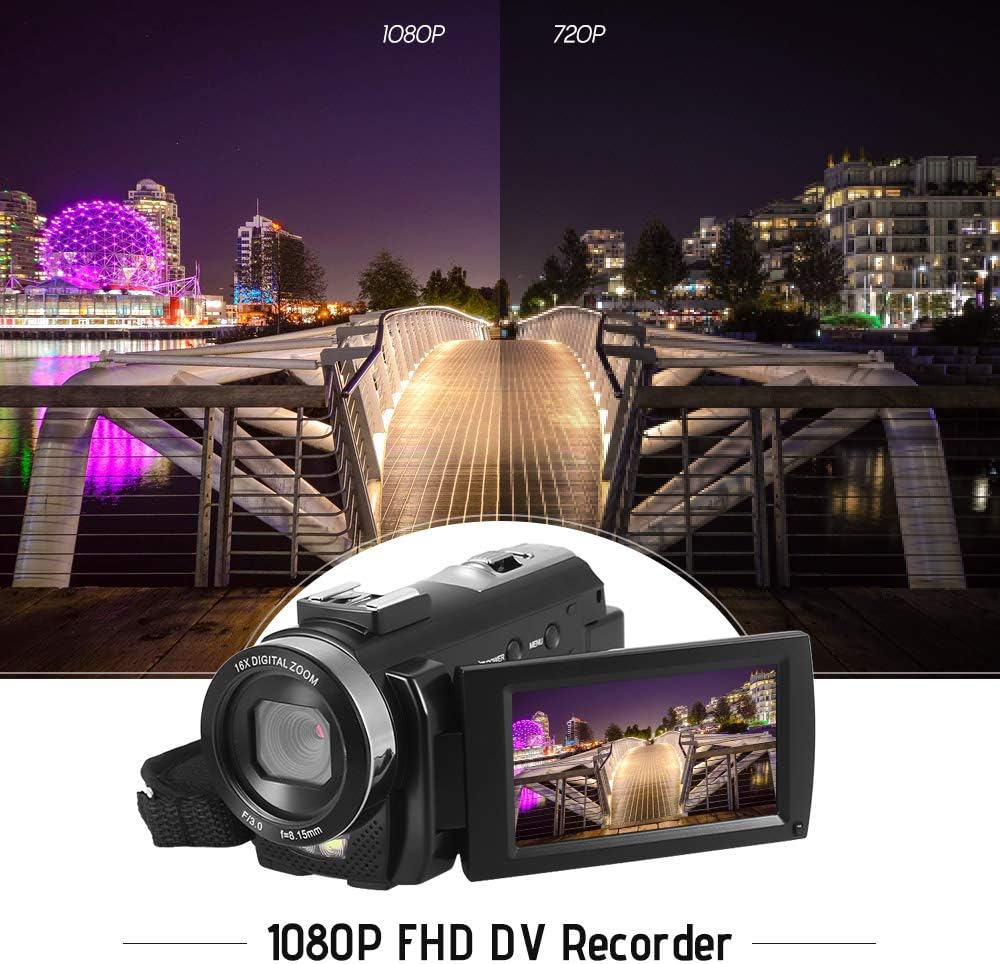
Figure 5.1: The camera is capable of recording in 1080p Full HD and 720p HD resolutions.
5.3. Fotografiranje
- Prepričajte se, da je kamera v načinu za fotografiranje. Če ni, pritisnite Način gumb za preklop.
- Kadrirajte posnetek z uporabo LCD-zaslona.
- Pritisnite Fotografija button to capture an image.
5.4. Uporaba digitalnega zooma
- Uporabite Š (širokokotni) in T (telefoto) lever to adjust the 16X digital zoom.

Figure 5.2: The camera's 16X digital zoom allows for closer views of subjects.
5.5. Nastavitve menija
- Pritisnite meni gumb za dostop do nastavitev.
- Use the navigation buttons to scroll through options such as:
- Ravnovesje beline: Auto, Daylight, Cloudy, Fluorescent, Tungsten.
- Scenski način: Auto, Night, Portrait, Landscape, Backlight, Sport, Party, Beach, High Sensitivity.
- Način fotografiranja: Single, Continuous.
- Izpostavljenost: Adjust ±3.0EV.
- Samosprožilec: Off, 2s, 5s, 10s.
- Samodejni izklop: Off, 1min, 3min, 5min.
- jezik: English, German, French, Spanish, Italian, Turkish, Russian, Portuguese, Dutch, Simplified Chinese, Traditional Chinese, Japanese, Polish.
- Druge funkcije: Face Detection, Smile Capture, Beauty Face, Anti-Shake.
- Pritisnite OK or Snemaj/Ustavi gumb za potrditev izbire.
- Pritisnite meni znova pritisnite za izhod.
5.6. Priklop na televizor
- Use the provided AV cable to connect the camera's AV output to your television's AV input.
- Select the correct AV input channel on your TV to view camera content.
6. Vzdrževanje
6.1. Čiščenje fotoaparata
- Za čiščenje ohišja fotoaparata uporabite mehko, suho krpo.
- Za lečo in LCD-zaslon uporabite posebno krpo in raztopino za čiščenje leč. Izogibajte se agresivnim kemikalijam.
6.2. Shranjevanje
- Fotoaparat shranjujte na hladnem in suhem mestu, stran od neposredne sončne svetlobe in ekstremnih temperatur.
- Odstranite baterijo, če fotoaparata ne boste uporabljali dlje časa.
7. Odpravljanje težav
| Težava | Možen vzrok | rešitev |
|---|---|---|
| Kamera se ne vklopi. | Baterija je prazna ali ni pravilno vstavljena. | Charge the battery fully. Ensure the battery is inserted with correct polarity and the insulator tab is removed. |
| Ni mogoče snemati videoposnetkov ali fotografirati. | Pomnilniška kartica je polna, ni vstavljena ali je poškodovana. | Insert a memory card. Delete unnecessary files or format the card (this will erase all data). Replace the card if corrupted. |
| Slaba kakovost videa/slike. | Nezadostna osvetlitev, umazan objektiv ali napačne nastavitve. | Ensure adequate lighting. Use the LED fill light if necessary. Clean the lens. Adjust white balance and scene mode settings. |
| Kamera se zamrzne ali se ne odziva. | Programska napaka ali prazna baterija. | Remove and reinsert the battery to reset the camera. Ensure the battery is charged. |
8. Specifikacije
| Funkcija | Specifikacija |
|---|---|
| Znamka | Andoer |
| Model | HDV-201LM |
| Slikovni senzor | Senzor CMOS z 5 milijona slikovnih pik |
| Video ločljivost | 1920x1080P (FHD 30fps), 1280x720 (HD 30fps), 640x480 (VGA 30fps), 320x240 (VGA 30fps) |
| Video format | AVI |
| Ločljivost slike | 24MP (Interpolated), 20MP (Interpolated), 16MP (Interpolated), 12MP (Interpolated), 10MP (Interpolated), 7M Wide (Interpolated), 5MP, 3MP, 2M Wide, VGA |
| Format slike | JPG |
| Digitalni zoom | 16X |
| Objektiv | ff (F/3.0 f=8.15mm) |
| Maks. Zaslonka | 8.15 F |
| LCD zaslon | 3.0-inch TFT-LCD (16:9), 270-degree rotation |
| Shranjevanje | SD Card (up to 32GB, Class 10 recommended) |
| Povezljivost | USB 2.0, AV Output (NTSC/PAL) |
| Napajalnik | 1 x 3.7 V 800 mAh polnilna baterija |
| Baterija za daljinski upravljalnik | 1 x 3V CR2025 baterija |
| Podpora za operacijski sistem | Windows XP/Vista/7/8/10 |
| Posebne lastnosti | Anti-shake, Face Detection, Smile Capture, Beauty Face, Self-Timer, LED Fill Light, Hot Shoe Mount |
| Dimenzije | 13.5 x 5.5 x 6.5 cm (5.3 x 2.2 x 2.6 palca) |
| Teža | 273g (9.6oz) with battery |
| barva | Črna |
9. Garancija in podpora
Za informacije o garanciji in tehnično podporo glejte dokumentacijo, ki je bila priložena nakupu, ali se obrnite na prodajalca. Shranite dokazilo o nakupu za morebitne garancijske zahtevke.
Ask a question about this manual
Ask about setup, troubleshooting, compatibility, parts, safety, or missing instructions. Manuals+ will review the question and use this page’s manual context to help answer it.