
1. Uvod
Hvala za nakupasing Moukey MAMP1 220W Bluetooth Dual Channel Power Amplifier. tole amplifier is designed to provide powerful and versatile audio amplification for various applications, including karaoke, home theater systems, and general audio playback. It features multiple input options, Bluetooth 5.0 connectivity, and intuitive controls for an enhanced audio experience. Please read this manual thoroughly before use to ensure proper operation and to maximize the product's performance.
2. Varnostna navodila
Da preprečite električni udar, požar ali poškodbe naprave, upoštevajte naslednje varnostne ukrepe:
- Te enote ne izpostavljajte dežju ali vlagi.
- Ne odpirajte casing. V notranjosti ni delov, ki bi jih lahko uporabnik popravil. Vsa servisna dela prepustite usposobljenemu osebju.
- Prepričajte se, da je napajalnik voltage ustreza zahtevam, navedenim na enoti.
- Place the unit on a stable, flat surface with adequate ventilation. Do not block ventilation openings.
- Napravo hranite stran od virov toplote, neposredne sončne svetlobe in prekomernega prahu.
- Disconnect the power plug from the outlet if the unit will not be used for an extended period.
- Enote ne upravljajte z mokrimi rokami.
3. Vsebina paketa
Preverite, ali so v paketu prisotni vsi elementi:
- Moukey MAMP1 moč Ampenota lifier
- Daljinski upravljalnik
- FM antena
- Uporabniški priročnik (ta dokument)
4. Izdelek je končanview
4.1 Front Panel Controls and Functions
The front panel provides access to all primary controls and input ports for easy operation.

Image: Detailed diagram of the Moukey MAMP1 front panel, highlighting each control and port with corresponding numbers.
- Stikalo za vklop: Vklopi ali izklopi enoto.
- USB / SD Slot: Za predvajanje zvoka files from USB drives (max 32GB) or SD cards (max 16GB).
- Gumb za način: Preklaplja med načini vnosa (Bluetooth, USB, SD, AUX, FM).
- BT gumb: Neposredno preklopi v način Bluetooth.
- Prev Button: Preskoči na prejšnjo skladbo/postajo.
- Gumb za predvajanje / premor: Predvaja ali začasno ustavi predvajanje zvoka.
- Naslednji gumb: Preskoči na naslednjo skladbo/postajo.
- LED zaslon: Shows current mode, track information, or frequency.
- Folder / Track: Navigates through folders or tracks on USB/SD.
- Glavni gumb za glasnost: Prilagodi skupno izhodno glasnost.
- Priključek za slušalke: 3.5mm output for monitor headphones.
- Microphone 1 Input: 6.35 mm priključek za priklop mikrofona.
- Microphone 2 Input: 6.35mm jack for a second microphone connection.
- Gumb za glasnost mikrofona: Prilagodi glasnost priključenih mikrofonov.
- Gumb Echo: Nadzoruje učinek odmeva za mikrofone.
- Gumb za bas: Prilagodi nizkofrekvenčni zvočni izhod.
- Visokotonski gumb: Prilagodi visokofrekvenčni zvočni izhod.
- Gumb za ravnotežje: Prilagodi ravnovesje levega/desnega kanala.
- AUX vhodni priključek: 3.5 mm vhod za zunanje avdio naprave.
- Izbirnik vhoda: Rotary switch to select between CD, AUX, DVD, and MP3/W inputs.
4.2 Priključki na zadnji plošči
The rear panel houses the main audio input and output connections.

Slika: Zadaj view of the Moukey MAMP1 ampprogram za prikaz vseh vhodnih in izhodnih vrat.

Image: Detailed diagram of the Moukey MAMP1 rear panel, highlighting each connection point.
- Audio Input for DVD (RCA): Connect DVD players or other audio sources.
- Audio Input for CD (RCA): Connect CD players or other audio sources.
- Line Out Jack (RCA): For connecting to another ampdvigalko ali snemalno napravo.
- Priključek za FM anteno: Za sprejem radia priključite priloženo FM anteno.
- Speaker Output Jacks: Connect passive speakers (4-16 Ohm impedance).
- Vhod za napajalni kabel: Priključite AC napajalni kabel.
5. Nastavitev
5.1 Namestitev
Postavite amplifier on a flat, stable surface. Ensure there is sufficient space around the unit for proper ventilation to prevent overheating.
5.2 Napajalni priključek
Connect the power cable to the Power Cable Input on the rear panel of the amplifier, then plug the other end into a suitable AC power outlet (115V AC).
5.3 Priključitev zvočnikov
MAMP1 amplifier supports two sets of passive speakers with an impedance of 4-16 Ohms. Use appropriate speaker wire to connect your speakers to the Speaker Output Jacks on the rear panel.

Image: Diagram illustrating how to connect speakers to the amplifier's binding posts.
- Rotate and loosen the speaker knob on the binding post.
- Insert the bare wire (remove approximately 10mm of insulation) into the hole. Ensure correct polarity (+ to + and - to -).
- Tighten the knobs to secure the wires firmly.
5.4 Priključitev vhodne naprave
Connect your audio sources (CD player, DVD player, tuner, etc.) to the corresponding RCA Audio Input jacks on the rear panel. For microphones, use the 6.35mm jacks on the front panel. For 3.5mm AUX devices, use the front panel AUX Input Jack.
6. Navodila za uporabo
6.1 Vklop/izklop
Pritisnite Stikalo za napajanje na sprednji plošči, da vklopite ampvklop ali izklop osvetlitve. LED-zaslon se bo prižgal, ko bo enota vklopljena.
6.2 Izbira vnosa
Uporabite Gumb za način on the front panel or the remote control to cycle through available input sources (Bluetooth, USB, SD, AUX, FM). Alternatively, use the Izbirnik vhoda knob on the front panel for RCA inputs (CD, AUX, DVD, MP3/W).
6.3 Nadzor glasnosti
- Glavni obseg: Zavrtite Glavni gumb za glasnost to adjust the overall output level of the amplifier.
- Glasnost mikrofona: Uporabite Gumb za glasnost mikrofona to control the volume of connected microphones independently.
6.4 Tonski nadzor
Adjust the audio characteristics using the Bas gumb in Visokokanalni gumb to suit your preference. The Gumb za ravnotežje allows adjustment of the left and right channel output levels.

Image: Close-up of the Moukey MAMP1 showing the Bass and Treble adjustment knobs.
6.5 Echo Control
Obrnite Gumb za odmev to add or reduce the echo effect on the microphone inputs, suitable for karaoke applications.
6.6 Bluetooth seznanjanje
Če želite povezati napravo Bluetooth:
- Pritisnite Gumb BT or cycle through modes until "BLUE" appears on the LED display.
- Omogočite Bluetooth na pametnem telefonu, tabličnem računalniku ali računalniku.
- Iskanje "Moukey MAMP1" in your device's Bluetooth settings and select it to pair.
- Once paired, you can stream audio wirelessly. Playback will temporarily pause during phone calls to protect privacy.
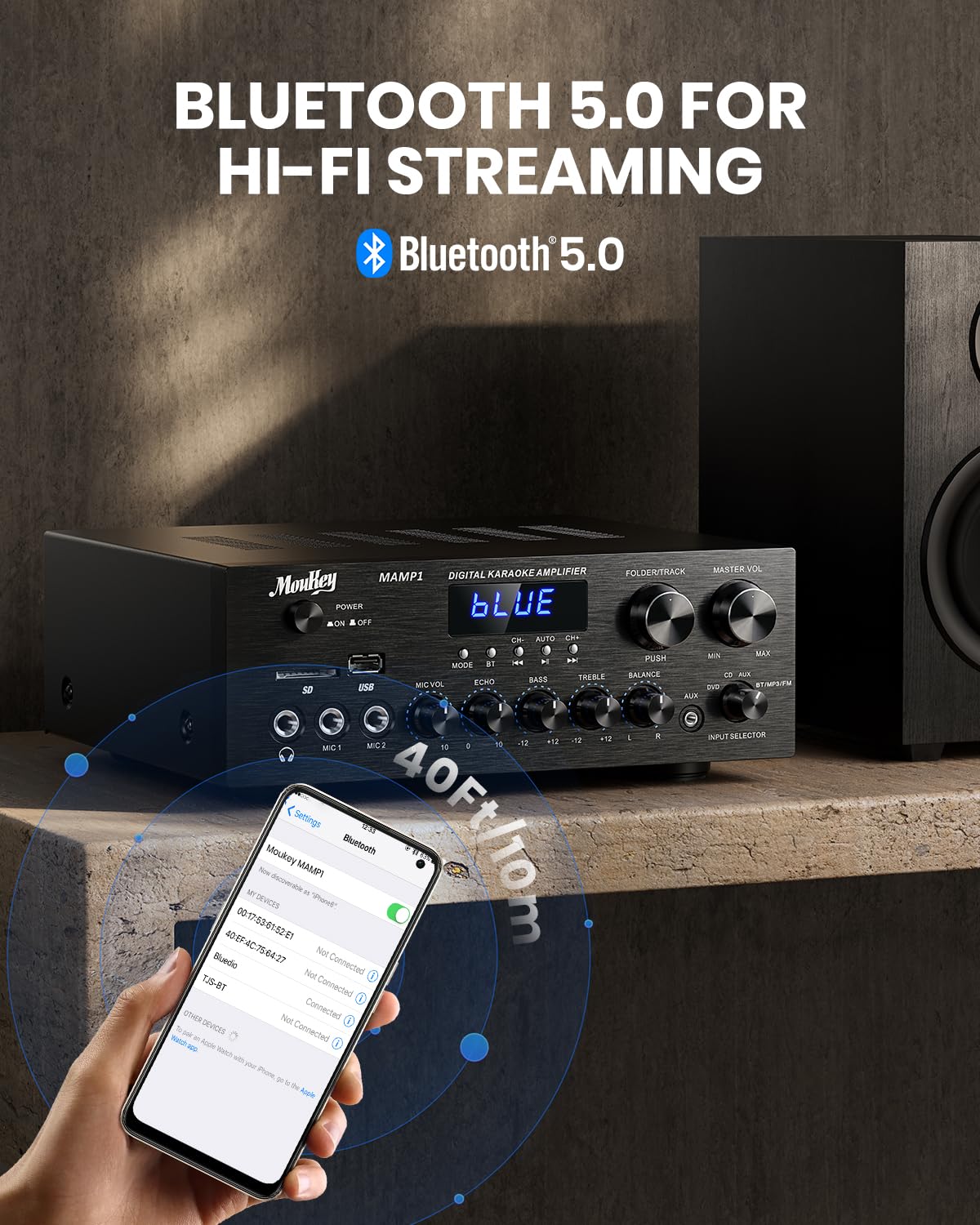
Image: The Moukey MAMP1 amplifier displaying "BLUE" on its screen, indicating Bluetooth mode, with a smartphone showing pairing options.
6.7 Predvajanje z USB-ja/SD-kartice
Insert a USB drive (max 32GB) or SD card (max 16GB) into the respective slot on the front panel. The amplifier will automatically switch to USB/SD mode and begin playback. Use the Prejšnji, Predvajaj/Premor, Naprej, in Folder/Track gumbi za nadzor predvajanja.
6.8 FM radio
Ensure the FM antenna is connected to the rear panel. Select FM mode using the Gumb za način. Uporabite Prejšnji in Naprej buttons to tune to radio stations. The LED display will show the current frequency.
7. Vzdrževanje
Za ohranitev zmogljivosti in videza vašega ampdvigalo:
- Čiščenje: Za brisanje zunanjosti enote uporabite mehko, suho krpo. Ne uporabljajte tekočih čistil ali abrazivnih kemikalij.
- Prezračevanje: Prepričajte se, da so prezračevalne odprtine čiste od prahu in umazanije.
- Shranjevanje: Če enoto shranjujete dalj časa, jo izključite iz električnega omrežja in jo shranite na hladnem in suhem mestu.
8. Odpravljanje težav
If you encounter issues with your Moukey MAMP1 amplifier, refer to the following table for common problems and solutions:
| Težava | Možen vzrok | rešitev |
|---|---|---|
| Brez moči | Napajalni kabel ni priključen; Okvara vtičnice; Stikalo za napajanje je izklopljeno. | Ensure power cable is securely connected. Try a different power outlet. Press the power switch to ON. |
| Ni zvoka | Incorrect input selected; Volume too low; Speakers not connected; Speaker wires loose; Mute function active. | Select the correct input source. Increase Master Volume. Check speaker connections and polarity. Ensure mute is off. |
| Bluetooth se ne povezuje | Amplifier not in Bluetooth mode; Device too far; Device already paired to another unit. | Zagotovite amplifier is in Bluetooth mode ("BLUE" on display). Move device closer to amplifier. Disconnect from other devices. |
| Mikrofon ne deluje | Microphone not connected; Mic volume too low; Echo knob set to minimum. | Connect microphone securely. Increase Microphone Volume. Adjust Echo knob. |
| Težave s predvajanjem po USB-ju/SD-ju | Nepodprto file format; USB drive/SD card corrupted; Capacity exceeded. | Zagotovite zvok files are in supported formats (e.g., MP3). Try a different USB drive/SD card. Check capacity limits (USB max 32G, SD max 16G). |
Če težava po poskusu teh rešitev še vedno obstaja, se obrnite na podporo strankam.
9. Specifikacije
| Funkcija | Specifikacija |
|---|---|
| Znamka | Moukey |
| Model | MAMP1 |
| Izhodna moč | 220 vatov |
| Kanali | 2 |
| voltage | 115 voltov (AC) |
| Impedanca zvočnika | 4-16 ohmov |
| Različica Bluetooth | 5.0 |
| Bluetooth obseg | Več kot 12 metra (40 čevljev) |
| Podpora za USB/SD kartico | USB: Max 32GB, SD: Max 16GB |
| Dimenzije (D x Š x V) | 25 cm x 21.3 cm x 9.5 cm (približno 10 palca x 8 palca x 4 palca) |
| UPC | 715802779039 |
| Država izvora | Kitajska |

Image: The Moukey MAMP1 amplifier with its dimensions labeled.
10. Garancija in podpora
This Moukey MAMP1 moč Amplifier prihaja z a 1-letna garancija od datuma nakupa. Ta garancija krije proizvodne napake in napake v izdelavi pri normalni uporabi.
Garancija ne zajema:
- Damage caused by accident, abuse, misuse, flood, fire, or other natural causes.
- Škoda, povzročena zaradi nepooblaščene modifikacije ali popravila.
- Damage caused by improper installation or connection.
- Cosmetic damage, such as scratches, dents, and broken plastic on ports.
For warranty claims or technical support, please contact the retailer where you purchased the product or visit the official Moukey website for contact information. Please have your purchase receipt and product model number (MAMP1) ready when contacting support.