
Uvod
This manual provides essential instructions for the safe operation, installation, and maintenance of your Chicago Pneumatic Digital Timer for Lamps & Appliances. Please read this manual thoroughly before using the product and retain it for future reference. Proper use ensures optimal performance and extends the product's lifespan.
Varnostna navodila
Vedno upoštevajte naslednje varnostne ukrepe, da preprečite poškodbe ali škodo na izdelku:
- Časovnika ne potapljajte v vodo in ga ne izpostavljajte prekomerni vlagi.
- Ne prekoračite največje obremenitve, določene za časovnik.
- Prepričajte se, da je časovnik varno priključen v ozemljeno vtičnico.
- Do not disassemble or attempt to repair the timer yourself. Contact qualified service personnel.
- Hraniti izven dosega otrok.
- Pred čiščenjem izključite časovnik iz električne vtičnice.
Vsebina paketa
Preverite, ali so v paketu prisotni vsi elementi:
- 1 x Chicago Pneumatic Digital Timer
- 1 x Uporabniški priročnik (ta dokument)
Konec izdelkaview
Seznanite se s komponentami digitalnega časovnika.
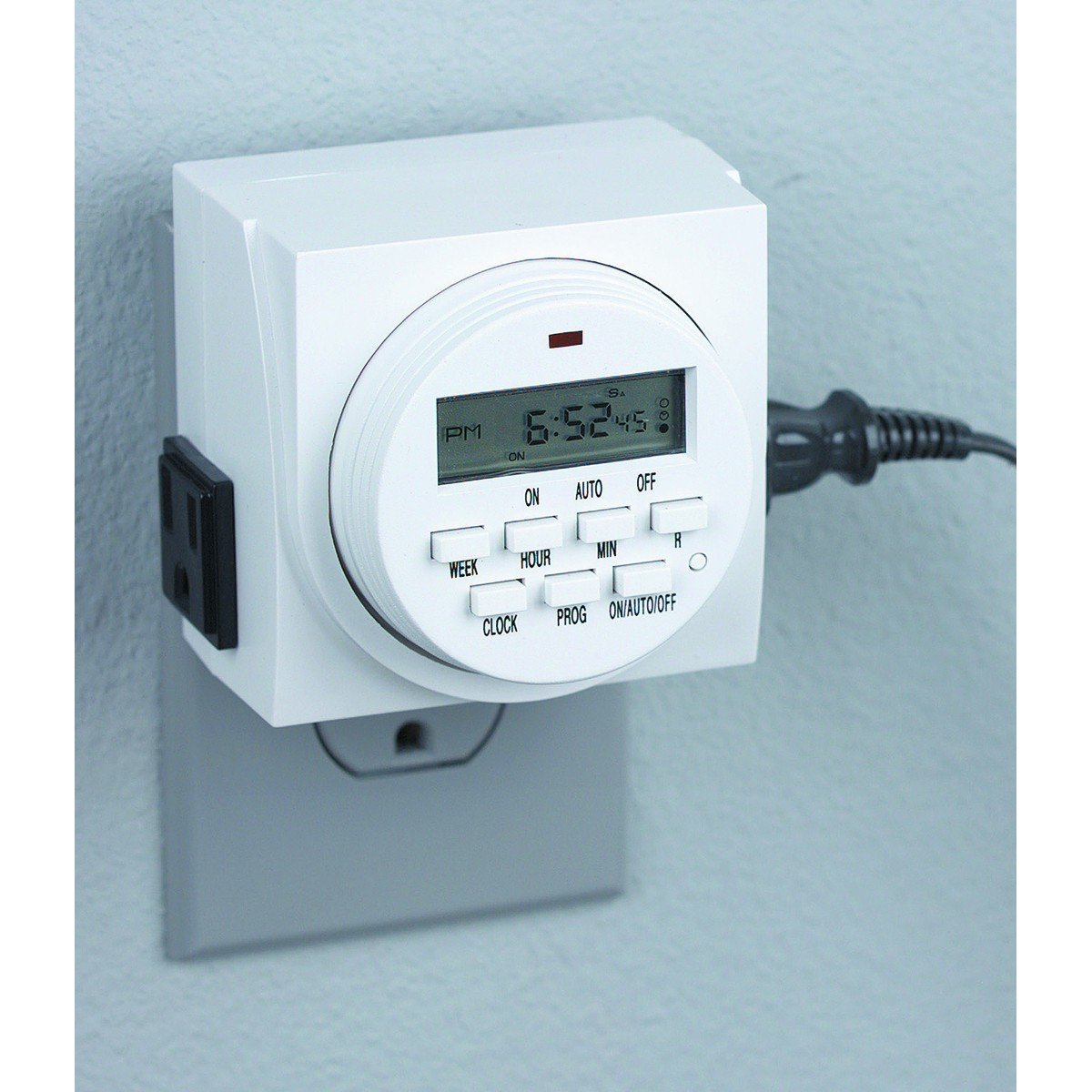
Slika 1: Spredaj view of the Chicago Pneumatic Digital Timer. This image displays the digital screen, which shows the current time and programming status, along with various control buttons for setting programs, adjusting time, and manual override.
The timer features a clear digital display, multiple programming buttons, and a power outlet for connecting appliances.
Nastavitev
- Začetni strošek: Before first use, plug the timer into a live electrical outlet for at least 30 minutes to charge the internal battery. This battery retains settings during power outages.
- Počisti vse nastavitve: Press the "RESET" button (often a small recessed button requiring a pen tip) to clear all previous settings and restore factory defaults.
- Nastavi trenutni čas:
- Pritisnite gumb "URA".
- Use the "HOUR" and "MINUTE" buttons to set the current time.
- Use the "WEEK" button to set the current day of the week.
- Press "CLOCK" again to confirm and exit time setting mode.
Navodila za uporabo
Čas vklopa / izklopa programiranja
Časovnik omogoča več programov VKLOP/IZKLOP. Za nastavitev programa sledite tem korakom:
- Press the "PROG" button. The display will show "1 ON".
- Use "WEEK" to select the day(s) for this program (e.g., MO, TU, WE, TH, FR, SA, SU, or combinations like MO-FR, SA-SU, MO-SU).
- Use "HOUR" and "MINUTE" to set the desired ON time.
- Ponovno pritisnite "PROG". Na zaslonu se bo prikazalo "1 OFF".
- Use "WEEK", "HOUR", and "MINUTE" to set the desired OFF time for the same program.
- Ponovite korake 1–5 za dodatne programe (npr. "2 VKLOP", "2 IZKLOP" itd.).
- After setting all programs, press the "CLOCK" button to return to the current time display.
Ročna preglasitev
To manually switch the timer's output ON or OFF, or to cycle through modes:
- Press the "MANUAL" or "ON/AUTO/OFF" button repeatedly.
- The display will cycle through "ON" (always on), "AUTO" (follows programs), and "OFF" (always off). Select "AUTO" for programmed operation.
Connecting an Appliance
Plug the appliance you wish to control into the outlet on the front of the digital timer. Ensure the appliance's power switch is in the ON position if it has one, so the timer can control its power supply.
Vzdrževanje
- Čiščenje: Disconnect the timer from the power outlet. Wipe the exterior with a soft, dry cloth. Do not use abrasive cleaners or solvents.
- Shranjevanje: Ko časovnika ne uporabljate, ga hranite na hladnem in suhem mestu.
- Baterija: The internal battery is designed for long life and typically does not require replacement. If the display becomes dim or settings are frequently lost, ensure the timer is regularly plugged in to charge the battery.
Odpravljanje težav
| Težava | Možen vzrok | rešitev |
|---|---|---|
| Timer not turning ON/OFF at programmed times. |
|
|
| Zaslon je prazen ali temen. |
|
|
| Nastavitve se izgubijo po izpadu napajanjatage. | Notranja baterija ni dovolj napolnjena. | Časovnik za nekaj ur priključite v vtičnico, da se notranja baterija popolnoma napolni. |
Specifikacije
| Model | Digitalni časovnik |
| Znamka | Chicago Pneumatic |
| Material | Plastika |
| Teža predmeta | 8.4 unč |
| Dimenzije paketa | 7.68 x 7.44 x 3.86 palcev |
| UPC | 367877920504 |
| ASIN | B082P3B3TY |
| Nazivna moč | (Za določeno količino glejte etiketo izdelka)tage/ampizbris) |
Garancija in podpora
Chicago Pneumatic products are manufactured to high-quality standards. For warranty information, please refer to the warranty card included with your purchase or visit the official Chicago Pneumatic webspletno mesto. Shranite račun kot dokazilo o nakupu.
For technical support, troubleshooting assistance beyond this manual, or to inquire about replacement parts, please contact Chicago Pneumatic customer service. Contact details can typically be found on the product packaging or the official brand webmesto.
Spletni viri: Za dodatno podporo in informacije o izdelku obiščite uradno Chicago Pneumatic webmesto.