
1. Uvod
This manual provides instructions for the FocalTop N2QAYB000953 replacement remote control. This remote is designed to function as a direct replacement for the original Panasonic Blu-ray Player remote control models N2QAYB000953, compatible with DMP-BDT360, DMP-BDT361, DMP-BDT460, and DMP-BDT460PS Blu-ray players.
No programming is required for this remote control. Simply insert batteries, and it is ready for use.
2. Nastavitev
2.1 Namestitev baterije
- Poiščite predal za baterije na zadnji strani daljinskega upravljalnika.
- Pokrov predala za baterije potisnite navzdol, da ga odprete.
- Insert two (2) AAA alkaline batteries (not included), ensuring the positive (+) and negative (-) terminals align correctly with the markings inside the compartment.
- Pokrov predalčka za baterije potisnite nazaj na svoje mesto, dokler se ne zaskoči.

Figure 2.1: Battery compartment with cover removed, showing battery placement.
Opomba: Ensure batteries are inserted with correct polarity. Incorrect installation may prevent the remote from functioning.
3. Upravljanje daljinskega upravljalnika
The FocalTop N2QAYB000953 remote control is designed for intuitive operation of your compatible Panasonic Blu-ray Player. Point the remote directly at the Blu-ray player's infrared sensor for optimal performance.
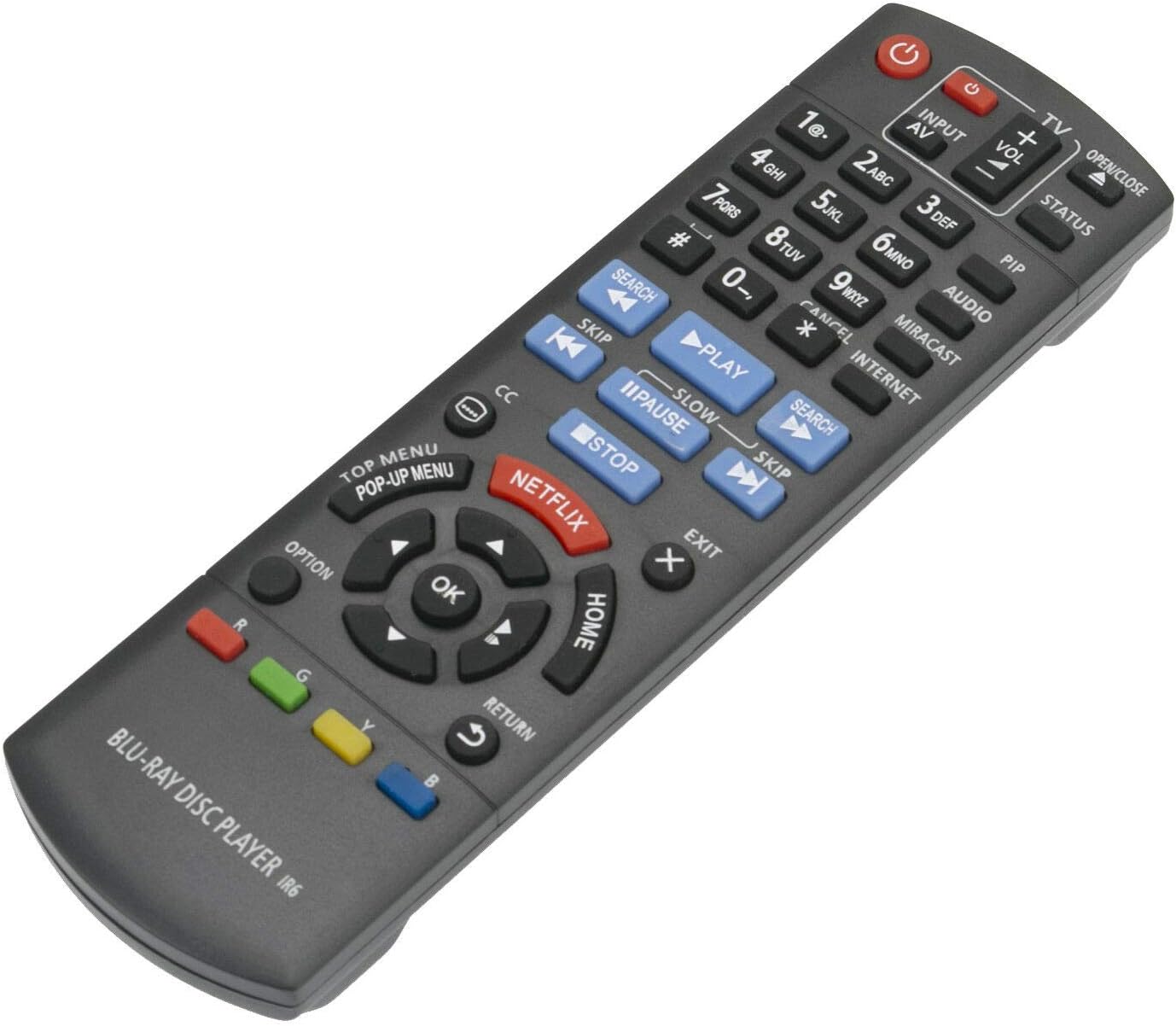
Slika 3.1: Spredaj view daljinskega upravljalnika z razporeditvijo gumbov.
3.1 Ključne funkcije
- moč (⏻): Turns the Blu-ray player on or off.
- Input/AV: Selects the input source on your television.
- Glasnost (+/-): Adjusts the volume of the connected audio system (if supported by the Blu-ray player's HDMI-CEC or similar function).
- Številski gumbi (0-9): Uporablja se za neposredno izbiro skladbe ali vnos numeričnih podatkov.
- Igraj (▶), Pavza (⏸), Ustavi (■): Standardni gumbi za predvajanje medijev.
- Preskoči (⏭), Search (⏮): Navigate between tracks or fast-forward/rewind.
- Directional Pad (Up, Down, Left, Right) & OK: Navigacija po menijih in potrditev izbir.
- DOMOV: Returns to the main menu of the Blu-ray player.
- GLAVNI MENI/POP-UP MENI: Accesses the disc's top menu or pop-up menu.
- NETFLIX: Direct access button for the Netflix application.
- VRNITEV: Vrne se na prejšnji zaslon ali meni.
- MOŽNOST: Displays options relevant to the current screen or playback.
- Barvni gumbi (rdeči, zeleni, rumeni, modri): Used for specific functions within menus or applications, as indicated on-screen.
4. Vzdrževanje
- Čiščenje: Daljinski upravljalnik obrišite z mehko, suho krpo. Ne uporabljajte tekočih čistil ali abrazivnih materialov.
- Zamenjava baterije: Replace batteries when the remote's response becomes sluggish or stops working. Always replace both batteries at the same time with new ones of the same type (AAA alkaline).
- Shranjevanje: Če daljinskega upravljalnika ne boste uporabljali dlje časa, odstranite baterije, da preprečite puščanje in morebitno škodo.
- Okolje: Avoid exposing the remote to extreme temperatures, direct sunlight, or high humidity.
5. Odpravljanje težav
| Težava | Možen vzrok | rešitev |
|---|---|---|
| Daljinski upravljalnik ne deluje. |
|
|
| Some buttons do not respond. |
|
|
| Daljinski upravljalnik deluje občasno. |
|
|
6. Specifikacije
- Model: N2QAYB000953
- Znamka: FocalTop
- Združljivost: Panasonic Blu-ray Player models DMP-BDT360, DMP-BDT361, DMP-BDT460, DMP-BDT460PS
- Tehnologija povezljivosti: Infrardeči (IR)
- Vrsta regulatorja: Nadzor gumbov
- vir energije: 2 x AAA alkalne baterije (niso priložene)
- Posebna lastnost: Ergonomska oblika
7. Garancija in podpora
This product is a replacement remote control. For specific warranty information or technical support, please refer to the documentation provided by the original seller or contact FocalTop directly. No explicit warranty information is provided within this manual.