
Uvod
The Perel EDIN305N is a 230V 16A 3600W DIN-rail mount digital weekly timer designed for indoor use. This device allows for precise, programmable control of electrical circuits, enabling automatic switching ON and OFF of connected appliances or lighting systems over a weekly cycle. It features a clear digital display and multiple programming options to suit various scheduling needs.
Varnostni ukrepi
OPOZORILO: Electrical installation should only be performed by a qualified electrician. Incorrect wiring can lead to electric shock, fire, or damage to the device and connected equipment. Always disconnect power at the main circuit breaker before installation or maintenance.
- Ensure the power supply matches the device's specifications (230V~50Hz).
- Ne prekoračite največje obremenitve 16 A / 3600 W.
- This device is designed for indoor use only. Avoid exposure to moisture, dust, or extreme temperatures.
- Naprave ne poskušajte odpirati ali popravljati sami. Vsa servisna dela prepustite usposobljenemu osebju.
- Hraniti izven dosega otrok.
Konec izdelkaview
The Perel EDIN305N digital timer consists of a main body with a digital display, control buttons, and terminal blocks for electrical connections. A transparent cover protects the display and buttons.
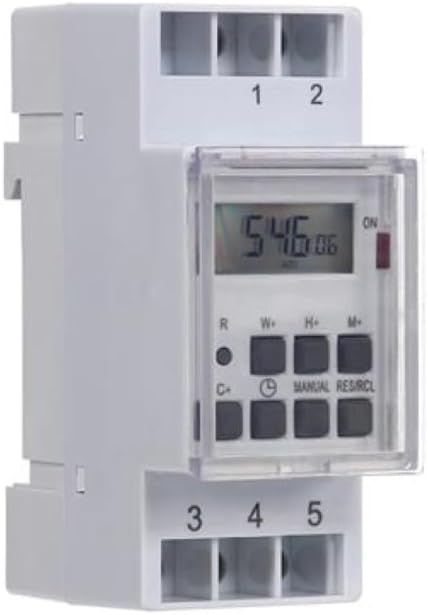
Slika 1: Spredaj view of the Perel EDIN305N Digital Weekly Timer. The image displays the LCD screen, control buttons (R, W+, H+, M+, C+, Clock, Manual, RES/RCL), and numbered terminal blocks (1, 2 at the top, 3, 4, 5 at the bottom).
Gumbi za upravljanje:
- R: Reset button (recessed).
- W+: Weekday setting.
- H+: Nastavitev ure.
- M+: Minute setting.
- C+: Clear program.
- Ikona ure: Used to set current time and day, and to exit programming mode.
- PRIROČNIK: Manual override for ON/AUTO/OFF modes.
- RES/RCL: Reset/Recall program.
Terminalni bloki:
- 1, 2: Power supply input (N, L).
- 3, 4, 5: Output terminals for controlled circuit (Common, Normally Open, Normally Closed).
Tehnične specifikacije
| Parameter | Vrednost |
|---|---|
| Številka modela | EDIN305N |
| voltage | 230V~50Hz |
| maks. Trenutno | 16A |
| Maks. Moč | 3600 W |
| Število nastavitev | 7 (programa VKLOP/IZKLOP) |
| Vrsta namestitve | DIN-tirnica |
| Dimenzije (D x Š x V) | 2.36 x 3.54 x 1.57 palca (60 x 90 x 40 mm) |
| Teža | 0.12 kg (4.2 unč) |
| Material | Plastika |
| barva | Bela |
| Potrebne baterije | No (internal battery for memory backup) |
Namestitev
1. Montaža
The Perel EDIN305N is designed for DIN-rail mounting. Securely attach the timer to a standard 35mm DIN-rail within an electrical enclosure. Ensure sufficient space for wiring and ventilation.
2. Ožičenje
POMEMBNO: Ensure power is disconnected at the main circuit breaker before proceeding with wiring. Follow local electrical codes and regulations.
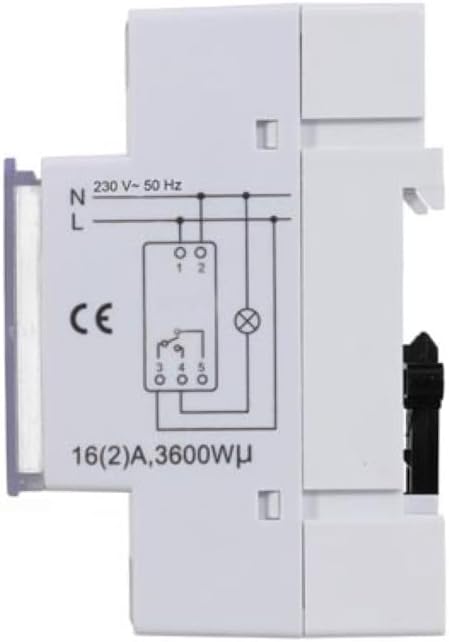
Slika 2: Stran view of the Perel EDIN305N Digital Weekly Timer showing the electrical wiring diagram. It illustrates connections for Neutral (N), Live (L), and the output contacts (1, 2, 3, 4, 5) for controlling a load.
Refer to the wiring diagram (Figure 2) and the terminal block labels on the device:
- Connect the Neutral (N) wire of your 230V AC supply to terminal 1.
- Connect the Live (L) wire of your 230V AC supply to terminal 2.
- For the controlled circuit:
- Terminal 3: Common contact for the relay output.
- Terminal 4: Normally Open (NO) contact. The circuit connected here will be ON when the timer is active.
- Terminal 5: Normally Closed (NC) contact. The circuit connected here will be OFF when the timer is active.
- Connect the load (e.g., light, appliance) between the Live (L) supply and either terminal 4 (for NO operation) or terminal 5 (for NC operation), with terminal 3 connected to the Live (L) supply. Alternatively, connect the load between terminal 4 or 5 and the Neutral (N) supply, with terminal 3 connected to the Live (L) supply. Consult a qualified electrician for specific load wiring configurations.
Začetna nastavitev in delovanje
1. Power On and Reset
After wiring and restoring power, the display will illuminate. If the display is blank or shows erratic characters, press the recessed R (Reset) button using a pointed non-metallic object (e.g., a pen tip). This will clear all settings and restore default values.
2. Nastavitev trenutnega časa in dneva
- Pritisnite in držite Ikona ure gumb.
- Medtem ko držite Ikona ure , pritisnite W+ to set the current day of the week (1=Monday, 7=Sunday).
- Medtem ko držite Ikona ure , pritisnite H+ za nastavitev trenutne ure (0–23).
- Medtem ko držite Ikona ure , pritisnite M+ za nastavitev trenutnih minut (0–59).
- Spustite Ikona ure gumb. Ura in dan sta zdaj nastavljena.
3. Programiranje ciklov VKLOP/IZKLOP
Časovnik podpira do 7 programov VKLOP/IZKLOP. Vsak program je sestavljen iz časa VKLOP in časa IZKLOP.
- Pritisnite Ikona ure button once to enter programming mode. The display will show "1 ON".
- Pritisnite W+ to select the day(s) for this program. You can choose a single day, a block of days (e.g., Mon-Fri), or all days.
- Pritisnite H+ to set the ON hour for program 1.
- Pritisnite M+ to set the ON minute for program 1.
- Pritisnite Ikona ure ponovno pritisnite gumb. Na zaslonu se bo prikazalo "1 IZKLOP".
- Repeat steps 2-4 to set the OFF day(s), hour, and minute for program 1.
- To set additional programs (2-7), press the Ikona ure button to cycle through "2 ON", "2 OFF", etc., and repeat the setting process.
- Ko nastavite vse želene programe, pritisnite PRIROČNIK gumb za izhod iz načina programiranja in vrnitev na prikaz trenutnega časa.
4. Ročni preglas
Pritisnite PRIROČNIK večkrat zaporedoma pritisnite , da preklapljate med načini delovanja:
- VKLOPLJENO: The output is continuously ON, overriding all programs.
- SAMODEJNO: The timer operates according to the programmed ON/OFF cycles.
- IZKLOPLJENO: The output is continuously OFF, overriding all programs.
Prepričajte se, da je časovnik nastavljen na AUTO za programirano delovanje.
5. Clearing Programs
To clear a specific program:
- V način programiranja vstopite s pritiskom na Ikona ure button until the desired program number (e.g., "3 ON") is displayed.
- Pritisnite C+ button. This will clear both the ON and OFF times for that specific program.
- Po potrebi ponovite za druge programe.
- Pritisnite PRIROČNIK za izhod iz načina programiranja.
To clear all programs and reset the device, use the recessed R (Reset) button.
Vzdrževanje
- Napravo očistite z mehko, suho krpo. Ne uporabljajte abrazivnih čistil ali topil.
- Ensure the transparent cover is closed to protect the display and buttons from dust and splashes.
- Regularly check electrical connections for tightness, especially in high-vibration environments.
Odpravljanje težav
| Težava | Možen vzrok | rešitev |
|---|---|---|
| Zaslon je prazen. | Ni napajanja; notranja baterija je prazna. | Check power connections (terminals 1 & 2). Ensure main power is ON. If power is present, press the R (Reset) button. The internal battery recharges when connected to power. |
| Timer not switching ON/OFF as programmed. | Incorrect program settings; timer in manual ON/OFF mode. | Verify program settings (time, day, ON/OFF). Ensure the timer is in AUTO način s pritiskom na PRIROČNIK gumb. |
| Connected appliance not receiving power. | Incorrect wiring; appliance fault; timer fault. | Check wiring according to Figure 2. Test the appliance directly. If wiring and appliance are fine, the timer may be faulty. |
| Buttons unresponsive or display erratic. | Software glitch; low internal battery. | Press the recessed R (Reset) button. Ensure the timer has been connected to power for at least 24 hours to fully charge the internal battery. |
Odstranjevanje
Do not dispose of this product with general household waste. This electronic device contains materials that can be recycled. Please dispose of it at a designated collection point for electrical and electronic equipment waste, in accordance with local regulations.
Garancija in podpora
Perel products are manufactured to high quality standards. For warranty information, technical support, or service inquiries, please refer to the documentation provided with your purchase or contact your local Perel distributor or retailer. Please have your model number (EDIN305N) and purchase details ready when contacting support.