
1. Uvod in konecview
The AVMATRIX VS0601 is a compact, multi-format 6-channel video switcher designed for live production environments. It supports a variety of input signals, including 4 SDI and 2 HDMI inputs, and offers scaled outputs for both SDI and HDMI Program (PGM) feeds. The device also features HDMI and SDI multiview outputs for comprehensive monitoring, various transition effects (CUT, AUTO, T-BAR, FADE, WIPE, MIX), GPIO Tally, Picture-in-Picture (PIP), and Fade-to-Black (FTB) functionalities. Its portable design makes it suitable for diverse applications.
2. Značilnosti izdelka
- Multi-format 6-Channel Input: Accepts 4 SDI and 2 HDMI input signals.
- Scaled Outputs: SDI and HDMI PGM outputs with scaling capabilities.
- Multiview Spremljanje: Dedicated HDMI and SDI multiview outputs for monitoring all inputs simultaneously.
- Prehodni učinki: Supports CUT, AUTO, T-BAR transitions, along with FADE, WIPE, and MIX effects.
- GPIO Tally Interface: For integration with live tally systems.
- Slika v sliki (PIP): Allows for overlaying one video source onto another.
- Fade-to-Black (FTB): Smooth transition to a black screen.
- Kompaktna zasnova: Portable and easy to transport for on-location use.
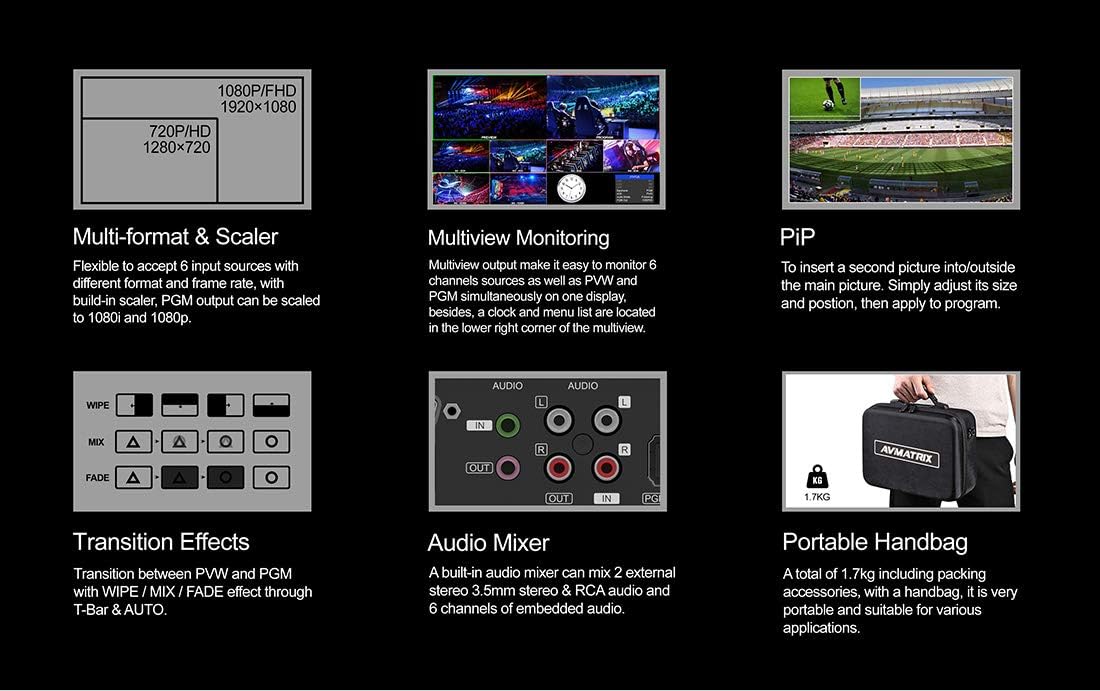
Slika 2.1: Ključne značilnostiview
3. Nastavitev
3.1 Razpakiranje in pregled
Carefully unpack the AVMATRIX VS0601 and all accessories. Inspect the unit for any signs of damage during transit. Retain the packaging materials for future transport or storage.
3.2 Priključitev napajanja
Connect the provided DC 12V power adapter to the 'DC 12V' input port on the rear panel of the switcher. Plug the adapter into a suitable power outlet. Ensure the power switch is in the 'OFF' position before connecting power.
3.3 Video Input Connections
The VS0601 supports 4 SDI inputs and 2 HDMI inputs. Connect your video sources (cameras, media players, computers) to the corresponding input ports on the rear panel.
- SDI Inputs: Connect up to four SDI sources to the 'SDI IN 1-4' ports.
- HDMI vhodi: Connect up to two HDMI sources to the 'HDMI IN 5-6' ports.

Slika 3.1: Priključki na zadnji plošči
3.4 Video Output Connections
Connect your display monitors or recording devices to the output ports.
- Program (PGM) Output: Connect your main program display or recorder to the 'PGM OUT' (SDI or HDMI) ports.
- Multiview Izhod: Connect a monitor to the 'MULTIVIEW OUT' (HDMI or SDI) for simultaneous viewing of all inputs, program, and preview.
- USB izhod: Connect to a computer via the 'USB OUT' port for streaming applications.
3.5 Zvočne povezave
The switcher includes audio input and output options.
- Avdio vhod: Connect external audio sources to the 'AUDIO IN' (RCA L/R or 3.5mm stereo) ports.
- Avdio izhod: Connect to external audio monitoring or recording devices via the 'AUDIO OUT' (RCA L/R or 3.5mm stereo) ports.
3.6 Tally and LAN Connections
- Tally: Connect a Tally system to the 'TALLY' (DB-15) port for visual indication of program and preview viri.
- LAN: Connect an Ethernet cable to the 'LAN' (RJ45) port for network control and firmware updates.
4. Navodila za uporabo
4.1 Kontrole sprednje plošče
The front panel provides intuitive controls for selecting inputs, managing transitions, and adjusting audio.

Slika 4.1: Postavitev sprednje plošče
- PGM (Program) Buttons: Select the input currently live on the program output.
- PVW (Preview) Gumbi: Select the input to be previewed before transitioning to program.
- T-bar: Manually control transitions between preview in program.
- CUT Button: Instantly switch from preview programirati.
- Gumb AUTO: Execute a transition with a pre-set speed.
- Gumb MENI: Navigate and select options within the on-screen display (OSD) menu.
- AUDIO/EFFECTS Buttons: Access audio mixer controls, keying functions (Chroma, Luma, DSK), and Picture-in-Picture (PIP) settings.
4.2 Osnovno preklapljanje
- Power on the unit using the switch on the rear panel.
- Na Multiview monitor, observe all connected inputs.
- Press a button in the PVW row to select an input for preview. This input will appear on the preview section of your multiview monitor.
- Press a button in the PGM row to select an input for program. This input will immediately go live.
- To transition from the previewed source to the program output, use the T-bar, REZI button for an instant switch, or AUTO button for a timed transition.
4.3 Mešanje zvoka
The VS0601 features an integrated audio mixer. Access the audio controls via the front panel buttons and the OSD menu to adjust levels for embedded audio from HDMI/SDI inputs and external analog audio inputs.
- Uporabite AFV (Audio Follow Video) function to automatically switch audio with video transitions.
- Manually adjust individual audio channel levels using the menu and rotary knob.
4.4 Keying and PIP
The switcher supports various keying effects and Picture-in-Picture functionality.
- Kromatični ključ: Use for green screen or blue screen effects.
- Lumin ključ: Key based on brightness levels.
- DSK (Downstream Key): Overlay graphics or text onto the program output.
- PIP (slika v sliki): Display a smaller video source within the main program video. Adjust size and position through the OSD menu.
5. Specifikacije
| Kategorija | Podrobnost |
|---|---|
| Model | VS0601 |
| Vložki | 4x SDI (SD/HD/3G-SDI), 2x HDMI (Type-A) |
| Analogni avdio vhodi | 1x 3.5mm stereo audio, 1x RCA (L/R) audio |
| PGM izhodi | 1x SDI (SD/HD/3G-SDI), 1x HDMI (Type-A) |
| AUX izhod | 1x SDI (SD/HD/3G-SDI) |
| Multiview Izhodi | 1x SDI (SD/HD/3G-SDI), 1x HDMI (Type-A) |
| Analogni avdio izhod | 1x 3.5mm stereo audio, 1x RCA (L/R) audio |
| LAN vmesnik | RJ45 x1, Synchronize local time |
| Tally vmesnik | DB-15 x1 |
| Podpora za vhodni format SDI | 1080p 60/50/30/25/24, 1080i 60/50, 720p 60/50, 576i, 480i |
| Podpora za vhodni format HDMI | 1080p 60/50/30/25/24, 1080i 60/50, 720p 60/50, 576p, 576i, 480p, 480i |
| PGM izhodni format | 1080p 60/50/30/25/24, 1080i 60/50 |
| Multiview Izhodni format | 1080p 60 |
| Skladnost s SDI | SMPTE 292M/SMPTE 259M/SMPTE 424M |
| Mere (LWD) | 249.2 x 172.3 x 55 mm |
| Teža | 1 kg (2.2 lbs) |
| Delovna temperatura | -20~60°C |
| Temperatura shranjevanja | -30~70°C |
| Trenutno | DC 12V, 1.2A |
| voltage | DC 6-17V |
| Napajalnik | DC 12V, 2A |

Slika 5.1: Tehnične specifikacije
6. Vzdrževanje
- Čiščenje: Za čiščenje zunanjosti enote uporabite mehko, suho krpo. Ne uporabljajte tekočih ali aerosolnih čistil.
- Prezračevanje: Zagotovite ustrezno prezračevanje okoli enote, da preprečite pregrevanje. Ne blokirajte prezračevalnih odprtin.
- Shranjevanje: When not in use for extended periods, store the switcher in a cool, dry place, preferably in its original packaging.
- Posodobitve vdelane programske opreme: Periodically check the AVMATRIX official website for firmware updates to ensure optimal performance and access to new features. Follow the instructions provided with the firmware update carefully.
7. Odpravljanje težav
7.1 Brez video izhoda
- Verify that the power adapter is securely connected and the unit is powered on.
- Check all video cables (SDI, HDMI) for secure connections at both the switcher and the display/source.
- Ensure the correct input is selected on the PGM row.
- Confirm that the output resolution of the switcher is compatible with your display device.
- Test with different cables or display devices if possible.
7.2 Brez zvočnega izhoda
- Preverite vse avdio kable za varne povezave.
- Verify audio levels in the mixer settings via the OSD menu. Ensure no channels are muted.
- Confirm that the audio source is active and producing sound.
- If using embedded audio, ensure the video source is providing audio.
7.3 Kontrole se ne odzivajo
- Restart the unit by powering it off and then on again.
- Ensure no foreign objects are obstructing buttons or the T-Bar.
- If connected via LAN, check network connection and control software status.
8. Garancija in podpora
For warranty information and technical support, please refer to the official AVMATRIX webspletno mesto ali se obrnite na lokalnega distributerja. Račun shranite kot dokazilo o nakupu za uveljavljanje garancije.
Spletni viri:
- AVMATRIX Official Webmesto
- LILLIPUT Store on Amazon (Manufacturer/Seller)