
1. Uvod
Thank you for choosing the AUNA Pro Amp-Pro1 BT PA Amplifier. tole amplifier is designed to deliver professional-level sound for various events, including karaoke nights, parties, and general audio amplification. It features a robust 2 x 50W RMS output, Bluetooth connectivity, multiple microphone inputs, USB/SD media playback, and a 7-band equalizer for precise sound control. This manual provides essential information for safe operation, setup, and maintenance of your device.
2. Varnostna navodila
Please read these safety instructions carefully before operating the device and keep them for future reference. Failure to follow these instructions may result in electric shock, fire, or other hazards.
- Napajanje: Connect the device only to a 230 V, 50 Hz AC power outlet. Ensure the power cord is not damaged or pinched.
- Prezračevanje: Do not block any ventilation openings. Ensure adequate airflow around the unit to prevent overheating. Do not place the amplifier on soft surfaces that may block vents.
- Voda in vlaga: Do not expose the device to rain or moisture. Do not place objects filled with liquids, such as vases, on or near the amplifier.
- Viri toplote: Obdrži amplifier away from heat sources such as radiators, heat registers, stoves, or other heat-producing appliances.
- Čiščenje: Unplug the device from the power outlet before cleaning. Use a dry, soft cloth. Do not use liquid cleaners or aerosol cleaners.
- Servisiranje: Tega izdelka ne poskušajte servisirati sami. Vsa servisna dela prepustite usposobljenemu serviserju. Odpiranje enote vas lahko izpostavi nevarnim hlapom.tagali druge nevarnosti.
- Vnos predmeta in tekočine: Nikoli ne potiskajte kakršnih koli predmetov v ta izdelek skozi odprtine, ker se lahko dotaknejo nevarnih voltage točke ali deli v kratkem stiku, ki bi lahko povzročili požar ali električni udar.
- Umestitev: Place the unit on a stable, level surface. Avoid placing it in direct sunlight or in areas with high humidity or dust.
3. Izdelek je končanview
The AUNA Pro Amp-Pro1 BT is a versatile PA amplifier designed for powerful audio output and flexible connectivity. It can be used as a standalone unit or installed in a 19-inch Hi-Fi rack.
Ključne značilnosti:
- Zmogljiv izhod: 2 x 50 W RMS power at 4 ohms.
- Bluetooth funkcija: For wireless audio streaming from smartphones, tablets, or laptops.
- Več vhodov za mikrofon: Three fully adjustable 6.3 mm jack microphone inputs for karaoke and vocal performances.
- Predvajanje medijev: USB port and SD/MMC card slot for direct playback of digital audio files.
- 7-pasovni izenačevalnik: Two-channel, 7-band equalizer for precise adjustment of treble, bass, and mid-range frequencies.
- Obsežna povezljivost: 2 x stereo RCA inputs, 1 x antenna input, 1 x 3.5 mm AUX input, and 2 x stereo speaker outputs.
- Montaža v stojalo: Suitable for installation in a 19-inch Hi-Fi rack.
Krmilni elementi in priključki na sprednji plošči:
The front panel provides access to power, microphone inputs, media playback controls, and sound adjustments.

Priključki na zadnji plošči:
The rear panel houses the main audio inputs and speaker outputs.

4. Nastavitev in povezave
Follow these steps to set up your AUNA Pro Amp-Pro1 BT amplifier.
4.1 Priključitev zvočnikov
- Zagotovite ampje žar izklopljen in izključen iz električne vtičnice.
- Connect your passive speakers to the stereo speaker outputs on the rear panel. Use appropriate speaker cables.
- For a single set of speakers, ensure their impedance is between 4 and 16 ohms.
- If connecting two sets of speakers simultaneously, ensure their combined impedance is between 8 and 16 ohms.
4.2 Priklop avdio virov
The amplifier offers various input options:
- RCA vhodi: Connect external audio devices like CD players, DVD players, or mixers to the 2 x stereo RCA inputs on the rear panel.
- AUX vhod: For portable devices, use the 3.5 mm AUX input on the front panel.
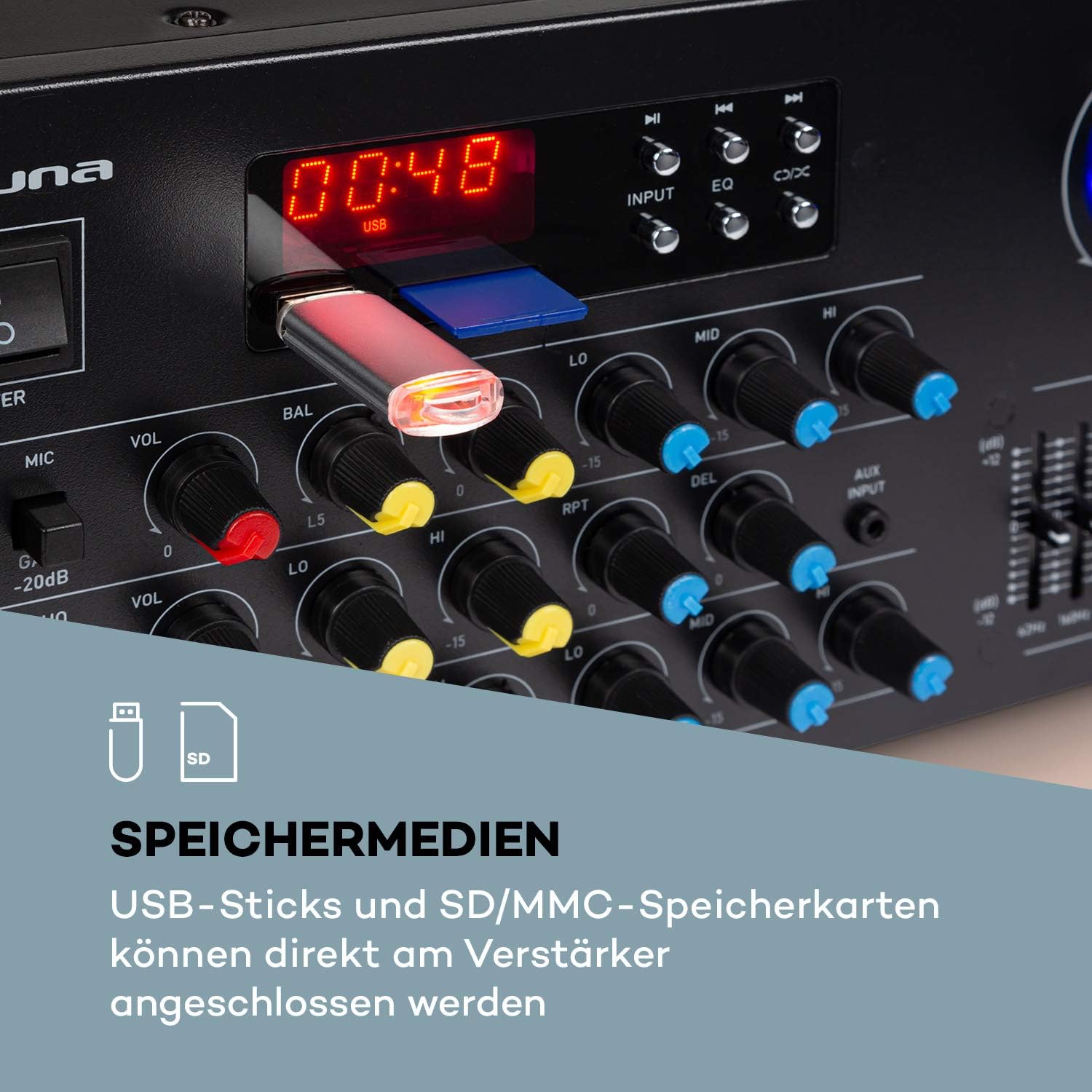
- USB/SD: Insert a USB stick or SD/MMC card into the respective slots on the front panel for direct media playback.
- Bluetooth: Za brezžično pretakanje zvoka iz združljivih naprav.
4.3 Priključitev mikrofonov
Connect up to three 6.3 mm jack microphones to the dedicated inputs on the front panel.

4.4 Napajalni priključek
Ko so vse povezave zvoka in zvočnikov vzpostavljene, priključite amplifier's power cord into a suitable 230 V, 50 Hz AC power outlet.
5. Navodila za uporabo
5.1 Vklop/izklop
Pritisnite MOČ gumb na sprednji plošči, da vklopite amplifier on or off. The display will illuminate when the unit is powered on.
5.2 Izbira vira
Uporabite VNOS selector button on the front panel to cycle through available audio sources: Bluetooth, USB, SD, AUX, and RCA inputs.
5.3 Delovanje Bluetooth
- Select the Bluetooth input source using the VNOS button. The display will show 'BLUE' or a similar indicator.
- Omogočite Bluetooth na pametnem telefonu, tabličnem računalniku ali prenosniku.
- Iskanje available devices and select 'AUNA Amp-Pro1 BT' (or similar) from the list.
- Ko sta seznanjena, lahko brezžično pretakate zvok na amplifier.

5.4 Predvajanje z USB-ja/SD-kartice
- Insert a USB stick or SD/MMC card into the corresponding slot on the front panel.
- Select the USB or SD input source using the VNOS gumb. The amplifier bo samodejno zaznal in začel predvajati združljiv zvok files.
- Use the playback controls (Play/Pause, Next, Previous) on the front panel to manage your music.
5.5 Upravljanje mikrofona
Each microphone input has individual volume, 3-band equalizer (treble, mid, bass), balance, and echo effect controls. The echo effect also has 2-band equalizer, repeat, delay, and volume controls.
- Prilagodite MIC VOL knob for the overall microphone volume.
- Uporabite posameznika VOL knobs for each microphone input.
- Prilagodite LO, MID, HI knobs for microphone equalization.
- Control the echo effect using the ODMEV, RPT (Repeat), and DEL (Delay) knobs.
5.6 Prilagoditev izenačevalnika
The amplifier features a 2-channel, 7-band equalizer to fine-tune your audio output. Adjust the sliders for each frequency band (62Hz, 160Hz, 400Hz, 1KHz, 3KHz, 8KHz, 16KHz) to shape your sound.

5.7 Glavni nadzor glasnosti
Adjust the large GLAVNA GLASNOST knob to control the overall output level of the amplifier.
6. Vzdrževanje
6.1 Čiščenje
Vedno izključite amplifier before cleaning. Use a soft, dry cloth to wipe the exterior surfaces. Do not use abrasive cleaners, waxes, or solvents, as they may damage the finish.
6.2 Shranjevanje
Če je amplifier will not be used for an extended period, unplug it from the power outlet and store it in a cool, dry place, away from direct sunlight and extreme temperatures.
6.3 Zamenjava varovalke
The amplifier is equipped with a 2A fuse. If the unit fails to power on, the fuse may need replacement. This should only be performed by qualified service personnel to ensure safety and proper operation.
7. Odpravljanje težav
Če imate težave z vašim ampza reševanje težav glejte naslednje pogoste težave in rešitve:
| Težava | Možen vzrok | rešitev |
|---|---|---|
| Brez moči | Power cord unplugged; Power outlet faulty; Fuse blown | Check power cord connection; Try a different outlet; Contact service for fuse replacement. |
| Ni zvoka | Incorrect input selected; Volume too low; Speakers not connected or faulty; Mute function active | Select correct input source; Increase Master Volume; Check speaker connections; Ensure no mute is active. |
| Bluetooth se ne povezuje | Amplifier not in Bluetooth mode; Device not discoverable; Interference | Select Bluetooth input; Ensure Bluetooth is enabled on your device and in pairing mode; Move devices closer; Restart both devices. |
| Mikrofon ne deluje | Microphone not connected; Microphone volume too low; Microphone faulty | Check microphone connection; Increase individual MIC VOL; Test with another microphone. |
| Popačen zvok | Volume too high; Input signal too strong; Speaker impedance mismatch | Reduce Master Volume or input source volume; Check speaker impedance. |
Če težava po poskusu teh rešitev še vedno obstaja, se obrnite na podporo strankam.
8. Tehnične specifikacije
Below are the technical specifications for the AUNA Pro Amp-Pro1 BT PA Ampdvigalo:
| Funkcija | Specifikacija |
|---|---|
| Izhodna moč | 2 x 50 W RMS at 4 ohms |
| Frekvenčni odziv | 20 Hz - 20 kHz |
| Razmerje med signalom in hrupom | > 76 dB |
| Speaker Impedance (1 set) | 4 - 16 ohma |
| Speaker Impedance (2 sets synchronized) | 8 - 16 ohma |
| Vhodi za mikrofon | 3 x 6.3 mm jack (front) |
| Avdio vhodi | 2 x stereo RCA, 1 x 3.5 mm AUX, USB, SD/MMC |
| Vhod antene | 1 x antenna input |
| Izhodi za zvočnike | 2 x stereo (screw terminals/banana connector) |
| Napajalnik | 230 V, 50 Hz |
| Varovalka | 2 A |
| Dimenzije (Š x V x G) | Približno 43 x 16.3 x 32.5 cm |
| Teža | Pribl. 3.0 kg |
| Tehnologija povezljivosti | AUX, Bluetooth, USB |
| Združljive naprave | Prenosni računalnik, pametni telefon |

9. Informacije o odstranjevanju
Do not dispose of this product with normal household waste. This product should be handed over to an applicable collection point for the recycling of electrical and electronic equipment. By ensuring this product is disposed of correctly, you will help prevent potential negative consequences for the environment and human health, which could otherwise be caused by inappropriate waste handling of this product. For more detailed information about recycling of this product, please contact your local city office, your household waste disposal service or the shop where you purchased the product.
10. Garancija in podpora
For warranty information, technical support, or service inquiries, please refer to the documentation provided with your purchase or contact your retailer. You can also visit the official AUNA webstran za nadaljnjo pomoč.