
Uvod
Thank you for choosing the HOMVILLA Digital LED Alarm Clock, Model HU-XI-74. This manual provides detailed instructions for setting up, operating, and maintaining your new alarm clock. Please read this manual thoroughly before use to ensure optimal performance and to understand all features.
Konec izdelkaview
The HOMVILLA Digital LED Alarm Clock features a large mirror LED display, dual alarms, temperature display, voice activation, and adjustable settings for brightness and volume. It is designed for ease of use and reliability.
Komponente in krmilniki
Familiarize yourself with the clock's layout and control buttons:

Slika: Spredaj in zadaj view of the alarm clock, highlighting the display, snooze/brightness button, alarm 1/2 switches, time set, up, down, alarm set, volume adjustment, power, reset, and 5V/1A USB port.
- Sprednji zaslon: Shows time, AM/PM indicator, temperature, and alarm icons.
- Zgornji gumb: Snooze / Brightness Adjustment.
- Zadnji krmilniki:
- ALARM1 ON/OFF Switch: Activates or deactivates Alarm 1.
- ALARM2 ON/OFF Switch: Activates or deactivates Alarm 2.
- TIME SET Button: Vstopi v način nastavitve časa.
- UP Button (+): Prilagodi vrednosti navzgor, preklaplja med 12/24-urnim formatom.
- DOWN Button (-): Adjusts values downwards, adjusts volume.
- Gumb NASTAVITEV ALARMOV: Vstopi v način nastavitve alarma.
- VOLUME Adjustment Button: Prilagodi glasnost alarma.
- Gumb za prižig: Turns the clock on/off.
- Gumb RESET: Resets the clock to factory settings.
- 5V/1A vrata USB: Power input for charging and continuous operation.
Nastavitev
Začetni vklop
- Connect the included USB cable to the 5V/1A USB port on the back of the clock.
- Plug the other end of the USB cable into a compatible 5V/1A or 5V/2A USB adapter (not included) or a USB port.
- The LED display will light up. If using battery power, ensure the clock is fully charged for optimal performance.
- For accurate temperature display, allow the clock to remain stationary for at least 30 minutes after unpacking.
Funkcija pomnilnika
The clock features a memory function. When sufficiently charged, it retains time and alarm settings even if the power key is turned off or the USB cable is disconnected for a short period.

Image: The clock displaying time and temperature, then showing it powered off, and finally powered on an hour later with the time advanced, demonstrating the memory function.
Navodila za uporabo
Nastavitev časa
- Pritisnite ČAS NAST button on the back of the clock. The hour digits will flash.
- Uporabite GOR (+) or DOL (-) gumbi za nastavitev ure.
- Pritisnite ČAS NAST ponovno. Številke minut bodo utripale.
- Uporabite GOR (+) or DOL (-) gumbe za nastavitev minut.
- Pritisnite ČAS NAST tretjič za potrditev in izhod iz načina nastavitve časa.

Image: A close-up of the clock display during time setting, showing the hour digits flashing.
12/24-urni format
V običajnem načinu prikaza časa pritisnite GOR (+) gumb za preklapljanje med 12-urnim in 24-urnim formatom časa.
Alarm Setting (Alarm 1 & Alarm 2)
Ura podpira dva neodvisna alarma.
- Potisnite ALARM1 ON/OFF or ALARM2 ON/OFF switch to the ON position. The corresponding alarm icon will appear on the display.
- Pritisnite ALARM NASTAVLJEN gumb. Številke za uro izbranega alarma bodo utripale.
- Uporabite GOR (+) or DOL (-) gumbe za nastavitev ure budilke.
- Pritisnite ALARM NASTAVLJEN ponovno. Številke minut bodo utripale.
- Uporabite GOR (+) or DOL (-) gumbe za nastavitev minut alarma.
- Pritisnite ALARM NASTAVLJEN a third time to confirm and exit alarm setting mode.

Image: A close-up of the clock display during alarm setting, showing the alarm icon and flashing hour digits.

Image: Illustration of setting two alarms for different daily routines, such as 7:00 AM for waking up and 6:00 PM for exercise.
Izbira melodije zvonjenja
The alarm clock offers 10 different alarm melodies. To select a ringtone:
- While in alarm setting mode (after setting minutes), press the ALARM NASTAVLJEN ponovno pritisnite gumb. Trenutna številka zvonjenja bo utripala.
- Uporabite GOR (+) or DOL (-) buttons to cycle through the 10 available ringtones.
- Pritisnite ALARM NASTAVLJEN da potrdite svojo izbiro.
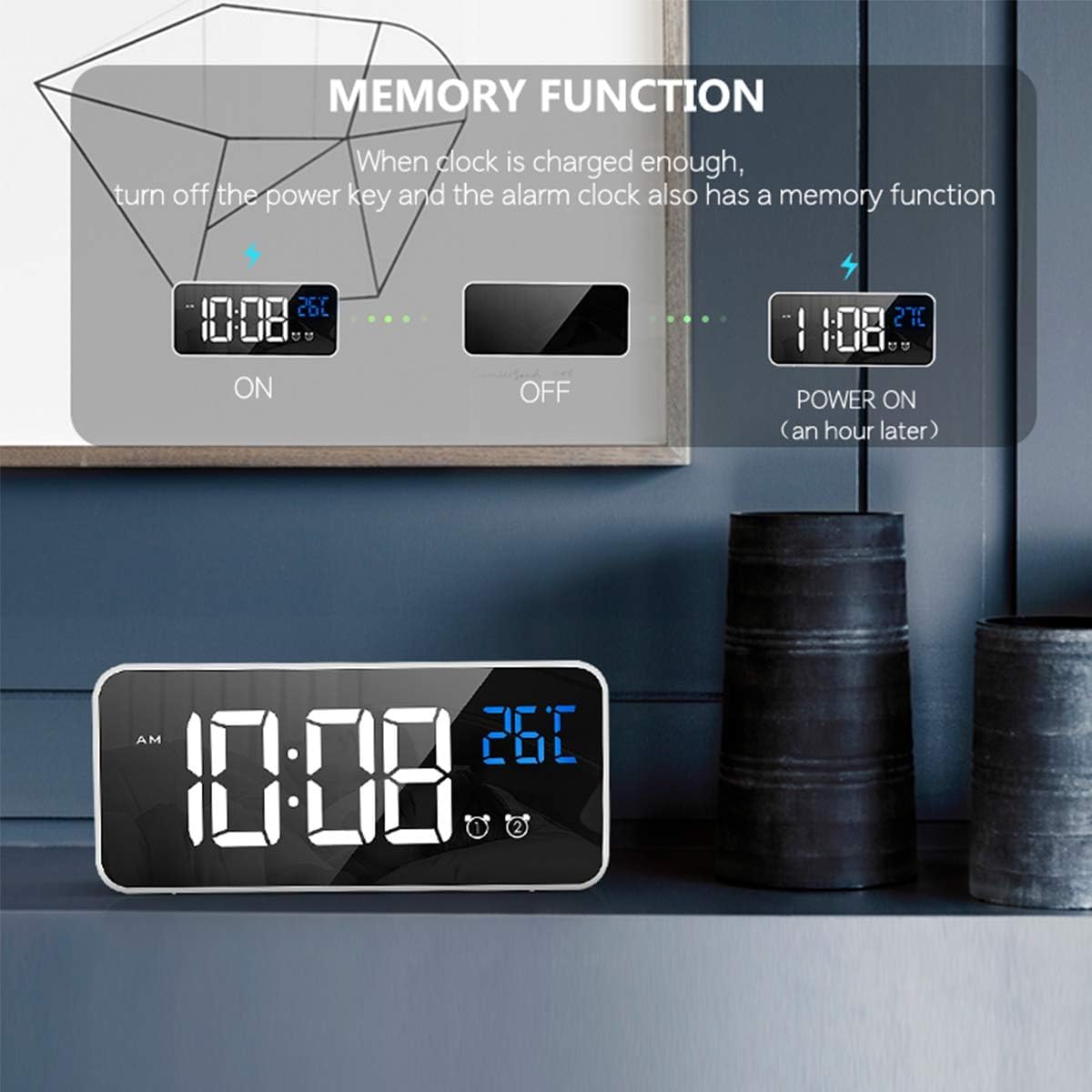
Image: A list of 10 available ringtones, including 'Di Di Di', 'Traditional Ringtone', 'Lullaby', 'The Chirps of Crickets', 'The Sound of the Waves', 'The Birds Chirping Running Water', 'The Sound of Running Water', 'White Noise', 'The Drip of Water', and 'The Sound of Thunderstorm'.
Funkcija dremeža
When the alarm sounds, gently press the Snooze/Brightness Adjustment button on the top of the clock. The alarm will pause for 5 minutes, and the alarm icon will flicker. To turn off the alarm completely, press any other button on the back of the clock.
Image: A person's hand pressing the top button of the alarm clock to activate the snooze function, with the display showing the time and a snooze icon.
Nastavitev svetlosti
The clock offers 4 levels of brightness. You can adjust it manually or allow automatic adjustment when powered via USB.
- Ročna nastavitev: V običajnem načinu prikaza časa pritisnite Snooze/Brightness Adjustment button on the top of the clock to cycle through the 4 brightness levels.
- Automatic Adjustment (USB Power Mode): When connected via USB, the clock will automatically adjust its brightness at different times of the day. You can still manually override this setting.

Slika: Štirje bivšiamples of the clock display at different brightness levels (1 to 4), demonstrating the adjustable illumination.

Image: A close-up of the clock display with a brightness icon, indicating the brightness adjustment feature.
Prilagoditev glasnosti
The alarm volume can be adjusted to three levels.
- V običajnem načinu prikaza časa pritisnite VOLUME Adjustment button (often combined with the DOWN button) on the back of the clock.
- Press the button repeatedly to cycle through the three volume levels.

Image: A close-up of the clock display with a volume icon, indicating the volume adjustment feature.
Voice Activation Function
When operating on battery power, the display can be activated by sound (e.g., a clap or tap on the table). The display will turn off automatically after 6 seconds to conserve power.
- To activate the display, make a sound above 90 decibels or gently knock the surface where the clock is placed.
- Note: The voice control function is disabled when the clock is continuously powered via USB. In this mode, the display remains on.

Image: A person making a sound near the alarm clock, causing its display to light up, illustrating the voice activation feature.

Image: A close-up of the clock display with a voice activation icon, indicating the feature is active.
Prikaz temperature
The clock displays the ambient temperature. The temperature unit can be switched between Celsius (°C) and Fahrenheit (°F).
- V običajnem načinu prikaza časa pritisnite in držite GOR (+) gumb za preklop med °C in °F.

Image: A person sleeping, with the alarm clock displaying time and temperature, and arrows indicating the ability to switch between Celsius and Fahrenheit.
Napajalnik
The HOMVILLA Digital LED Alarm Clock can be powered in two ways:
- USB Cable (Continuous Power): Connect the clock to a 5V/1A or 5V/2A USB adapter for continuous display and power. The LED light will remain on.
- Built-in Lithium Battery (Portable Power): The clock has a built-in rechargeable lithium battery. When running on battery, the LED display will automatically turn off after 6 seconds of inactivity to conserve power. The voice activation function is available in this mode. Ensure the battery is fully charged for extended use.
Important: Only use a 5V/1A or 5V/2A adapter for charging the clock. Using an incompatible adapter may damage the device.
Vzdrževanje
- Uro očistite z mehko, suho krpo. Ne uporabljajte abrazivnih čistil ali topil.
- Ure ne izpostavljajte ekstremnim temperaturam, neposredni sončni svetlobi ali visoki vlažnosti.
- Do not disassemble the clock. This will void any potential warranty and may cause damage.
Odpravljanje težav
| Težava | Možen vzrok | rešitev |
|---|---|---|
| Display is off or dim. | Battery low; USB cable disconnected; brightness set too low; voice activation mode (battery power). | Connect to USB power; charge battery; adjust brightness manually; make a sound to activate display if on battery. |
| Alarm se ne oglasi. | Alarm is not activated; volume set too low; incorrect alarm time. | Ensure ALARM ON/OFF switch is on; adjust volume; verify alarm time setting. |
| Odčitek temperature se zdi netočen. | Clock recently moved or unpacked. | Allow the clock to stabilize for at least 30 minutes in its location for accurate readings. |
| Voice activation not working. | Clock is connected to USB power; ambient noise is too low. | Disconnect USB cable to enable battery mode; ensure sound is above 90dB or tap the surface. |
| Cannot change time/alarm settings. | Not in setting mode. | Pritisnite ustrezno ČAS NAST or ALARM NASTAVLJEN gumb za vstop v način nastavitev. |
Specifikacije
- Znamka: HOMVILLA
- Številka modela: HU-XI-74 (also 8808)
- barva: Bela
- Material: Plastika
- Vrsta zaslona: Digital LED Mirror Screen
- Dimenzije izdelka: 14.5 x 3.81 x 3 cm (5.7 x 1.5 x 1.2 palca)
- Teža artikla: 220 gramov
- vir energije: USB Cable (5V/1A or 5V/2A adapter required) / Built-in Lithium Battery
- Posebne lastnosti: Dual Alarms, Temperature Display (°C/°F), Voice Activation, 10 Ringtones, 4 Brightness Levels, 3 Volume Levels, Snooze Function, Memory Function.
- Baterija: 1 baterija tipa C (priložena)
Garancija in podpora
Information regarding warranty coverage and customer support for the HOMVILLA Digital LED Alarm Clock (Model HU-XI-74) is not available in this document. Please refer to the product packaging or the retailer's webZa posebne garancijske pogoje in kontaktne podatke za podporo obiščite spletno mesto.