
1. Uvod
Thank you for choosing the Ahuja DPA-570 Mixer Amplifier. This manual provides essential information for the safe and efficient operation of your device. Please read it thoroughly before use and retain it for future reference. The DPA-570 is designed for public address applications, offering versatile audio mixing and ampzmožnosti lifikacije.
2. Varnostna navodila
- vir energije: Povežite amplifier only to the specified AC voltage or a compatible 12V DC car battery. Ensure the power outlet is properly grounded.
- Prezračevanje: Ne blokirajte prezračevalnih odprtin. Zagotovite zadosten pretok zraka okoli enote, da preprečite pregrevanje.
- Vlaga: Obdrži amplifier away from water, rain, and excessive humidity. Do not operate with wet hands.
- Umestitev: Place the unit on a stable, flat surface. Avoid direct sunlight, heat sources, or areas with high vibration.
- Servisiranje: Tega izdelka ne poskušajte servisirati sami. Vsa servisna dela prepustite usposobljenemu servisnemu osebju.
- Čiščenje: Pred čiščenjem izklopite napajanje. Uporabite mehko, suho krpo. Ne uporabljajte tekočih čistil ali aerosolov.
3. Vsebina paketa
Prosimo, preverite, ali vaš paket vsebuje naslednje predmete:
- Ahuja DPA-570 Mixer Ampenota lifier
- AC napajalni kabel
- Remote Control for MP3 Player
- Uporabniški priročnik (ta dokument)
Če kateri koli predmet manjka ali je poškodovan, se nemudoma obrnite na prodajalca.
4. Izdelek je končanview
The Ahuja DPA-570 is a robust mixer amplifier designed for various public address needs. It features multiple inputs and controls for flexible audio management.
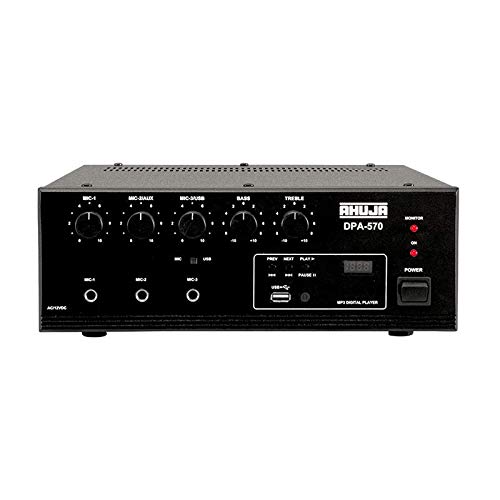
Slika 1: Spredaj view of the Ahuja DPA-570 Mixer Amplifier, showing input jacks, control knobs, and the MP3 player interface.
Ključne značilnosti:
- 3 Microphone Inputs & 1 Auxiliary Input: Allows connection of multiple audio sources.
- Vgrajen MP3 predvajalnik: Features a USB reader for playing audio files directly, controlled via the front panel or remote.
- Linijski izhod: Provides an output for connecting to an external booster amplifier for expanded sound coverage.
- Active Bass & Treble Controls: Independent controls for adjusting the low and high frequencies of the audio output.
- AC/DC Operation: Automatically switches to DC power (car battery) if AC power fails, ensuring uninterrupted operation.
5. Nastavitev
Follow these steps to set up your Ahuja DPA-570 Mixer Ampdvigalo:
- Umestitev: Postavite amplifier on a stable, flat surface in a well-ventilated area, away from direct heat or moisture.
- Povezava zvočnikov: Connect your speakers to the appropriate speaker output terminals on the rear panel. Ensure correct polarity (+ to + and - to -) and impedance matching. Refer to the amplifier's specifications for compatible speaker impedance.
- Priključek mikrofona: Plug your microphones into the MIC 1, MIC 2, or MIC 3 input jacks on the front panel.
- Auxiliary Device Connection: Connect external audio sources (e.g., CD player, smartphone) to the AUX input jack using an appropriate cable.
- Napajalni priključek:
- AC napajanje: Priloženi napajalni kabel priključite na amplifier's AC inlet and then to a suitable wall outlet.
- DC Power (Optional): For battery operation, connect a 12V DC car battery to the DC input terminals on the rear panel, observing correct polarity. The unit will automatically switch to DC power if AC power is interrupted.
- Začetni vklop: Ensure all volume controls are set to minimum before turning on the amplifier.
6. Navodila za uporabo
6.1 Osnovna operacija
- Vklop: Pritisnite stikalo za vklop, da vklopite amppolnilnik. Indikatorska lučka napajanja bo zasvetila.
- Prilagoditev glasnosti: Gradually increase the MASTER volume control to the desired listening level. Adjust individual MIC and AUX volume controls as needed.
- Nadzor tonov: Use the BASS and TREBLE knobs to adjust the low and high frequencies of the audio output to your preference.
6.2 Using the MP3 Player
- Vstavite USB-pogon: Vstavite USB-ključ z zvočno datoteko MP3 filev vrata USB na sprednji plošči.
- Izberite način: The amplifier should automatically switch to USB mode. If not, press the 'MODE' button on the front panel or remote control until USB mode is selected.
- Nadzor predvajanja: Use the play/pause, next, and previous track buttons on the front panel or remote control to manage playback.
- obseg: Adjust the MP3 player's volume using its dedicated control or the main volume control.
7. Vzdrževanje
- Čiščenje: Redno obrišite zunanjost ampObrišite z mehko, suho krpo. Ne uporabljajte abrazivnih čistil ali topil.
- Prezračevanje: Ensure that the ventilation grilles are free from dust and debris to maintain proper cooling.
- Shranjevanje: Ko naprave dalj časa ne uporabljate, jo shranite amplifier in a cool, dry place, protected from dust and extreme temperatures.
- Pregled kabla: Občasno preverite vse kable glede znakov obrabe ali poškodb. Poškodovane kable takoj zamenjajte.
8. Odpravljanje težav
| Težava | Možen vzrok | rešitev |
|---|---|---|
| Brez moči | Napajalni kabel ni priključen; vtičnica je okvarjena; Ampizklopljeno stikalo za vklop rešovalnika. | Check power cord connection; Try a different outlet; Ensure power switch is ON. |
| Ni zvoka | Speaker cables disconnected; Volume controls too low; Input source not selected or faulty. | Check speaker connections; Increase MASTER and input volume; Verify input source is active and correctly connected. |
| Popačen zvok | Volume too high; Incorrect impedance speakers; Faulty cables. | Reduce volume; Ensure speaker impedance matches amplifier; Replace faulty cables. |
| MP3 predvajalnik ne deluje | USB drive not inserted correctly; USB drive corrupted; Incorrect file format. | Reinsert USB drive; Try a different USB drive; Ensure fileso v formatu MP3. |
9. Specifikacije
| Funkcija | Specifikacija |
|---|---|
| Znamka | Ahuja |
| Številka modela | DPA-570 |
| Število kanalov | 4 |
| Mere izdelka (D x Š x V) | 34 G x 36 Š x 32 V centimetrov |
| Teža predmeta | 6900 gramov |
| Tehnologija povezljivosti | Pomožni, USB |
| Vrsta vira napajanja | AC (Mains), Battery Powered (12V DC) |
| Vrsta izhodnega priključka | 1/4" TRS (balanced) |
| Avdio vhod | USB |
| Država izvora | Kitajska |
10. Garancija in podpora
Ahuja products are manufactured to high-quality standards. For warranty information, please refer to the warranty card included with your product or visit the official Ahuja webspletnega mesta. Račun shranite kot dokazilo o nakupu za uveljavljanje garancije.
For technical support, service, or inquiries, please contact Ahuja customer service through their official channels. Contact details can typically be found on the product packaging or the manufacturer's webmesto.