
1. Uvod
Thank you for choosing the UBeesize TBC001 Flexible Tripod. This manual provides comprehensive instructions for the safe and effective use of your new tripod, including setup, operation, maintenance, and troubleshooting. Please read this manual thoroughly before use and retain it for future reference.
The UBeesize TBC001 Flexible Tripod is designed for versatility, offering stable support for smartphones, DSLR cameras, and GoPro devices. Its flexible legs and 360-degree rotating ball head allow for creative positioning and stable shots in various environments, complemented by a wireless Bluetooth remote for convenient control.
2. Izdelek je končanview in komponente
Your UBeesize TBC001 Flexible Tripod package includes the following items:
- Prilagodljivo stojalo
- Univerzalno držalo za telefon
- Brezžični Bluetooth daljinski zaklop
Below is an illustration of the main components:
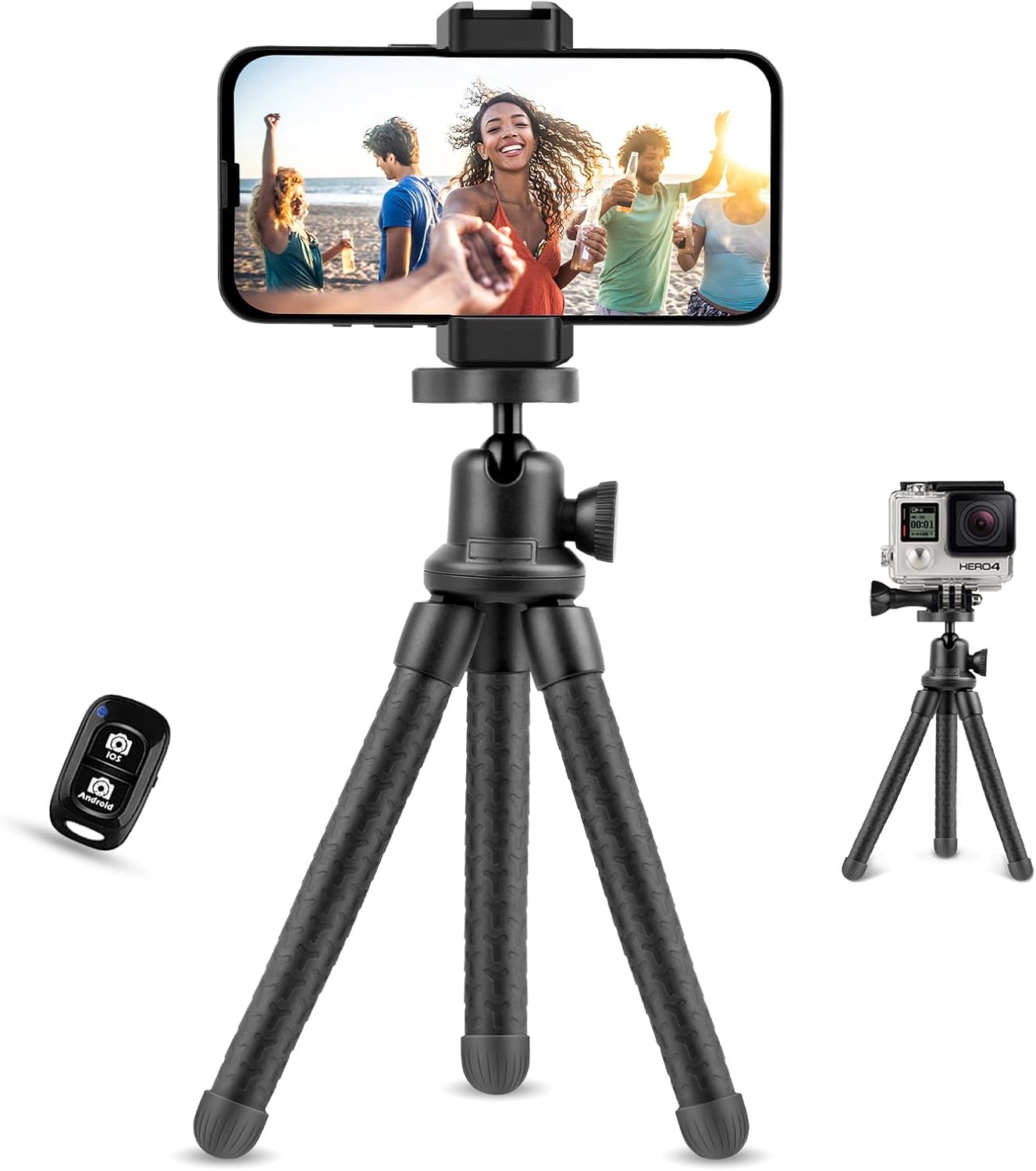
Slika 2.1: The UBeesize TBC001 Flexible Tripod, shown with a smartphone mounted and the Bluetooth remote control.

Slika 2.2: Podrobno view of the tripod's upgraded rubber components, highlighting anti-slip feet, the 360-degree panning and 90-degree tilt ball head, and the flexible, durable legs.
3. Navodila za nastavitev
3.1 Priključitev naprave
- Za pametne telefone:
a. Extend the universal phone holder to securely grip your smartphone. The holder is compatible with devices between 2.2 and 3.5 inches wide.
b. The phone holder features a cold shoe mount, allowing attachment of accessories like LED lights or microphones.
c. Screw the phone holder onto the tripod's 1/4-inch universal screw mount. - Za DSLR/brezzrcalne fotoaparate:
a. Directly screw your camera onto the tripod's 1/4-inch universal screw mount. - Za GoPro kamere:
a. Attach your GoPro to the tripod using the provided BC part (GoPro mount adapter).

Slika 3.1: The universal phone holder, showing its cold shoe mount for accessories and the waterproof design of the tripod legs.

Slika 3.2: The tripod's 1/4-inch universal screw mount and the included adapter for GoPro cameras, demonstrating its broad compatibility.
3.2 Seznanjanje daljinskega upravljalnika Bluetooth
- Ensure the Bluetooth remote has a working battery (Lithium metal battery).
- Turn on the remote by pressing the power button. An indicator light will flash.
- Na pametnem telefonu pojdite na nastavitve > Bluetooth.
- Iskanje available devices and select "UBeesize" from the list.
- Once paired, the indicator light on the remote will stop flashing. You can now use the remote to trigger your phone's camera shutter.

Slika 3.3: Visual guide for pairing the wireless Bluetooth remote with a smartphone, showing the device listed as "UBeesize" in the Bluetooth settings.
4. Navodila za uporabo
4.1 Adjusting the Tripod Legs
The flexible, high-density rubber-coated legs can be bent and wrapped around objects like poles or branches to secure your device in unique positions. They can also be splayed out for stable tabletop or ground-level shots on uneven surfaces.
4.2 Using the Ball Head
The metal ball head offers 360-degree rotation and 90-degree tilt, allowing you to achieve various shooting angles. Loosen the knob on the side of the ball head to adjust the angle, then tighten it to secure your device in place. An integrated bubble level helps ensure your shots are perfectly straight.
4.3 Using the Bluetooth Remote
After successful pairing, open your device's camera application. Press the corresponding button on the Bluetooth remote (iOS or Android) to take photos or start/stop video recording. The remote operates up to 10 meters (33 feet) away, ideal for group shots and selfies.

Slika 4.1: Examples of the tripod's versatility, including use as a tabletop stand, a handheld grip, mounted on a bicycle, and as a flexible stand for a tablet.
5. Vzdrževanje
- Čiščenje: Stojalo obrišite z mehko, suho krpo. Za trdovratno umazanijo rahlo obrišiteamp Uporabite lahko krpo. Izogibajte se agresivnim kemikalijam ali abrazivnim čistilom.
- Shranjevanje: Stojalo shranjujte na hladnem in suhem mestu, stran od neposredne sončne svetlobe in ekstremnih temperatur.
- Pregled: Periodically check all screws and joints for tightness. If any part feels loose, gently tighten it to ensure stability.
- Baterija: Replace the Bluetooth remote's lithium metal battery when its performance diminishes.
6. Odpravljanje težav
- Bluetooth Remote Not Pairing:
a. Ensure the remote is powered on and within 10 meters (33 feet) of your device.
b. Check if the remote's battery needs replacement.
c. Try unpairing and re-pairing the remote in your device's Bluetooth settings.
d. Some phone models may require a third-party camera app for full remote functionality. - Nestabilnost stativa:
a. Ensure all legs are firmly positioned on a stable surface or securely wrapped around an object.
b. Check that the ball head knob is fully tightened after adjustment.
c. Verify that your device's weight does not exceed the tripod's maximum load capacity (1 kg). - Device Not Fitting in Phone Holder:
a. Ensure your smartphone's width is within the 2.2 to 3.5 inch range.
7. Specifikacije
| Funkcija | Specifikacija |
|---|---|
| Znamka | Ubeesize |
| Model | TBC001 |
| Material | Metal and Rubber |
| barva | Črna |
| Height (Max/Min) | 30.4 cm (12 palcev) |
| Omejitev teže | 1 kilogramov |
| Tip glave stativa | 3-axis Ball Head with 360° Rotation and 90° Tilt |
| Združljivost držala za telefon | 2.2 - 3.5 inches wide smartphones |
| Nosilec kamere | 1/4-inch Universal Screw, GoPro Adapter |
| Doseg daljinskega upravljalnika Bluetooth | Do 10 metrov (33 čevljev) |
| Bluetooth Remote Battery | Kovinski litij |
8. Varnostne informacije
- Do not exceed the maximum weight limit of 1 kg to prevent damage to the tripod or your device.
- Ensure the tripod is stable before attaching your device.
- Keep the tripod and its small parts away from children to prevent choking hazards.
- Avoid exposing the tripod to extreme heat or cold, which can affect material durability.
- Do not use the tripod in strong winds or unstable conditions where it might tip over.
9. Garancija in podpora
For warranty information and customer support, please refer to the product packaging or contact UBeesize customer service directly through their official website or the retailer where the product was purchased. Specific warranty details may vary by region and purchase date.