
1. Izdelek je končanview
The Schneider SC600SND is a versatile 2.0 channel soundbar designed to enhance your audio experience. It offers a total output power of 30W (15W x 2) and supports multiple connectivity options including Bluetooth, HDMI (ARC), Optical, and Aux. A unique feature of this soundbar is its convertible design, allowing it to be used as a single horizontal unit or split into two vertical speaker columns.

Image 1.1: The Schneider SC600SND Soundbar in its standard monoblock configuration.
2. Nastavitev
2.1 Razpakiranje in namestitev
Carefully remove all components from the packaging. Ensure you have the soundbar unit, remote control, and 3.5mm Jack cable.
The SC600SND soundbar offers two primary placement options:
- Monoblock Configuration: Use the soundbar as a single horizontal unit, ideal for placing below your television.
- Split Column Configuration: The soundbar can be separated into two vertical speaker columns. This allows for flexible placement on either side of your television or entertainment unit. To split, gently twist and pull the two halves apart at the central connection point. Attach the provided bases to each column for stability.

Image 2.1: Detail of the central connection point, allowing the soundbar to be split into two columns.
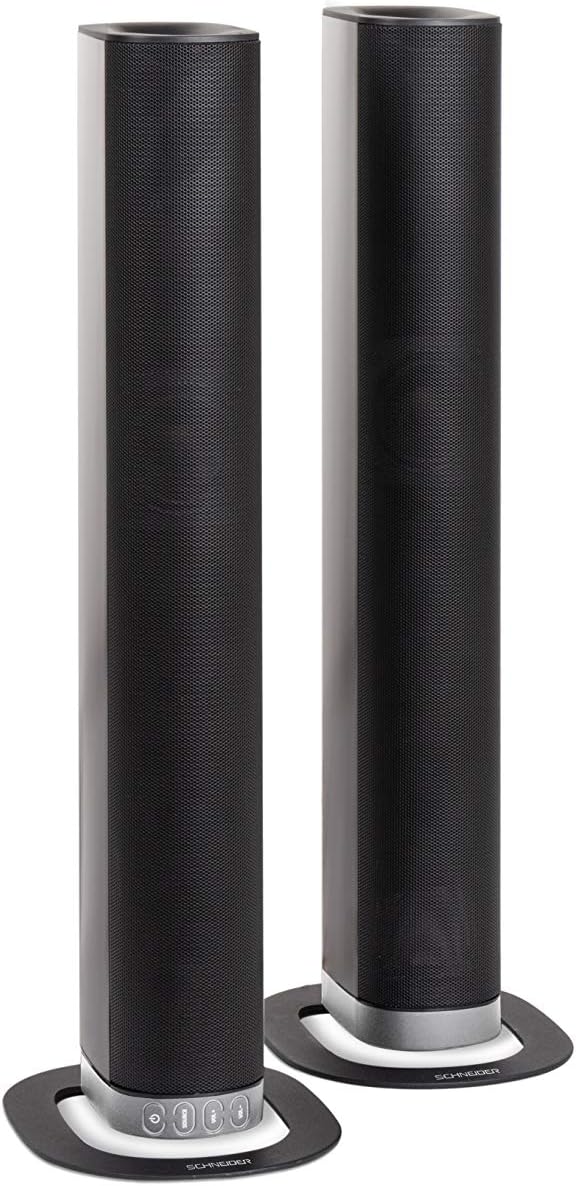
Image 2.2: The soundbar configured as two independent vertical speaker columns.
2.2 Priključitev na napajanje
Connect the power cable to the soundbar's power input and then to a suitable wall outlet. The soundbar will enter standby mode.
2.3 Zvočne povezave
Za povezavo zvočnega vira izberite enega od naslednjih načinov:
- HDMI (ARC): For optimal audio quality and control, connect an HDMI cable from the soundbar's HDMI ARC port to your TV's HDMI ARC port. This allows your TV remote to control the soundbar's volume.
- Optični: Connect an optical cable from the soundbar's OPTICAL input to your TV's optical output.
- AUX: Use the included 3.5mm Jack cable to connect the soundbar's AUX input to the headphone jack or audio output of your device (e.g., TV, smartphone, MP3 player).
- Bluetooth: For wireless connection, refer to the Bluetooth pairing instructions in the Operating section.
3. Navodila za uporabo
3.1 Vklop/izklop
Pritisnite Moč gumb na zvočniški letvi ali daljinskem upravljalniku, da vklopite ali izklopite enoto.
3.2 Izbira vira
Pritisnite VIR button on the soundbar or the remote control to cycle through the available input sources: Bluetooth (BT), HDMI (ARC), Optical, and AUX.

Image 3.1: On-unit control buttons for power, source selection, and volume adjustment.
3.3 Nadzor glasnosti
Uporabite GLASNOST+ in ZV.- buttons on the soundbar or remote control to adjust the volume. Press the MUTE gumb na daljinskem upravljalniku, da začasno utišate zvok.
3.4 Bluetooth seznanjanje
- Select Bluetooth as the source input. The soundbar will enter pairing mode, indicated by a flashing LED.
- Na mobilni napravi (pametnem telefonu, tabličnem računalniku itd.) omogočite Bluetooth in poiščite razpoložljive naprave.
- Select "SC600SND" from the list of devices.
- Once paired, the LED indicator on the soundbar will stop flashing and remain solid. You can now play audio wirelessly from your device.
3.5 zvočni načini
The remote control includes dedicated buttons for different sound modes to optimize your listening experience:
- NOVICE: Izboljša jasnost vokala pri novicah in dialogih.
- FILM: Zagotavlja bolj poglobljene zvoketage za filme.
- GLASBA: Optimizira zvok za predvajanje glasbe.

Image 3.2: The included remote control with dedicated buttons for power, source, volume, mute, and sound modes.
4. Vzdrževanje
Za zagotovitev dolge življenjske dobe in optimalne zmogljivosti vašega zvočnika upoštevajte ta navodila za vzdrževanje:
- Čiščenje: Use a soft, dry cloth to clean the exterior surfaces of the soundbar. Do not use liquid cleaners, aerosols, or abrasive materials, as these can damage the finish or internal components.
- Prezračevanje: Ensure that the soundbar's ventilation openings are not blocked. Proper airflow prevents overheating.
- Shranjevanje: If storing the soundbar for an extended period, disconnect it from power and store it in a cool, dry place, away from direct sunlight and extreme temperatures.
- Ravnanje: Zvočne letve ne smete spustiti ali izpostavljati močnim udarcem.
5. Odpravljanje težav
If you encounter issues with your SC600SND soundbar, refer to the following common problems and solutions:
- Brez napajanja:
- Prepričajte se, da je napajalni kabel varno priključen tako na zvočniško letev kot na delujočo električno vtičnico.
- Preverite, ali vtičnica deluje, tako da vanjo priključite drugo napravo.
- Ni zvoka:
- Verify that the correct input source (HDMI, Optical, AUX, Bluetooth) is selected on the soundbar.
- Increase the volume on both the soundbar and your connected audio source (e.g., TV, smartphone).
- Prepričajte se, da zvočna vrstica ni utišana.
- Check all audio cables for secure connections and damage. Try a different cable if possible.
- If using HDMI ARC, ensure your TV's HDMI ARC function is enabled in its settings.
- Poor Sound Quality / Distorted Audio:
- Adjust the volume levels to avoid distortion.
- Try switching between the different sound modes (NEWS, MOVIE, MUSIC) to see if one improves the audio for your content.
- Ensure the soundbar is placed on a stable surface and not vibrating excessively.
- If using Bluetooth, ensure your device is within range and there are no obstructions causing interference.
- Težave s povezovanjem Bluetooth:
- Prepričajte se, da je zvočna vrstica v načinu seznanjanja Bluetooth (utripa LED).
- Make sure your device's Bluetooth is enabled and it is searching for new devices.
- Napravo premaknite bližje zvočniški vrstici.
- Če je bila naprava že seznanjena, poskusite prekiniti seznanitev in jo znova seznaniti.
- Daljinski upravljalnik ne deluje:
- Preverite in zamenjajte baterije v daljinskem upravljalniku.
- Prepričajte se, da med daljinskim upravljalnikom in senzorjem zvočne letve ni ovir.
- Daljinski upravljalnik usmerite neposredno v zvočno vrstico.
6. Specifikacije
| Funkcija | Specifikacija |
|---|---|
| Številka modela | SC600SND |
| Kanali | 2.0 |
| Izhodna moč | 30 W (15 W x 2) |
| Tehnologija povezljivosti | Bluetooth, HDMI (ARC), Optical, Aux |
| Brezžična komunikacija | Bluetooth |
| Nadzorna metoda | Daljinski upravljalnik |
| Vrsta zvočnika | Soundbar |
| Velikost zvočnika | 2 palcev |
| Vir napajanja | Električni kabel |
| Product Dimensions (Monoblock) | 80.5 x 6.2 x 9 cm |
| Teža izdelka | 2.5 kilogramov |
| Vključene komponente | Remote Control, 3.5mm Jack Cable |
| barva | Črna |
7. Garancija in podpora
7.1 Omejena garancija
This Schneider SC600SND Soundbar is covered by a Limited Warranty. Please refer to the warranty card included with your product or contact your retailer for specific terms and conditions regarding warranty coverage and duration.
7.2 Podpora strankam
For technical assistance, troubleshooting beyond this manual, or warranty claims, please contact the retailer where you purchased the product or visit the official Schneider webspletno mesto za informacije o podpori.