
Uvod
This manual provides instructions for the Ematic NSWC012W Wired Controller. This controller is designed for use with Nintendo Switch and PC devices, offering an ergonomic design, responsive controls, rumble feedback, and a 7.2-foot USB cable for a reliable gaming experience.
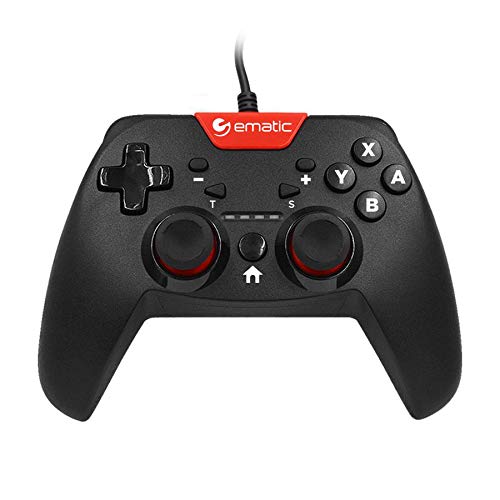
Image: Two individuals are shown holding Ematic wired controllers, actively engaged in a video game displayed on a television. The controllers are black with red accents, featuring joysticks and face buttons.
Vsebina paketa
- Ematic NSWC012W Wired Controller
- Navodila za uporabo (ta dokument)
Nastavitev
Povezovanje z Nintendo Switch
- Ensure your Nintendo Switch console is powered on and docked.
- Plug the USB connector of the Ematic NSWC012W controller into an available USB port on the Nintendo Switch dock.
- The controller should be automatically recognized by the console. You may need to navigate to the 'Controllers' menu on your Switch to confirm connection.
- Krmilnik je zdaj pripravljen za uporabo.
Povezovanje z računalnikom (Windows)
- Prepričajte se, da je vaš računalnik vklopljen.
- Plug the USB connector of the Ematic NSWC012W controller into an available USB port on your computer.
- The operating system will typically install the necessary drivers automatically. This process may take a few moments.
- Once drivers are installed, the controller will be recognized as a standard game controller. You can verify its functionality in your PC's device settings or within compatible games.
Navodila za uporabo
Razporeditev in funkcije krmilnika
The Ematic NSWC012W controller features a standard button layout for intuitive gameplay.
- Analogne palice: Dve klikabilni analogni palici za natančno gibanje in upravljanje kamere.
- Smerna ploščica (D-Pad): Za usmerjeni vnos v igrah.
- Gumbi na obrazu (A, B, X, Y): Akcijski gumbi za ukaze v igri.
- Ramenski gumbi (L, R): Zgoraj nameščeni gumbi.
- Trigger Buttons (ZL, ZR): Bottom-mounted triggers.
- Gumb HOME: Returns to the console's home screen (Nintendo Switch).
- PLUS (+) / MINUS (-) Buttons: For in-game menu navigation and options.
- Gumb za posnetek zaslona: Captures screenshots during gameplay (Nintendo Switch).
- Gumb TURBO: Activates turbo function for assigned buttons.
Using TURBO Mode
- Pritisnite in držite TURBO gumb.
- Med držanjem TURBO, press the desired action button (e.g., A, B, X, Y, L, R, ZL, ZR) you wish to assign the turbo function to.
- Release both buttons. The assigned button will now rapidly repeat its input when held down.
- To disable TURBO mode for a specific button, repeat steps 1 and 2.
Funkcija zaslona
Pritisnite Gumb za posnetek zaslona during gameplay on Nintendo Switch to capture an image of your screen. The captured image will be saved to your console's album.
Vzdrževanje
- Krmilnik vzdržujte čist tako, da ga obrišete z mehko, suho krpo.
- Izogibajte se izpostavljanju krmilnika ekstremnim temperaturam, vlagi ali neposredni sončni svetlobi.
- Na krmilniku ne uporabljajte abrazivnih čistil ali topil.
- Ko krmilnika ne uporabljate, ga shranite na varno mesto, da preprečite poškodbe kabla ali gumbov.
- Ne poskušajte razstaviti krmilnika, saj boste s tem razveljavili garancijo.
Odpravljanje težav
Krmilnik se ne odziva
- Preverite kabelsko povezavo: Prepričajte se, da je kabel USB varno priključen tako v krmilnik kot v konzolo/računalnik.
- Poskusite z drugim USB-vhodom: Connect the controller to another USB port on your console or PC.
- Znova zaženite napravo: Restart your Nintendo Switch or PC and try connecting the controller again.
- PC Driver Check: On PC, verify that the controller drivers are installed correctly in Device Manager.
Buttons or Joysticks Not Working Correctly
- Čisti krmilnik: Prepričajte se, da okoli gumbov ali igralnih palic ni umazanije.
- Test in Another Game/Application: Determine if the issue is specific to one game or widespread.
- Recalibrate (PC): On PC, you may be able to recalibrate the controller through Windows Game Controller settings.
Specifikacije
| Številka modela | NSWC012W |
| Znamka | Ematic |
| Združljive naprave | Nintendo Switch, PC, Windows |
| Tehnologija povezljivosti | USB |
| Dolžina kabla | 7.2 čevljev (približno 2.2 metre) |
| Dodatne funkcije | Ergonomic design, Rumble feedback, TURBO button, Screenshot button |
| Količina gumbov | 10 (excluding D-Pad and analog stick clicks) |
| Vir napajanja | Električni z žico (prek USB-ja) |
| UPC | 815592024156 |
Informacije o garanciji
This Ematic product is covered by a STANDARD 90 DAYS warranty from the date of purchase. This warranty covers manufacturing defects under normal use. It does not cover damage caused by misuse, accidents, unauthorized modifications, or normal wear and tear. Please retain your proof of purchase for warranty claims.
Podpora
For further assistance, technical support, or warranty inquiries, please refer to the official Ematic webspletno mesto ali se obrnite na njihovo službo za pomoč strankam. Kontaktne podatke običajno najdete na embalaži izdelka ali na uradni spletni strani proizvajalca webmesto.
Opomba: Specifikacije in lastnosti izdelka se lahko spremenijo brez predhodnega obvestila.