
1. Uvod
Hvala za nakupasing the VIVIBRIGHT GP100UP LED Projector. This manual provides essential information for the safe and efficient operation of your device. Please read it thoroughly before use and retain it for future reference.
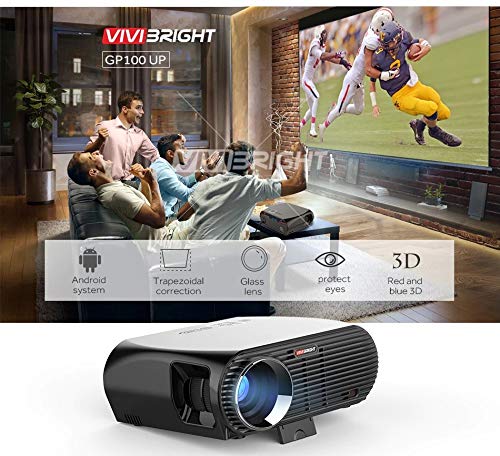
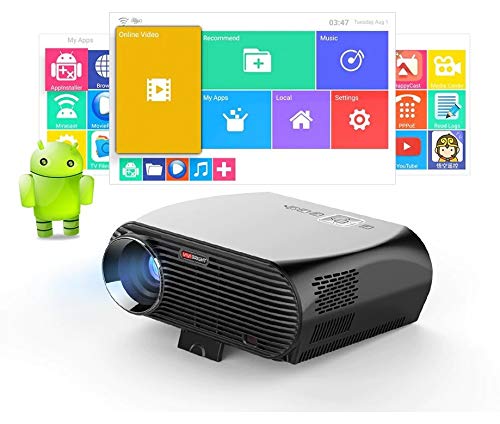
The VIVIBRIGHT GP100UP is an Android 6.0-based LED projector featuring built-in Wi-Fi and Bluetooth, designed for home theater and office presentations. It supports Full HD content and offers a bright projection experience.
2. Varnostne informacije
- Napajanje: Uporabljajte samo navedeni napajalnik. Prepričajte se, da je glasnosttage ustreza vašemu lokalnemu napajalniku.
- Prezračevanje: Ne blokirajte prezračevalnih odprtin. Zagotovite zadosten pretok zraka okoli projektorja, da preprečite pregrevanje.
- Izpostavljenost tekočini: Projektor hranite stran od vode ali drugih tekočin. Ne uporabljajte ga vamp okoljih.
- Čiščenje: Disconnect power before cleaning. Use a soft, dry cloth. Avoid liquid or aerosol cleaners.
- Vstavljanje predmeta: Never insert objects of any kind into the projector openings as they may touch dangerous voltage točke ali deli kratkega stika.
- Servisiranje: Tega izdelka ne poskušajte servisirati sami. Vsa servisna dela prepustite usposobljenemu servisnemu osebju.
- Zaščita oči: Ne glejte neposredno v lečo projektorja, ko jeamp je vklopljena. Svetla svetloba lahko povzroči poškodbe oči.
3. Vsebina paketa
Preverite, ali so v vašem paketu priloženi vsi spodaj navedeni elementi:
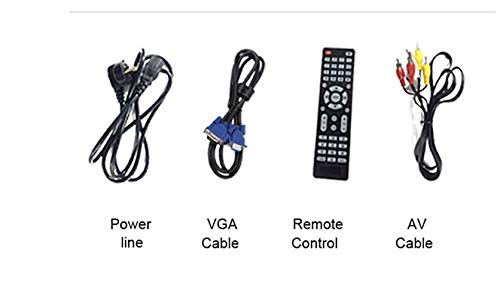
- VIVIBRIGHT GP100UP Projector
- Napajalni kabel
- VGA kabel
- AV Cable
- Daljinski upravljalnik
- Uporabniški priročnik (ta dokument)
Slika 3.1: Included accessories with the VIVIBRIGHT GP100UP projector, including power cable, VGA cable, remote control, and AV cable.
4. Izdelek je končanview
4.1. Projector Dimensions
Slika 4.1: Spredaj in zgoraj view of the VIVIBRIGHT GP100UP projector with approximate dimensions: 11 inches (length), 8.85 inches (width), and 4 inches (height).
4.2. Vhodno/izhodna vrata
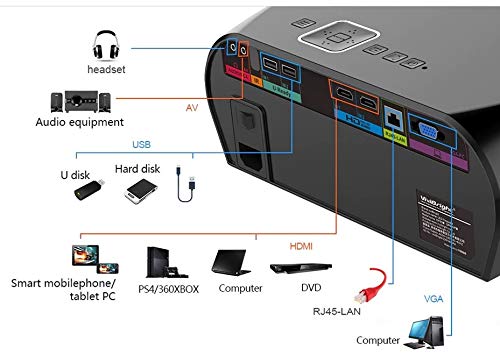
The projector features various ports for connecting external devices:
Slika 4.2: Detailed diagram of the projector's rear panel, illustrating connectivity options including headset, audio equipment (AV), USB ports for U disk and hard disk, HDMI ports, RJ45-LAN, and VGA port.
- HDMI: Connect to Blu-ray players, gaming consoles, laptops, or other HDMI-enabled devices.
- USB: For connecting USB drives (U disk) or external hard drives.
- OD: Za priključitev starejših naprav, ki uporabljajo kompozitni video in stereo zvok.
- VGA: For connecting to computers or laptops with a VGA output.
- RJ45-LAN: Za žično omrežno povezavo.
- Priključek za slušalke: Za priklop zunanjih slušalk ali zvočnikov.
4.3. Daljinski upravljalnik
Priloženi daljinski upravljalnik omogoča priročno upravljanje projektorja.
Slika 4.3: Remote control layout with key functions: ON/OFF, Volume Up/Down, OK, Menu, Home, Speed, Mute, Back, Mouse Mode, and the USB receiver.
- VKLOP/IZKLOP: Power on or off the projector.
- Glasnost +/-: Prilagodite glasnost zvoka.
- V REDU: Potrdite izbiro.
- meni: Dostop do nastavitev projektorja.
- Domov: Return to the main Android interface.
- Nazaj: Vrnite se na prejšnji zaslon.
- Način miške: Activate/deactivate air mouse function (if applicable).
- Mute: Izklopite ali vklopite zvok.
5. Nastavitev
5.1. Umestitev
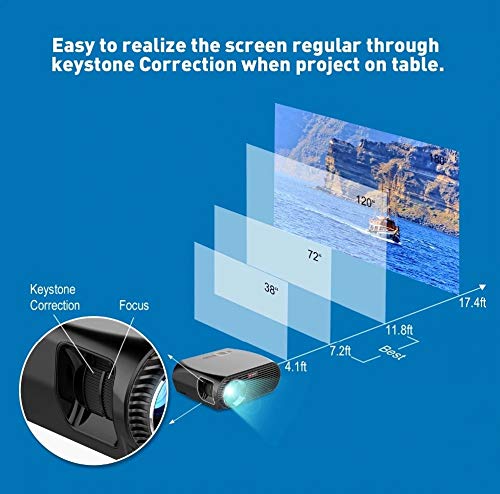
Place the projector on a stable, flat surface or mount it to the ceiling. Ensure there are no obstructions to the lens or ventilation ports. The optimal projection distance for a clear image is between 1 to 5 meters.
Slika 5.1: Illustration of projection distances and corresponding screen sizes, along with the location of the keystone correction and focus rings on the projector.
- For a 72-inch screen, the recommended distance is approximately 7.2 feet (2.2 meters).
- For a 120-inch screen, the recommended distance is approximately 11.8 feet (3.6 meters).
5.2. Napajalni priključek
- Priključite napajalni kabel na vhod za napajanje projektorja.
- Drugi konec napajalnega kabla priključite v ustrezno električno vtičnico.
- Lučka indikatorja napajanja na projektorju bi morala zasvetiti.
5.3. Ostrenje in korekcija trapezne slike
After powering on, adjust the image for clarity and proper geometry.
- Fokus: Rotate the focus ring near the lens until the projected image is sharp and clear.
- Trapezni popravek: If the projected image appears trapezoidal (wider at the top or bottom), use the keystone correction ring or lever (usually located near the focus ring) to adjust the image until it is rectangular. The GP100UP supports +/- 15 degrees vertical keystone correction.
6. Navodila za uporabo
6.1. Initial Power On and Android Interface
Press the power button on the projector or remote control to turn on the device. The projector will boot into its Android 6.0 operating system interface.
Slika 6.1: The VIVIBRIGHT GP100UP projector in operation, highlighting its Android system capabilities and other features.
Navigate the Android interface using the remote control. You can access pre-installed applications, settings, and media files.
6.2. Priključitev zunanjih naprav
To project content from external sources:
- Connect your device (e.g., laptop, gaming console, USB drive) to the appropriate port on the projector (HDMI, USB, AV, VGA).
- On the projector's Android interface, navigate to the "Input Source" or "Source" option.
- Select the corresponding input source (e.g., HDMI1, USB, AV, VGA) to display content from your connected device.
6.3. Wireless Connectivity (Wi-Fi, Bluetooth, Screen Mirroring)
The GP100UP supports various wireless functions:
- Wi-Fi:
- Go to "Settings" on the Android interface.
- Izberite »Wi-Fi« in ga vklopite.
- Choose your desired network and enter the password to connect.
- Bluetooth:
- Go to "Settings" on the Android interface.
- Izberite »Bluetooth« in ga vklopite.
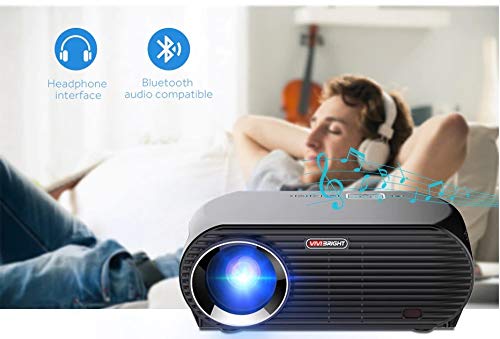
- Pair with Bluetooth audio devices like headphones or speakers.
Slika 6.2: The projector's Bluetooth audio compatibility, allowing connection to wireless headphones or speakers.
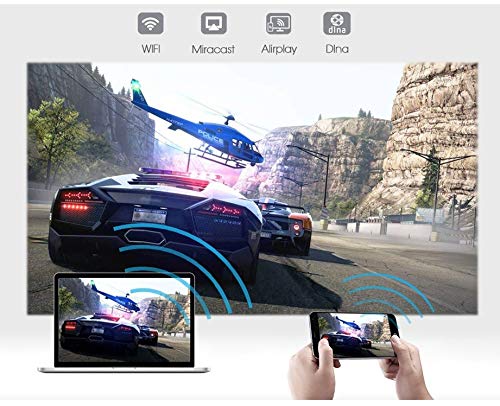
- Screen Mirroring (Miracast/Airplay/DLNA):
The projector supports mirroring content from compatible smartphones, tablets, and laptops via Wi-Fi, Miracast, Airplay, and DLNA.
- Prepričajte se, da sta vaša naprava in projektor povezana z istim omrežjem Wi-Fi.
- On the projector's Android interface, open the relevant screen mirroring application (e.g., Miracast, Airplay, DLNA).
- On your smartphone/tablet/laptop, activate its screen mirroring function (e.g., "Screen Mirroring," "Smart View," "Cast," "AirPlay").
- Select the projector from the list of available devices to begin mirroring.

Slika 6.3: Wireless screen mirroring capabilities, enabling content from mobile devices and laptops to be displayed on the projector.
7. Vzdrževanje
7.1. Čiščenje leče
Use a soft, lint-free cloth specifically designed for optical lenses. Gently wipe the lens to remove dust or smudges. Avoid using abrasive materials or harsh chemicals.
7.2. Čiščenje projektorja Casing
Zunanjost projektorja obrišite z mehko, suho krpo. Za trdovratne madeže rahlo obrišiteamp cloth can be used, followed by a dry cloth. Ensure no liquid enters the ventilation openings.
7.3. Air Filter (if applicable)
While LED projectors typically have sealed optical engines, regularly check ventilation openings for dust accumulation. Use a soft brush or compressed air to clear any blockages.
8. Odpravljanje težav
| Težava | Možen vzrok | rešitev |
|---|---|---|
| Nobena slika ni prikazana |
|
|
| Slika je zamegljena |
|
|
| Slika je trapezoidna |
|
|
| Brez zvoka |
|
|
| Težave s povezavo Wi-Fi/Bluetooth |
|
|
9. Specifikacije
| Funkcija | Podrobnost |
|---|---|
| Številka modela | GP100UP |
| Tehnologija zaslona | LCD |
| Izvorna ločljivost | 1280x800dpi (WXGA) |
| Svetlost | 3500 lumnov |
| Kontrastno razmerje | 1000:1-2000:1 |
| Vir svetlobe | LED |
| Življenje svetlobnega vira | Not specified (typically 20,000+ hours for LED) |
| Projekcijska razdalja | 1-5m |
| Projicirana dimenzija | 40-300 inches (Best image size: 72-120 inches) |
| Zaslonska lestvica | 4:3/16:9 |
| Popravek Keystone | Manual Correction, +/- 15 degrees (vertical) |
| Sistem | Android 6.0.1, CPU: Quad core ARM Cortex-A53 |
| Pomnilnik (RAM/ROM) | RAM: 1G / ROM: 8G |
| Brezžična povezljivost | Wi-Fi, Bluetooth, DLNA, Miracast, Airplay |
| Vhodna vrata | HDMI, USB, AV, VGA, RJ45-LAN |
| Napajalnik | AC 90-240V, 50/60Hz |
| Poraba energije | 140 W |
| Mere (pribl.) | 37 x 30.5 x 15.9 cm |
| Teža (pribl.) | 2.6 kg |
| 3D funkcija | Red-blue 3D |
10. Garancija in podpora
The VIVIBRIGHT GP100UP Projector comes with a 1-letna garancija od datuma nakupa. Ta garancija krije proizvodne napake pri normalni uporabi.
For technical support, warranty claims, or service inquiries, please contact your retailer or the official VIVIBRIGHT customer service channel. Please have your product model number (GP100UP) and proof of purchase ready when contacting support.