
SUUNTO Eon Core
SUUNTO Eon Core Wrist Dive Computer User Manual
Model: Eon Core
Znamka: SUUNTO
1. Uvod
The SUUNTO Eon Core is a compact and versatile wrist dive computer designed for divers of all experience levels. It provides essential dive information through a clear color display with large, prominent digits and an intuitive menu system. This manual provides detailed instructions for setting up, operating, maintaining, and troubleshooting your Eon Core dive computer.
2. Kaj je v škatli
- SUUNTO Eon Core Wrist Dive Computer
- SUUNTO Tank POD Multi Transmitter
- Kabel za polnjenje/prenos podatkov USB
- Elastomer Strap (pre-installed or included)
- Quick Guide and Safety Leaflet
3. Ključne značilnosti
- Clear color display with large, prominent digits and intuitive menu logic.
- Rechargeable lithium-ion battery providing 10 to 20 hours of dive time on a full charge.
- Multiple dive modes: Gauge, Air, Nitrox, Trimix, and CCR (fixed point).
- Wireless tank pressure monitoring for up to 10 divers when paired with a transducer.
- On-board digital 3D tilt-compensated compass (up to 45 degrees).
- Customizable display layouts and dive details.
- Updatable software for future enhancements.
- Bluetooth compatible for wireless connectivity with mobile devices and the Suunto Movescount App.
- 200-hour logbook memory.
- Multiple audio and visual warnings.
4. Nastavitev
4.1 Začetno polnjenje
Before first use, fully charge your SUUNTO Eon Core using the provided USB cable. Connect the USB cable to the charging port on the dive computer and to a USB power source. The battery icon on the display will indicate charging status. A full charge typically provides 10 to 20 hours of dive time.
4.2 Vklop/izklop
To power on, press and hold any button until the display activates. To power off, navigate to the main menu, select 'Power Off', and confirm.
4.3 Nastavitev traku
The Eon Core comes with a durable elastomer strap designed for comfort on various wrist sizes. Adjust the strap to ensure a snug fit that is comfortable but not overly tight, allowing for wetsuit compression if applicable.
4.4 Tank POD Pairing
The SUUNTO Tank POD allows for wireless tank pressure monitoring. To pair the Tank POD with your Eon Core:
- Ensure your Eon Core is powered on and in pairing mode (refer to the device menu for 'Pairing' or 'Sensors').
- Attach the Tank POD to your regulator's high-pressure port and pressurize the system.
- Hold your Eon Core close to the Tank POD. The computer will display an easy guide menu showing the Tank POD serial number, battery status, and tank pressure.
- Confirm the pairing on your Eon Core. A green blinking light on the Tank POD will illuminate when successfully paired and transmitting.
The Tank POD can transmit up to 6 feet (1.8m) and supports multi-tank diving by connecting to up to 10 different transmitters.
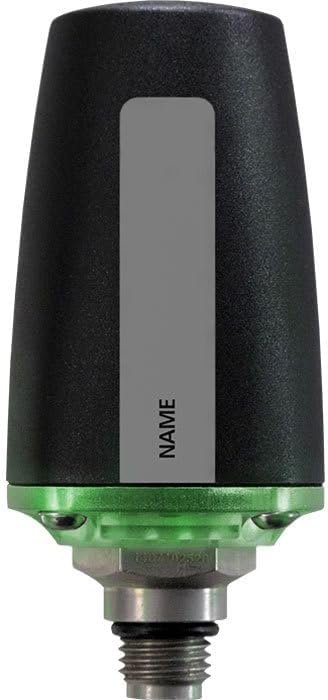
Figure 4.4.1: SUUNTO Tank POD Multi Transmitter for wireless tank pressure monitoring.
4.5 Posodobitve programske opreme
The Eon Core features upgradable software. To update the software and transfer dive logs, connect your Eon Core to a computer via the USB cable and use the Suunto DM5 software. Download Suunto DM5 from www.suunto.com/dm5. This software is compatible with both PC and Mac.
5. Delovanje
5.1 Navigacija po zaslonu
The Eon Core features an intuitive menu system navigated by large buttons, operable even with gloves. The clear color display presents important diving details with large numbers and high-contrast colors for readability in various conditions.

Figure 5.1.1: SUUNTO Eon Core display showing depth, dive time, and tank pressure.
5.2 Načini potapljanja
The Eon Core supports several dive modes:
- Način merilnika: For divers who prefer to monitor depth and time without decompression calculations.
- Zračni način: For standard air diving.
- Nitrox način: For diving with enriched air nitrox.
- Trimix Mode: For advanced technical diving with helium-based gas mixtures.
- CCR (Fixed Point) Mode: For closed-circuit rebreather diving with a fixed partial pressure of oxygen.
You can switch between these modes via the main menu. The computer uses the Suunto Fused RGBM algorithm for decompression calculations.
5.3 Customizing the Display
The Suunto Custom-Display feature allows you to personalize your Eon Core. Choose from different view styles and select the specific dive details you wish to see on your screen, optimizing it for your preferences and diving needs.
5.4 Digitalni kompas
The integrated digital tilt-compensated 3D compass provides accurate directional information, even when the computer is not held perfectly level. This feature is useful for underwater navigation.
5.5 Opozorila
The Eon Core is equipped with multiple audio and visual warnings to alert you to important dive parameters, such as ascent rate, decompression limits, and low battery. Pay close attention to these warnings for safe diving.
5.6 Dnevnik
The computer has a 200-hour logbook memory, automatically recording your dive profiles. You can transfer your dives to the Suunto Movescount App via Bluetooth for detailed analysis and sharing.
Video 5.6.1: Konecview of the Suunto Eon Core dive computer, highlighting its features and ease of use for divers.
Video 5.6.2: A detailed look at the Suunto Eon Core Wrist Computer, showcasing its display, functionality, and benefits for divers.
6. Vzdrževanje
6.1 Skrb za baterije
The Eon Core is powered by a rechargeable lithium-ion battery. Charge the device regularly, especially before dive trips. Avoid completely draining the battery to prolong its lifespan. If the battery level drops to 2 hours of dive time, the computer will indicate a recharge is required and may lock out diving functions until recharged.
6.2 Posodobitve programske opreme
Periodically check for and install software updates via the Suunto DM5 software. Updates can introduce new features, improve performance, and address potential issues.
6.3 Tank POD Battery
The Suunto Tank POD uses a user-replaceable AA 3V lithium battery. Refer to the Tank POD's user guide for instructions on how to replace the battery.
6.4 Čiščenje
After each dive, rinse your Eon Core and Tank POD thoroughly with fresh water. Allow them to air dry completely before storage. Avoid using harsh chemicals or abrasive materials for cleaning.
7. Odpravljanje težav
7.1 Težave z berljivostjo prikaza
In bright sunlight or murky waters, the display may be challenging to read. Adjust the display brightness settings if available, or try to shade the screen with your hand for better visibility. The high-contrast colors are designed to assist in these conditions.
7.2 Battery Life and Lockout
The Eon Core's battery life is rated for 10-20 hours of dive time. If the battery level is critically low (e.g., 2 hours remaining), the computer may enter a lockout state for 48 hours to prevent unsafe diving. Ensure the computer is fully charged before diving. This lockout also applies to missed decompression stops.
7.3 Tank POD Pairing Issues
If the Tank POD fails to connect via Bluetooth, try the following:
- Ensure the Tank POD is correctly attached to the regulator and the tank is pressurized.
- Bring the Eon Core very close to the Tank POD during the pairing process.
- Try purging some air from the regulator a couple of times to re-establish communication.
- Check the Tank POD battery status.
7.4 Splošne okvare
If you experience any other issues, consult the full user manual available on the Suunto website or contact Suunto customer support for assistance.
8. Specifikacije
| Specifikacija | Vrednost |
|---|---|
| Znamka | SUUNTO |
| Material | Plastika |
| Dimenzije artikla D x Š x V | 7 x 4 x 4 palcev |
| Teža predmeta | 1.1 Pounds (154g for computer only) |
| UPC | 647732658972 |
| Proizvajalec | Suunto USA, Inc. |
| Vključene komponente | Scuba Computer |
| Število enot | 1.0 štetje |
| ASIN | B077SJCBRM |
| Vodoodpornost | 262' (80 m) |
| Zaslon | Barvni TFT |
| Material leč | Mineral Crystal Glass |
| Bezel/Case Material | Sestavljeno |
| Altitude Adjustable | 1,000' to 10,000' (300 to 3,000m) |
| Jeziki | 17 jezikov |
9. Garancija in podpora
For warranty information, detailed user manuals, and customer support, please visit the official SUUNTO website. Regular software updates and product registration are recommended to ensure you have the latest features and support.
10. Pomembne varnostne informacije
Always read and understand the full user manual and safety instructions before using your SUUNTO Eon Core dive computer. Diving carries inherent risks, and proper training and adherence to safe diving practices are essential. Never rely solely on a single instrument for critical dive information. Always dive within your training and experience limits.
Ask a question about this manual
Ask about setup, troubleshooting, compatibility, parts, safety, or missing instructions. Manuals+ will review the question and use this page’s manual context to help answer it.