
Uvod
This manual provides detailed instructions for the operation and maintenance of your BOOMBOOST DAB-P7 Professional DAB FM Digital Radio. Please read this manual thoroughly before using the device to ensure proper function and to maximize your listening experience. Keep this manual for future reference.
Konec izdelkaview
The BOOMBOOST DAB-P7 is a compact, portable digital radio offering DAB/DAB+ and FM reception, Bluetooth connectivity, and an MP3 player function via TF card. It features a 1.8-inch LCD screen for easy navigation and a built-in rechargeable battery for on-the-go use.
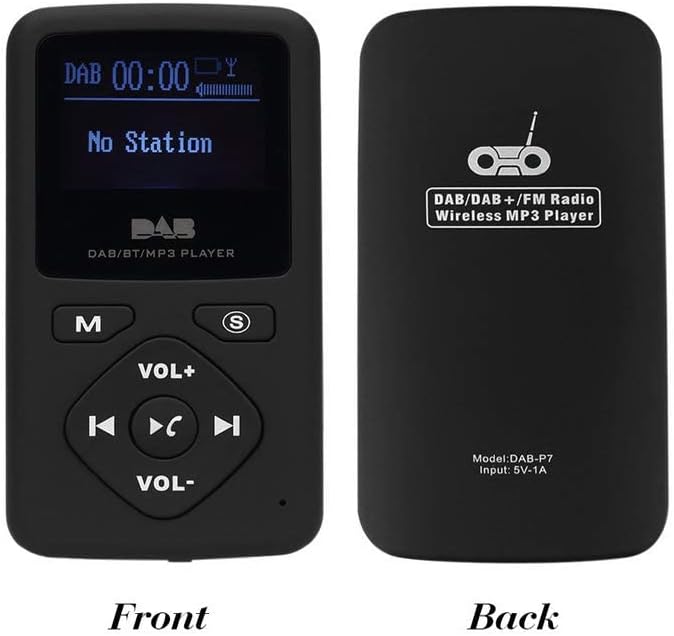
Slika: Spredaj in zadaj view of the BOOMBOOST DAB-P7 radio. The front shows the LCD screen, 'M' (Mode) button, 'S' (Scan/Select) button, 'VOL+' and 'VOL-' buttons, and navigation/playback controls. The back displays "DAB/DAB+/FM Radio Wireless MP3 Player" and "Model: DAB-P7 Input: 5V-1A".

Slika: The BOOMBOOST DAB-P7 radio shown with its included white wired earphones, highlighting its portable design.
Ključne značilnosti
- DAB/DAB+ digitalni radio: Enjoy high-quality digital audio broadcasting.
- FM stereo radio: Access traditional FM radio stations (87.5 - 108 MHz).
- Predvajalnik Bluetooth: Connect wirelessly to your mobile phone for audio playback and hands-free calls.
- MP3 Player (TF Card): Predvajajte glasbo MP3 files directly from a TF card (up to 32GB, card not included).
- 1.8-palčni LCD zaslon: Clear screen for station information, time, and menu navigation.
- Akumulatorska baterija: Integrated 700mAh Li-polymer battery provides approximately 5 hours of playback.
- USB polnjenje: Convenient charging via USB port.
- Automatic Clock Setting: Clock automatically sets from DAB information.
Nastavitev
1. Polnjenje baterije
Before first use, fully charge the device. Connect the supplied USB cable to the radio's USB charging port and the other end to a USB power adapter (not included) or a computer's USB port. The charging indicator will illuminate. Charging typically takes a few hours. A full charge provides approximately 5 hours of operation.
2. Vklop/izklop
Za vklop naprave pritisnite in držite 'M' (Mode) button for a few seconds until the LCD screen illuminates. To power off, press and hold the M gumb, dokler se zaslon ne izklopi.
3. Initial DAB/FM Scan
Upon first power-on in DAB mode, the radio will automatically perform a full scan for available DAB stations. This may take a few minutes. Once complete, the first available station will begin playing. For FM mode, you may need to initiate a scan manually (see Operating Instructions).

Slika: The radio's LCD screen showing "No Station" during or after a scan if no stations are found, or before a scan is initiated.
Navodila za uporabo
1. Izbira načina
Pritisnite 'M' (Mode) button briefly to cycle through the available modes: DAB Radio, FM Radio, Bluetooth, and MP3 Player (if a TF card is inserted).
2. Način DAB radia
- Izbira postaje: Uporabite Prejšnja skladba (puščica levo) in Naslednja skladba (puščica desno) buttons to navigate through the list of available DAB stations.
- Celotno skeniranje: To perform a full scan for DAB stations, press and hold the 'S' (Scan/Select) button. The radio will scan and update the station list.
- Prikaz informacij: Na kratko pritisnite S button to cycle through different information displays (e.g., program type, signal strength, time, date).
3. Način radia FM
- Samodejno skeniranje: V načinu FM pritisnite in držite 'S' (Scan/Select) button to automatically scan for and save available FM stations.
- Ročna nastavitev: Na kratko pritisnite Prejšnja skladba (puščica levo) oz Naslednja skladba (puščica desno) buttons to fine-tune the frequency.
- Prednastavljena navigacija: After an auto scan, use the Prejšnja skladba (puščica levo) in Naslednja skladba (puščica desno) buttons to cycle through saved preset stations.
4. Način Bluetooth
- Seznanjanje: Switch the radio to Bluetooth mode. The screen will display "Bluetooth Pairing" or similar. On your mobile device, search for Bluetooth devices and select "DAB-P7" to pair.
- Predvajanje zvoka: Once paired, you can play audio from your mobile device through the radio. Use the radio's Predvajaj/Premor (sredinski gumb), Prejšnja skladba, in Naslednja skladba gumbi za nadzor predvajanja.
- Prostoročni klici: Ko prejmete klic, pritisnite Predvajaj/Premor button to answer or end the call.
5. MP3 Player Mode (TF Card)
Insert a TF card (microSD card) with MP3 files into the designated slot on the side of the radio. Switch to MP3 Player mode using the M gumb.

Slika: A close-up of the BOOMBOOST DAB-P7 radio showing the TF card slot on the side, with a TF card partially inserted. A note indicates "TF Card is not included."
- Nadzor predvajanja: Uporabite Predvajaj/Premor (sredinski gumb), Prejšnja skladba, in Naslednja skladba buttons to control music playback.
- Nadaljevanje predvajanja: The device will automatically resume playback from where it left off when powered on again in MP3 mode.
6. Nadzor glasnosti
Glasnost poslušanja prilagodite z uporabo GLASNOST+ in ZV.- gumbi, ki se nahajajo na sprednji plošči.
Vzdrževanje
- Čiščenje: Za čiščenje površine radia uporabite mehko, suho krpo. Ne uporabljajte abrazivnih čistil ali topil.
- Shranjevanje: Napravo shranjujte na hladnem in suhem mestu, stran od neposredne sončne svetlobe in ekstremnih temperatur.
- Vzdrževanje baterije: Da podaljšate življenjsko dobo baterije, se izogibajte pogostemu popolnemu praznjenju baterije. Napravo redno polnite, tudi če je dalj časa ne uporabljate.
- Izpostavljenost vodi: Ta naprava ni vodoodporna. Izogibajte se izpostavljanju vodi ali visoki vlažnosti.
Odpravljanje težav
| Težava | rešitev |
|---|---|
| No Power / Device won't turn on. | Prepričajte se, da je baterija napolnjena. Napravo priključite na vir napajanja s kablom USB. |
| No DAB stations found. | Perform a full DAB scan. Ensure you are in an area with DAB coverage. Try moving to a different location or adjusting the position of the device. |
| Poor DAB/FM reception. | Ensure the earphones are properly plugged in, as they act as the antenna. Move away from sources of interference (e.g., other electronic devices). Try a different location. |
| Bluetooth povezovanje ni uspelo. | Ensure the radio is in Bluetooth mode and discoverable. Make sure Bluetooth is enabled on your mobile device. Try restarting both devices. |
| MP3 files not playing from TF card. | Ensure the TF card is inserted correctly. Verify that the MP3 files are not corrupted and are in a supported format. Check if the card capacity exceeds 32GB. |
Specifikacije
- Model: DAB-P7
- Podprti radijski pasovi: DAB/DAB+ (Band III: 174-240 MHz), FM (87.5-108 MHz)
- Povezljivost: Bluetooth, USB
- Zaslon: 1.8-palčni LCD
- vir energije: Built-in 700mAh Li-polymer rechargeable battery
- Življenjska doba baterije: Približno 5 ur (popolnoma napolnjeno)
- Vrata za polnjenje: USB
- Predvajanje MP3: Podpira TF kartico do 32 GB
- Dimenzije (D x V x Š): 87 x 45 x 13 mm (pribl.)
- Material: Plastika
- barva: Črna
Garancija in podpora
This product comes with a standard manufacturer's warranty. For specific warranty details, please refer to the documentation provided at the time of purchase or contact your retailer. For technical support or service inquiries, please contact the BOOMBOOST customer service department through their official webspletno mesto ali kontaktne podatke, ki ste jih prejeli ob nakupu.