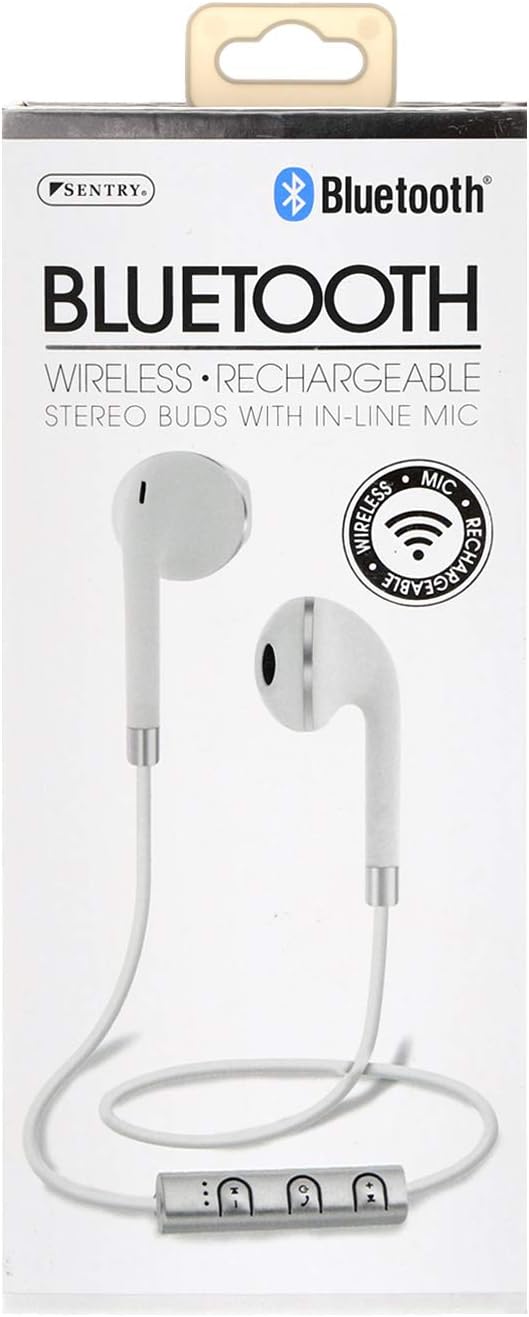
SENTRY Bluetooth® Wireless Stereo Earbuds with Mic - Model BT879
Uradni uporabniški priročnik
Uvod
Hvala za nakupasing the SENTRY Bluetooth® Wireless Stereo Earbuds with Mic, Model BT879. These earbuds are designed to provide a high-quality audio experience with the convenience of wireless connectivity. This manual will guide you through the setup, operation, and maintenance of your new earbuds.
For optimal performance and longevity, please read this manual thoroughly before use and retain it for future reference.
Pomembne varnostne informacije
OPOZORILO:
Ta izdelek vsebuje kemikalije, za katere je v zvezni državi Kalifornija znano, da povzročajo raka in prirojene okvare ali druge reproduktivne poškodbe. Prosimo, ravnajte previdno in ga odgovorno zavrzite.
Do not expose the earbuds to extreme temperatures, moisture, or corrosive materials.
Do not disassemble or attempt to repair the earbuds yourself. This may void the warranty and cause damage.
Hraniti izven dosega otrok in hišnih ljubljenčkov.
Izogibajte se dolgotrajnemu poslušanju pri visoki glasnosti, da preprečite poškodbe sluha.
Kaj je v škatli
Your SENTRY Bluetooth® Wireless Stereo Earbuds package should contain the following items:
Image: The SENTRY BT879 earbuds displayed in their retail packaging, showcasing the earbuds, in-line controls, and the included deluxe carry pouch.
Vodnik za namestitev
1. Polnjenje slušalk
Before first use, ensure your earbuds are fully charged. The earbuds are equipped with a Lithium-ion battery.
Locate the charging port on the in-line control unit.
Connect the provided USB charging cable to the earbuds and plug the other end into a USB power source (e.g., computer USB port, wall adapter).
An indicator light will typically show the charging status. Refer to the light behavior for full charge indication (e.g., light turns off or changes color).
Image: Close-up of the SENTRY BT879 earbuds, highlighting the in-line control unit which houses the charging port and control buttons.
2. Seznanjanje z napravo Bluetooth
The SENTRY BT879 earbuds are compatible with devices that have Bluetooth capabilities and microphone support.
Prepričajte se, da so slušalke napolnjene in izklopljene.
Press and hold the power button on the in-line control unit until the indicator light begins to flash, indicating pairing mode. (Typically blue/red flashing).
V napravi (pametnem telefonu, tablici, računalniku) pojdite v nastavitve Bluetooth.
Iskanje available devices. The earbuds should appear as "SENTRY BT879" or similar.
Select the earbuds from the list to initiate pairing.
Once successfully paired, the indicator light on the earbuds will typically stop flashing and remain solid blue, or turn off. A voice prompt may also confirm the connection.
Doseg Bluetootha je približno 10 metrov (33 čevljev).
Navodila za uporabo
The in-line control unit allows for easy management of your audio and calls.
Nadzorni gumbi nadview
Slika: Podrobna view of the SENTRY BT879 in-line control unit, showing the various buttons for power, volume, and track control.
Funkcije linijskega krmiljenja
Gumb/dejanje
funkcija
Gumb za vklop (sredinski)
Pritisnite in držite: Vklop/izklop, vstop v način seznanjanja
Single Press (Music): Play/Pause
Single Press (Call): Answer/End Call
Double Press (Call): Redial Last Number
Press and Hold (Call): Reject Incoming Call
Povečanje glasnosti (+)
Single Press: Increase Volume
Press and Hold: Next Track
Znižaj glasnost (-)
Single Press: Decrease Volume
Press and Hold: Previous Track
Predvajanje glasbe
Za predvajanje ali pavza music, press the Gumb za vklop enkrat.
Če želite preskočiti na naslednja skladba, pritisnite in držite Povečanje glasnosti (+) gumb.
Da gredo na prejšnja skladba, pritisnite in držite Znižaj glasnost (-) gumb.
Za prilagodi glasnost, pritisnite Povečanje glasnosti (+) or Znižaj glasnost (-) gumbi na kratko.
Klicanje in sprejemanje klicev
Za odgovorite na dohodni klic, pritisnite Gumb za vklop enkrat.
Za end an active call, pritisnite Gumb za vklop enkrat.
Za zavrniti dohodni klic, pritisnite in držite Gumb za vklop približno 2 sekundi.
Za ponovno pokličite zadnjo številko, dvakrat pritisnite Gumb za vklop.
Vgrajeni linijski mikrofon allows for clear hands-free communication.
Nega in vzdrževanje
Proper care will ensure the longevity and optimal performance of your SENTRY earbuds.
Čiščenje: Use a soft, dry, lint-free cloth to clean the earbuds. Do not use abrasive cleaners, alcohol, or chemical solvents. Gently wipe the ear tips and the body of the earbuds.
Shranjevanje: When not in use, store the earbuds in the provided deluxe travel friendly carry pouch to protect them from dust, dirt, and physical damage.
Temperatura: Avoid exposing the earbuds to extreme temperatures (hot or cold) as this can affect battery life and internal components.
Vlaga: Keep the earbuds dry. Do not immerse them in water or expose them to excessive moisture.
Odpravljanje težav
Če imate težave s slušalkami, si oglejte naslednje pogoste težave in rešitve:
Težava
Možen vzrok/rešitev
Slušalke se ne vklopijo.
Battery is depleted. Charge the earbuds fully.
Power button not held long enough. Press and hold the power button until the indicator light appears.
Seznanitev z napravo ni mogoča.
Earbuds are not in pairing mode. Ensure the indicator light is flashing (e.g., blue/red).
Bluetooth is off on your device. Enable Bluetooth in your device's settings.
Earbuds are already connected to another device. Disconnect from the previous device or turn off Bluetooth on that device.
Distance too far. Ensure earbuds are within 10 meters of your device.
Interference. Move away from other wireless devices or strong electromagnetic fields.
Poskusite pozabiti napravo na telefonu in jo znova seznaniti.
Ni zvoka ali nizka glasnost.
Volume on earbuds or device is too low. Increase volume using the '+' button on the earbuds and on your device.
Earbuds are not properly connected. Re-pair the earbuds with your device.
Audio output setting on your device is incorrect. Ensure audio is routed to the Bluetooth earbuds.
Kakovost zvoka je slaba ali občasna.
Distance from device is too far or there are obstacles. Reduce distance and remove obstructions.
Low battery. Charge the earbuds.
Interference from other wireless devices. Move to an area with less interference.
Mikrofon ne deluje.
Ensure the earbuds are properly connected and selected as the audio input device on your phone/computer.
Check for any mute functions on your device or in the application you are using.
Tehnične specifikacije
Funkcija
Specifikacija
Model
BT879
Povezljivost
Brezžični Bluetooth
Bluetooth obseg
10 metrov
Pogonska enota
15 mm
Frekvenčni odziv
20 Hz - 20 kHz
Impedanca
32 ohme
Občutljivost
100 dB +/- 3dB
Vrsta baterije
Litij-ionski
Vrsta nadzora
In-line Control Buttons
Mikrofon
Da (vrstično)
Material
Kovina, plastika, silikon
barva
Bela
Namestitev ušesa
V ušesu
Faktor oblike
V ušesu
Priključek za slušalke
Brez Jacka
Dimenzije izdelka
3.5 x 6.75 x 3.8 palcev
Teža predmeta
5.4 unč
Proizvajalec
Stražar
UPC
080068548799, 800685487994
Garancija in podpora
SENTRY Industries is committed to customer satisfaction. While specific warranty details are not provided in this manual, most SENTRY products come with a limited warranty against defects in materials and workmanship.
For warranty claims, technical support, or further assistance, please visit the official SENTRY webspletno mesto ali se obrnite na njihovo službo za pomoč strankam. Shranite dokazilo o nakupu za morebitna vprašanja v zvezi z garancijo.
Ask about setup, troubleshooting, compatibility, parts, safety, or missing instructions. Manuals+ will review the question and use this page’s manual context to help answer it.