
1. Uvod
This manual provides essential information for the safe and efficient use of your TCL 32B400 32-inch HD LCD TV. Please read it thoroughly before operating the television and retain it for future reference.
The TCL 32B400 features a direct-lit LED backlight for uniform high brightness and image quality. Its VA panel technology delivers superior contrast, allowing for natural expression of subtle light and dark details. Equipped with a dual tuner, this TV supports terrestrial digital, BS digital, and 110-degree CS digital broadcasts, enabling simultaneous recording of one program while watching another. It supports various recording functions including instant, scheduled, daily/weekly repeat, and event recording. Connectivity options include two HDMI Ver1.4a input terminals (Port 1 supports ARC) and one USB2.0 input/output terminal, allowing connection to Blu-ray/DVD players/recorders and external speakers via ARC.

Slika 1: Spredaj view of the TCL 32B400 TV.
2. Nastavitev
2.1 Razpakiranje in preverjanje komponent
Previdno vzemite vse komponente iz embalaže. Prepričajte se, da so prisotni vsi spodaj navedeni elementi:
- Daljinski upravljalnik x1
- AAA baterije x2
- miniB-CAS card x1
- Napajalni kabel x1
- Tip-over prevention parts set x1
- Stojalo x2
- Screws (ST4, 20mm) x4 (for 32-inch model)
- Navodila za uporabo
- Hitri vodnik
- Garancijski list

Slika 2: Priložena dodatna oprema.
2.2 Namestitev stojala
- Televizor postavite z zaslonom navzdol na mehko, ravno površino, da preprečite poškodbe.
- Poravnajte stojala z ustreznimi režami na spodnji strani televizorja.
- Secure each stand using the provided screws (ST4, 20mm).
2.3 Povezovalni kabli
Connect the necessary cables to the appropriate ports on the TV. Refer to the connection diagram below.
- Napajalni kabel: Napajalni kabel priključite na vhod za napajanje televizorja in nato v stensko vtičnico.
- Antena: Connect your terrestrial digital antenna cable to the 'Antenna Input' port. For BS/CS broadcasts, connect the satellite antenna cable to the 'BS/CS 110°' port.
- Naprave HDMI: Connect external devices like Blu-ray players or game consoles to the HDMI input ports. HDMI Port 1 supports Audio Return Channel (ARC).
- Naprave USB: Connect external USB storage devices for recording to the USB port.
- miniB-CAS Card: Insert the miniB-CAS card into its dedicated slot.

Figure 3: Connection terminals overview.
2.4 Začetna nastavitev
After connecting all cables and powering on the TV, follow the on-screen instructions to complete the initial setup, including channel tuning and network configuration (if applicable).
3. Navodila za uporabo
3.1 Osnovna operacija
- Vklop/izklop: Pritisnite gumb za vklop na daljinskem upravljalniku ali televizorju.
- Izbira kanala: Use the 'CH +/-' buttons or number buttons on the remote control.
- Prilagoditev glasnosti: Use the 'VOL +/-' buttons on the remote control.
- Vir vhoda: Press the 'Input' button on the remote to select between HDMI, TV, and other connected sources.
3.2 Snemanje programov
Your TCL 32B400 TV supports recording to an external USB Hard Disk Drive (HDD) thanks to its dual tuner. This allows you to record one program while watching another.
- Connect a compatible external USB HDD to the TV's USB port.
- Format the HDD if prompted by the TV.
- To record, select the desired program and use the recording options in the TV menu (e.g., instant recording, scheduled recording via EPG).

Figure 4: Dual tuner allows watching one program while recording another.
3.3 Nastavitve slike in zvoka
Access the TV's menu to adjust picture (brightness, contrast, color, sharpness) and sound (bass, treble, balance, sound mode) settings to your preference.
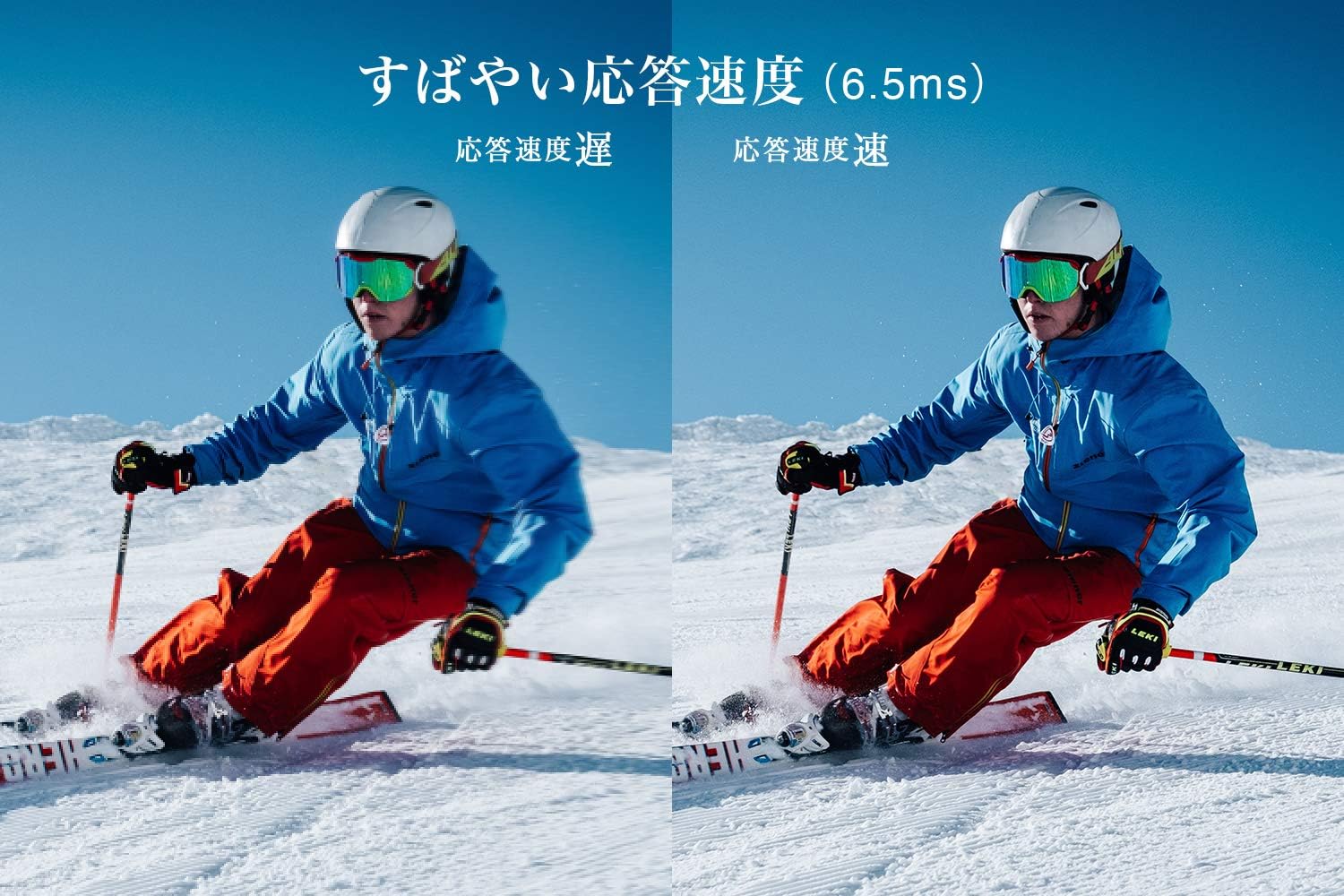
Figure 5: The TV features a fast response speed of 6.5ms for clear motion.
4. Vzdrževanje
4.1 Čiščenje zaslona
Zaslon nežno obrišite z mehko, suho krpo, ki ne pušča vlaken. Za trdovratne madeže rahlo obrišiteampen the cloth with water or a specialized screen cleaner (ensure it's suitable for LCD screens) and wipe carefully. Avoid applying excessive pressure.
4.2 Čiščenje ohišja televizorja
Wipe the TV body with a soft, dry cloth. Do not use abrasive cleaners, waxes, or solvents as they can damage the finish.
4.3 Splošna nega
- Televizorja ne izpostavljajte neposredni sončni svetlobi ali ekstremnim temperaturam.
- Zagotovite zadostno prezračevanje okoli televizorja, da preprečite pregrevanje.
- Med nevihtami ali če televizorja dalj časa ne boste uporabljali, ga izključite iz električne vtičnice.
5. Odpravljanje težav
Če imate težave s televizorjem, si oglejte naslednje pogoste korake za odpravljanje težav. Če težava ne izgine, se obrnite na podporo strankam.
5.1 Brez napajanja
- Preverite, ali je napajalni kabel varno priključen tako na televizor kot v stensko vtičnico.
- Preverite, ali stenska vtičnica deluje, tako da vanjo priključite drugo napravo.
- Pritisnite gumb za vklop na samem televizorju, ne samo na daljinskem upravljalniku.
5.2 No Picture/No Signal
- Prepričajte se, da je izbran pravilen vhodni vir (npr. HDMI 1, TV).
- Preverite vse kabelske povezave (HDMI, antena) glede morebitnih zrahljanih ali poškodovanih spojev.
- Če uporabljate zunanjo napravo, se prepričajte, da je vklopljena in deluje pravilno.
- Perform a channel scan if you are watching broadcast TV.
5.3 Ni zvoka
- Preverite glasnost in se prepričajte, da televizor ni izklopljen.
- Če uporabljate zunanje zvočnike, se prepričajte, da so pravilno priključeni in vklopljeni.
- Preverite nastavitve zvoka v meniju televizorja.
5.4 Daljinski upravljalnik ne deluje
- Zamenjajte baterije z novimi.
- Prepričajte se, da med daljinskim upravljalnikom in infrardečim senzorjem televizorja ni ovir.
6. Specifikacije
| Funkcija | Specifikacija |
|---|---|
| Velikost zaslona | 32 palcev |
| Tehnologija zaslona | LCD |
| Resolucija | HD (1366 x 768) |
| Hitrost osveževanja | 60 Hz |
| Razmerje stranic | 16:9 |
| Kontrastno razmerje | 3000:1 |
| Viewkota | 178/178 degrees (JEITA standard, CR>=10) |
| Vrsta osvetlitve ozadja | Neposredno osvetljena LED |
| Hitrost odziva | 6.5ms |
| Mere (s stojalom) | Š731 x V491 x G186 mm |
| Mere (brez stojala) | Š731 x V436 x G76 mm |
| Teža (s stojalom) | 4.4 kg |
| Teža (brez stojala) | 4.3 kg |
| Stenski nosilec (VESA) | 100x100 mm |
| Letna poraba energije | 45 kWh/leto |
| Vrata HDMI | 2 (HDMI Ver1.4a, Port 1 supports ARC) |
| Vrata USB | 1 (USB2.0) |
| Vrsta sprejemnika | Terrestrial Digital, BS Digital, 110-degree CS Digital (Dual Tuner) |
| Modelno leto | 2019 |

Figure 6: TV dimensions and recommended viewrazdalja.

Figure 7: VA panel technology provides superior contrast and depth.
7. Garancija in podpora
7.1 Garancija proizvajalca
Za ta izdelek velja 1-letna garancija proizvajalca od datuma nakupa. Za uveljavljanje garancije shranite dokazilo o nakupu.
7.2 Podpora strankam
For any inquiries, technical assistance, or repair requests, please contact TCL customer support. Our dedicated Japanese staff are available to assist you.
- telefon: 0120-955-517
- Delovni čas: 9:00 - 18:00 (Weekdays and Holidays, excluding year-end and New Year holidays)
- Webspletno mesto: https://www.tcl.com/jp/ja/services.html
Nationwide repair service is available.
Figure 8: TCL Customer Support details.