
Uvod
This manual provides detailed instructions for the setup, operation, and maintenance of your Homtime C1 Mini Snooze Alarm Clock. Please read this manual thoroughly before using the product to ensure proper function and longevity.

Image: The Homtime C1 Mini Alarm Clock, light blue in color, is shown on a decorative tray next to a small potted plant. The digital display shows the time 20:08.
Konec izdelkaview
The Homtime C1 Mini is a compact digital alarm clock designed for convenience and functionality. It features a clear LCD display, dual USB charging ports for mobile devices, and a snooze function. Its design is suitable for various environments including bedrooms, offices, and for travel.
Ključne značilnosti:
- Digitalni prikaz časa
- Funkcija dremeža
- Dvojna vrata USB za polnjenje
- Dimmable LCD Screen
- Kompakten in prenosen dizajn
Vsebina paketa:
- Homtime C1 Mini Alarm Clock
- Napajalni adapter
- Uporabniški priročnik (ta dokument)
Nastavitev
- Napajalni priključek: Connect the provided power adapter to the DC input port on the back of the alarm clock. Plug the adapter into a standard wall outlet. The display will illuminate.
- Namestitev baterije (neobvezno za rezervno napajanje): Za varnostno kopiranje nastavitev časa in alarma med izpadom električne energijetages, install 3 AAA batteries (not included) into the battery compartment located on the bottom of the unit. Ensure correct polarity.
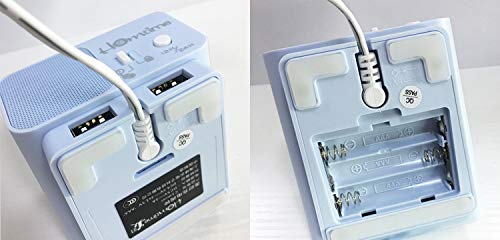
Image: A split image showing the bottom of the Homtime C1 Mini. The left side displays the rear with two USB charging ports and a power input. The right side shows the open battery compartment, designed for AAA batteries.
Navodila za uporabo
1. Nastavitev časa
- Pritisnite in držite "Time Set" gumb (običajno se nahaja na vrhu ali zadaj), dokler ne začnejo utripati številke za uro.
- Uporabite "+" or "-" buttons to adjust the hour. Pay attention to AM/PM indicators if present.
- Pritisnite "Time Set" ponovno pritisnite gumb, da potrdite uro in se premaknete na nastavitev minut.
- Uporabite "+" or "-" gumbe za nastavitev minut.
- Pritisnite "Time Set" button one last time to save the time setting.
2. Nastavitev alarma
- Pritisnite in držite "Alarm Set" gumb, dokler ne začnejo utripati številke ure budilke.
- Uporabite "+" or "-" gumbe za nastavitev ure budilke.
- Pritisnite "Alarm Set" button again to confirm the alarm hour and move to alarm minute adjustment.
- Uporabite "+" or "-" gumbe za nastavitev minut alarma.
- Pritisnite "Alarm Set" button one last time to save the alarm setting.
- Za vklop/izklop alarma pritisnite "Alarm On/Off" button (or a dedicated alarm icon button). An alarm icon will appear on the display when active.
3. Funkcija dremeža
When the alarm sounds, press the large button on the top of the clock (often labeled "Dremež" or simply the main control button). The alarm will pause for approximately 9 minutes and then sound again. To turn off the alarm completely, press any other button or let it sound for its full duration.
4. Svetlost zaslona
The LCD screen has multiple brightness levels. Press the "Dimmer" button (or a dedicated light icon button) repeatedly to cycle through the available brightness settings (e.g., High, Medium, Low, Off).
5. Vrata za polnjenje USB
The Homtime C1 Mini features dual USB charging ports on the back of the unit. These ports are designed to charge compatible mobile devices such as smartphones and tablets. Simply connect your device's USB charging cable to one of the ports. Charging will begin automatically.
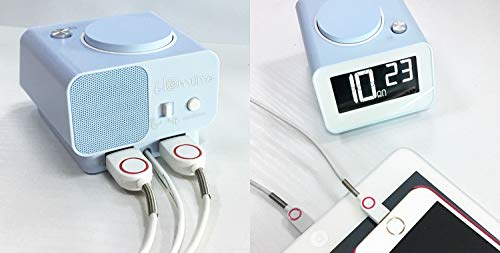
Slika: Zadnji del view of the Homtime C1 Mini alarm clock, showing two white USB charging cables plugged into its dual USB ports. This illustrates the charging functionality.
Vzdrževanje
- Čiščenje: Napravo obrišite z mehko, suho krpo. Ne uporabljajte abrazivnih čistil ali topil, saj lahko poškodujejo površino.
- moč: Ensure the power adapter is securely connected. Disconnect from power during extended periods of non-use.
- Okolje: Avoid placing the clock in direct sunlight, near heat sources, or in excessively humid environments.
Odpravljanje težav
| Težava | Možen vzrok | rešitev |
|---|---|---|
| Prikaz ure je prazen. | Brez moči ali močitage. | Check power adapter connection. If using battery backup, ensure batteries are installed correctly and are not depleted. |
| Alarm se ne oglasi. | Alarm ni aktiviran ali je napačno nastavljen. | Prepričajte se, da je alarm vklopljen (ikona alarma je vidna). Preverite, ali je čas alarma pravilno nastavljen. |
| Polnjenje prek USB-ja ne deluje. | Težava s kablom ali nezdružljivostjo naprav. | Try a different USB cable. Ensure the device is compatible with USB charging. Check if the clock is powered on. |
| Zaslon je presvetel/pretemn. | Potrebno je prilagoditi nastavitev svetlosti. | Press the "Dimmer" button to cycle through brightness levels. |
Specifikacije
- Znamka: Homtime
- Model: C1 Mini
- Vrsta zaslona: Digitalni LCD
- vir energije: Electrical (AC Adapter)
- Varnostno kopiranje baterije: 3 x AAA baterije (niso priložene)
- Posebne lastnosti: Alarm, Dual USB Charging Ports, Dimmable Screen
- Material okvirja: Akrilonitril butadien stiren, plastika
- Vrsta pritrditve: Namizna
- Država izvora: Kitajska
Garancija in podpora
For warranty information and customer support, please refer to the warranty card included with your product or visit the official Homtime webmesto. Shranite račun za garancijske zahtevke.
For further assistance, you may contact Homtime customer service through their official channels. Please have your model number (C1 Mini) and purchase details ready.