
Uvod
This manual provides instructions for the proper setup, operation, and maintenance of your Calvas 2020B0-B1 remote control. This remote is designed to be compatible with Shaw LCD LED televisions, offering a convenient replacement or secondary control unit. Please read this manual thoroughly before using the device.

Slika: spredaj view of the Calvas 2020B0-B1 remote control.
Nastavitev
1. Namestitev baterije
- Poiščite predal za baterije na zadnji strani daljinskega upravljalnika.
- Pritisnite zapah navzdol in potisnite pokrov baterije stran.
- Vstavite dve bateriji AAA (nista priloženi) in pazite, da se pozitivni (+) in negativni (-) pol pravilno poravnata z oznakami v predalu.
- Potisnite pokrov baterije nazaj na mesto, dokler se ne zaskoči.

Slika: Nazaj view daljinskega upravljalnika z odprtim predalom za baterije.
2. Quick Setup for TV Control
The remote features a quick setup function for initial pairing with your television. Follow these steps:
- Pritisnite in držite NASTAVITEV button until the LED light blinks twice.
- Pritisnite TV MOČ gumb.
- Pritisnite in držite OK gumb.
- Spustite OK key when your TV turns off. This indicates successful pairing.
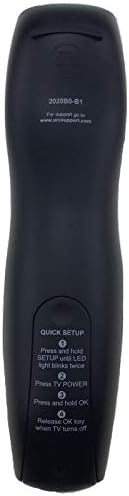
Image: Back of the remote control displaying quick setup instructions.
Note: If the TV does not turn off, repeat the steps or consult the TV's manual for specific remote programming codes if available.
Navodila za uporabo
The Calvas 2020B0-B1 remote control utilizes infrared (IR) technology. Ensure a clear line of sight between the remote's IR emitter and your TV's IR receiver for optimal performance.
Funkcije gumbov:
- MOČ: Vklopi ali izklopi TV.
- GLASNOST +/-: Poveča ali zmanjša glasnost.
- CH +/-: Spremeni kanal navzgor ali navzdol.
- MUTE: Izklopi ali vklopi zvok televizorja.
- ŠTEVILČNA TIPKOVNICA (0–9): Neposredno vnese številke kanalov.
- VODNIK: Prikaže programski vodnik.
- MENI: Dostopi do glavnega menija televizorja.
- INFO: Prikaže informacije o trenutnem programu.
- OK / Navigation Arrows: Potrjuje izbire in se premika po menijih.
- IZHOD: Izhod iz trenutnega menija ali zaslona.
- ZADNJE: Vrne se na prejšnje viewed kanal.
- DAN +/-: Navigacija po dnevih v programskem vodniku.
- MUSIC / FAV: Accesses music channels or favorite channels (functionality may vary by TV model).
Vzdrževanje
Čiščenje:
- Daljinski upravljalnik obrišite z mehko, suho krpo.
- Za trdovratno umazanijo rahlo dampsl krpo z vodo ali blagim, neabrazivnim čistilom.
- Do not use harsh chemicals, solvents, or abrasive cleaning pads, as these can damage the remote's surface or internal components.
Zamenjava baterije:
- Replace batteries when the remote's response becomes sluggish or the LED indicator fails to light up.
- Always replace both batteries at the same time with new AAA batteries.
- Ne mešajte starih in novih baterij ali različnih vrst baterij.
- Če daljinskega upravljalnika ne boste uporabljali dlje časa, odstranite baterije, da preprečite puščanje.
Shranjevanje:
- Daljinski upravljalnik shranjujte na hladnem in suhem mestu, stran od neposredne sončne svetlobe in ekstremnih temperatur.
- Daljinski upravljalnik ne sme pasti na tla ali biti izpostavljen prekomerni vlagi.
Odpravljanje težav
- Daljinec se ne odziva:
- Preverite, ali so baterije pravilno vstavljene in ali niso izpraznjene. Po potrebi jih zamenjajte.
- Zagotovite neoviran vidni kot med daljinskim upravljalnikom in IR-sprejemnikom televizorja. Odstranite vse ovire.
- Try re-pairing the remote with the TV using the "Quick Setup" steps.
- Delujejo samo nekateri gumbi:
- This might indicate a partial pairing issue or a specific button malfunction. Try re-pairing the remote.
- Clean the remote's surface, especially around the unresponsive buttons, to ensure no debris is interfering.
- Kratek razpon delovanja:
- Zamenjajte baterije s svežimi.
- Prepričajte se, da noben močan vir svetlobe (kot so neposredna sončna svetloba ali svetle fluorescentne luči) ne moti IR signala.
Specifikacije
| Znamka | plešasti madeži |
| Številka modela | 2020B0-B1 (Mfr Part Number: CLS-D41D8CD98F00B204E9800998ECF8427E) |
| Združljive naprave | Television (Shaw LCD LED TVs) |
| Tehnologija povezljivosti | Infrardeči (IR) |
| Vrsta krmilnika | Nadzor gumbov |
| Maximum Number of Supported Devices | 1 |
| Največji doseg | 10 metrov |
| Posebna funkcija | Ergonomska oblika |
Informacije o garanciji
This product is typically covered by a limited warranty provided by the seller or manufacturer. Please refer to your purchase documentation or contact the retailer directly for specific warranty terms and conditions. Keep your proof of purchase for any warranty claims.
Podpora
For further assistance, technical support, or inquiries regarding your Calvas 2020B0-B1 remote control, please contact the seller or manufacturer through the platform where the product was purchased. Provide your model number (2020B0-B1) and any relevant purchase details when seeking support.