
1. Uvod
This manual provides comprehensive instructions for the setup, operation, maintenance, and troubleshooting of your Canyon CNS-SW71SS Smartwatch. Please read this manual carefully before using your device to ensure proper function and longevity.
The Canyon CNS-SW71SS Smartwatch is designed to help you monitor your fitness activities and stay connected. It features a 1.22-inch color screen, multi-sport modes, heart rate monitoring, sleep tracking, and notification alerts. Its IP68 water resistance makes it suitable for various environments.
2. Izdelek je končanview
2.1 Ključne lastnosti
- 1.22-inch color touch screen display.
- Multi-sport mode for tracking various activities.
- Daily activity monitoring: calories, steps, heart rate, and sleep.
- Notifications for incoming calls, SMS, emails, calendar events, and social media.
- Music control and remote camera function.
- Smart alarm and weather data display.
- Do 7 dni delovanja baterije.
- IP68 water resistance (submersible up to 1 meter for 30 minutes).
- Povezljivost Bluetooth 4.0.
- Compatible with iOS and Android operating systems.
- Comes with two interchangeable wristbands: metal and TPU.
2.2 Komponente
The Canyon CNS-SW71SS Smartwatch consists of the main watch unit, interchangeable wristbands, and a charging cable.

Slika 1: Spredaj view of the Canyon CNS-SW71SS Smartwatch, showing the display with steps, distance, calories, and heart rate data.

Slika 2: Pod kotom view of the Canyon CNS-SW71SS Smartwatch, featuring a silver metal mesh strap and a round display.
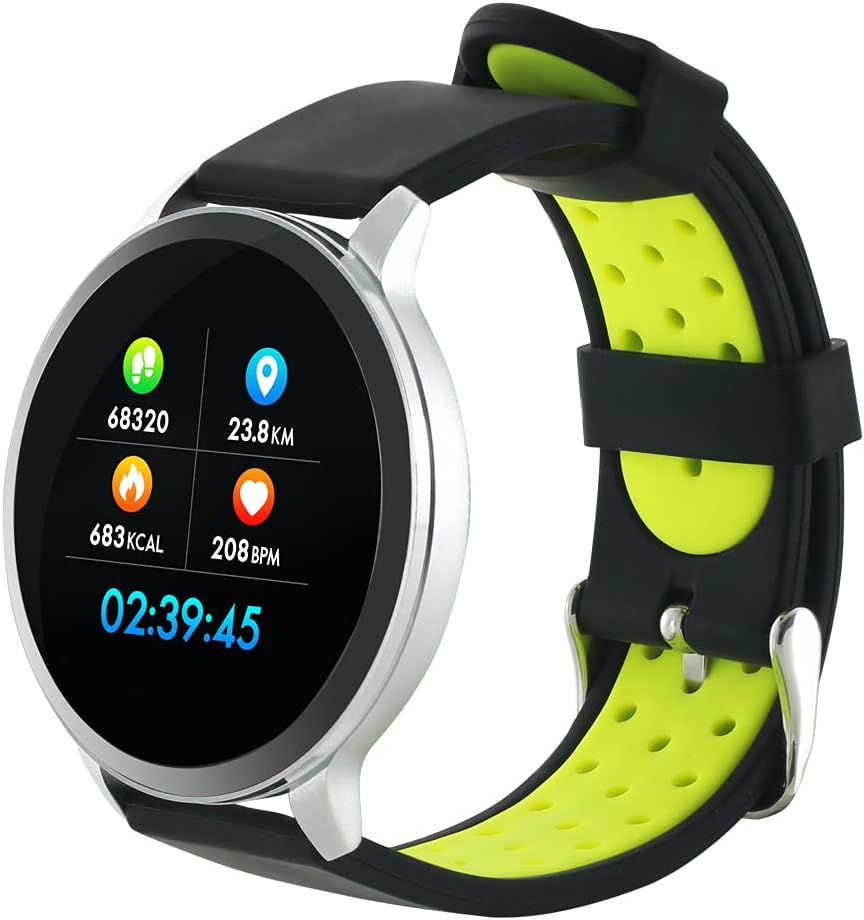
Figure 3: The Canyon CNS-SW71SS Smartwatch shown with an alternative black and lime green TPU strap, highlighting its interchangeable design.

Slika 4: Zadaj view of the Canyon CNS-SW71SS Smartwatch, displaying the optical heart rate sensor and magnetic charging contacts.

Figure 5: The retail packaging for the Canyon CNS-SW71SS Smartwatch, illustrating key features and the included two straps.
3. Nastavitev
3.1 Polnjenje pametne ure
- Polnilni kabel priključite na napajalnik USB (ni priložen) ali na vrata USB računalnika.
- Align the magnetic charging pins of the cable with the charging contacts on the back of the smartwatch. The watch will vibrate and display a charging icon.
- Allow approximately 2-3 hours for a full charge. A full charge provides up to 7 days of usage.
3.2 Installing the Canyon Fit Application
- Scan the QR code provided in the packaging or search for "Canyon Fit" in your smartphone's app store (Google Play Store for Android, Apple App Store for iOS).
- Prenesite in namestite aplikacijo.
- Open the Canyon Fit app and follow the on-screen instructions to create an account and set up your profile.
3.3 Seznanjanje s pametnim telefonom
- Prepričajte se, da je vaša pametna ura napolnjena in vklopljena.
- V pametnem telefonu omogočite Bluetooth.
- Open the Canyon Fit application.
- Navigate to the device pairing section within the app (usually found under 'Device' or 'Profile').
- Select your smartwatch (e.g., "CNS-SW71SS") from the list of available devices.
- Po potrebi potrdite zahtevo za seznanjanje tako na pametnem telefonu kot na pametni uri.
3.4 Attaching/Changing Wristbands
The smartwatch comes with two wristbands (metal and TPU) that can be interchanged. To attach or change a wristband, locate the quick-release pins on the underside of the strap. Slide the pin to detach the current strap and then align and slide the pin of the new strap into the corresponding holes on the watch body until it clicks into place.
4. Navodila za uporabo
4.1 Osnovna navigacija
- Zaslon na dotik: Swipe left/right to navigate through different functions and menus. Swipe up/down to view obvestila ali hitre nastavitve.
- Stranski gumb: Press the side button to return to the main watch face or to wake up the screen. A long press may access power options or specific features depending on the context.
4.2 Sledenje telesni pripravljenosti
- Večšportni način: Access the 'Workout' or 'Sport' menu on your watch. Select your desired activity (e.g., running, cycling, walking) to start tracking. The watch will record duration, distance, calories burned, and heart rate.
- Dnevna aktivnost: Ura samodejno beleži vaše korake, razdaljo in porabljene kalorije čez dan. View these statistics on the watch face or in the Canyon Fit app.
- Spremljanje srčnega utripa: The watch continuously monitors your heart rate. You can also manually initiate a heart rate measurement from the heart rate interface.
- Sledenje spanju: Wear the smartwatch to bed, and it will automatically track your sleep patterns, including deep sleep, light sleep, and wake times. View detailed sleep analysis in the Canyon Fit app.
4.3 Obvestila
Once paired with your smartphone and with notification permissions granted in the Canyon Fit app, your smartwatch will display alerts for:
- Dohodni klici
- SMS sporočila
- E-poštna sporočila
- Koledar dogodkov
- Social Media Apps (e.g., WhatsApp, Facebook, InstagOven)
Povlecite navzgor po številčnici ure za view recent notifications. You can dismiss notifications from the watch.
4.4 dodatnih funkcij
- Nadzor glasbe: While music is playing on your phone, you can use the watch to play/pause, skip tracks, and adjust volume.
- Oddaljena kamera: Open the camera function in the Canyon Fit app. Use your smartwatch as a remote shutter button to take photos on your phone.
- Pametni alarm: Set alarms through the Canyon Fit app. The watch will vibrate to wake you up gently.
- Vremenski podatki: Once connected to your phone, the watch will display current weather conditions and forecasts for your location.
5. Vzdrževanje
5.1 Čiščenje
- Zaslon in ohišje ure obrišite z mehko krpoamp krpo.
- For the metal strap, use a soft brush to gently clean any debris. For the TPU strap, wash with mild soap and water.
- Pred polnjenjem se prepričajte, da so polnilni kontakti čisti in suhi.
- Za čiščenje se izogibajte uporabi močnih kemikalij ali abrazivnih materialov.
5.2 Vodoodpornost (IP68)
The Canyon CNS-SW71SS Smartwatch is IP68 rated, meaning it is resistant to dust and can be immersed in water up to 1 meter deep for a maximum of 30 minutes. While it can withstand splashes, rain, and brief immersion, it is not recommended for hot showers, saunas, or diving, as steam and high water pressure can compromise the seals.
- Do not press any buttons while the watch is submerged.
- Po stiku z vodo uro temeljito posušite.
5.3 Skrb za baterije
- Izogibajte se pogostemu popolnemu praznjenju baterije.
- Napravo redno polnite, tudi če je ne uporabljate, da ohranite zdravje baterije.
- Uro shranjujte na hladnem in suhem mestu, ko je dalj časa ne uporabljate.
6. Odpravljanje težav
- Ura se ne vklopi: Prepričajte se, da je ura popolnoma napolnjena. Priključite jo na polnilnik za vsaj 30 minut.
- Seznanjanje s pametnim telefonom ni mogoče:
- Prepričajte se, da je v telefonu omogočen Bluetooth.
- Ensure the Canyon Fit app has necessary permissions.
- Znova zaženite telefon in pametno uro.
- Poskusite prekiniti seznanitev in ponovno seznaniti napravo prek aplikacije.
- Obvestila se ne prikazujejo:
- Check notification settings in the Canyon Fit app and your phone's system settings.
- Prepričajte se, da je ura povezana prek Bluetootha.
- Netočni podatki o srčnem utripu/aktivnosti:
- Prepričajte se, da je ura tesno prilegana zapestju, ne pretesna ali preohlapna.
- Očistite senzor na zadnji strani ure.
- Environmental factors or certain movements can affect accuracy.
- Zaslon se ne odziva: Try restarting the smartwatch by holding down the side button. If unresponsive, allow the battery to fully drain and then recharge.
7. Specifikacije
| Ime modela | CNS-SW71SS |
| Znamka | KANJON |
| Velikost zaslona | 1.22 palcev |
| Združljivost operacijskega sistema | Android, iOS |
| Tehnologija povezljivosti | Bluetooth 4.0 |
| Ocena vodoodpornosti | IP68 |
| Posebne lastnosti | Wireless Charging (implied by product data), Multi-Sport Mode, Heart Rate Monitor, Sleep Tracker, Notifications |
| Združljive naprave | Pametni telefon |
| Baterija | Polnilna (1 priloženi) |
| Barvne možnosti | Black, Lime Green, Silver |
8. Garancija in podpora
For warranty information and technical support, please refer to the documentation included with your purchase or visit the official Canyon website. You can also contact Canyon customer service for assistance with product issues or inquiries.
Spletna podpora: https://canyon.eu/support/ (Nprample link, please verify official support page)