
Uvod
This manual provides detailed instructions for the installation, operation, and maintenance of your LoraTap WIFI Smart Roller Shutter Timer. Please read this manual carefully before installation and use to ensure proper function and safety.
Varnostne informacije
- Pred namestitvijo ali vzdrževanjem se prepričajte, da je napajanje izklopljeno, da preprečite električni udar.
- Namestitev mora opraviti usposobljen električar ali pa mora biti v skladu z lokalnimi električnimi predpisi.
- Naprave ne uporabljajte z mokrimi rokami.
- Napravo hranite stran od vode in okolij z visoko vlažnostjo.
- Naprave ne poskušajte razstavljati ali popravljati sami. V primeru težav se obrnite na podporo.
- Ta naprava je zasnovana samo za uporabo v zaprtih prostorih.
Lastnosti izdelka
- Pametno upravljanje: Upgrade traditional electric roller shutters or awnings for smart control via smartphone app or voice commands.
- Remote Access & Scheduling: Control your blinds from anywhere and set custom schedules for automatic opening and closing.
- Group Control & Family Sharing: Group multiple roller shutters for simultaneous control and share access with family members.
- Trajna zasnova: Features a scratch-resistant tempered crystal glass panel, safe to touch with wet hands and easy to clean.
- Adjustable Motor Run Time: Configure the motor's operating time for precise control over shutter position (e.g., 50% open/close).
- Združljivost glasovnega upravljanja: Works with Google Home and Amazon Alexa for hands-free operation.
Vsebina paketa
Preverite, ali so v paketu prisotni vsi elementi:
- 1 x LoraTap WIFI Smart Roller Shutter Timer
- 1 x User Manual (German/English)
- 1 x izvijač
- 4 x Vijaki
- 1 x Wiring Clamp
Specifikacije
| Parameter | Vrednost |
|---|---|
| Dimenzije | 86 x 86 x 34 mm (with cover frame) |
| Material plošče | Kaljeno kristalno steklo |
| Spodnji material | Fire-retardant Polycarbonate (Plastic) |
| Delovna zvezatage | Izmenični tok 100-250 V 50/60 Hz |
| Rated/Maximum Current | 3 A / 10 A |
| Power per Speed | 300 W |
| Standardni Wi-Fi | 2.4 GHz, 802.11b/g/n |
| Tok v stanju pripravljenosti | 0.001 A |
| Poraba v stanju pripravljenosti | 0.25 W |
| Način namestitve | Screw-mounted, fits standard 60mm flush-mounted box |
| Združljiva programska oprema | Smart Life App (Android 4.4+, iOS 8+) |
| Certifikati | CE |
Nastavitev in namestitev
1. Shema ožičenja
The smart roller shutter timer requires a neutral conductor for proper operation. Ensure your existing wiring includes a neutral wire. This switch is suitable for already motorized roller shutters.

Image: Detailed wiring diagram showing connections for Live (L), Neutral (N), and motor control wires (L1 for Up, L2 for Down). The diagram also indicates the input voltage območje 100-250VAC.
- Vnos: Connect the Neutral (N) and Live (L) wires from your power supply to the corresponding terminals on the switch.
- Output to Motor: Connect the motor's Neutral (N), Up (L1), and Down (L2) wires to the respective terminals on the switch.
- Pomembna opomba: A neutral conductor must be present.
2. Fizična namestitev
- Odklop napajanja: Before starting, turn off the main power supply to the circuit where you will install the switch.
- Prepare Mounting Box: The switch fits a standard 60mm diameter flush-mounted box.
- Povežite žice: Follow the wiring diagram carefully. Use the provided wiring clamp če je potrebno.
- Namestite stikalo: Secure the switch into the flush-mounted box using the two provided screws (one on the left, one on the right).
- Priložite ploščo: Carefully attach the crystal glass panel to the switch module.
- Obnovi moč: Once installation is complete and secure, restore power to the circuit.
3. Namestitev in seznanjanje aplikacij
- Prenesite aplikacijo: Download the "Smart Life" application from the App Store (iOS 8 or higher) or Google Play Store (Android 4.4 or higher).
- Registracija/Prijava: Odprite aplikacijo in registrirajte nov račun ali se prijavite z obstoječim.
- Dodaj napravo: In the Smart Life app, tap the "+" icon to add a new device. Select "Curtain Switch" or a similar category.
- Vnesite podrobnosti o omrežju Wi-Fi: Follow the on-screen instructions to connect the switch to your 2.4 GHz Wi-Fi network. Ensure your phone is connected to the same 2.4 GHz network during pairing.
- Potrditev: Ko je naprava uspešno seznanjena, se bo prikazala v vaši aplikaciji in pripravljena za upravljanje.
Navodila za uporabo
1. Ročno upravljanje
The touch panel allows for direct control of your roller shutters:
- Puščica navzgor: Tap to open the roller shutter.
- Puščica dol: Tap to close the roller shutter.
- Stop Button (Circle): Tap to pause the roller shutter at its current position.

Slika: spredaj view of the LoraTap Smart Roller Shutter Timer showing the touch-sensitive Up, Stop, and Down buttons. Also displays product dimensions (86x86x34mm) and a detailed wiring diagram on the back of the unit.
2. App Control (Smart Life)
After successful pairing, you can control your roller shutters via the Smart Life app:
- Odpri/Zapri: Use the virtual buttons in the app to open, close, or stop the roller shutter.
- Set Motor Run Time: The latest version of the switch allows you to set the motor's operating time. This enables partial opening or closing (e.g., 50%).

Image: Screenshot of the Smart Life app interface demonstrating the new function to set the motor's operating time in seconds (e.g., 10s, 120s) for precise control of roller shutter position.
3. Razporejanje in časovniki
Set up automated schedules for your roller shutters:
- In the Smart Life app, navigate to the device settings and select "Schedule" or "Timer."
- Add new schedules by specifying the time, action (open/close), and repetition days.
- This feature allows for automatic operation, such as opening blinds in the morning.

Image: Demonstrates the Smart Life app's scheduling feature with various set times for opening and closing. Also highlights voice control compatibility with Amazon Alexa and Google Assistant.
4. Glasovni nadzor
Integrate your LoraTap switch with voice assistants:
- Amazon Alexa: Enable the "Smart Life" skill in the Alexa app and link your account. You can then use commands like "Alexa, open the roller shutter" or "Alexa, close the roller shutter."
- Googlova domača stran: Link your Smart Life account in the Google Home app. Use commands such as "Hey Google, open the blinds" or "Hey Google, close the blinds."
5. Group Control and Family Sharing
- Nadzor skupine: In the Smart Life app, you can create groups of multiple LoraTap roller shutter timers to control them simultaneously with a single command.
- Družinska skupna raba: Share control of your devices with family members through the Smart Life app, allowing everyone in the household to manage the roller shutters.
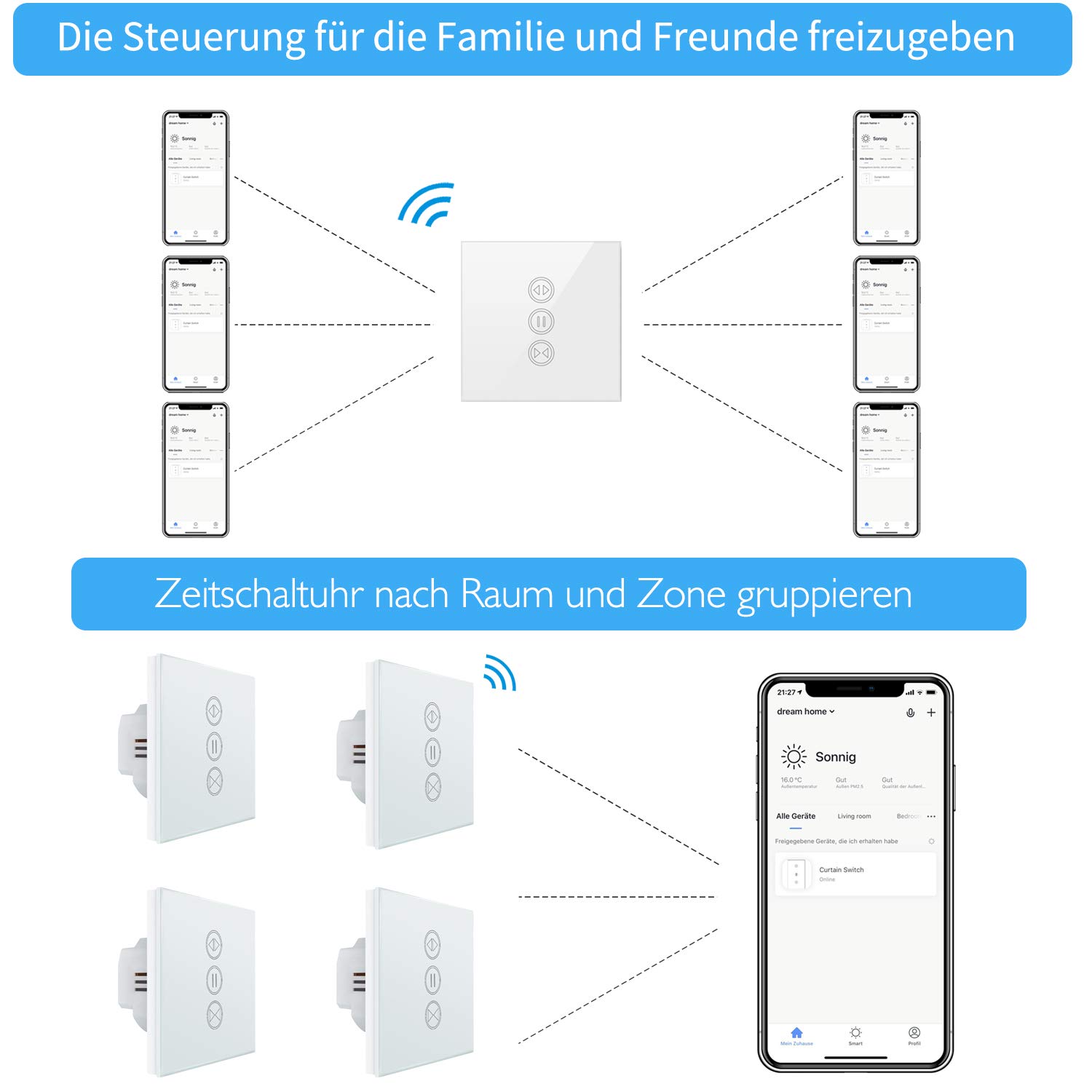
Image: Illustration of how multiple users can control the LoraTap Smart Roller Shutter Timer via the Smart Life app, demonstrating family sharing and the ability to group devices by room or zone for unified control.
Vzdrževanje
- Čiščenje: The crystal glass panel is easy to clean. Use a soft, damp krpo za brisanje površine. Izogibajte se abrazivnim čistilom ali močnim kemikalijam.
- Redni pregledi: Občasno preverite priključke ožičenja, da se prepričate, da so varni.
Odpravljanje težav
- Naprava se ne odziva:
- Check if the power supply to the switch is active.
- Ensure the switch is properly connected to your Wi-Fi network (2.4 GHz only).
- Restart the switch by turning off and on the circuit breaker.
- Preverite, ali je aplikacija Smart Life posodobljena.
- Roleta se ne premika:
- Confirm that the motor is receiving power and is functioning correctly.
- Check the motor wiring connections to the switch.
- Ensure the motor run time is correctly configured in the app if using partial open/close functions.
- Glasovno upravljanje ne deluje:
- Ensure your Smart Life account is correctly linked to Alexa or Google Home.
- Preverite internetno povezavo in stanje naprave z glasovnim pomočnikom.
- Try re-discovering devices in the Alexa or Google Home app.
- Automatic Stop Issue: This issue has been resolved in newer versions. If you experience unexpected stops, ensure your device firmware is updated via the Smart Life app.
Garancija in podpora
LoraTap specializes in the research, development, and manufacturing of wireless switches. All LoraTap products are CE certified, ensuring compliance with European safety, health, and environmental protection requirements.
For technical support or warranty inquiries, please contact your retailer or visit the official LoraTap website for further assistance. Please have your product model number (5d4cddd3-8a52-4746-8937-9fbf21a20273) ready when contacting support.