
Uvod
Thank you for choosing Obbug True Wireless Earbuds. These earbuds are designed for comfort, durability, and high-quality audio, featuring an ergonomic design, IPX7 waterproof rating, and advanced Bluetooth 5.1 technology for stable connections and long battery life. This manual provides essential information for setup, operation, maintenance, and troubleshooting to ensure you get the best experience from your new earbuds.
Kaj je v škatli
- 1 x par brezžičnih slušalk
- 1 x prenosni etui za polnjenje
- 1 x kabel Type-C
- 4 x ušesni nastavki (različne velikosti)
- 1 x priročnik za uporabo
Konec izdelkaview

The Obbug True Wireless Earbuds come with a sleek, portable charging case. The earbuds feature a compact design for a comfortable and secure fit.

The earbuds are designed for one-step pairing, automatically connecting to your device once removed from the charging case.

Weighing only 4g each, these earbuds offer a super lightweight design for hassle-free listening and extended comfort.
Nastavitev
Polnjenje slušalk
Before first use, fully charge the earbuds and the charging case. Place the earbuds into their respective slots in the charging case. The indicator lights on the case will show the charging status. Connect the Type-C cable to the charging case and a USB power source.

The charging case provides up to 120 hours of standby time and can fully recharge the earbuds 2-3 times, offering up to 5 hours of talk/play time per charge.
Official product video demonstrating the charging case and earbuds. This video highlights the design and charging functionality of the pink wireless earbuds.
Uradni videoposnetek izdelkaasing the Mini Wireless Earbuds and their TWS Bluetooth Headset Charging Case. This video provides a visual guide to the product's features and charging capabilities.
Seznanjanje z vašo napravo
- Odprite polnilno ohišje. Slušalke se bodo samodejno vklopile in preklopile v način seznanjanja.
- V napravi (pametnem telefonu, tabličnem računalniku itd.) omogočite Bluetooth.
- Iskanje "Q13S TWS" in the list of available Bluetooth devices and select it to connect.
- Once connected, you will hear a confirmation prompt, and the earbuds' indicator lights will change.
The earbuds offer one-step pairing, compatible with iOS, Android, and Windows devices for seamless connection.
Selecting the Right Ear Tips
The earbuds come with three different sizes of ear tips to ensure a comfortable and secure fit. Experiment with the different sizes to find the best fit for your ears. A proper fit enhances sound quality and noise isolation.
The ergonomic design and lightweight nature of the earbuds ensure a snug and comfortable fit for various activities, including sports and exercise.
Navodila za uporabo
Osnovne kontrole
The Obbug True Wireless Earbuds feature intuitive touch controls for easy management of your audio and calls.

Control your music and calls with simple finger taps on the earbuds.
| funkcija | Akcija |
|---|---|
| Predvajaj/Premor | Enkratni dotik na obeh ušesnih čepkih |
| Glasnost + | Tap and hold right earbud |
| Prostornina - | Tap and hold left earbud |
| Naslednja skladba | Dvakrat tapnite desni ušesni čep |
| Prejšnja skladba | Dvakrat tapnite levi ušesni čep |
| Sprejmi/končaj klic | Enkratni dotik na obeh ušesnih čepkih |
| Prekini klic | Dotaknite se in pridržite katero koli slušalko |
| Glasovni pomočnik | Trikrat tapnite na katero koli slušalko |
Način enojne slušalke
Both earbuds can be used independently. Simply take one earbud out of the charging case, and it will automatically connect to your device. This allows for flexible usage, such as sharing one earbud with a friend or using one while the other charges.

Each earbud can be used independently, offering flexibility for various listening scenarios.
Vzdrževanje
Čiščenje
To maintain optimal performance and hygiene, regularly clean your earbuds and charging case. Use a soft, dry, lint-free cloth to wipe down the surfaces. For ear tips, remove them and clean with a mild soap solution, then rinse thoroughly and dry completely before reattaching. Avoid using harsh chemicals or abrasive materials.
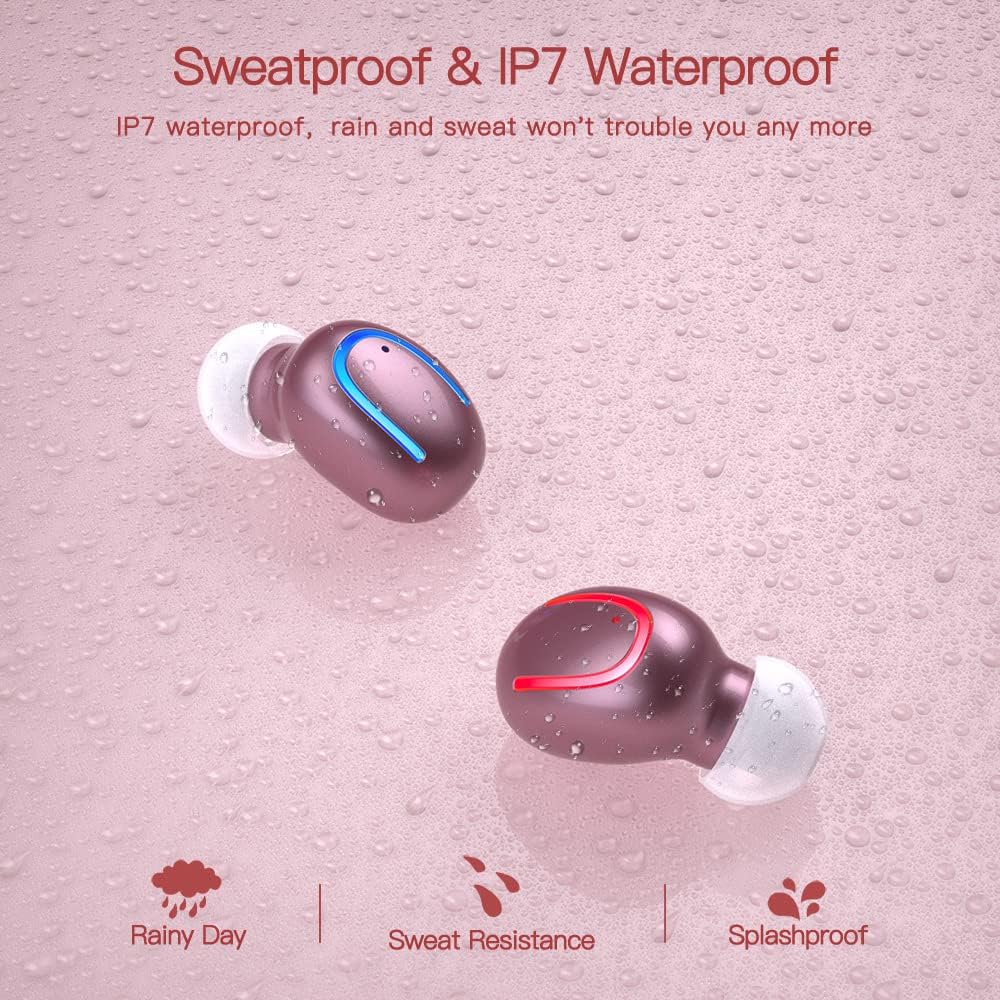
Vodoodpornost
The earbuds are IPX7 waterproof, meaning they can withstand heavy rain and sweat during intense workouts. This protection is ideal for sports and all-weather conditions. Note: The charging case is not waterproof. Avoid submerging the charging case in water.

IPX7 water and sweat resistant nano-coating protects the earbuds from heavy rain or sweat during intense workouts.
Odpravljanje težav
- Slušalke se ne morejo seznaniti: Ensure both earbuds are charged and removed from the case. Turn off and on your device's Bluetooth. If issues persist, try resetting the earbuds (refer to the full manual for specific reset instructions if available).
- Ni zvoka ali nizka glasnost: Check the volume levels on both your device and the earbuds. Ensure the earbuds are properly seated in your ears and that the ear tips are clean and correctly sized.
- Disconnection issues: Ensure your device is within the 12-meter Bluetooth range. Avoid obstacles that may interfere with the signal.
- Težave s polnjenjem: Verify the Type-C cable is securely connected to both the case and the power source. Check if the charging indicators on the case are active.
- Mikrofon ne deluje: Ensure the earbuds are properly connected and selected as the audio input device on your phone during calls.
For further assistance, please consult the customer service for 24-hour after-sales support.
Specifikacije
| Funkcija | Podrobnost |
|---|---|
| Znamka | Obbug |
| Ime modela | Obbq13 / Q13S TWS |
| Tehnologija povezljivosti | Brezžično (Bluetooth 5.1) |
| Stopnja vodoodpornosti | Vodoodporen IPX7 |
| Življenjska doba baterije (slušalke) | Up to 5 hours talk/play time |
| Življenjska doba baterije (z ohišjem) | Skupni čas igranja do 20 ur |
| Čas polnjenja | Približno 1-2 ur |
| Zmogljivost polnilnega ohišja | 600 mAh |
| Vrsta nadzora | Nadzor na dotik |
| Namestitev ušesa | V ušesu |
| Teža predmeta | 0.64 unč |
| Material | Plastika |
| Združljive naprave | Android, iPhone, iPad, Samsung Galaxy, iPod Nano, Laptops & Tablets, etc. |
Garancija in podpora
Obbug products are manufactured with high-quality standards. For any product-related inquiries, technical support, or warranty claims, please contact Obbug customer service. Refer to your purchase documentation for specific warranty terms and contact information.
Customer service is available for 24 hours after-sales support to assist you with any concerns or issues you may encounter.