
Uvod
This manual provides instructions for the safe and efficient operation of your RIDGID R84086B 18-Volt Cordless Mini Bluetooth Radio. This compact and versatile device offers portable audio entertainment and device charging, featuring AM/FM radio, Bluetooth connectivity, and an auxiliary input. It is powered by RIDGID 18-Volt batteries and can also function as a power bank for charging other devices.
Varnostne informacije
Always read and understand all safety warnings and instructions before operating this product. Failure to follow these instructions may result in electric shock, fire, and/or serious injury.
- Do not expose the radio to rain or wet conditions. Water entering the radio will increase the risk of electric shock.
- Use only with specified battery packs. Using any other battery packs may create a risk of injury and fire.
- Do not operate the radio in explosive atmospheres, such as in the presence of flammable liquids, gases, or dust.
- Keep the radio away from heat sources, direct sunlight, and extreme temperatures.
- Always ensure the battery is properly seated before use.
Konec izdelkaview
Familiarize yourself with the components of your RIDGID R84086B radio.
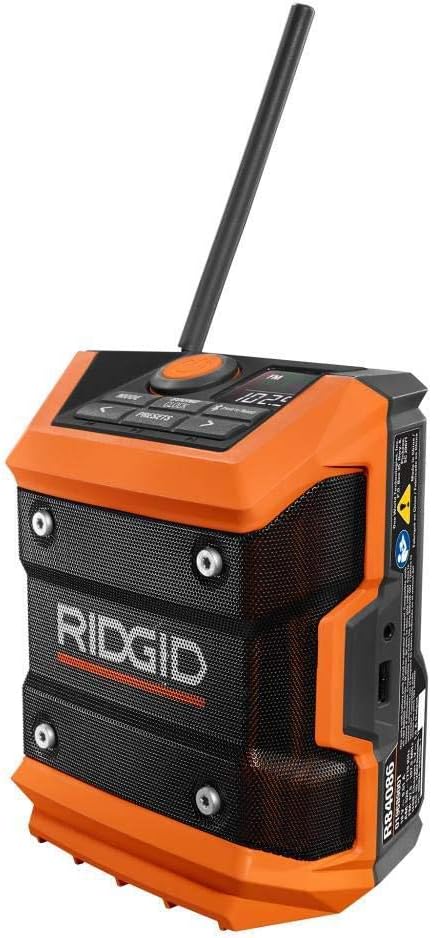
Slika 1: Spredaj view of the RIDGID R84086B radio, showing the control panel, speaker, and extended antenna.

Figure 2: The RIDGID R84086B radio in a workshop setting, demonstrating its portability and use with a smartphone.
Nastavitev
Namestitev baterije
- Prepričajte se, da je radio izklopljen.
- Align a charged RIDGID 18-Volt battery pack with the battery port on the radio.
- Potisnite baterijski sklop v vrata, dokler se ne zaskoči.
Prilagoditev antene
For optimal radio reception, extend and adjust the antenna as needed. The antenna can be rotated and tilted to improve signal strength.
Navodila za uporabo
Vklop/izklop
Press the orange power button located on the control panel to turn the radio on or off.
Izbira načina
Pritisnite NAČIN button to cycle through available audio sources: FM Radio, AM Radio, Bluetooth, and Auxiliary (AUX) input.
Radio Tuning (AM/FM)
- Select FM or AM mode using the NAČIN gumb.
- Use the left (<) in desno (>) arrow buttons to manually tune to a desired frequency.
- Če želite postajo shraniti kot prednastavitev, pritisnite in držite PREDSTAVI button, then use the arrow buttons to select a preset number and press PREDSTAVI ponovno za potrditev.
Bluetooth združitev
- Izberite način Bluetooth z uporabo NAČIN button. The Bluetooth icon on the display will flash, indicating it is in pairing mode.
- V mobilni napravi omogočite Bluetooth in poiščite razpoložljive naprave.
- Select "RIDGID Radio" from the list of devices to pair. Once paired, the Bluetooth icon will stop flashing and remain solid.
Pomožni vhod
To use the auxiliary input, connect an audio device (e.g., smartphone, MP3 player) to the 3.5mm AUX port on the side of the radio using a standard audio cable. Select AUX mode using the NAČIN gumb.
Prilagoditev zvoka
Pritisnite SOUND/CLOCK button to access sound settings. Use the arrow buttons to adjust bass and treble levels for your preferred audio experience.
Funkcionalnost prenosne baterije
The radio features a USB port that allows you to charge compatible devices. Connect your device to the USB port using an appropriate charging cable. The radio's battery will provide power to charge your device.
Video: Demonstration of the RIDGID R84086B radio's features, including battery installation, mode selection, radio tuning, auxiliary input, and power bank functionality.
Vzdrževanje
Čiščenje
Redno čistite radio z mehko krpoamp krpo. Ne uporabljajte agresivnih kemikalij ali abrazivnih čistil. Prepričajte se, da so vsa vrata brez prahu in umazanije.
Skrb za baterijo
Store battery packs in a cool, dry place away from direct sunlight. Do not store battery packs in a discharged condition. Always charge batteries fully before extended storage.
Odpravljanje težav
Brez moči
- Prepričajte se, da je baterijski paket popolnoma napolnjen in pravilno vstavljen.
- Check for any obstructions in the battery port.
Slab radijski sprejem
- Extend and adjust the antenna for better signal.
- Move the radio to a different location to avoid interference.
Težave s povezavo Bluetooth
- Ensure the radio is in Bluetooth pairing mode.
- Prepričajte se, da je Bluetooth vaše mobilne naprave omogočen in v dosegu.
- Poskusite prekiniti seznanitev in ponovno seznaniti napravo.
Specifikacije
| Znamka | RIDGID |
| Številka modela | R84086B |
| Tehnologija povezljivosti | Bluetooth |
| Vir napajanja | Battery Powered (RIDGID 18-Volt) |
| Teža predmeta | 1.75 funta |
| Združljive naprave | Pametni telefon |
| Strojni vmesnik | USB |
| UPC | 723548648427 |
Garancija in podpora
Informacije o garanciji
This product comes with a 90-day limited warranty. Please refer to the warranty card included with your purchase for full terms and conditions.
Podpora uporabnikom
For technical assistance, troubleshooting, or warranty claims, please contact RIDGID customer support. Contact information can typically be found on the official RIDGID webspletnem mestu ali na embalaži vašega izdelka.