
1. Uvod
This manual provides detailed instructions for the installation, operation, and maintenance of your COMAP Smart Home Wireless Programmable Thermostat. This system is designed to optimize the control of electric heating systems equipped with a pilot wire, enhancing comfort while contributing to energy efficiency. The thermostat can be managed locally or remotely via a dedicated application available on Play Store and Apple Store, and is compatible with Google Assistant and Amazon Alexa voice assistants.
2. Varnostne informacije
- Always disconnect power to the heating system before installing or servicing the heating module.
- Če niste prepričani glede električne napeljave, naj namestitev opravi usposobljen električar.
- Use only AAA non-rechargeable batteries for the thermostat. Do not mix old and new batteries, or different types of batteries.
- Napravo hranite stran od vode in ekstremnih temperatur.
- Do not attempt to open or repair the device yourself. Refer to qualified personnel.
3. Vsebina paketa
Preverite, ali so v paketu priložene vse naslednje komponente:
- 1 x COMAP Smart Home Thermostat
- 1 x Heating Module
- 1 x Gateway
- 1 x USB kabel
- 1 x RJ45 Ethernet kabel
- 3 x AAA bateriji (nista polnilna)
- 4 x Screws/Wall Plugs for mounting
- 1 x Installation Guide (separate document)

Slika 3.1: Konecview of the COMAP Smart Home Thermostat and Heating Module.
4. Nastavitev in namestitev
4.1. Nastavitev termostata
- Vstavite baterije: Open the battery compartment on the back of the thermostat and insert the 3 AAA non-rechargeable batteries, ensuring correct polarity.
- Montaža: Choose a central location in the room, away from direct sunlight, drafts, or heat sources. Mount the thermostat on the wall using the provided screws and wall plugs.

Image 4.1: The COMAP Smart Home Thermostat installed on a wall.
4.2. Gateway Connection
- Napajalni priključek: Connect the gateway to a power source using the provided USB cable (5V DC 200mA).
- Internetna povezava: Connect the gateway to your internet router using the provided RJ45 Ethernet cable. Ensure your internet connection is active.
4.3. Heating Module Installation
The heating module connects to your electric radiator's pilot wire. Refer to the separate installation guide for detailed wiring diagrams specific to your heating system. It is recommended to consult a qualified electrician for this step.
4.4. Prenos aplikacije in seznanjanje
- Prenesite aplikacijo: Download the COMAP Smart Home application from the Apple App Store or Google Play Store.
- Ustvari račun: Sledite navodilom v aplikaciji, da ustvarite nov uporabniški račun.
- Združevanje naprav: Follow the in-app instructions to pair your thermostat, heating module, and gateway with your account. This typically involves a discovery process and confirmation on the devices.
5. Navodila za uporabo
5.1 Ročna nastavitev temperature
On the thermostat display, use the touch controls (up/down arrows) to manually adjust the desired temperature. The thermostat will maintain this temperature until the next programmed event or until it is manually changed again.
5.2. App Control and Programming
The COMAP Smart Home application provides comprehensive control over your heating system:
- Oddaljeno upravljanje: Adjust temperature, switch modes (Comfort, Eco, Frost Protection, Off) from anywhere using your smartphone, tablet, or PC.
- Tedenski program: Create customized heating schedules for each day of the week to match your lifestyle.
- Heating History: Access historical data on heating periods and temperatures to optimize your energy consumption.
- Večconsko upravljanje: If you have multiple heating modules, the app allows for independent control of different zones.

Image 5.1: Controlling the thermostat via the COMAP Smart Home web application on a laptop.

Image 5.2: Adjusting heating settings using the COMAP Smart Home mobile application.
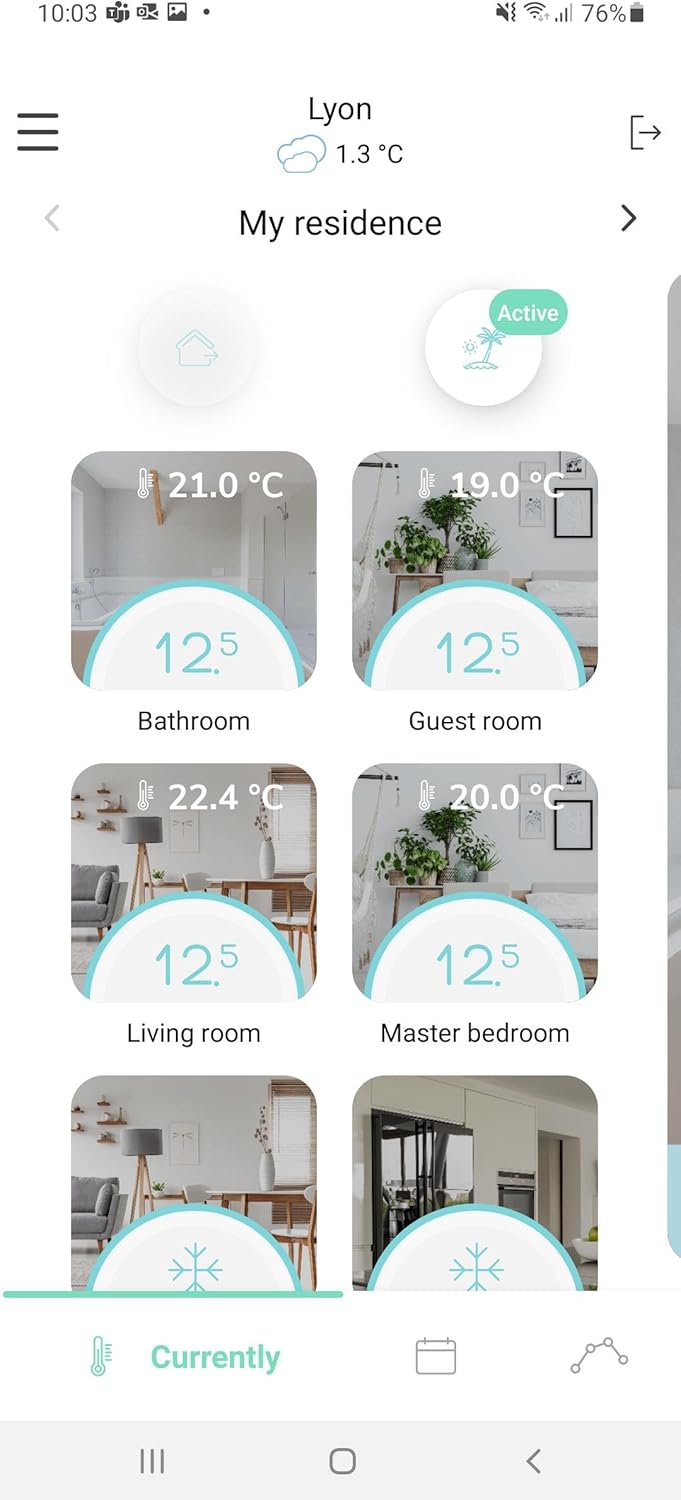
Image 5.3: The COMAP Smart Home app interface showing temperature control for multiple zones.
5.3. Integracija glasovnega pomočnika
The COMAP Smart Home system is compatible with Google Assistant and Amazon Alexa. To enable voice control, link your COMAP Smart Home account within the respective voice assistant application (Google Home or Amazon Alexa app) and follow the setup instructions.
6. Vzdrževanje
- Zamenjava baterije: Replace the AAA batteries in the thermostat approximately every 2 years, or when the low battery indicator appears on the display or in the app. Always use new, non-rechargeable AAA batteries.
- Čiščenje: Clean the thermostat and other components with a soft, dry cloth. Do not use abrasive cleaners or solvents.
- Posodobitve vdelane programske opreme: Ensure your system's firmware is up to date through the COMAP Smart Home application for optimal performance and new features.
7. Odpravljanje težav
7.1. No Display on Thermostat
- Check if the AAA batteries are correctly inserted and not depleted. Replace if necessary.
7.2. No Connection to App/Gateway
- Ensure the gateway is powered on and connected to your internet router via the RJ45 cable.
- Preverite, ali je vaša internetna povezava aktivna.
- Check if the thermostat and heating module are within the wireless range of the gateway (up to 20m in open field, but can be affected by building structure).
- Restart the gateway and your internet router.
- Re-pair the devices through the app if the connection is lost persistently.
7.3. Napačne odčitke temperature
- Prepričajte se, da termostat ni nameščen v bližini virov toplote (npr. neposredna sončna svetloba,amps, appliances) or cold drafts.
- Allow some time for the thermostat to stabilize after initial setup or significant temperature changes.
7.4. Heating Not Responding to Commands
- Verify the heating module is correctly wired to the electric radiator's pilot wire.
- Check the connection status of the heating module in the app.
- Ensure the main power to the heating system is on.
8. Specifikacije
| Funkcija | Specifikacija |
|---|---|
| Številka modela | QTW12-EW-CO-EU (L151015001) |
| Napajalnik (termostat) | 3 x AAA bateriji (nista polnilna) |
| Thermostat Consumption (Standby) | 10 µA |
| Thermostat Consumption (Active) | 40 mA |
| Gateway Consumption (Active) | 100mA |
| Heating Module Consumption | 1/2 W |
| Povprečna življenjska doba baterije | 2 leti |
| Zaslon | Low consumption LED |
| Radijski vmesnik | 868 MHz (6LoWPAN protocols) |
| Prehodna povezava | USB 5V DC 200mA, RJ45 Ethernet |
| Brezžično Domet | Max 20m in open field (indicative) |
| Merilno območje | 0°C do 50°C |
| Občutljivost | +/- 0.05°C |
| Območje nastavljene temperature | 4°C do 28°C |
| Povečanje temperature | 0.5°C |
| Senzorji | Wide-field presence sensor, Humidity sensor |
| Dimenzije (D x Š x V) | 10.7 x 10.7 x 2.6 cm |
| Teža | 460 gramov |
| Material | Plastika |
| barva | Bela |
9. Garancija in podpora
For warranty information, technical support, or service inquiries, please refer to the official COMAP website or contact COMAP customer service directly. Keep your purchase receipt as proof of purchase for warranty claims.


