
Filius 0543-14
Filius 0543-14 Radio Controlled Solar Alarm Clock User Manual
Model: 0543-14 | Brand: Filius
Uvod
Thank you for choosing the Filius 0543-14 Radio Controlled Solar Alarm Clock. This manual provides essential information for the safe and efficient operation of your new alarm clock. Please read it thoroughly before use and retain it for future reference.
The Filius 0543-14 features a silver plastic casing, a clear white analog dial, illumination, a loud alarm, and a snooze function. It is designed for indoor use and incorporates radio-controlled time synchronization and solar power capabilities.
Varnostne informacije
- Do not expose the clock to extreme temperatures, direct sunlight for prolonged periods (beyond normal operation), or high humidity.
- Pazite, da vam ura ne pade ali da je ne izpostavljate močnim udarcem.
- Ne poskušajte ure razstavljati ali popravljati sami. Vsa servisna dela prepustite usposobljenemu osebju.
- Baterije hranite izven dosega otrok. Če pride do zaužitja, takoj poiščite zdravniško pomoč.
- Izrabljene baterije zavrzite v skladu z lokalnimi predpisi.
Vsebina paketa
Preverite, ali so v paketu prisotni vsi elementi:
- Filius 0543-14 Alarm Clock
- 1 x AA baterija
- Uporabniški priročnik (ta dokument)
Nastavitev
1. Namestitev baterije
The Filius 0543-14 alarm clock requires one AA battery for operation. A battery is included in the package.
- Poiščite pokrovček predalčka za baterije na zadnji strani ure.
- Pokrov odstranite tako, da ga potisnete ali dvignete.
- Insert the AA battery, ensuring the correct polarity (+ and -) as indicated inside the compartment.
- Varno namestite pokrov prostora za baterije.

Slika: Zadaj view of the Filius 0543-14 alarm clock, showing the battery compartment and controls.
2. Začetna časovna sinhronizacija (radijsko vodena)
This clock is radio-controlled and will automatically set itself to the correct time once the battery is installed and it receives a signal. This process may take a few minutes to several hours depending on your location and signal strength.
- Place the clock near a window or in an open area to facilitate signal reception.
- Izogibajte se postavljanju v bližino elektronskih naprav, ki lahko povzročajo motnje (npr. televizorjev, računalnikov, mikrovalovnih pečic).
- The clock will automatically search for the time signal. The hands will move to 12:00 and then adjust to the correct time.
- If the clock does not set itself after 24 hours, try moving it to a different location or manually setting the time (refer to the "Manual Time Setting" section if available on the device, otherwise rely on radio control).
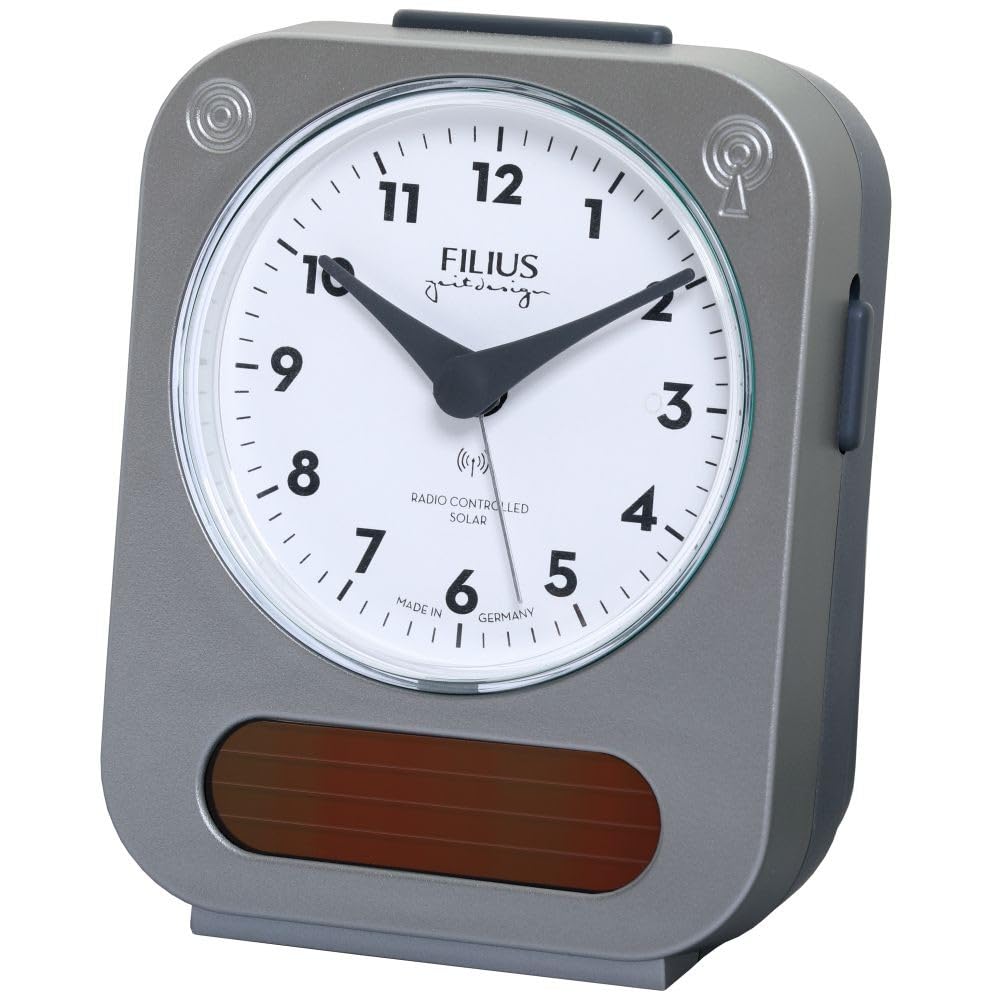
Image: Detail of the clock face, highlighting the "RADIO CONTROLLED SOLAR" indicator.
Navodila za uporabo
1. Nastavitev alarma
Če želite nastaviti čas alarma:
- Locate the alarm setting knob, usually on the back or side of the clock.
- Rotate the knob to move the alarm hand to your desired alarm time.
- Activate the alarm by sliding the alarm ON/OFF switch (typically on the side or back) to the "ON" position.
2. Funkcija dremeža
When the alarm sounds, press the large button on top of the clock to activate the snooze function. The alarm will temporarily stop and sound again after approximately 5-10 minutes.
3. Osvetlitev
To illuminate the clock face in low light conditions, press the large button on top of the clock. The backlight will activate for a few seconds, allowing you to read the time.

Image: The Filius 0543-14 alarm clock displaying its blue illumination feature in the dark.
4. Solar Power Feature
The clock is equipped with a solar panel to supplement power. Ensure the clock is exposed to ambient light (not necessarily direct sunlight) to utilize this feature and extend battery life. The solar panel is visible on the front bottom of the clock.
Vzdrževanje
1. Čiščenje
Wipe the clock with a soft, dry cloth. Do not use abrasive cleaners, solvents, or chemical sprays, as these may damage the casing ali številčnico.
2. Zamenjava baterije
When the clock's display dims or the alarm weakens, it is time to replace the AA battery. Follow the "Battery Installation" steps in the Setup section.
Odpravljanje težav
| Težava | Možen vzrok | rešitev |
|---|---|---|
| Clock does not display correct time or hands do not move. | Battery is dead or incorrectly installed. No radio signal received. | Check and replace the battery. Move the clock to a location with better signal reception (e.g., near a window). Allow up to 24 hours for synchronization. |
| Alarm se ne oglasi. | Alarm is not activated. Alarm time is incorrectly set. Battery is low. | Ensure the alarm ON/OFF switch is in the "ON" position. Verify the alarm hand is set to the desired time. Replace the battery. |
| Illumination is dim or not working. | Baterija je skoraj prazna. | Zamenjajte baterijo. |
Specifikacije
- Številka modela: 0543-14
- Znamka: Filius
- Material: Plastika (srebrna)
- Vrsta zaslona: Analogni
- Posebne lastnosti: Illuminated, Loud Alarm, Snooze, Radio Controlled, Solar Powered
- vir energije: 1 x AA Battery (included), Solar
- Mere izdelka (D x Š x V): Približno 9.5 cm (D) x 5 cm (Š) x 12.5 cm (V)
- Teža artikla: 195 gramov
- Namen uporabe: Notranja
- Država izvora: Nemčija
Informacije o garanciji
Specific warranty details are not provided in the product information. Please refer to the retailer's return policy or contact Filius customer support for warranty information. Typically, electronic devices come with a standard manufacturer's warranty against defects in materials and workmanship.
Podpora
For further assistance, technical support, or inquiries regarding your Filius 0543-14 alarm clock, please contact your retailer or visit the official Filius webspletno mesto za kontaktne podatke.
Opomba: Informacije o razpoložljivosti rezervnih delov niso na voljo.
Ask a question about this manual
Ask about setup, troubleshooting, compatibility, parts, safety, or missing instructions. Manuals+ will review the question and use this page’s manual context to help answer it.