
Pomembna varnostna navodila
To ensure safe operation and prolong the life of your monitor, please read and follow these instructions carefully:
- Pred čiščenjem monitorja vedno izključite napajalni kabel iz električne vtičnice.
- Monitorja ne izpostavljajte dežju ali vlagi, da preprečite električni udar.
- Ensure proper ventilation around the monitor to prevent overheating. Do not block ventilation openings.
- Uporabljajte samo napajalnik in kable, ki jih je dobavil proizvajalec.
- Izogibajte se postavljanju težkih predmetov na napajalni kabel ali monitor.
- If the monitor is damaged or malfunctions, do not attempt to repair it yourself. Contact qualified service personnel.
Vsebina paketa
Before proceeding with the setup, please check the contents of your package to ensure all items are present:
- Acer CB272U smiiprx LED Monitor
- Stojalo za monitor (podstavek in roka)
- Napajalni kabel
- HDMI kabel
- Priročnik za hiter začetek / Garancijska kartica
Nastavitev
1. Sestavljanje stojala za monitor
- Carefully remove the monitor from its packaging. Place the monitor face down on a soft, clean cloth or surface to prevent scratches to the screen.
- Attach the stand arm to the back of the monitor panel. Ensure it is securely fastened, typically by sliding it into place until it clicks or by tightening screws.
- Connect the stand base to the bottom of the stand arm. Secure the base by tightening the captive screw located underneath the base.

Slika 1: Zadaj view of the Acer CB272U smiiprx monitor with the stand attached, illustrating the assembly points.
2. Connecting the Monitor to Your Computer
- En konec priloženega kabla HDMI priključite v vrata HDMI na monitorju.
- Connect the other end of the HDMI cable to the HDMI output port on your computer or graphics card.
- Plug the power cord into the monitor's power input, then plug the other end into a grounded electrical outlet.

Slika 2: Nagnjen zadnji del view showing the input ports of the monitor, including HDMI and power connections.
Upravljanje monitorja
Vklop in izklop
Locate the power button on the monitor's bezel. Press it once to turn the monitor on. The power indicator light will illuminate. Press it again to turn the monitor off.
Adjusting Display Settings (OSD Menu)
The On-Screen Display (OSD) menu allows you to customize various monitor settings. Use the control buttons (usually located on the back or bottom right of the monitor) to navigate the OSD menu. Common adjustments include:
- Svetlost/kontrast: Prilagodite splošno svetlost in razliko med svetlimi in temnimi območji.
- Barvne nastavitve: Spremenite barvno temperaturo, gamo in posamezne ravni RGB.
- Vir vhoda: Manually select the video input (e.g., HDMI).
- Avdio: Nadzor glasnosti vgrajenih zvočnikov.
Ergonomske prilagoditve
The Acer CB272U smiiprx monitor stand offers multiple ergonomic adjustments to optimize your viewudobje:
- Nastavitev višine: Dvignite ali spustite monitor v višino oči.
- Nagib: Adjust the screen angle forward or backward to reduce glare.
- Vrtljiva: Rotate the monitor horizontally to share your screen or adjust viewvhodni kot.
- Vrtenje: Rotate the screen to a portrait orientation for document viewkodiranje.
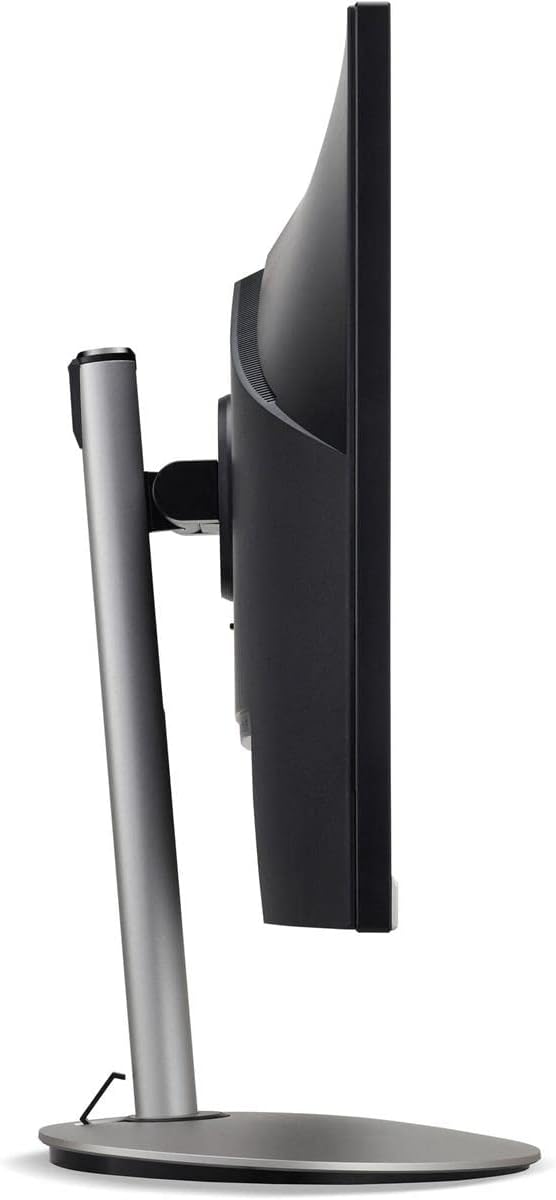
Slika 3: Stranski profesionalecfile of the monitor, illustrating its adjustable stand for ergonomic positioning.
Vzdrževanje
Cleaning the Monitor Screen and Casing
To clean your monitor, first ensure it is turned off and unplugged from the power outlet. Use a soft, lint-free cloth. For stubborn marks, lightly dampen the cloth with water or a specialized non-abrasive screen cleaner. Tekočine ne pršite neposredno na zaslon aliasing. Izogibajte se uporabi agresivnih kemikalij, abrazivnih čistil ali topil.
Smernice za shranjevanje
If you need to store the monitor for an extended period, it is recommended to use its original packaging to protect it from dust, moisture, and physical damage. Store in a cool, dry environment away from direct sunlight and extreme temperatures.
Odpravljanje težav
Za pogoste težave in njihove rešitve glejte spodnjo tabelo:
| Težava | Možen vzrok | rešitev |
|---|---|---|
| Na zaslonu ni slike | Napajalni kabel odklopljen; video kabel odklopljen; izbran napačen vhodni vir. | Check power and video cable connections; Ensure the monitor is powered on; Select the correct input source via the OSD menu. |
| Slika je zamegljena ali popačena | Incorrect resolution setting; Faulty video cable. | Set the display resolution to 2560 x 1440 at 75 Hz; Try a different HDMI cable. |
| Iz zvočnikov ni zvoka | Monitor volume too low or muted; Incorrect audio output selected on computer. | Adjust monitor volume via OSD; Unmute audio; Select the monitor as the audio output device in your computer's sound settings. |
| Utripanje monitorja | Refresh rate mismatch; Interference; Faulty cable. | Ensure refresh rate is set to 75 Hz; Check for nearby electronic devices causing interference; Replace video cable. |
Specifikacije
Key technical specifications for the Acer CB272U smiiprx LED Monitor:
| Funkcija | Podrobnost |
|---|---|
| Ime modela | CB272U smiiprx |
| Velikost zaslona | 24.1 palcev |
| Izvorna ločljivost | 2560 x 1440 (WQHD) |
| Hitrost osveževanja | 75 Hz |
| Odzivni čas | 1 Millisecond (VRB) |
| Razmerje stranic | 16:9 |
| Vrsta zaslona | LED-backlit LCD / TFT active matrix (IPS) |
| Svetlost | 350 cd/m² |
| Kontrastno razmerje | 1000:1 (statično) |
| Povezljivost | HDMI |
| Prilagodljiva sinhronizacija | FreeSync |
| Vgrajeni zvočniki | ja |
| Dimensions (WxDxH with stand) | 24.1 palcev x 9.2 palcev x 20.5 palcev |
| Teža (s stojalom) | 18.1 funta |

Figure 4: Monitor dimensions with stand, indicating width, depth, and height.
Informacije o garanciji
The Acer CB272U smiiprx LED Monitor comes with a 3-letna omejena garancija proizvajalca. This warranty covers defects in materials and workmanship under normal use. For complete details regarding warranty coverage, limitations, and how to make a claim, please refer to the warranty documentation included with your product or visit the official Acer support webmesto.
Please retain your proof of purchase (receipt or invoice) as it will be required for any warranty service.
Podpora uporabnikom
Should you require further assistance, technical support, or wish to download the latest drivers and firmware updates for your monitor, please visit the official Acer support webspletno mesto:
You can also find contact information for Acer customer service in your region on the support webspletno mesto za osebno pomoč.