
Fanimation MAD7912BBN
Fanimation Levon Custom DC Motor Ceiling Fan
Uporabniški priročnik
Model: MAD7912BBN
Uvod
This manual provides detailed instructions for the safe installation, operation, and maintenance of your Fanimation Levon Custom DC Motor Ceiling Fan, model MAD7912BBN. The Levon Custom series offers a versatile design with various optional blade and finish combinations, allowing for a personalized aesthetic. This fan is designed for indoor use and features a DC motor for efficient performance, along with Wi-Fi compatibility and fanSync Bluetooth for modern control options.
Varnostne informacije
Pred začetkom namestitve preberite in razumite vsa navodila. Neupoštevanje teh navodil lahko povzroči električni udar, požar ali telesne poškodbe.
- Prepričajte se, da je mesto namestitve konstrukcijsko trdno in da lahko prenese težo ventilatorja (približno 19 funtov).
- All electrical connections must be made in accordance with local codes, ordinances, and the National Electric Code (NEC). If you are unfamiliar with electrical wiring, consult a qualified electrician.
- Disconnect power at the main circuit breaker before attempting any installation or maintenance.
- Ventilatorja ne uporabljajte s poškodovanim napajalnim kablom ali vtičem.
- Roke, lase in oblačila držite stran od vrtečih se lopatic ventilatorja.
- Ta ventilator je zasnovan samo za uporabo v zaprtih prostorih.
Vsebina paketa
Carefully unpack all components and ensure you have received all items listed below. If any parts are missing or damaged, contact Fanimation customer support immediately.
- DC Motor Assembly (Fanimation Levon Custom)
- Montažni nosilec
- Downrod
- Nadstrešek
- Paket strojne opreme (vijaki, podložke, matice)
- fanSync Bluetooth Receiver
- Navodila za uporabo
- Note: Fan blades and optional LED Light Kit are sold separately.
Nastavitev in namestitev
Installation of the Fanimation Levon Custom ceiling fan requires basic electrical knowledge. If you are unsure about any steps, please consult a qualified electrician.
1. Pripravite mesto namestitve
Ensure the electrical box is securely mounted to the building structure and is rated for fan support. The fan requires a 120V AC power supply.
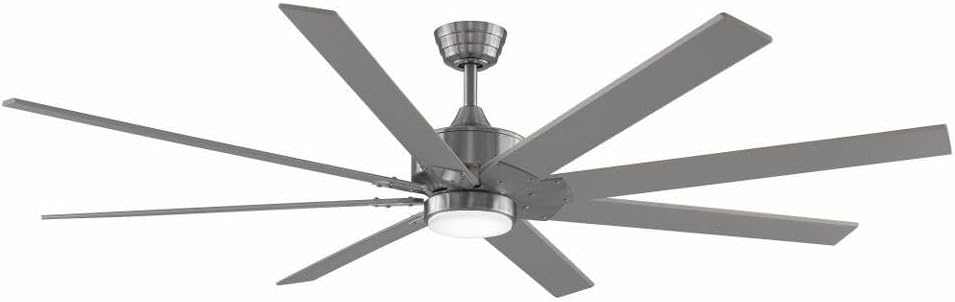
Figure 1: Assembled Fanimation Levon Custom DC Motor Ceiling Fan. This image shows the complete fan unit, including the motor housing, downrod, and a set of eight fan blades (sold separately), all in a brushed nickel finish.
2. Mount the Bracket and Downrod
Attach the mounting bracket to the electrical box. Secure the downrod to the fan motor assembly, ensuring all pins and screws are tightened.
3. Električne povezave
Connect the fan's electrical wires to the household wiring according to the wiring diagram provided in the separate detailed installation guide. Ensure proper grounding. The fanSync Bluetooth receiver should be wired in line as per instructions for remote and smart control functionality.

Slika 2: stran view of the Fanimation Levon Custom DC Motor Ceiling Fan. This perspective highlights the sleek profile of the motor housing and the angle of the fan blades, demonstrating its modern design.
4. Attach Fan Blades and Light Kit (Optional)
Securely attach the fan blades (sold separately) to the motor housing. If installing the optional LED light kit (sold separately), follow its specific installation instructions.

Slika 3: Bližnji posnetek view of the Fanimation Levon Custom DC Motor Ceiling Fan's central housing. This image focuses on the brushed nickel finish of the motor unit and the integrated light fixture, which is part of the optional LED light kit.
Navodila za uporabo
Your Fanimation Levon Custom fan can be controlled via the included fanSync Bluetooth remote or through a compatible Wi-Fi enabled smart device (with required controls sold separately).
- Vklop/izklop: Use the designated button on your remote or smart device interface to turn the fan on or off.
- Nadzor hitrosti: The fan offers 3 distinct power levels. Adjust the fan speed using the speed control buttons on your remote or the slider/buttons in your smart application.
- Nadzor svetlobe (če je primerno): If an optional LED light kit is installed, use the light control buttons on your remote or smart device to turn the light on/off and adjust brightness (if dimmable).
- Povezljivost Wi-Fi: For Wi-Fi control, ensure you have the necessary Wi-Fi compatible controls and follow their specific pairing instructions to connect your fan to your home network.
Vzdrževanje
Redno vzdrževanje bo zagotovilo dolgo življenjsko dobo in optimalno delovanje vašega stropnega ventilatorja.
- Čiščenje: Za čiščenje ventilatorja ga obrišite z mehko krpo,amp krpo. Ne uporabljajte abrazivnih čistil ali topil, saj lahko poškodujejo površino ali rezila.
- Pregled rezila: Periodically check the blade attachments for tightness. Loose blades can cause wobbling and noise.
- Mazanje motorja: Enosmerni motor je trajno mazan in ne potrebuje dodatnega oljenja.
- Električne povezave: Annually inspect all electrical connections for any signs of wear or loosening. Ensure power is disconnected before inspection.
Odpravljanje težav
If you experience issues with your Fanimation Levon Custom ceiling fan, refer to the following common problems and solutions:
| Težava | Možen vzrok | rešitev |
|---|---|---|
| Ventilator se ne zažene | Ventilator ni priključen na napajanje; Ohlapne žične povezave; Prazna baterija daljinskega upravljalnika. | Check circuit breaker and wall switch. Ensure all wire connections are secure. Replace remote control batteries. |
| Ventilator niha | Zrahljani vijaki rezila; Neuravnotežena rezila; Zrahljan pritrdilni nosilec. | Tighten all blade screws. Use a balancing kit (not included) to balance blades. Ensure mounting bracket is securely fastened. |
| Hrupno delovanje | Zrahljani vijaki; brenčanje motorja; rezila zadenejo oviro. | Check and tighten all screws. A slight motor hum is normal for DC motors. Ensure nothing is obstructing the blade path. |
| Daljinski upravljalnik ne deluje | Low battery; Not paired correctly; Obstruction between remote and receiver. | Replace batteries. Refer to fanSync pairing instructions. Ensure clear line of sight. |
Specifikacije
Detailed technical specifications for the Fanimation Levon Custom DC Motor Ceiling Fan (Model MAD7912BBN).
| Znamka | Animacija |
| Ime modela | Levon Custom DC Motor - BN |
| Številka modela | MAD7912BBN |
| barva | Brušen nikelj |
| Dizajn električnega ventilatorja | Stropni ventilator |
| Vir napajanja | Električni na kabel |
| Posebna funkcija | Wi-Fi Enabled (with separate controls) |
| Vrsta zaključka | Končano |
| Zmogljivost pretoka zraka | 8244 CFPH |
| voltage | 120.0 V |
| Teža predmeta | 18.96 funta (približno 8.6 kg) |
| Dimenzije izdelka | 52 x 52 x 15.58 palca (približno 132 x 132 x 39.6 cm) |
| Notranja/zunanja uporaba | Notranja |
| Material rezila | Plastic (if purchased separately) |
| Število ravni moči | 3 |
| UPC | 840506087224 |
Informacije o garanciji
The Fanimation Levon Custom DC Motor Ceiling Fan is backed by a Omejena doživljenjska garancija. This warranty covers defects in materials and workmanship under normal use. For specific terms, conditions, and limitations, please refer to the warranty documentation included with your purchase or visit the official Fanimation webmesto.
Podpora uporabnikom
If you have any questions, require technical assistance, or need to report a missing or damaged part, please contact Fanimation customer support. Have your model number (MAD7912BBN) and purchase information ready when contacting support.
For the most up-to-date contact information and additional resources, please visit the official Fanimation webspletno mesto: www.fanimation.com
Ask a question about this manual
Ask about setup, troubleshooting, compatibility, parts, safety, or missing instructions. Manuals+ will review the question and use this page’s manual context to help answer it.