
Uvod
This manual provides instructions for the Calvas USARMT LTV-914 Universal Remote Control, designed for use with various LG TV models, including AKB73715634, AKB73715679, and 3D Smart TV LN577S. This remote operates via infrared (IR) technology and is intended as a direct replacement, requiring no programming for most compatible LG televisions.
Vsebina paketa
- 1 x USARMT LTV-914 Universal Remote Control
Specifikacije
- Številka modela: LTV-914
- Znamka: plešasti madeži
- Tip: TV daljinski upravljalnik
- Komunikacija: Infrardeči (IR)
- Pogostost: 433 MHz
- Kanali: 1
- vir energije: 2 x AAA alkalne baterije (niso priložene)
- Material: ABS
- Združljive naprave: LG Televisions (e.g., AKB73715634, AKB73715679, 3D Smart TV LN577S)
- Posebna lastnost: Univerzalna združljivost
Nastavitev
Namestitev baterij
- Poiščite predal za baterije na zadnji strani daljinskega upravljalnika.
- Pokrov predalčka za baterije potisnite navzdol ali pritisnite zapah in ga dvignite, da ga odprete.
- Insert two (2) AAA alkaline batteries, ensuring the positive (+) and negative (-) terminals align correctly with the markings inside the compartment.
- Pokrov predalčka za baterije namestite nazaj tako, da ga potisnete nazaj na svoje mesto, dokler se ne zaskoči.

Image: Back of the remote control with the battery compartment open, illustrating battery insertion.
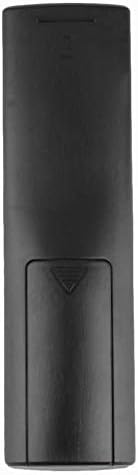
Slika: Zadaj view daljinskega upravljalnika z zaprtim pokrovom baterije.
Navodila za uporabo
Začetna uporaba
The Calvas USARMT LTV-914 remote control is designed to work directly with most compatible LG TV models without requiring any programming. Simply insert the batteries and point the remote towards your television.
Direct Use and Basic Functions
Most functions, such as power on/off, volume control, channel selection, and navigation, should operate immediately upon pointing the remote at your LG TV.

Slika: spredaj view of the remote control, displaying the button layout.
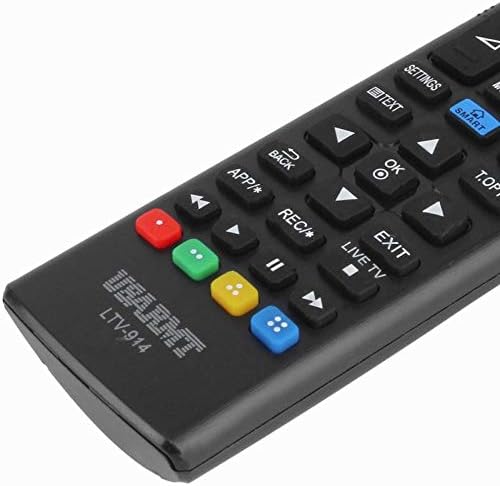
Image: Close-up of the remote's buttons, showing details of the control interface.
Factory Reset / Reconfiguration (If direct use fails)
In rare cases, if the remote does not operate your TV directly, you may need to perform a factory reset or attempt a reconfiguration.
- To reset to factory settings: Press and hold the MOČ button and the number 0 gumb hkrati za nekaj sekund.
- To attempt re-pairing (if applicable, though typically not required for this universal remote): Press and hold the MOČ button and the number 1 gumb hkrati za nekaj sekund.
After performing either of these steps, release the buttons and test the remote's functionality with your TV.
Odpravljanje težav
- Daljinec se ne odziva:
- Preverite, ali so baterije pravilno vstavljene s pravilno polarnostjo.
- Replace old or depleted batteries with new AAA alkaline batteries.
- Prepričajte se, da med daljinskim upravljalnikom in IR-sprejemnikom televizorja ni ovir.
- Prepričajte se, da ste znotraj dosega IR-sprejemnika televizorja.
- Nekatere funkcije ne delujejo:
- While this is a universal remote, some advanced or specific smart TV functions might not be fully supported on all LG models.
- Try the factory reset/reconfiguration steps mentioned in the "Operating Instructions" section.
- Remote LED indicator not lighting up:
- This usually indicates dead batteries or incorrect battery insertion. Replace batteries.
Vzdrževanje
- Keep the remote control dry. Avoid exposure to liquids.
- Daljinskega upravljalnika ne spuščajte in ga ne izpostavljajte močnim udarcem.
- Daljinski upravljalnik očistite z mehko, suho krpo. Ne uporabljajte abrazivnih čistil ali topil.
- Če daljinskega upravljalnika ne boste uporabljali dlje časa, odstranite baterije, da preprečite njihovo puščanje.
Garancija in podpora
Specific warranty information for this product is not provided in the available data. For support or warranty inquiries, please contact your retailer or the manufacturer, Calvas.