
1. Uvod
This manual provides instructions for the Zerone Universal Remote Control, designed as a replacement for various Haier TV models. It is compatible with Haier HTR-A18M, 55D3550, 40D3500M, and 48D3500 series televisions. This remote control offers direct access to digital TV functions without complex programming.

Image 1.1: The Zerone Universal Remote Control in use, demonstrating its compatibility with Haier HTR-A18M, 55D3550, 40D3500M, and 48D3500 TV models.
2. Nastavitev
2.1 Namestitev baterije
Daljinski upravljalnik za delovanje potrebuje dve (2) bateriji AAA (nista priloženi). Za namestitev baterij sledite tem korakom:
- Poiščite predal za baterije na zadnji strani daljinskega upravljalnika.
- Pritisnite zapah navzdol in potisnite pokrov baterije stran.
- Vstavite dve bateriji AAA in pazite, da se pozitivni (+) in negativni (-) pol pravilno poravnata z oznakami v predalu.
- Potisnite pokrov baterije nazaj na mesto, dokler se ne zaskoči.
The remote is ready for use immediately after battery installation; no additional programming is required for compatible Haier TV models.

Slika 2.1: Podrobno view of the remote control, highlighting the battery compartment for AAA battery installation.
3. Navodila za uporabo
3.1 Osnovne funkcije
This remote control provides standard functions for your Haier TV. Point the remote directly at your television's infrared receiver for optimal performance.
- Gumb za prižig (U): Vklopi ali izklopi televizor.
- Vnos: Selects video input sources (HDMI, AV, etc.).
- Številski gumbi (0-9): Neposredna izbira kanala.
- GLASNOST +/-: Adjusts volume up or down.
- CH +/-: Preklaplja kanale navzgor ali navzdol.
- MUTE: Izklopi ali vklopi zvok televizorja.
- MENI: Dostopi do glavnega menija televizorja.
- Navigacijski gumbi (gor, dol, levo, desno, V redu): Navigacija po menijih in potrditev izbir.
- NAZAJ / IZHOD: Returns to the previous screen or exits the current menu.
- ZASLON: Shows current channel information.
- SAP / AUDIO: Selects audio language or mode.
- SPANJE: Nastavi časovnik za spanje.
- PICTURE / WIDE: Adjusts picture mode or aspect ratio.
- CH.LIST / FAVORITE: Accesses channel list or favorite channels.
- Media Control Buttons (Play, Pause, Fast Forward, Rewind): Upravlja predvajanje medijev.
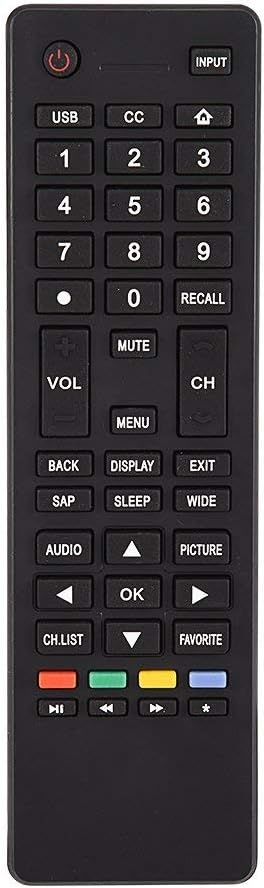
Slika 3.1: Konecview of the remote control's button layout for easy identification of functions.
3.2 Območje delovanja
The remote control has a stable signal transmission distance of up to 10 meters (33 feet). Actual remote distance may vary depending on environmental factors and the specific model of your TV.
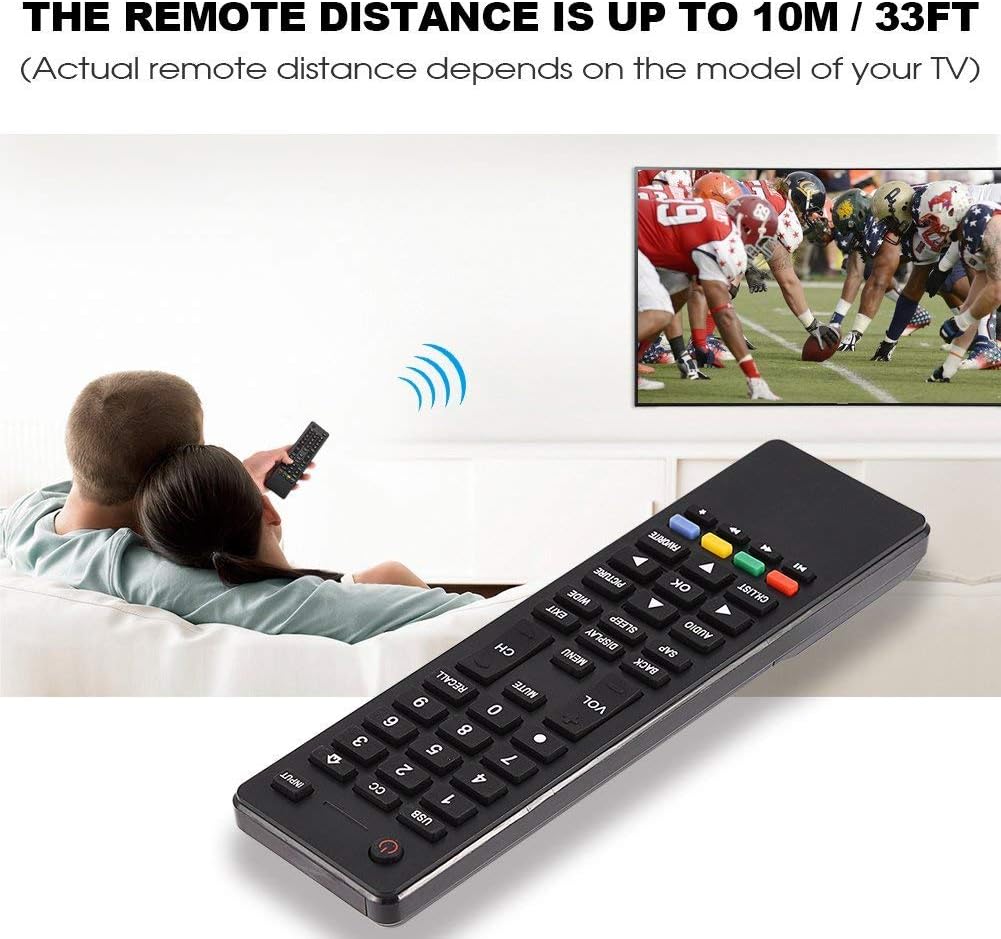
Image 3.2: Visual representation of the remote control's effective operating distance to the television.
4. Vzdrževanje
4.1 Čiščenje
Za čiščenje daljinskega upravljalnika uporabite mehko, suho krpo. Za trdovratno umazanijo rahlo obrišiteampen the cloth with water or a mild cleaning solution. Avoid using harsh chemicals or abrasive cleaners, as these can damage the remote's surface or internal components.
4.2 Skrb za baterije
- Baterije zamenjajte, ko daljinski upravljalnik postane počasen ali preneha delovati.
- Ne mešajte starih in novih baterij ali različnih vrst baterij.
- Če daljinskega upravljalnika ne boste uporabljali dlje časa, odstranite baterije, da preprečite puščanje.
- Izrabljene baterije zavrzite odgovorno v skladu z lokalnimi predpisi.
5. Odpravljanje težav
5.1 Daljinski upravljalnik se ne odziva
- Preverite baterije: Ensure batteries are inserted correctly with the correct polarity (+/-) and are not depleted. Replace with fresh AAA batteries if necessary.
- Linija vida: Make sure there are no obstructions between the remote control and the TV's infrared sensor.
- Razdalja: Confirm you are within the effective operating range (up to 10 meters / 33 feet).
- TV združljivost: Verify that your TV model is listed as compatible (Haier HTR-A18M, 55D3550, 40D3500M, 48D3500).
5.2 Buttons Not Working Correctly
- Čisti daljinski upravljalnik: Dust or debris under buttons can cause malfunction. Refer to the Maintenance section for cleaning instructions.
- Preverjanje baterije: Weak batteries can lead to inconsistent button responses. Replace batteries.
6. Specifikacije
| Funkcija | Podrobnost |
|---|---|
| Znamka | Zerone |
| Združljive naprave | Haier HTR-A18M, 55D3550, 40D3500M, 48D3500 TVs |
| Tehnologija povezljivosti | Infrardeči |
| Največji doseg | 10 metra (33 čevljev) |
| Vrsta baterije | 2 x AAA (niso vključeni) |
| Vrsta krmilnika | Nadzor gumbov |
| Material | ABS |
| Številka modela | Zerone9rnag3b5y4-cr |
| UPC | 647213811490 |

Image 6.1: Physical dimensions of the Zerone Universal Remote Control.
7. Informacije o garanciji
This product is offered as an Amazon Renewed item. Amazon Renewed products are professionally inspected and tested to work and look like new. If you are not satisfied with your purchase, renewed products are eligible for replacement or refund under the Amazon Renewed Guarantee.
Poleg tega proizvajalec ponuja 90-dnevna omejena garancija. For specific details regarding the terms and conditions of this warranty, please refer to the documentation provided at the time of purchase or contact customer support.
8. Podpora strankam
If you encounter any issues or have questions regarding your Zerone Universal Remote Control that are not addressed in this manual, please contact the seller or Amazon Renewed customer service for assistance.
For Amazon Renewed Guarantee claims, please visit the Amazon Renewed program page or contact Amazon customer support directly.