
Uvod
This manual provides comprehensive instructions for the Hoco ES20 Original Series Wireless V5.0 Earphones. Please read this manual carefully before using the product to ensure proper operation and to maximize your user experience. Keep this manual for future reference.
Konec izdelkaview
The Hoco ES20 earphones are designed for wireless audio playback and hands-free communication. The package includes two wireless earphones and a portable charging case.

Slika 1: Hoco ES20 Wireless Earphones. This image displays both the left and right earphones, highlighting their in-ear design and compact form factor.
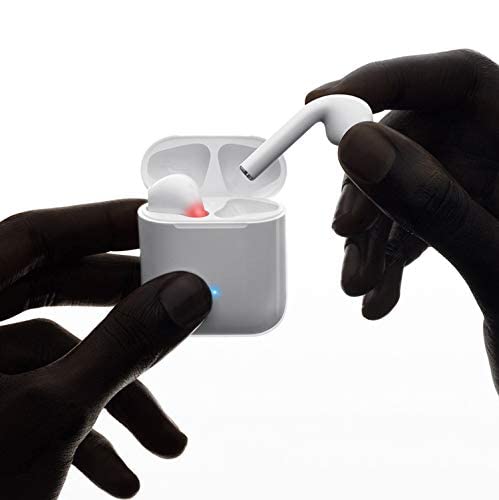
Slika 2: Hoco ES20 Earphones in Charging Case. The earphones are shown placed inside their charging case, indicating the charging status with an illuminated LED.
Specifikacije
| Funkcija | Podrobnost |
|---|---|
| Brezžična različica | V5.0 |
| Podprti protokoli | Headset, Hands-free, A2DP, Avrcp |
| Frekvenca prenosa | 2.4 GHz |
| Obseg prenosa | 10 metrov |
| Polnjenje Voltage | DC5V |
| Čas polnjenja (slušalke) | Približno 1 uro |
| Čas pogovora | 2 uri |
| Čas predvajanja glasbe | 2 uri |
| Zmogljivost baterije polnilnega ohišja | 400 mAh |
| Earphone Battery Capacity (Each) | 40 mAh |
| Čas pripravljenosti | 200 uri |
| Skupna teža (z ohišjem) | 44.8 g |
| Teža ene slušalke | 3.8 g |
| Vključene komponente | Bluetooth Headphones, 1 Charging Cable |
Nastavitev
1. Polnjenje slušalk in etuija
- Vstavite obe slušalki v polnilno ohišje. Prepričajte se, da sta pravilno nameščeni.
- Connect the charging cable to the charging port on the case and to a DC5V power source (e.g., USB wall adapter, computer USB port).
- The indicator light on the charging case will show charging status. A full charge for the earphones takes approximately 1 hour. The charging case itself has a 400mAh battery capacity.
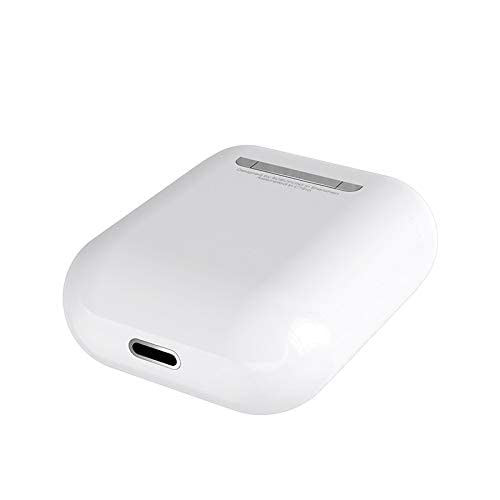
Slika 3: Hoco ES20 Charging Case Port. This image shows the charging port located at the bottom of the charging case, where the charging cable is connected.
2. Seznanjanje z napravo
- Prepričajte se, da so slušalke napolnjene.
- Odprite polnilno ohišje. Slušalke bodo samodejno prešle v način seznanjanja.
- Na pametnem telefonu ali drugi napravi, ki podpira Bluetooth, pojdite v nastavitve Bluetooth.
- Iskanje available devices and select "Hoco ES20" (or similar name) from the list.
- Once connected, the earphones will indicate successful pairing (e.g., an audio prompt or LED change).
- For Apple phones and some Android phones, the battery level of the earphones may be displayed on your device.
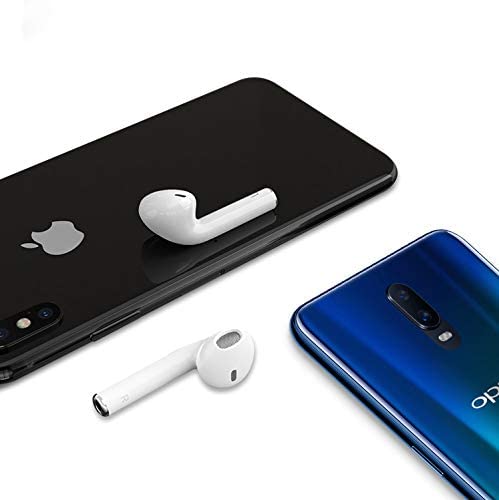
Slika 4: Hoco ES20 Earphones with Smartphones. This image illustrates the earphones positioned near two different smartphones, demonstrating their compatibility with various mobile devices.
Navodila za uporabo
Osnovne funkcije (upravljanje na dotik)
- Vklop: Earphones power on automatically when removed from the charging case.
- Ugasniti: Earphones power off automatically when placed back into the charging case.
- Predvajanje/pavza: Tap the touch area on either earphone once.
- Sprejmi/končaj klic: Tap the touch area on either earphone once during an incoming call or an active call.
- Zavrni klic: Press and hold the touch area on either earphone for approximately 2 seconds during an incoming call.
- Naslednja skladba: Dvakrat tapnite območje na dotik na desni slušalki.
- Prejšnja skladba: Dvakrat tapnite območje na dotik na levi slušalki.
- Aktiviranje glasovnega pomočnika: Triple-tap the touch area on either earphone.
Vzdrževanje
- Slušalke in polnilno ohišje naj bodo čisti in suhi.
- Izdelka ne izpostavljajte ekstremnim temperaturam, vlagi ali korozivnim snovem.
- Do not attempt to disassemble or modify the earphones or charging case, as this will void the warranty and may cause damage.
- Use a soft, dry cloth to clean the earphones and charging contacts.
- Ko slušalk ne uporabljate, jih shranite v polnilno škatlico, da jih zaščitite in ohranite napolnjene.
Odpravljanje težav
Pogoste težave in rešitve
- Slušalke se ne morejo seznaniti:
- Prepričajte se, da sta obe slušalki napolnjeni.
- Place earphones back in the case, close it, then open it again.
- Izklopite in vklopite Bluetooth na svoji napravi.
- Delete "Hoco ES20" from your device's Bluetooth list and try pairing again.
- Deluje samo ena slušalka:
- Prepričajte se, da sta obe slušalki napolnjeni.
- Place both earphones back in the charging case, close the lid, wait a few seconds, then open the lid and remove them together.
- If the issue persists, try resetting the earphones (refer to manufacturer's website if a specific reset procedure is not in this manual).
- Ni zvoka ali nizka glasnost:
- Preverite glasnost tako na napravi kot na slušalkah.
- Prepričajte se, da so slušalke pravilno priključene na vašo napravo.
- Poskusite predvajati zvok iz druge aplikacije ali vira.
- Težave s polnjenjem:
- Prepričajte se, da je polnilni kabel varno priključen tako na ohišje kot na vir napajanja.
- Preverite, ali je polnilna vrata na ohišju čista in brez umazanije.
- Poskusite uporabiti drug polnilni kabel ali napajalnik.
- Poor connection/intermittent audio:
- Ensure your device is within the 10-meter transmission range.
- Avoid obstacles between your device and the earphones.
- Zmanjšajte motnje zaradi drugih brezžičnih naprav.
Garancija in podpora
The Hoco ES20 Wireless Earphones come with a 6-mesečna garancija od datuma nakupa. Ta garancija krije proizvodne napake. Za uveljavljanje garancije shranite dokazilo o nakupu.
For technical support or warranty inquiries, please contact your retailer or the official Hoco support channels. Refer to the product packaging or Hoco's official webspletno mesto za kontaktne podatke.